Category Archives: Programming

Enhance your programming skills with DevOpsRoles.com. Access expert guides and tutorials on various programming languages and techniques to boost your DevOps capabilities.

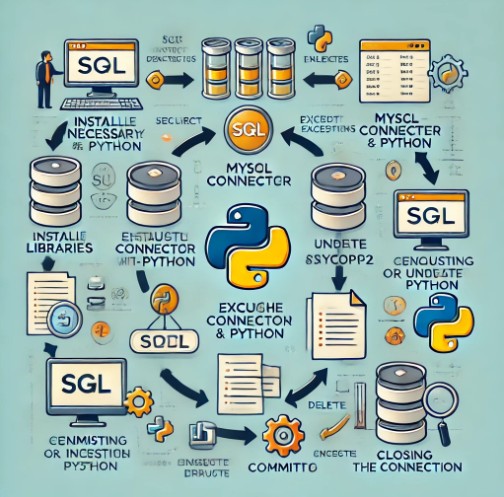
How to Use SQL Databases with Python: A Comprehensive Guide

Introduction

SQL (Structured Query Language) databases have been the backbone of data management in modern applications for decades. Whether you’re building a web application, performing data analysis, or automating processes, working with SQL databases is a crucial skill. Python, one of the most popular programming languages, makes interacting with SQL databases straightforward and efficient.

In this guide, we’ll explore how to use SQL databases with Python. From connecting to the database to executing queries and retrieving data, we’ll walk you through essential techniques that every Python developer should know. Whether you’re a beginner or an experienced programmer, you’ll find practical examples and tips to enhance your Python-DB integration.

What is SQL?

SQL: The Language of Databases

SQL is a standard programming language designed for managing and manipulating relational databases. With SQL, you can create, read, update, and delete (CRUD operations) data stored in tables. The language is known for its simplicity and powerful querying capabilities.

Basic SQL Commands:

  • SELECT: Retrieves data from one or more tables.
  • INSERT: Adds new data into a table.
  • UPDATE: Modifies existing data in a table.
  • DELETE: Removes data from a table.
  • CREATE: Creates a new table or database.
  • DROP: Deletes a table or database.

SQL is widely used in various industries, including banking, e-commerce, healthcare, and education. As Python’s popularity grows, the need to integrate SQL databases with Python-based applications has become increasingly important.

How to Use SQL Databases with Python

Setting Up Your Environment

Before you can use SQL databases with Python, you need to install the required libraries. Python’s built-in library, sqlite3, is suitable for lightweight databases, but if you are working with MySQL, PostgreSQL, or other databases, you may need additional libraries.

Installing MySQL Connector:

For MySQL databases, use the mysql-connector-python package. You can install it with pip:

pip install mysql-connector-python

Installing PostgreSQL Adapter:

To interact with PostgreSQL, use psycopg2:

pip install psycopg2

Connecting to the Database

Once the necessary libraries are installed, you’ll need to establish a connection to the database.

Example: Connecting to SQLite

import sqlite3

# Establish connection to SQLite database
connection = sqlite3.connect("example.db")

# Create a cursor object to interact with the database
cursor = connection.cursor()

Example: Connecting to MySQL

import mysql.connector

# Establish connection to MySQL database
connection = mysql.connector.connect(
    host="localhost",
    user="yourusername",
    password="yourpassword",
    database="yourdatabase"
)

# Create a cursor object to interact with the database
cursor = connection.cursor()

Once the connection is established, you can begin executing SQL queries.

Executing SQL Queries with Python

Python provides several methods to execute SQL queries. The most common method is using a cursor object, which allows you to run commands and fetch results from the database.

Example 1: Executing a Simple SELECT Query

# Execute a simple SELECT query
cursor.execute("SELECT * FROM users")

# Fetch all results
results = cursor.fetchall()

# Display results
for row in results:
    print(row)

Example 2: Inserting Data into a Table

# Inserting data into the 'users' table
cursor.execute("INSERT INTO users (name, age) VALUES (%s, %s)", ("John Doe", 30))

# Commit changes to the database
connection.commit()

Example 3: Updating Data

# Update the 'age' of a user
cursor.execute("UPDATE users SET age = %s WHERE name = %s", (35, "John Doe"))

# Commit changes
connection.commit()

Example 4: Deleting Data

# Delete a user from the 'users' table
cursor.execute("DELETE FROM users WHERE name = %s", ("John Doe",))

# Commit changes
connection.commit()

Advanced Database Operations

Using Parameters in SQL Queries

Instead of directly inserting data into SQL queries (which can be prone to SQL injection attacks), it’s good practice to use parameterized queries. These queries separate the SQL logic from the data.

cursor.execute("SELECT * FROM users WHERE age > %s", (25,))

This approach improves security and helps prevent SQL injection.

Using Context Managers for Database Connections

It’s a good practice to use Python’s context manager (with statement) for managing database connections. This ensures that the connection is properly closed, even in case of an exception.

import sqlite3

with sqlite3.connect("example.db") as connection:
    cursor = connection.cursor()
    cursor.execute("SELECT * FROM users")
    results = cursor.fetchall()
    print(results)

Handling Errors and Exceptions

You should always handle errors and exceptions when working with databases. The try-except block is commonly used to catch SQL-related errors.

try:
    cursor.execute("SELECT * FROM non_existing_table")
except sqlite3.Error as e:
    print(f"An error occurred: {e}")

Transaction Management

In many cases, you may need to handle multiple database operations as part of a single transaction. Python’s commit() method is used to save changes, while rollback() can be used to undo changes if something goes wrong.

try:
    cursor.execute("INSERT INTO users (name, age) VALUES ('Alice', 25)")
    cursor.execute("UPDATE users SET age = 26 WHERE name = 'Alice'")
    connection.commit()
except:
    connection.rollback()
    print("Transaction failed. Changes rolled back.")

Best Practices for Using SQL Databases with Python

1. Use Prepared Statements

Prepared statements improve performance and security. They ensure that the same SQL query can be executed multiple times with different parameters.

2. Always Close Database Connections

Always close your database connections after use. Using context managers (with statement) is an efficient way to manage database connections and ensure they are properly closed.

3. Use Transactions

Wrap related operations in a transaction to ensure data consistency and rollback in case of failure.

4. Optimize SQL Queries

Ensure your SQL queries are optimized for better performance, especially when dealing with large datasets. Use indexes, avoid using SELECT *, and optimize joins.

Frequently Asked Questions (FAQ)

1. How do I connect Python to SQL Server?

To connect Python to SQL Server, you can use the pyodbc library.

pip install pyodbc

Here’s how you can connect:

import pyodbc

connection = pyodbc.connect(
    "DRIVER={ODBC Driver 17 for SQL Server};"
    "SERVER=your_server_name;"
    "DATABASE=your_database_name;"
    "UID=your_username;"
    "PWD=your_password"
)

2. Can I use Python with PostgreSQL?

Yes, you can use Python with PostgreSQL by installing the psycopg2 package. You can interact with the PostgreSQL database just like any other SQL database.

3. What is an ORM in Python?

An ORM (Object-Relational Mapping) allows you to work with SQL databases using Python objects. Some popular ORM frameworks for Python include SQLAlchemy and Django ORM.

4. How can I improve SQL query performance?

You can improve SQL query performance by:

  • Indexing the right columns
  • Using efficient joins
  • Avoiding SELECT *
  • Analyzing query execution plans

External Links

Conclusion

Learning how to use SQL databases with Python opens the door to many exciting opportunities in programming and data management. Whether you’re working with SQLite, MySQL, PostgreSQL, or any other relational database, Python offers robust tools for executing queries and handling data. By following the practices and examples in this guide, you’ll be able to efficiently integrate SQL databases into your Python projects.

Remember to prioritize security, efficiency, and best practices when working with databases. As you gain experience, you’ll discover more advanced techniques for optimizing your workflows and enhancing performance. Keep experimenting with real-world projects, and soon you’ll be a pro at using SQL with Python! Thank you for reading the DevopsRoles page!

Introduction to Python AI: Your Gateway to Revolutionary Insights

Python AI. In the rapidly evolving landscape of technology, Python’s role in artificial intelligence (AI) development has become more crucial than ever. Known for its simplicity and flexibility, Python has emerged as the go-to language for AI enthusiasts and professionals aiming to push the boundaries of what’s possible. This guide presents seven revolutionary insights into Python AI, designed to equip you with the knowledge to unleash its full potential.

Why Python for AI?

Python’s readability and straightforward syntax have made it particularly appealing for AI development. Its extensive support from a vibrant community and compatibility with numerous AI and machine learning (ML) libraries allow for seamless integration and scalable solutions.

Key Python Libraries for AI

The power of Python in AI comes from its extensive libraries:

  • NumPy & Pandas: Essential for data manipulation and analysis.
  • Scikit-learn: A fundamental toolkit for data mining and analysis.
  • TensorFlow & PyTorch: Advanced libraries for building and training neural networks in deep learning projects.

Embarking on Python AI Projects

Starting with Python AI projects can seem daunting, yet, by focusing on basic projects such as spam detection or simple recommendation systems, beginners can gradually build confidence and skills, paving the way to tackle more complex challenges.

Leveraging Python AI in Data Analysis

Python excels in data analysis, providing a robust foundation for AI models that rely on data insights for prediction and decision-making. Its data handling capabilities ensure AI projects are built on accurate and insightful analyses.

Mastering Machine Learning with Python

With libraries like Scikit-learn, Python offers an accessible path to developing machine learning models. From regression to clustering, Python simplifies the journey from data processing to model training and evaluation.

Exploring Deep Learning with Python

For deep learning enthusiasts, Python’s TensorFlow and PyTorch libraries offer cutting-edge tools. Whether you’re designing neural networks or implementing NLP models, Python is the bridge to advanced AI solutions.

Overcoming Challenges in Python AI

Despite its advantages, Python AI development is not without challenges. From data quality issues to the computational demands of training models, developers must navigate these hurdles with continuous learning and innovative thinking.

Conclusion: Unleashing the Potential of Python AI

Python AI represents a fusion of accessibility and power, offering a platform for innovation in the AI space. As you delve into these seven insights, remember that the journey into Python AI is one of exploration and continuous learning. Whether you’re a novice taking your first steps or a seasoned professional seeking to expand your toolkit, Python AI opens up a world of possibilities. Embark on this journey today and be part of the revolution that’s shaping the future of technology. Thank you for reading the DevopsRoles page!

Understanding Random Number Generation in Python

Introduction

How to Generate a Random Number in Python. Randomness plays a critical role in programming, enabling tasks ranging from data sampling to security.

In Python, the random module offers versatile tools for generating random numbers and shuffling sequences, crucial for simulations, games, and more.

This article delves into six key functions of Python random module, explaining their use and importance.

Random Number Generation in Python

What is the Random Module?

The Random Module is a built-in Python library. This means once you have Python installed on your computer, the Random Module is ready to use! It contains several functions to help you generate random numbers and perform actions on lists randomly. Let’s go through some of these functions:

1. seed() Function:

The seed() function initializes the random number generator, allowing for the creation of reproducible sequences of random numbers. This is particularly useful for debugging or scientific research where repeatability is necessary.

Example:

import random
random.seed(10)
print(random.random())

Imagery: A flowchart beginning with setting a seed value, leading to a consistent random number sequence.

2. getstate() Function:

getstate() captures the current state of the random number generator, enabling the preservation and replication of the sequence of random numbers.

Example:

import random
state = random.getstate()
print(random.random())
random.setstate(state)
print(random.random())

Imagery: A diagram showing the saving and restoring process of the generator’s state to reproduce a random number.

3. randrange() Function:

This function returns a randomly selected element from the specified range, exclusive of the endpoint. It’s useful for obtaining an integer within a range.

import random
print(random.randrange(1, 10))

Imagery: A number line from 1 to 10, with arrows indicating a range from 1 to 9.

4. randint() Function:

randint() is similar to randrange(), but inclusive of both endpoints, perfect for cases requiring a random integer within a fixed set of bounds.

Example:

import random
print(random.randint(1, 10))

Imagery: A number line from 1 to 10, including both endpoints, highlighting the function’s inclusivity.

5. choice() Function:

The choice() function randomly selects and returns an element from a non-empty sequence, such as a list.

Example:

import random
items = ['apple', 'banana', 'cherry']
print(random.choice(items))

Imagery: Three fruits (apple, banana, cherry) with an arrow pointing randomly at one, illustrating the selection process.

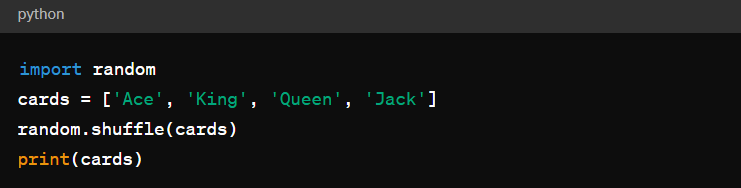
6. shuffle() Function:

shuffle() randomly reorders the elements in a list, commonly used for mixing or dealing cards in a game.

Example:

import random
cards = ['Ace', 'King', 'Queen', 'Jack']
random.shuffle(cards)
print(cards)

Imagery: A sequence of cards displayed before and after shuffling, demonstrating the randomization effect.

Conclusion

Mastering the random module in Python empowers programmers to implement randomness in their projects effectively, whether for data analysis, gaming, or simulation. By understanding and utilizing these six functions, developers can enhance the unpredictability and variety in their programs, making them more dynamic and engaging. Thank you for reading the DevopsRoles page!

Creating a Terraform variable file from an Excel

Introduction

How to Create a Terraform variable file from an Excel. In the world of infrastructure as code (IaC), Terraform stands out as a powerful tool for provisioning and managing infrastructure resources. Often, managing variables for your Terraform scripts can become challenging, especially when dealing with a large number of variables or when collaborating with others.

This blog post will guide you through the process of creating a Terraform variable file from an Excel spreadsheet using Python. By automating this process, you can streamline your infrastructure management workflow and improve collaboration.

Prerequisites

Before we begin, make sure you have the following installed:

Steps to Create a Terraform Variable File from Excel

  • Step 1: Excel Setup
  • Step 2: Python Script to create Terraform variable file from an Excel
  • Step 3: Execute the Script

Step 1: Excel Setup

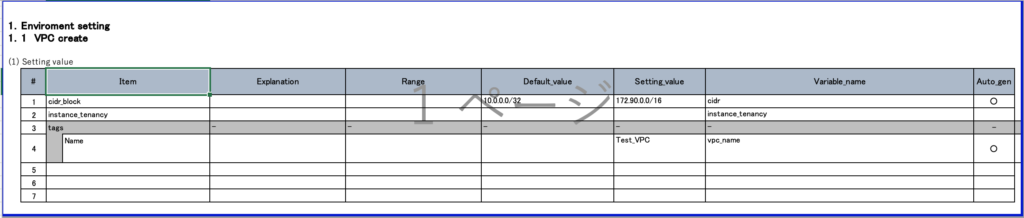
Start by organizing your variables in an Excel spreadsheet. Create columns for variable names, descriptions, default values, setting value, and any other relevant information.

Setting_value and Variable_name columns will be written to the output file.

In the lab, I only created a sample Excel file for the Terraform VPC variable

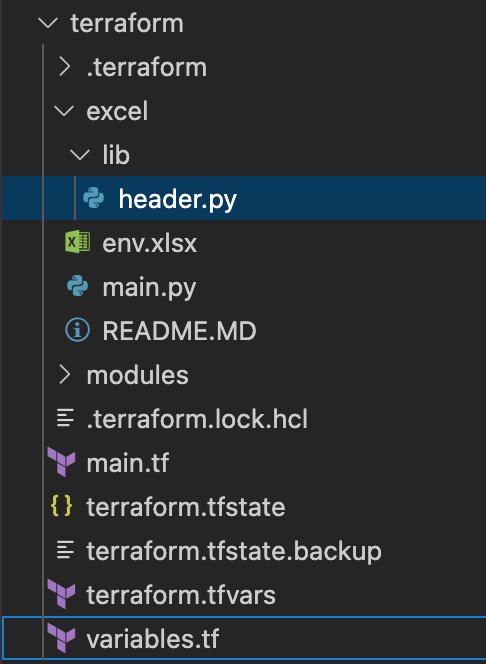
Folder structure

  • env.xlsx: Excel file

Step 2: Python Script to create Terraform variable file from an Excel

Write a Python script to read the Excel spreadsheet and generate a Terraform variable file (e.g., terraform2.tfvars).

import pandas as pd
from pathlib import Path
import traceback
from lib.header import get_header

parent = Path(__file__).resolve().parent

# Specify the path to your Excel file
excel_file_path = 'env.xlsx'
var_file_name = 'terraform2.tfvars'

def main():
    try:
        env = get_header()
        sheet_name = env["SHEET_NAME"]

        # Read all sheets into a dictionary of DataFrames
        excel_data = pd.read_excel(parent.joinpath(excel_file_path),sheet_name=None, header=6, dtype=str)
        
        # Access data from a specific sheet
        extracted_data = excel_data[sheet_name]
        col_map = {
            "setting_value": env["SETTING_VALUE"],
            "variable_name": env["VARIABLE_NAME"],
            "auto_gen": env["AUTO_GEN"]
        }
        sheet_data = extracted_data[[col_map[key] for key in col_map if key in col_map]]
        sheet_name_ft = sheet_data.query('Auto_gen == "○"')

        # Display the data from the selected sheet
        print(f"\nData from [{sheet_name}] sheet:\n{sheet_name_ft}")

        # Open and clear content of file
        with open(f"{var_file_name}", "w", encoding="utf-8") as file:
            print(f"{var_file_name} create finish")

        # Write content of excel file to file
        for index, row in sheet_name_ft.iterrows():
            with open(f"{var_file_name}", "a", encoding="utf-8") as file:
                file.write(row['Variable_name'] + ' = ' + '"' + row['Setting_value'] + '"' + '\n')
        print(f"{var_file_name} write finish")
        
    except Exception:
        print(f"Error:")
        traceback.print_exc()

if __name__ == "__main__":
    main()
 

You can change the input Excel file name and output file name at these variables

excel_file_path = 'env.xlsx' 
var_file_name = 'terraform2.tfvars'

Depending on the contents of your Excel file, you can change the variables in the header.py file below

import os

def get_header():
    # Description
    os.environ["DESCRIPTION"] = os.environ.get("DESCRIPTION", "Description")
    # Description
    os.environ["DATA_TYPE"] = os.environ.get("DATA_TYPE", "Data_type")
    # setting value
    os.environ["SETTING_VALUE"] = os.environ.get("SETTING_VALUE", "Setting_value")
    # variablename
    os.environ["VARIABLE_NAME"] = os.environ.get("VARIABLE_NAME", "Variable_name")
    # genaration
    os.environ["AUTO_GEN"] = os.environ.get("AUTO_GEN", "Auto_gen")
    # variable file name location
    os.environ["FILE_NAME_LOCATION"] = os.environ.get("FILE_NAME_LOCATION", "4")

    return os.environ

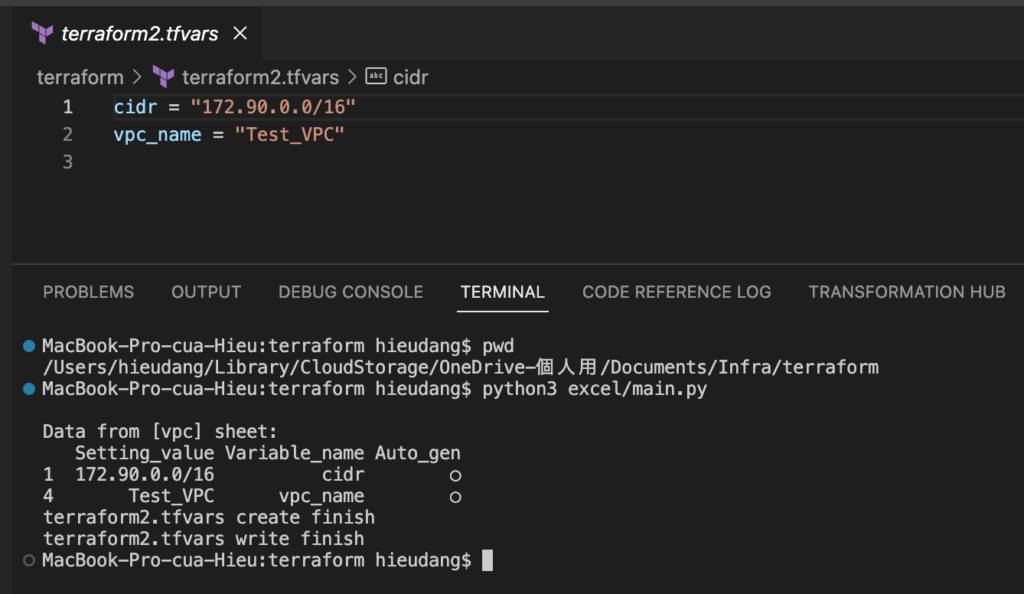
Step 3: Execute the Script

python3 excel/main.py 

Output

Conclusion

By following these steps, you’ve automated the process of creating a Terraform variable file from an Excel spreadsheet. This not only saves time but also enhances collaboration by providing a standardized way to manage and document your Terraform variables.

Feel free to customize the script based on your specific needs and scale it for more complex variable structures. Thank you for reading the DevopsRoles page!

A Deep Dive into Establishing Python Coding Standards for Your Dev Team

Embark on the exciting Python coding adventure with us! Whether you’re a seasoned pro or a coding novice, grasping the significance of coding standards is key. This post delves into the world of Python coding, explaining how having clear standards is akin to having a trustworthy map for your coding escapades.

Join us on the Python coding journey! Whether you’re an experienced developer or just starting out, recognizing the importance of coding standards is essential. In this post, we’ll dive into the realm of Python coding and discuss why having well-defined standards is like having a reliable map for navigating your coding adventures.

Welcome to the Python coding expedition! Whether you’re a seasoned coder or a beginner, understanding the value of coding standards is crucial. This post takes a closer look at the world of Python coding and highlights the significance of having clear standards – think of them as a dependable map for guiding you through your coding explorations.

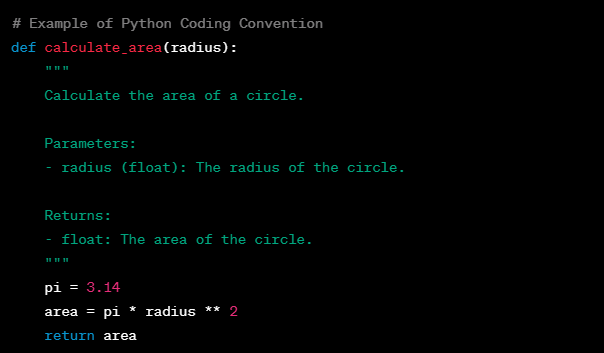
1. Define Coding Conventions:

Begin by articulating clear coding conventions that resonate with your team’s objectives and project requirements. For instance, establish guidelines for indentation, naming conventions, spacing, and comments. Here’s a snippet of what your coding convention document might look like:

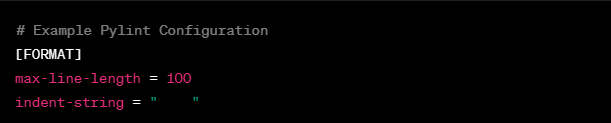
2. Choose a Linter:

Selecting a suitable linter is a pivotal step in enforcing coding standards. Consider integrating pylint into your development environment and customize it to your team’s preferences. Here’s a snippet of a pylint configuration file:

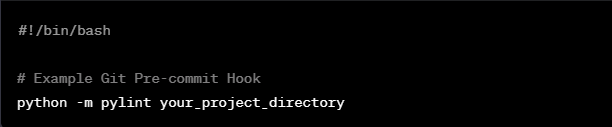
3. Python coding Version Control Integration:

Make sure coding standards are seamlessly integrated into your version control system. Here’s an example, of using a pre-commit hook with Git:

4. Documentation Guidelines:

Clearly articulate documentation guidelines, emphasizing the importance of well-documented code. A sample docstring following the guidelines could be:

# Example Docstring
def calculate_area(radius):
    """
    Calculate the area of a circle.

    Parameters:
    - radius (float): The radius of the circle.

    Returns:
    - float: The area of the circle.
    """
    pi = 3.14
    area = pi * radius ** 2
    return area

5. Code Reviews:

Establish a comprehensive code review procedure that integrates coding standards. For instance, a code review checklist may encompass items such as:

  • Is the code PEP 8 compliant?
  • Are variable names descriptive and follow naming conventions?
  • Is the documentation complete and accurate?

6. Training and Onboarding:

Organize training sessions and onboarding programs to introduce new team members to our coding standards. Offer practical examples and promote hands-on experience, ensuring a smooth integration for everyone joining the team.

Facilitate training sessions and onboarding programs to acquaint new team members with our coding standards. Utilize practical examples and encourage hands-on participation, allowing a seamless transition for those entering the team.

Run training sessions and onboarding programs to acquaint new team members with our coding standards. Incorporate practical examples and emphasize hands-on learning, fostering a welcoming environment and helping new members integrate into the team smoothly.

7. Continuous Improvement:

Regularly revisit and adjust coding standards to align with changing project needs. Seek input from the team and refine the standards through iterations, ensuring they stay pertinent and efficient.

Periodically review and enhance coding standards to accommodate evolving project demands. Collect feedback from the team and iterate on the standards, ensuring their continued relevance and effectiveness.

Keep coding standards up-to-date by routinely reviewing and adjusting them to meet the evolving requirements of the project. Encourage team feedback and iterate on the standards to ensure they stay current and impactful.

8. Foster a Culture of Quality:

Cultivate a positive atmosphere by promoting a culture centered around code quality. Recognize and appreciate team members who consistently adhere to coding standards during team meetings or through special acknowledgment programs. This encourages a collective commitment to high-quality coding practices.

Build a positive workplace by nurturing a culture that values code quality. Take a moment to commend and reward team members for their dedication to coding standards during team meetings or through recognition programs. By doing so, you foster an environment where everyone is motivated to uphold high standards in their coding endeavors.

9. Meet PEP 8: Your Trusty Navigator

Navigate the Python landscape with PEP 8, your reliable guide. Offering clear instructions on code formatting ensures your code appears organized and polished. Picture PEP 8 as the GPS guiding you through the scenic route of your Python coding journey.

Consider PEP 8 your dependable companion in the Python realm. With guidelines for code formatting, it guarantees a clean and orderly appearance. Imagine PEP 8 as the GPS system steering you through the twists and turns of your Python coding adventure.

In the world of Python, PEP 8 acts as your trusty navigator. Offering directives on code formatting, it guarantees a sleek and well-organized presentation. Envision PEP 8 as the GPS leading you through the winding paths of your Python coding expedition.

In conclusion, establishing coding conventions, selecting a linter, integrating Python coding with version control, following documentation guidelines, conducting code reviews, providing training and onboarding, fostering a culture of quality, and adhering to PEP 8 serve as the essential pillars for a robust coding journey. By embracing continuous improvement, teams can ensure a smooth and successful navigation through the ever-evolving landscape of Python development. I hope will this your helpful. Thank you for reading the DevopsRoles page!

Unlocking the Power of Top 10 Python Libraries for Data Science in 2024

Introduction

Python continues to dominate the field of data science in 2024, offering powerful libraries that streamline everything from data analysis to machine learning and visualization. Whether you’re a seasoned data scientist or a newcomer to the field, leveraging the right tools is key to success. This article explores the top 10 Python libraries for data science in 2024, showcasing their features, use cases, and practical examples.

Top 10 Python Libraries for Data Science in 2024

1. NumPy

Overview

NumPy (Numerical Python) remains a cornerstone for scientific computing in Python. It provides robust support for multi-dimensional arrays, mathematical functions, and efficient operations on large datasets.

Key Features

  • Multi-dimensional array manipulation.
  • Built-in mathematical functions for algebra, statistics, and more.
  • High-performance tools for linear algebra and Fourier transforms.

Example

import numpy as np

# Create a NumPy array
data = np.array([1, 2, 3, 4, 5])

# Perform operations
print("Mean:", np.mean(data))
print("Standard Deviation:", np.std(data))

2. Pandas

Overview

Pandas is a game-changer for data manipulation and analysis. It simplifies working with structured data through its versatile DataFrame and Series objects.

Key Features

  • Data cleaning and transformation.
  • Handling missing data.
  • Powerful grouping, merging, and aggregation functionalities.

Example

import pandas as pd

# Create a DataFrame
data = pd.DataFrame({
    'Name': ['Alice', 'Bob', 'Charlie'],
    'Age': [25, 30, 35]
})

# Analyze data
print(data.describe())

3. Matplotlib

Overview

Matplotlib is a versatile library for creating static, animated, and interactive visualizations.

Key Features

  • Extensive plotting capabilities.
  • Customization options for axes, titles, and styles.
  • Compatibility with multiple file formats.

Example

import matplotlib.pyplot as plt

# Create a simple line plot
x = [1, 2, 3, 4, 5]
y = [2, 4, 6, 8, 10]

plt.plot(x, y)
plt.title("Simple Line Plot")
plt.show()

4. Seaborn

Overview

Seaborn builds on Matplotlib, providing an intuitive interface for creating aesthetically pleasing and informative statistical graphics.

Key Features

  • Built-in themes for attractive plots.
  • Support for complex visualizations like heatmaps and pair plots.
  • Easy integration with Pandas DataFrames.

Example

import seaborn as sns
import pandas as pd

# Create a heatmap
data = pd.DataFrame({
    'A': [1, 2, 3],
    'B': [4, 5, 6],
    'C': [7, 8, 9]
})

sns.heatmap(data, annot=True)

5. Scikit-learn

Overview

Scikit-learn is the go-to library for machine learning. It offers tools for everything from simple predictive models to complex algorithms.

Key Features

  • Support for supervised and unsupervised learning.
  • Tools for feature selection and preprocessing.
  • Comprehensive documentation and examples.

Example

from sklearn.linear_model import LinearRegression

# Simple linear regression
model = LinearRegression()
X = [[1], [2], [3]]
y = [2, 4, 6]
model.fit(X, y)

print("Predicted:", model.predict([[4]]))

6. TensorFlow

Overview

TensorFlow, developed by Google, is a powerful library for deep learning and large-scale machine learning.

Key Features

  • Versatile neural network building blocks.
  • GPU acceleration for high-performance training.
  • Pre-trained models for tasks like image and speech recognition.

Example

import tensorflow as tf

# Define a simple constant
hello = tf.constant('Hello, TensorFlow!')
print(hello.numpy())

7. PyTorch

Overview

PyTorch, developed by Facebook, is another deep learning framework that excels in flexibility and dynamic computation graphs.

Key Features

  • Intuitive syntax.
  • Dynamic computation graphs.
  • Strong community support.

Example

import torch

# Create a tensor
tensor = torch.tensor([1.0, 2.0, 3.0])
print(tensor * 2)

8. SciPy

Overview

SciPy complements NumPy by offering advanced mathematical and scientific computing tools.

Key Features

  • Functions for optimization, integration, and interpolation.
  • Tools for signal and image processing.
  • Support for sparse matrices.

Example

from scipy.optimize import minimize

# Minimize a quadratic function
result = minimize(lambda x: (x - 2)**2, 0)
print("Optimal Value:", result.x)

9. Plotly

Overview

Plotly excels at creating interactive visualizations for web-based applications.

Key Features

  • Interactive dashboards.
  • Support for 3D plotting.
  • Compatibility with Python, R, and JavaScript.

Example

import plotly.express as px

# Create an interactive scatter plot
df = px.data.iris()
fig = px.scatter(df, x='sepal_width', y='sepal_length', color='species')
fig.show()

10. NLTK

Overview

Natural Language Toolkit (NLTK) is essential for text processing and computational linguistics.

Key Features

  • Tools for tokenization, stemming, and sentiment analysis.
  • Extensive corpus support.
  • Educational resources and documentation.

Example

import nltk
from nltk.tokenize import word_tokenize

# Tokenize a sentence
sentence = "Data science is amazing!"
tokens = word_tokenize(sentence)
print(tokens)

FAQ

What is the best Python library for beginners in data science?

Pandas and Matplotlib are ideal for beginners due to their intuitive syntax and wide range of functionalities.

Are these libraries free to use?

Yes, all the libraries mentioned in this article are open-source and free to use.

Which library should I choose for deep learning?

Both TensorFlow and PyTorch are excellent for deep learning, with TensorFlow being preferred for production and PyTorch for research.

Conclusion

The Python ecosystem in 2024 offers a robust toolkit for data scientists. Libraries like NumPy, Pandas, Scikit-learn, and TensorFlow continue to push the boundaries of what’s possible in data science. By mastering these tools, you can unlock new insights, build sophisticated models, and create impactful visualizations. Start exploring these libraries today and take your data science projects to the next level.

External Links

I hope will this your helpful. Thank you for reading the DevopsRoles page!
Filter Data in Pandas Dataframe

Introduction

Pandas, a popular Python library for data manipulation and analysis, provides powerful tools for filtering data within a Pandas DataFrame. Filtering is a fundamental operation when working with large datasets, as it allows you to focus on specific subsets of your data that meet certain criteria. In this guide, we’ll explore various techniques for filtering data in Pandas DataFrame.

Prerequisites

Before starting, you should have the following prerequisites configured

  • Visual Studio Code with Jupyter extension to run the notebook
  • Python 3.9, pandas library
  • CSV data file sample

Using tool to create a sample CSV file at page https://extendsclass.com/csv-generator.html

Basic Filtering

  • Read CSV file into a Pandas DataFrame object
  • Using the query Method
  • Filtering with isin
  • Filtering Null (NaN) Values

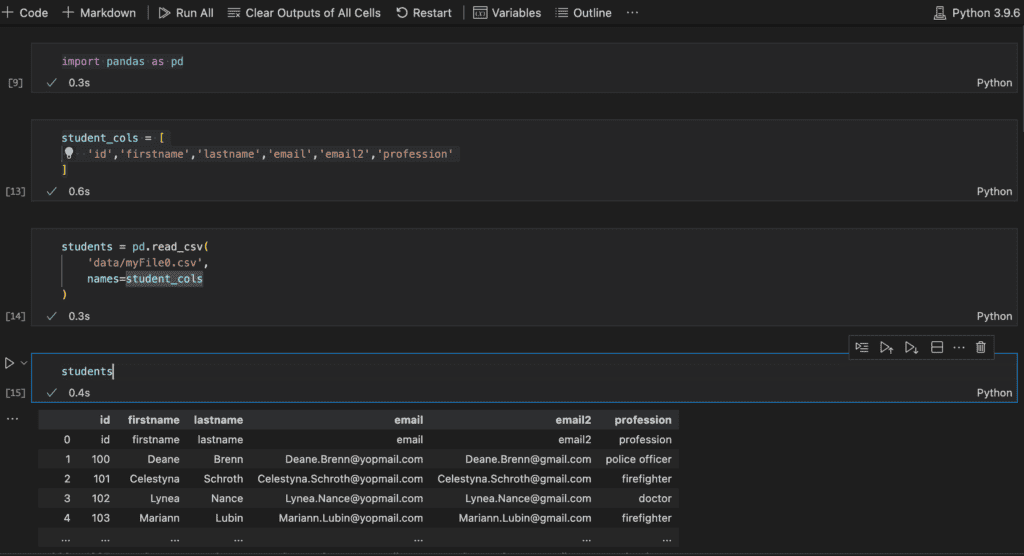
Read CSV file into a Pandas DataFrame object

use read_csv() function to read data from CSV file and setting header for the dataframe

import pandas as pd
student_cols = [
    'id','firstname','lastname','email','email2','profession'
]
students = pd.read_csv(
    'data/myFile0.csv',
    names=student_cols
)

Using the query Method

The query method allows you to express conditions as strings, providing a more concise and readable syntax:

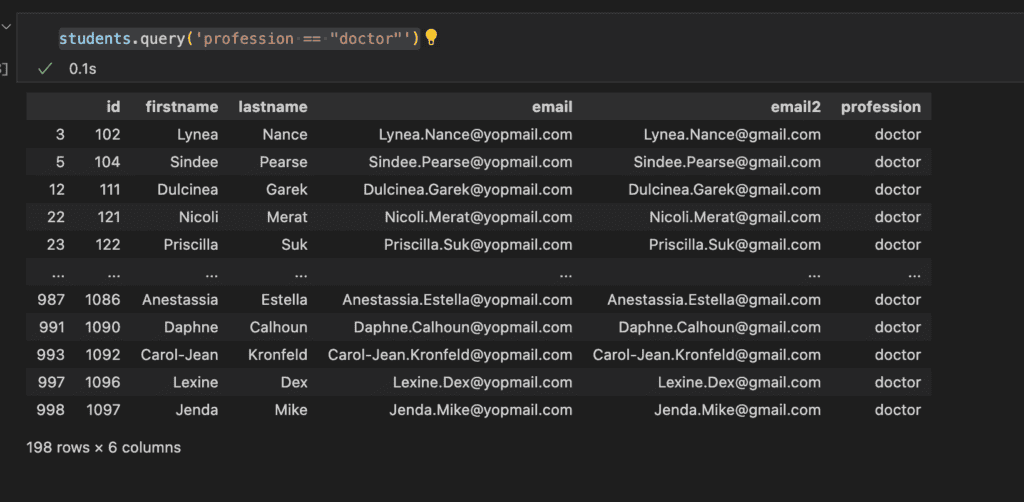
students.query('profession == "doctor"')

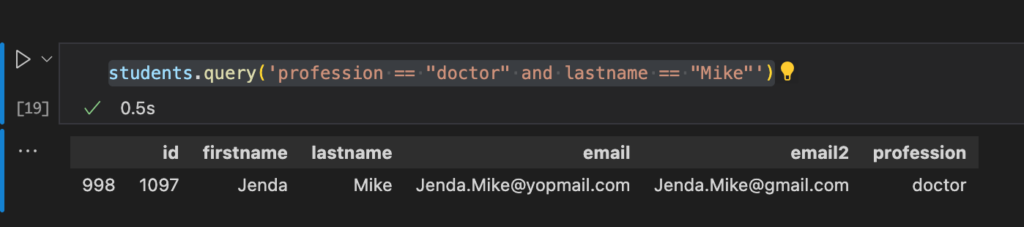
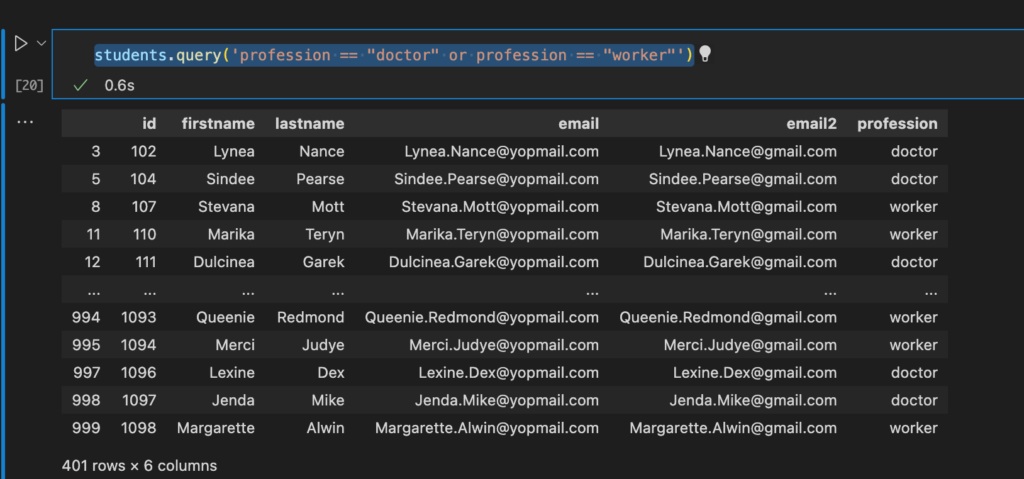
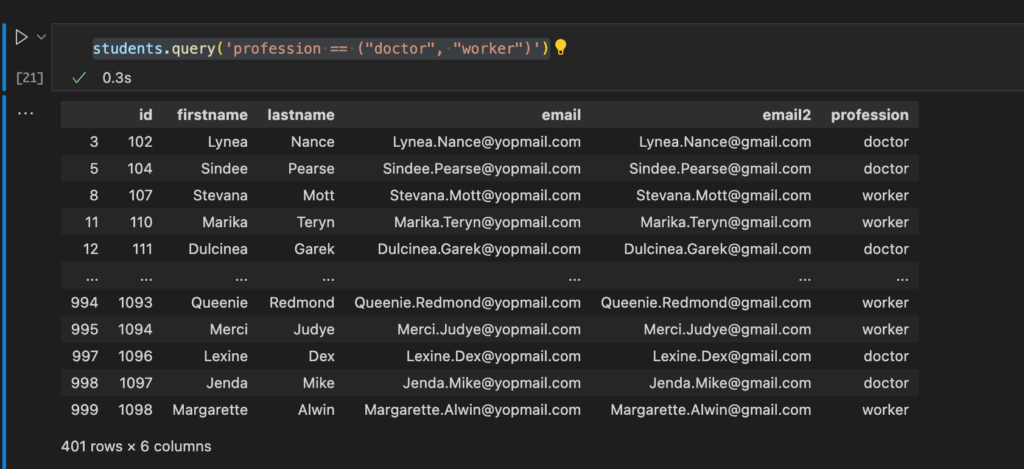
You can use logical operators (& for AND, | for OR) to combine multiple conditions:

students.query('profession == "doctor" and lastname == "Mike"')
students.query('profession == "doctor" or profession == "worker"')
students.query('profession == ("doctor", "worker")')

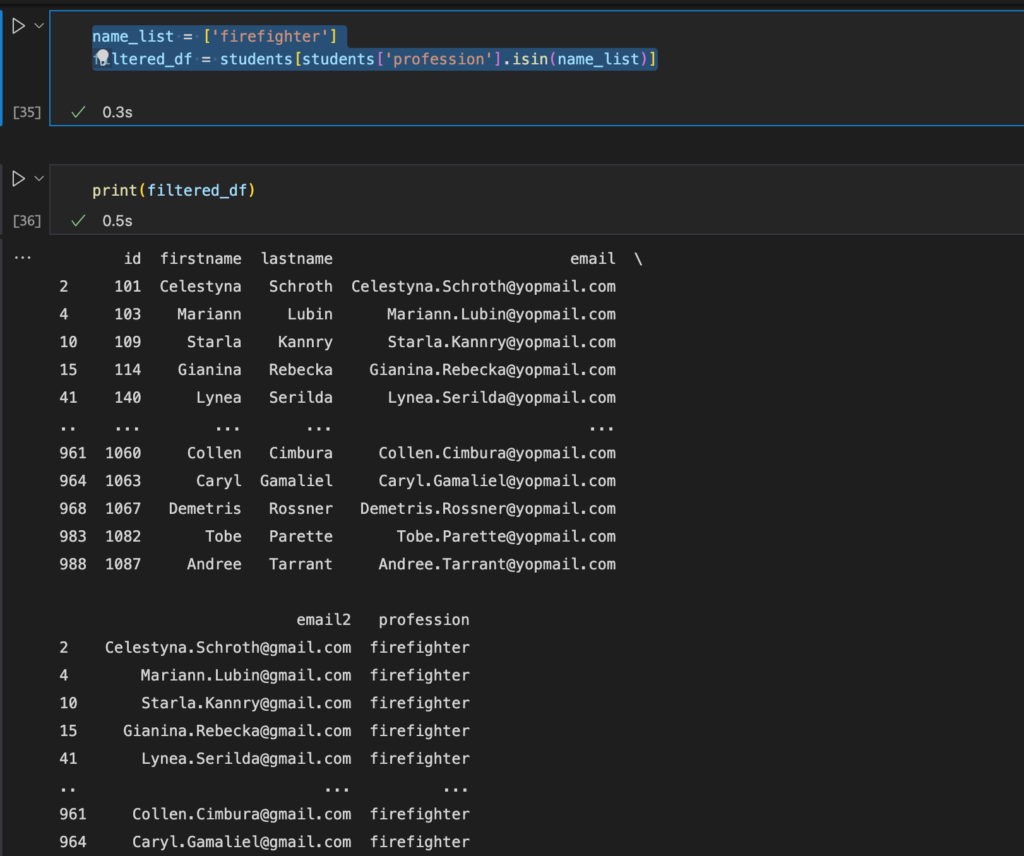
Filtering with isin

The isin method is useful when you want to filter rows based on a list of values:

name_list = ['firefighter']
filtered_df = students[students['profession'].isin(name_list)]
print(filtered_df)

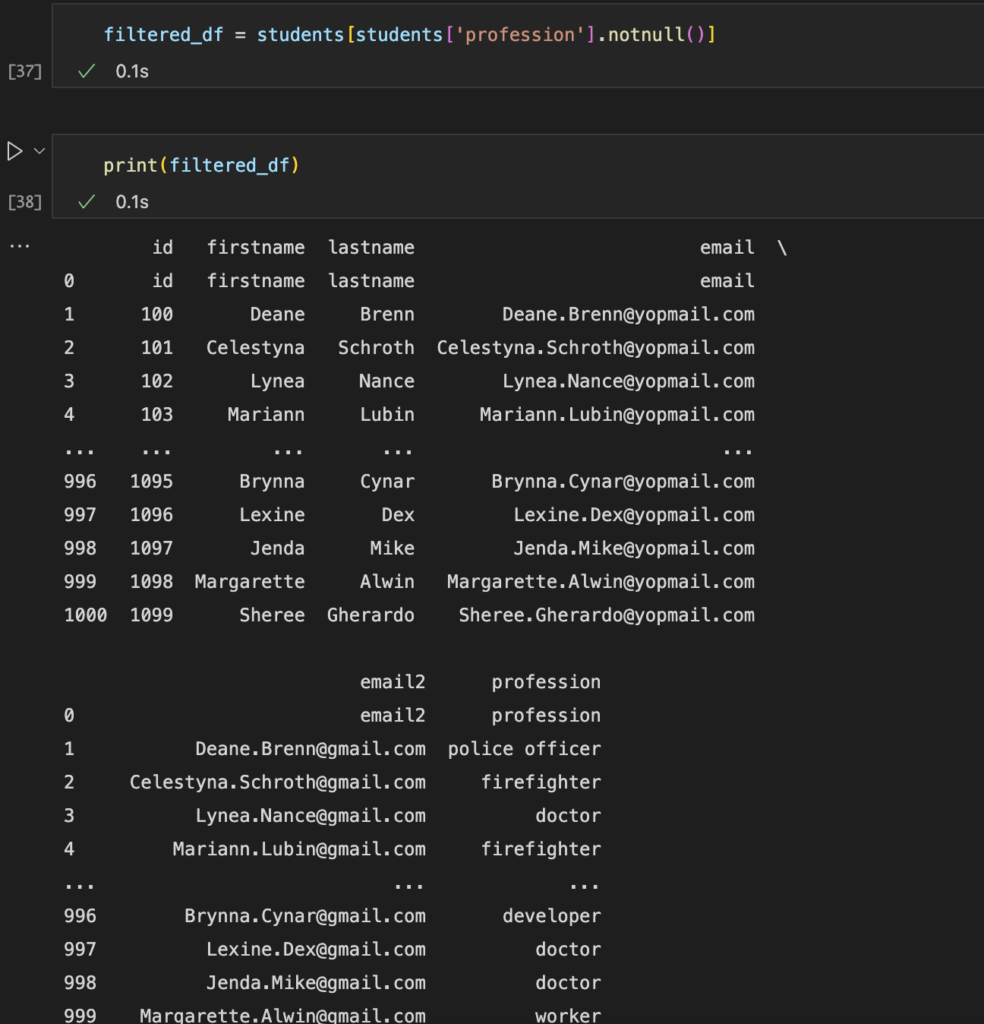
Filtering Null (NaN) Values

You can use the isnull() or notnull() methods to filter rows with missing data:

filtered_df = students[students[‘profession’].notnull()]

print(filtered_df)

Conclusion

Filtering data is a crucial skill when working with Pandas DataFrames. Whether you need to select rows based on simple conditions or complex queries, Pandas provides a versatile set of tools to handle your data effectively.

Experiment with these techniques on your own datasets to gain a deeper understanding of how to filter data in Pandas DataFrames. As you become more comfortable with these methods, you’ll be better equipped to extract valuable insights from your data. Thank you for reading the DevopsRoles page!

11 Ways ChatGPT Can Help Developers

Introduction

In this post, we’ll explore 11 ways ChatGPT can help developers. As technology continues to evolve, developers are faced with increasingly complex challenges. From debugging code to integrating systems, developers need to be able to navigate a wide range of issues. Fortunately, with the help of advanced language models like ChatGPT, developers have access to powerful tools that can help them overcome these challenges.

Ways ChatGPT Can Help Developers

1.Code Assistance

One of the biggest challenges developers face is writing efficient, error-free code. ChatGPT can assist with this by providing code suggestions, syntax error correction, and debugging support. With ChatGPT’s assistance, developers can write better code in less time.

2.Language Translation

Programming languages can be complex, and developers may not be familiar with all of them. ChatGPT can help by translating programming languages, making it easier for developers to work with code in languages they may not be familiar with.

3.Documentation Assistance

APIs, libraries, and coding frameworks can be difficult to navigate. ChatGPT can provide documentation assistance by answering questions related to these technologies. With ChatGPT’s help, developers can better understand how to use these technologies and write more effective code.

4.Integration Support

Integrating different technologies and systems can be a major challenge for developers. ChatGPT can provide guidance on how to integrate these technologies, helping developers overcome integration challenges and create more robust systems.

5.Best Practices

There are many best practices for coding, security, and optimization that developers need to be aware of. ChatGPT can provide advice on these best practices, helping developers write better code that is more secure and performs well.

6.Troubleshooting

Even the best developers encounter issues with their code or software. ChatGPT can help developers troubleshoot these issues by providing insights and solutions to problems.

7.Educational Resources

Learning new programming languages, frameworks, or technologies can be daunting. ChatGPT can provide educational resources, such as tutorials and videos, to help developers learn these new technologies and improve their skills.

8.Community Engagement

Engaging with the developer community can be an important part of a developer’s career. ChatGPT can help developers engage with their community by answering questions, providing support, and sharing knowledge. With ChatGPT’s assistance, developers can build strong relationships with their peers and collaborate to build better software.

9.Improved Decision Making

ChatGPT can analyze large amounts of data and provide insights and recommendations to developers. This can help developers make better decisions about their code, projects, and systems. For example, ChatGPT can analyze performance data and suggest optimizations to improve the speed and efficiency of a system.

10.Natural Language Processing

Natural Language Processing (NLP) is a branch of Artificial Intelligence that focuses on making it easier for computers to understand and interpret human language. ChatGPT is based on NLP, which means it can help developers understand natural language queries, commands, and statements. This can make it easier for developers to communicate with their tools and get the results they need.

11.Personalization

ChatGPT can also personalize its responses to individual developers based on their preferences and past interactions. For example, if a developer frequently works with a specific programming language or technology, ChatGPT can tailor its responses to provide more relevant information. This can save developers time and make their work more efficient.

Conclusion

ChatGPT is a versatile tool that can help developers in many different ways. Ways ChatGPT Can Help Developers. From code assistance to community engagement, and natural language processing to improved decision-making, ChatGPT can provide valuable support and insights to developers at every stage of their work.

As technology continues to evolve, ChatGPT and other language models are likely to play an increasingly important role in the development process. I hope will this your helpful. Thank you for reading the DevopsRoles page!

How to run shell commands in Python

Introduction

In this tutorial, How to run shell commands in Python. the ability to automate tasks and scripts is invaluable, and Python offers robust tools to execute these operations efficiently. this guide will provide the necessary insights and examples to integrate shell commands within your Python applications.

  1. Use subprocess module
  2. Use OS module
  3. Use sh library

Run shell commands in Python

Use subprocess module

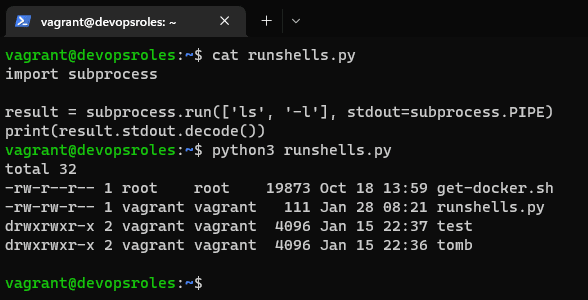
You can use the subprocess module in Python to run shell commands. The subprocess.run() function can be used to run a command and return the output.

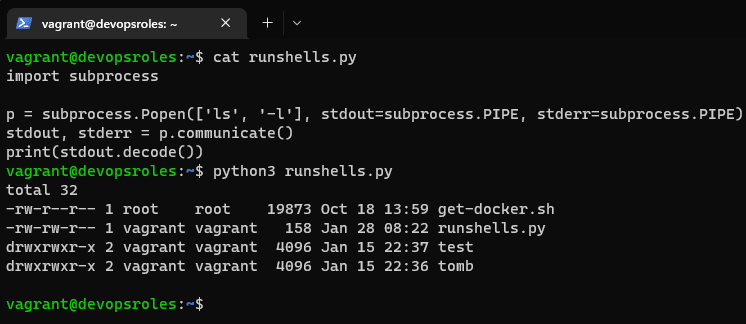
Here is an example of how to use the subprocess.run() function to run the ls command and print the output:

import subprocess

result = subprocess.run(['ls', '-l'], stdout=subprocess.PIPE)
print(result.stdout.decode())

You can also use subprocess.Popen to run shell commands and access the input/output channels of the commands.

import subprocess

p = subprocess.Popen(['ls', '-l'], stdout=subprocess.PIPE, stderr=subprocess.PIPE)
stdout, stderr = p.communicate()
print(stdout.decode())

However, it’s generally recommended to avoid using shell commands in python, and instead use python libraries that provide equivalent functionality, as it is more secure and less error-prone.

use os module

The os module in Python provides a way to interact with the operating system and can be used to run shell commands as well.

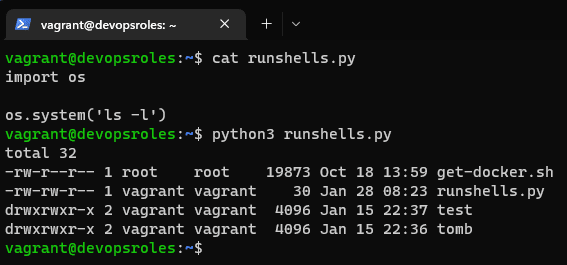
Here is an example of how to use the os.system() function to run the ls command and print the output:

import os

os.system('ls -l')

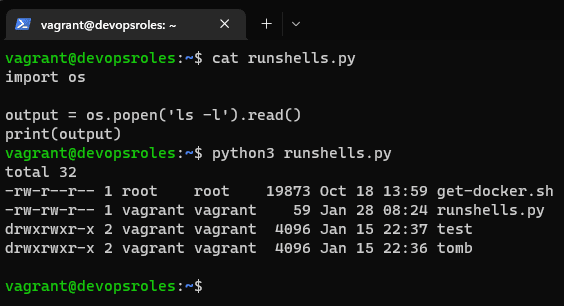
Alternatively, you can use the os.popen() function to run a command and return the output as a file object, which can be read using the read() or readlines() method.

import os

output = os.popen('ls -l').read()
print(output)

You can also use os.popen() and os.popen3() to run shell commands and access the input/output channels of the commands.

import os

p = os.popen3('ls -l')
stdout, stderr = p.communicate()
print(stdout)

It’s worth noting that the os.system() and os.popen() methods are considered old and are not recommended to use. subprocess module is recommended instead, as it provides more control over the process being executed and is considered more secure.

use sh library

The sh library is a Python library that provides a simple way to run shell commands, it’s a wrapper around the subprocess module, and it provides a more convenient interface for running shell commands and handling the output.

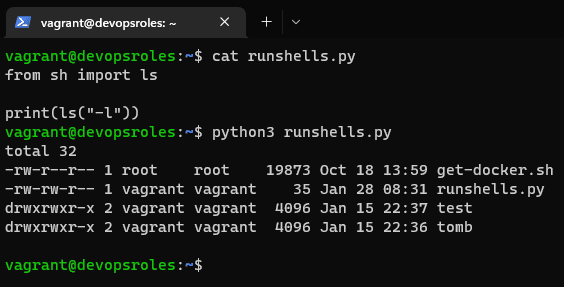
Here is an example of how to use the sh library to run the ls command and print the output:

from sh import ls

print(ls("-l"))

You can also use sh to run shell commands and access the input/output channels of the command.

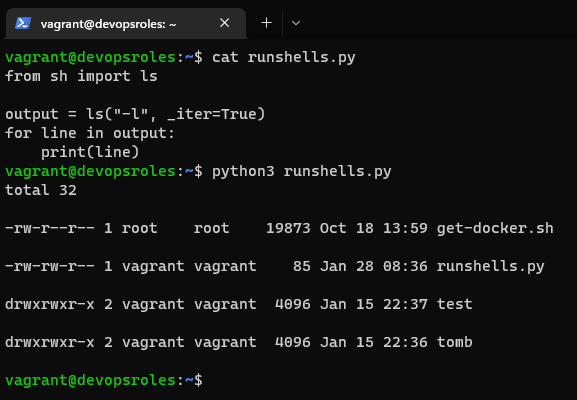
from sh import ls

output = ls("-l", _iter=True)
for line in output:
    print(line)

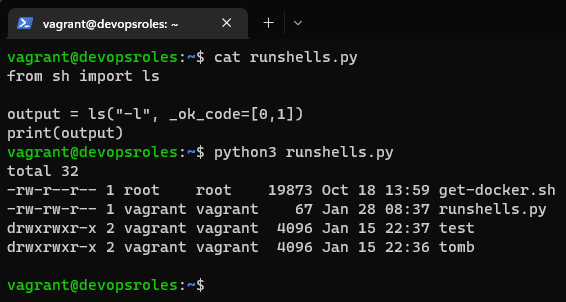
You can also capture the output of a command to a variable

from sh import ls

output = ls("-l", _ok_code=[0,1])
print(output)

It’s worth noting that the sh library provides a very convenient way to run shell commands and handle the output, but it can be less secure, as it allows arbitrary command execution, so it’s recommended to use it with caution.

Conclusion

Throughout this tutorial, we explored various methods for executing shell commands using Python, focusing on the subprocess module, os module, and the sh library. Each method offers unique advantages depending on your specific needs, from enhanced security and control to simplicity and convenience.

You have now learned how to run shell commands in Python. I hope you find this tutorial useful. Thank you for reading the DevopsRoles page!

python data type cheatsheet

#Introduction

In this tutorial, we learn about Integers, Lists, Dictionaries, and Tuples. Python data type cheatsheet begins.

python data type cheatsheet

Integers

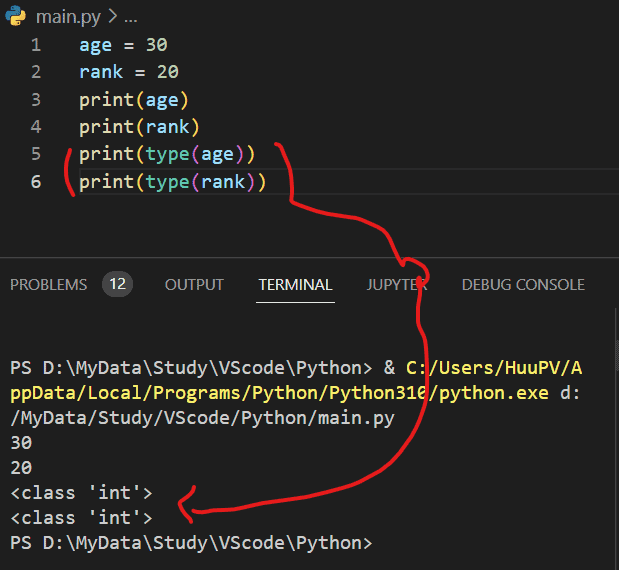
Integers represent whole numbers. Example

age = 30
rank = 20

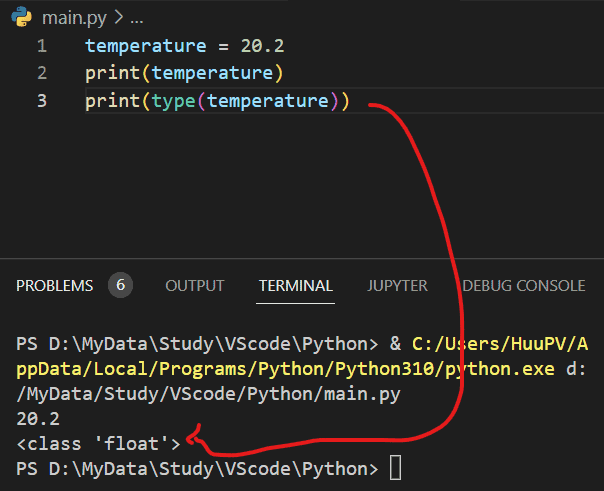
Floats represent decimal numbers. For example,

temperature = 20.2

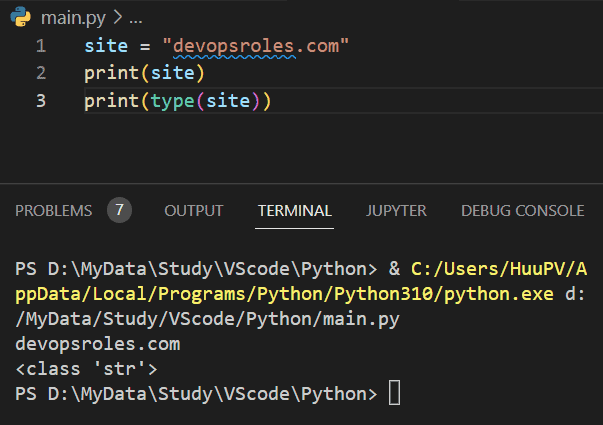
Strings represent text. For example

site = "devopsroles.com"

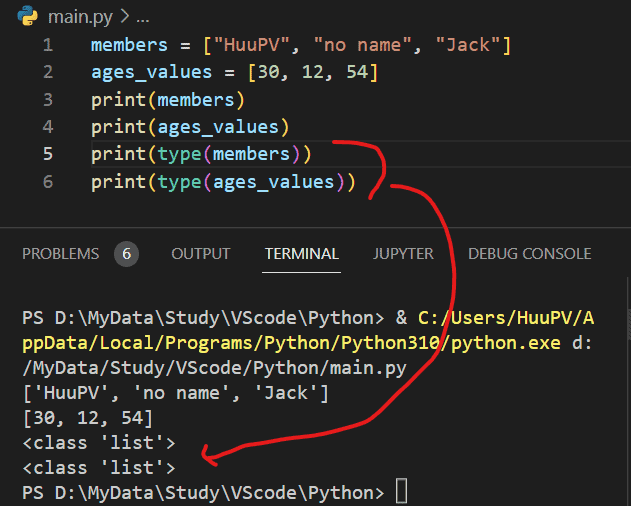
Lists represent arrays of values that may change during the program

members = ["HuuPV", "no name", "Jack"]
ages_values = [30, 12, 54]

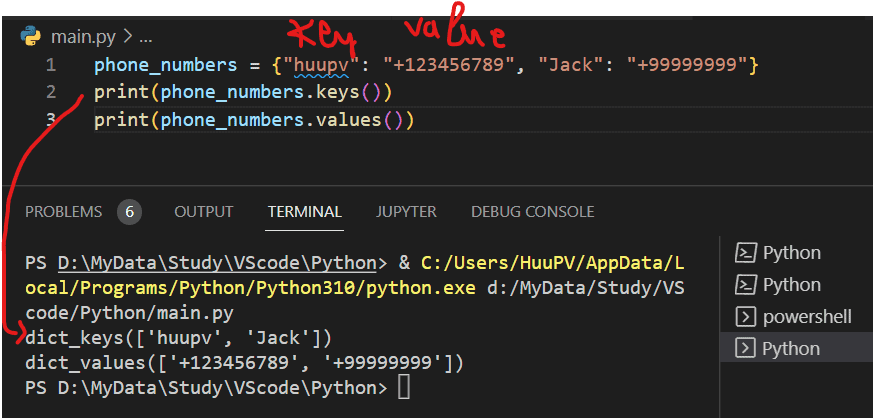
Dictionaries represent pairs of keys and values:

phone_numbers = {"huupv": "+123456789", "Jack": "+99999999"}

The Keys and values of a dictionary can be extracted

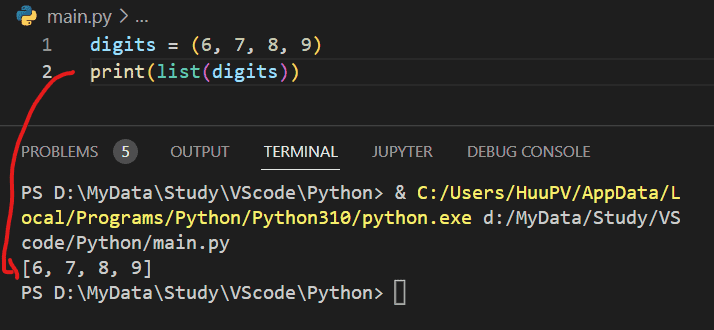
Tuples

Tuples represent arrays of values that are not to be changed during the program

convert Tuples to list

 convert the list to a tuple

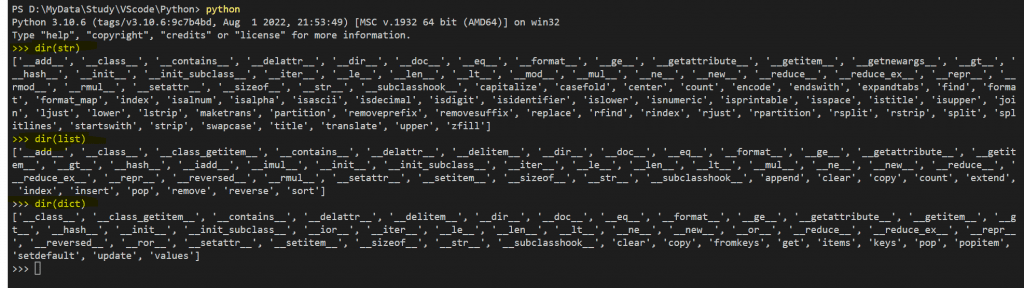
get a list of attributes of a data type

get a list of Python built-in functions

get the documentation of a Python data type

help(str)
help(str.replace)
help(dict.values)

Conclusion

You learn python data type cheatsheet. I hope this will be helpful. Thank you for reading the DevopsRoles page!