Scale AWS Environment Securely with Terraform and Sentinel Policy as Code

Scaling your AWS environment efficiently and securely is crucial for any organization, regardless of size. Manual scaling processes are prone to errors, inconsistencies, and security vulnerabilities. This leads to increased operational costs, downtime, and potential security breaches. This comprehensive guide will demonstrate how to effectively scale AWS environment securely using Terraform for infrastructure-as-code (IaC) and Sentinel for policy-as-code, creating a robust and repeatable process. We’ll explore best practices and practical examples to ensure your AWS infrastructure remains scalable, resilient, and secure throughout its lifecycle.

Understanding the Challenges of Scaling AWS

Scaling AWS infrastructure presents several challenges. Manually managing resources, configurations, and security across different environments (development, testing, production) is tedious and error-prone. Inconsistent configurations lead to security vulnerabilities, compliance issues, and operational inefficiencies. As your infrastructure grows, managing this complexity becomes exponentially harder, leading to increased costs and risks. Furthermore, ensuring consistent security policies across your expanding infrastructure requires significant effort and expertise.

  • Manual Configuration Errors: Human error is inevitable when managing resources manually. Mistakes in configuration can lead to security breaches or operational failures.
  • Inconsistent Environments: Differences between environments (dev, test, prod) can cause deployment issues and complicate debugging.
  • Security Gaps: Manual security management can lead to inconsistencies and oversight, leaving your infrastructure vulnerable.
  • Scalability Limitations: Manual processes struggle to keep pace with the dynamic demands of a growing application.

Infrastructure as Code (IaC) with Terraform

Terraform addresses these challenges by enabling you to define and manage your infrastructure as code. This means representing your AWS resources (EC2 instances, S3 buckets, VPCs, etc.) in declarative configuration files. Terraform then automatically provisions and manages these resources based on your configurations. This eliminates manual processes, reduces errors, and improves consistency.

Terraform Basics

Terraform uses the HashiCorp Configuration Language (HCL) to define infrastructure. A simple example of creating an EC2 instance:


resource "aws_instance" "example" {
ami = "ami-0c55b31ad2299a701" # Replace with your AMI ID
instance_type = "t2.micro"
}

Scaling with Terraform

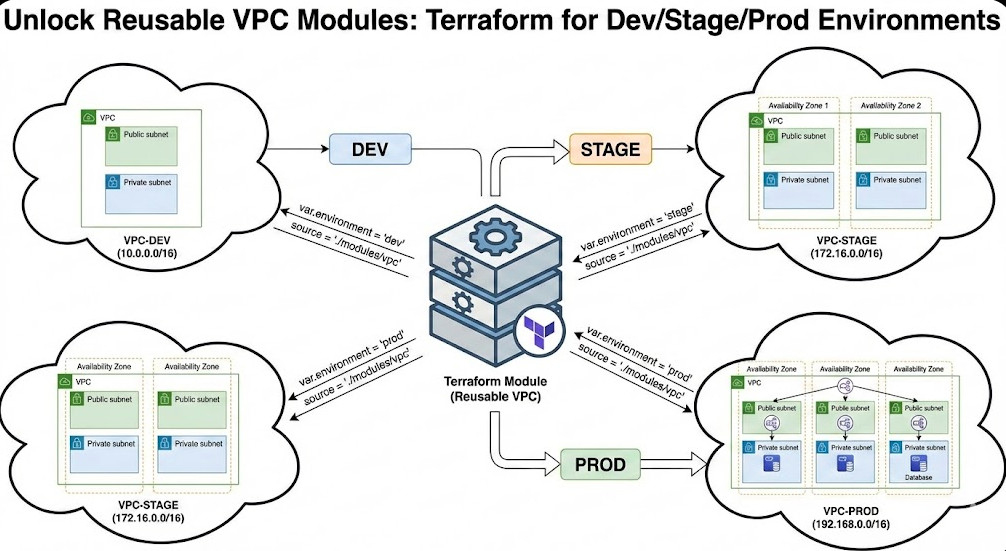
Terraform allows for easy scaling through variables and modules. You can define variables for the number of instances, instance type, and other parameters. This enables you to easily adjust your infrastructure’s scale by modifying these variables. Modules help organize your code into reusable components, making scaling more efficient and manageable.

Policy as Code with Sentinel

While Terraform handles infrastructure provisioning, Sentinel ensures your infrastructure adheres to your organization’s security policies. Sentinel allows you to define policies in a declarative way, which are then evaluated by Terraform before deploying changes. This prevents deployments that violate your security rules, reinforcing a secure scale AWS environment securely strategy.

Sentinel Policies

Sentinel policies are written in a dedicated language designed for policy enforcement. An example of a policy that checks for the minimum required instance type:


policy "instance_type_check" {
rule "minimum_instance_type" {
when aws_instance.example.instance_type != "t2.medium" {
message = "Instance type must be at least t2.medium"
}
}
}

Integrating Sentinel with Terraform

Integrating Sentinel with Terraform involves configuring the Sentinel provider and defining the policies that need to be enforced. Terraform will then automatically evaluate these policies before applying any infrastructure changes. This ensures that only configurations that meet your security requirements are deployed.

Scale AWS Environment Securely: Best Practices

Implementing a secure and scalable AWS environment requires adhering to best practices:

  • Version Control: Store your Terraform and Sentinel code in a version control system (e.g., Git) for tracking changes and collaboration.
  • Modular Design: Break down your infrastructure into reusable modules for better organization and scalability.
  • Automated Testing: Implement automated tests to validate your infrastructure code and policies.
  • Security Scanning: Use security scanning tools to identify potential vulnerabilities in your infrastructure.
  • Role-Based Access Control (RBAC): Implement RBAC to restrict access to your AWS resources based on roles and responsibilities.
  • Regular Audits: Regularly review and update your security policies to reflect changing threats and vulnerabilities.

Advanced Techniques

For more advanced scenarios, consider these techniques:

  • Terraform Cloud/Enterprise: Manage your Terraform state and collaborate efficiently using Terraform Cloud or Enterprise.
  • Continuous Integration/Continuous Deployment (CI/CD): Automate your infrastructure deployment process with a CI/CD pipeline.
  • Infrastructure as Code (IaC) security scanning tools: Integrate static and dynamic code analysis tools within your CI/CD pipeline to catch security issues early in the development lifecycle.

Frequently Asked Questions

1. What if a Sentinel policy fails?

If a Sentinel policy fails, Terraform will prevent the deployment from proceeding. You will need to address the policy violation before the deployment can continue. This ensures that only compliant infrastructure is deployed.

2. Can I use Sentinel with other cloud providers?

While Sentinel is primarily used with Terraform, its core concepts are applicable to other IaC tools and cloud providers. The specific implementation details would vary depending on the chosen tools and platforms. The core principle of defining and enforcing policies as code remains constant.

3. How do I handle complex security requirements?

Complex security requirements can be managed by decomposing them into smaller, manageable policies. These policies can then be organized and prioritized within your Sentinel configuration. This promotes modularity, clarity, and maintainability.

4. What are the benefits of using Terraform and Sentinel together?

Using Terraform and Sentinel together provides a comprehensive approach to managing and securing your AWS infrastructure. Terraform automates infrastructure provisioning, ensuring consistency, while Sentinel enforces security policies, preventing configurations that violate your organization’s security standards. This helps in building a robust and secure scale AWS environment securely.

Conclusion

Scaling your AWS environment securely is paramount for maintaining operational efficiency and mitigating security risks. By leveraging the power of Terraform for infrastructure as code and Sentinel for policy as code, you can create a robust, scalable, and secure AWS infrastructure. Remember to adopt best practices such as version control, automated testing, and regular security audits to maintain the integrity and security of your environment. Employing these techniques allows you to effectively scale AWS environment securely, ensuring your infrastructure remains resilient and protected throughout its lifecycle. Remember to consistently review and update your policies to adapt to evolving security threats and best practices.

For further reading, refer to the official Terraform documentation: https://www.terraform.io/ and the Sentinel documentation: https://www.hashicorp.com/products/sentinel.  Thank you for reading the DevopsRoles page!
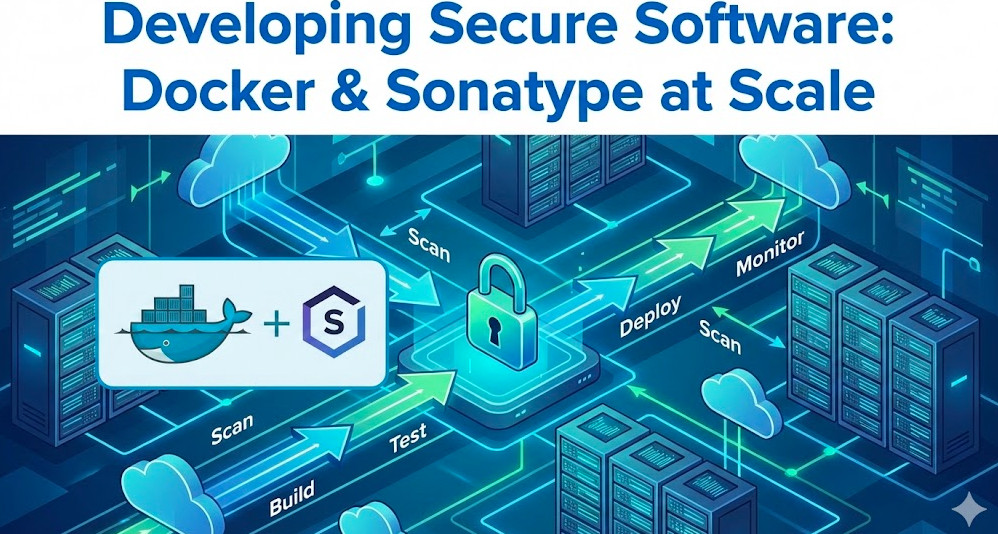
Docker Security 2025: Protecting Containers from Cyberthreats

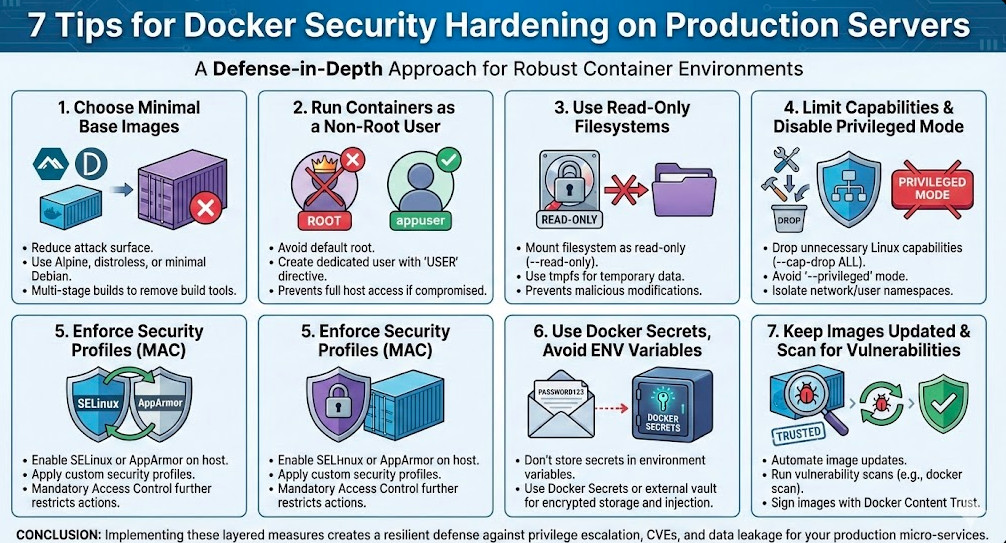
The containerization revolution, spearheaded by Docker, has transformed software development and deployment. However, this rapid adoption has also introduced new security challenges. As we look towards 2025 and beyond, ensuring robust Docker security is paramount. This article delves into the multifaceted landscape of container security, examining emerging threats and providing practical strategies to safeguard your Dockerized applications. We’ll explore best practices for securing images, networks, and the Docker environment itself, helping you build a resilient and secure container ecosystem.

Understanding the Docker Security Landscape

The inherent benefits of Docker – portability, consistency, and efficient resource utilization – also create potential vulnerabilities if not properly addressed. Attack surfaces exist at various levels, from the base image to the running container and the host system. Threats range from compromised images containing malware to misconfigurations exposing sensitive data. A comprehensive Docker security strategy needs to consider all these facets.

Common Docker Security Vulnerabilities

  • Vulnerable Base Images: Using outdated or insecure base images introduces numerous vulnerabilities.
  • Image Tampering: Malicious actors can compromise images in registries, injecting malware.
  • Network Security Issues: Unsecured networks allow unauthorized access to containers.
  • Misconfigurations: Incorrectly configured Docker settings can create significant security holes.
  • Runtime Attacks: Exploiting vulnerabilities in the container runtime environment itself.

Implementing Robust Docker Security Practices

A multi-layered approach is essential for effective Docker security. This includes securing the image creation process, managing network traffic, and enforcing runtime controls.

Securing Docker Images

  1. Use Minimal Base Images: Start with the smallest, most secure base image possible. Avoid bloated images with unnecessary packages.
  2. Regularly Update Images: Stay up-to-date with security patches and updates for your base images and application dependencies.
  3. Employ Static and Dynamic Analysis: Conduct thorough security scanning of images using tools like Clair, Anchore, and Trivy to identify vulnerabilities before deployment.
  4. Use Multi-Stage Builds: Separate the build process from the runtime environment to reduce the attack surface.
  5. Sign Images: Digitally sign images to verify their authenticity and integrity, preventing tampering.

Securing the Docker Network

  1. Use Docker Networks: Isolate containers using dedicated Docker networks to limit communication between them and the host.
  2. Restrict Network Access: Configure firewalls and network policies to restrict access to only necessary ports and services.
  3. Employ Container Network Interfaces (CNIs): Leverage CNIs like Calico or Weave for enhanced network security features, including segmentation and policy enforcement.
  4. Secure Communication: Use HTTPS and TLS for all communication between containers and external services.

Enhancing Docker Runtime Security

  1. Resource Limits: Set resource limits (CPU, memory) for containers to prevent resource exhaustion attacks (DoS).
  2. User Namespaces: Run containers with non-root users to minimize the impact of potential breaches.
  3. Security Context: Utilize Docker’s security context options to define capabilities and permissions for containers.
  4. Regular Security Audits: Conduct periodic security audits and penetration testing to identify and address vulnerabilities.
  5. Security Monitoring: Implement security monitoring tools to detect suspicious activity within your Docker environment.

Docker Security: Advanced Techniques

Beyond the fundamental practices, advanced techniques further strengthen your Docker security posture.

Secrets Management

Avoid hardcoding sensitive information within Docker images. Use dedicated secrets management tools like HashiCorp Vault or AWS Secrets Manager to store and securely access credentials and other sensitive data.

Kubernetes Integration

For production deployments, integrating Docker with Kubernetes provides powerful security benefits. Kubernetes offers features like network policies, role-based access control (RBAC), and pod security policies for enhanced container security. This is crucial for advanced Docker security within a large-scale system.

Image Immutability

Enforce image immutability to prevent runtime modifications and maintain the integrity of your containers. This principle is central to maintaining a secure Docker security strategy. Once an image is built, it should not be changed.

Runtime Security Scanning

Implement continuous runtime security scanning using tools that monitor containers for malicious behavior and vulnerabilities. Tools like Sysdig and Falco provide real-time monitoring and alerting capabilities.

Frequently Asked Questions

Q1: What are the key differences between Docker security and general container security?

A1: While Docker security is a subset of container security, it focuses specifically on the security aspects of using the Docker platform and its associated tools, images, and processes. General container security encompasses best practices for all container technologies, including other container runtimes like containerd and CRI-O.

Q2: How can I effectively scan for vulnerabilities in my Docker images?

A2: Use static and dynamic analysis tools. Static analysis tools like Trivy and Anchore scan the image’s contents for known vulnerabilities without actually running the image. Dynamic analysis involves running the container in a controlled environment to observe its behavior and detect malicious activity.

Q3: Is it necessary to use rootless containers for production environments?

A3: While not strictly mandatory, running containers with non-root users is a highly recommended security practice to minimize the impact of potential exploits. It significantly reduces the attack surface and limits the privileges a compromised container can access. Consider it a best practice for robust Docker security.

Q4: How can I monitor Docker containers for malicious activity?

A4: Employ runtime security monitoring tools like Sysdig, Falco, or similar solutions. These tools can monitor container processes, network activity, and file system changes for suspicious behavior and alert you to potential threats.

Conclusion

In the evolving landscape of 2025 and beyond, implementing robust Docker security measures is not optional; it’s critical. By combining best practices for image security, network management, runtime controls, and advanced techniques, you can significantly reduce the risk of vulnerabilities and protect your applications. Remember that Docker security is a continuous process, demanding regular updates, security audits, and a proactive approach to threat detection and response. Neglecting this crucial aspect can have severe consequences. Prioritize a comprehensive Docker security strategy today to safeguard your applications tomorrow.

For more information on container security best practices, refer to the following resources: Docker Security Documentation and OWASP Top Ten. Thank you for reading the DevopsRoles page!

Revolutionizing Automation with IBM and Generative AI for Ansible Playbooks

The world of IT automation is constantly evolving, demanding faster, more efficient, and more intelligent solutions. Traditional methods of creating Ansible playbooks, while effective, can be time-consuming and prone to errors. This is where the transformative power of Generative AI steps in. IBM is leveraging the potential of Generative AI to significantly enhance the development and management of Ansible playbooks, streamlining the entire automation process and improving developer productivity. This article will explore how IBM is integrating Generative AI into Ansible, addressing the challenges of traditional playbook creation, and ultimately demonstrating the benefits this innovative approach offers to IT professionals.

Understanding the Challenges of Traditional Ansible Playbook Development

Creating Ansible playbooks traditionally involves a deep understanding of YAML syntax, Ansible modules, and the intricacies of infrastructure management. This often leads to several challenges:

  • Steep Learning Curve: Mastering Ansible requires significant time and effort, creating a barrier to entry for many.
  • Time-Consuming Process: Writing, testing, and debugging playbooks can be incredibly time-intensive, especially for complex automation tasks.
  • Error-Prone: Even experienced Ansible users can make mistakes in YAML syntax or module configuration, leading to deployment failures.
  • Lack of Reusability: Playbooks often lack standardization, making it difficult to reuse code across different projects.

Generative AI: A Game Changer for Ansible Automation

IBM’s integration of Generative AI into the Ansible workflow aims to address these challenges directly. By utilizing the power of AI, developers can significantly accelerate playbook creation, improve code quality, and reduce errors. This involves several key aspects:

AI-Powered Code Generation

Generative AI models can analyze existing Ansible playbooks and generate new code based on natural language descriptions or code snippets. This allows developers to simply describe their desired automation tasks in plain English, and the AI will generate the corresponding Ansible code. For example, a simple prompt like “Create an Ansible playbook to install Apache web server on a CentOS machine” could produce a fully functional playbook.

Intelligent Code Completion and Suggestions

Generative AI can also provide real-time code completion and suggestions as developers write their playbooks. This feature helps to prevent syntax errors, suggests best practices, and improves code readability.

Automated Playbook Testing and Debugging

Integrating Generative AI into the testing and debugging process can drastically reduce the time spent identifying and fixing errors. The AI can analyze the playbook code and identify potential issues before deployment, significantly improving the reliability of automated tasks.

Improved Code Reusability

Generative AI can analyze existing playbooks and identify common patterns and reusable components. This allows developers to create modular playbooks that can be easily reused across different projects, promoting consistency and reducing development time.

Practical Example: Using Generative AI to Create an Ansible Playbook

Let’s consider a scenario where we need to create an Ansible playbook to configure a web server. Instead of manually writing the YAML code, we can use a Generative AI tool. We provide a natural language description:

“Create an Ansible playbook to install and configure Apache web server on Ubuntu 20.04. The playbook should also create a virtual host for example.com.”

A Generative AI model would then generate the following (simplified) Ansible playbook:

---
- hosts: all
  become: true
  tasks:
    - name: Update apt cache
      apt:
        update_cache: yes

    - name: Install Apache2 web server
      apt:
        name: apache2
        state: present

    - name: Enable Apache2 service
      systemd:
        name: apache2
        state: started
        enabled: yes

    - name: Create virtual host for example.com
      template:
        src: /path/to/example.com.j2
        dest: /etc/apache2/sites-available/example.com
      notify: restart apache2

    - name: Enable virtual host for example.com
      command: a2ensite example.com
      notify: restart apache2

  handlers:
    - name: restart apache2
      service:
        name: apache2
        state: restarted

Note: This is a simplified example. A real-world scenario would require more complex configurations and error handling.

Exploring IBM’s Specific Implementations (Hypothetical Example – No Publicly Available Specifics)

While IBM hasn’t publicly released detailed specifications of its Generative AI integration with Ansible, we can hypothesize potential implementations based on current AI trends:

  • IBM Watson integration: IBM’s Watson AI platform could power the underlying Generative AI models for Ansible playbook creation.
  • Plugin for Ansible Tower: A plugin could be developed to seamlessly integrate the Generative AI capabilities into the Ansible Tower interface.
  • API access: Developers might be able to access the Generative AI functionalities through an API, allowing for custom integrations.

Frequently Asked Questions

Q1: Is Generative AI for Ansible Playbooks ready for production use?

While the technology is rapidly advancing, the production readiness depends on the specific implementation and the complexity of your automation needs. Thorough testing and validation are crucial before deploying AI-generated playbooks to production environments.

Q2: What are the security implications of using Generative AI for Ansible Playbooks?

Security is a paramount concern. Ensuring the security of the Generative AI models and the generated playbooks is essential. This involves careful input validation, output sanitization, and regular security audits.

Q3: How does the cost of using Generative AI for Ansible compare to traditional methods?

The cost depends on the specific Generative AI platform and usage. While there might be initial setup costs, the potential for increased efficiency and reduced development time could lead to significant long-term cost savings.

Q4: Will Generative AI completely replace human Ansible developers?

No. Generative AI will augment the capabilities of human developers, not replace them. It will automate repetitive tasks, freeing up developers to focus on more complex and strategic aspects of automation.

Conclusion

IBM’s exploration of Generative AI for Ansible playbooks represents a significant step forward in IT automation. By leveraging the power of AI, developers can overcome many of the challenges associated with traditional Ansible development, leading to faster, more efficient, and more reliable automation solutions. While the technology is still evolving, the potential benefits are clear, and embracing Generative AI is a strategic move for organizations seeking to optimize their IT infrastructure and operations. Remember to always thoroughly test and validate any AI-generated code before deploying it to production.  Thank you for reading the DevopsRoles page!
IBM Ansible Red Hat Ansible Ansible Documentation

Automating SAP Deployments on Azure with Terraform & Ansible: Streamlining Deploying SAP

Deploying SAP systems is traditionally a complex and time-consuming process, often fraught with manual steps and potential for human error. This complexity significantly impacts deployment speed, increases operational costs, and raises the risk of inconsistencies across environments. This article tackles these challenges by presenting a robust and efficient approach to automating SAP deployments on Microsoft Azure using Terraform and Ansible. We’ll explore how to leverage these powerful tools to streamline the entire Deploying SAP process, from infrastructure provisioning to application configuration, ensuring repeatable and reliable deployments.

Understanding the Need for Automation in Deploying SAP

Modern businesses demand agility and speed in their IT operations. Manual Deploying SAP processes simply cannot keep pace. Automation offers several key advantages:

  • Reduced Deployment Time: Automate repetitive tasks, significantly shortening the time required to deploy SAP systems.
  • Improved Consistency: Eliminate human error by automating consistent configurations across all environments (development, testing, production).
  • Increased Efficiency: Free up valuable IT resources from manual tasks, allowing them to focus on more strategic initiatives.
  • Enhanced Scalability: Easily scale your SAP infrastructure up or down as needed, adapting to changing business demands.
  • Reduced Costs: Minimize manual effort and infrastructure waste, leading to significant cost savings over time.

Leveraging Terraform for Infrastructure as Code (IaC)

Terraform is a powerful Infrastructure as Code (IaC) tool that allows you to define and provision your Azure infrastructure using declarative configuration files. This eliminates the need for manual configuration through the Azure portal, ensuring consistency and repeatability. For Deploying SAP on Azure, Terraform manages the creation and configuration of virtual machines, networks, storage accounts, and other resources required by the SAP system.

Defining Azure Resources with Terraform

A typical Terraform configuration for Deploying SAP might include:

  • Virtual Machines (VMs): Defining the specifications for SAP application servers, database servers, and other components.
  • Virtual Networks (VNETs): Creating isolated networks for enhanced security and management.
  • Subnets: Segmenting the VNET for better organization and security.
  • Network Security Groups (NSGs): Controlling inbound and outbound network traffic.
  • Storage Accounts: Providing storage for SAP data and other files.

Example Terraform Code Snippet (Simplified):


resource "azurerm_resource_group" "rg" {
name = "sap-rg"
location = "WestUS"
}
resource "azurerm_virtual_network" "vnet" {
name = "sap-vnet"
address_space = ["10.0.0.0/16"]
location = azurerm_resource_group.rg.location
resource_group_name = azurerm_resource_group.rg.name
}

This is a simplified example; a complete configuration would be significantly more extensive, detailing all required SAP resources.

Automating SAP Configuration with Ansible

While Terraform handles infrastructure provisioning, Ansible excels at automating the configuration of the SAP application itself. Ansible uses playbooks, written in YAML, to define tasks that configure and deploy the SAP software on the provisioned VMs. This includes installing software packages, configuring SAP parameters, and setting up the database.

Ansible Playbook Structure for Deploying SAP

An Ansible playbook for Deploying SAP would consist of several tasks, including:

  • Software Installation: Installing required SAP components and dependencies.
  • SAP System Configuration: Configuring SAP parameters, such as instance profiles and database connections.
  • Database Setup: Configuring and setting up the database (e.g., SAP HANA on Azure).
  • User Management: Creating and managing SAP users and authorizations.
  • Post-Installation Tasks: Performing any necessary post-installation steps.

Example Ansible Code Snippet (Simplified):


- name: Install SAP package
apt:
name: "{{ sap_package }}"
state: present
update_cache: yes
- name: Configure SAP profile
template:
src: ./templates/sap_profile.j2
dest: /usr/sap/{{ sap_instance }}/SYS/profile/{{ sap_profile }}

This is a highly simplified example; a real-world playbook would be considerably more complex, encompassing all aspects of the SAP application configuration.

Integrating Terraform and Ansible for a Complete Solution

For optimal efficiency, Terraform and Ansible should be integrated. Terraform provisions the infrastructure, and Ansible configures the SAP system on the provisioned VMs. This integration can be achieved through several mechanisms:

  • Terraform Output Variables: Terraform can output the IP addresses and other relevant information about the provisioned VMs, which Ansible can then use as input.
  • Ansible Dynamic Inventory: Ansible’s dynamic inventory mechanism can fetch the inventory of VMs directly from Terraform’s state file.
  • Terraform Providers: Using dedicated Terraform providers can simplify the interaction between Terraform and Ansible. Terraform Registry offers a wide selection of providers.

Deploying SAP: A Step-by-Step Guide

  1. Plan Your Infrastructure: Determine the required resources for your SAP system (VMs, storage, network).
  2. Write Terraform Code: Define your infrastructure as code using Terraform, specifying all required Azure resources.
  3. Write Ansible Playbooks: Create Ansible playbooks to automate the configuration of your SAP system.
  4. Integrate Terraform and Ansible: Connect Terraform and Ansible to exchange data and ensure smooth operation.
  5. Test Your Deployment: Thoroughly test your deployment process in a non-production environment before deploying to production.
  6. Deploy to Production: Once testing is complete, deploy your SAP system to your production environment.

Frequently Asked Questions

Q1: What are the prerequisites for automating SAP deployments on Azure?

Prerequisites include a working knowledge of Terraform, Ansible, and Azure, along with necessary Azure subscriptions and permissions. You’ll also need appropriate SAP licenses and access to the SAP installation media.

Q2: How can I manage secrets (passwords, etc.) securely in my automation scripts?

Employ techniques like using Azure Key Vault to store secrets securely and accessing them via environment variables or dedicated Ansible modules. Avoid hardcoding sensitive information in your scripts.

Q3: What are some common challenges faced during automated SAP deployments?

Common challenges include network connectivity issues, dependency conflicts during software installation, and ensuring compatibility between SAP components and the Azure environment. Thorough testing is crucial to mitigate these challenges.

Q4: How can I monitor the automated deployment process?

Implement monitoring using Azure Monitor and integrate it with your automation scripts. Log all relevant events and metrics to track deployment progress and identify potential issues.

Conclusion

Automating the Deploying SAP process on Azure using Terraform and Ansible offers significant advantages in terms of speed, consistency, and efficiency. By leveraging IaC and automation, you can streamline your SAP deployments, reduce operational costs, and improve overall agility. Remember to thoroughly test your automation scripts in a non-production environment before deploying to production to minimize risks. Adopting this approach will significantly enhance your ability to effectively and efficiently manage your SAP landscape in the cloud. Thank you for reading the DevopsRoles page!

Microsoft Azure Documentation

Terraform Official Website

Ansible Official Documentation

Bolstering Your Defenses: Docker’s Hardened Images and Enhanced Docker Container Security

In today’s dynamic landscape of cloud-native applications and microservices, containerization has emerged as a cornerstone technology. Docker, the industry leader in containerization, plays a pivotal role, simplifying application deployment and management. However, with the increasing adoption of Docker comes a growing concern: Docker container security. This article delves into Docker’s innovative solution to this challenge: Hardened Images. We will explore how these images enhance security, provide practical examples, and address frequently asked questions to help you elevate your Docker container security posture.

Understanding the Need for Enhanced Docker Container Security

Containers, while offering numerous advantages, inherit vulnerabilities from their base images. A compromised base image can leave your entire application ecosystem exposed. Traditional security practices often fall short when dealing with the dynamic nature of containers and their ephemeral lifecycles. Vulnerabilities can range from outdated libraries with known exploits to misconfigurations that grant attackers unauthorized access. Neglecting Docker container security can lead to serious consequences, including data breaches, service disruptions, and reputational damage.

Introducing Docker Hardened Images: A Proactive Approach to Security

Docker Hardened Images represent a significant leap forward in Docker container security. These images are built with enhanced security features embedded directly into the base image, providing a more secure foundation for your applications. This proactive approach minimizes the attack surface and reduces the risk of vulnerabilities being introduced during the application development and deployment process.

Key Features of Hardened Images

  • Minimized attack surface: Hardened images often include only essential packages and services, reducing the number of potential vulnerabilities.
  • Security hardening: They incorporate security best practices like AppArmor profiles, SELinux configurations, and secure defaults to restrict access and prevent privilege escalation.
  • Regular security updates: Docker actively maintains and updates these images, ensuring the latest security patches are applied.
  • Enhanced auditing and logging: Features for more detailed auditing and logging capabilities aid in incident response and security monitoring.

Implementing Hardened Images for Enhanced Docker Container Security

Integrating Hardened Images into your workflow is relatively straightforward. The primary method involves specifying the hardened image during container creation. Let’s explore a practical example using a common web server image.

Example: Deploying a Hardened Web Server

Instead of using a standard `nginx` image, you might choose a hardened variant provided by Docker or a trusted third-party provider. The process remains largely the same, only the image name changes.


docker run -d -p 80:80

Note: Replace `` with the actual name of the hardened Nginx image from your chosen registry. Always verify the image’s authenticity and source before deployment.

Beyond Hardened Images: Comprehensive Docker Container Security Strategies

While Hardened Images provide a robust foundation, a comprehensive Docker container security strategy requires a multi-layered approach. This includes:

1. Secure Image Building Practices

  • Use minimal base images.
  • Regularly scan images for vulnerabilities using tools like Clair or Trivy.
  • Employ multi-stage builds to reduce the size and attack surface of your images.
  • Sign your images to verify their authenticity and integrity.

2. Runtime Security

  • Utilize container runtime security tools like Docker Desktop’s built-in security features or dedicated solutions.
  • Implement resource limits and constraints to prevent runaway processes from consuming excessive resources or impacting other containers.
  • Regularly monitor container logs and system events for suspicious activity.

3. Network Security

  • Use Docker networks to isolate containers and control network traffic.
  • Implement network policies to define allowed communication between containers and external networks.
  • Employ firewalls to filter incoming and outgoing network connections.

Docker Container Security: Best Practices and Advanced Techniques

To further strengthen your Docker container security posture, consider these advanced techniques:

1. Implementing Security Scanning at Every Stage

Integrate automated security scanning into your CI/CD pipeline to catch vulnerabilities early. This should include static analysis of code, dynamic analysis of running containers, and regular vulnerability scans of your base images.

2. Leveraging Security Orchestration Platforms

Tools like Kubernetes with integrated security features can automate many security tasks, including network policies, access control, and auditing.

3. Employing Secrets Management

Never hardcode sensitive information like passwords and API keys into your container images. Use secure secrets management solutions to store and manage these credentials.

By adopting a combination of hardened images and these best practices, you can significantly enhance the security of your Docker containers and protect your applications from evolving threats.

Frequently Asked Questions

Q1: Are Hardened Images a complete solution for Docker container security?

No, while Hardened Images significantly reduce the attack surface, they are not a silver bullet. A comprehensive security strategy also involves secure image building practices, runtime security measures, and robust network security configurations.

Q2: How often are Docker Hardened Images updated?

The frequency of updates depends on the specific image and the severity of discovered vulnerabilities. Docker typically releases updates regularly to address known security issues. It’s crucial to monitor for updates and adopt a process for regularly updating your base images.

Q3: Where can I find Docker Hardened Images?

Docker and various third-party providers offer hardened images. Always verify the source and reputation of the provider before using their images in production environments. Check the official Docker Hub and reputable sources for validated images.

Q4: Can I create my own hardened images?

Yes, you can customize your own hardened images by starting from a minimal base image and carefully selecting the packages and configurations needed for your application. However, this requires a deep understanding of security best practices and is more resource-intensive than using pre-built options.

Conclusion

Implementing Docker Hardened Images is a critical step towards strengthening your Docker container security. By leveraging these images in conjunction with a multi-layered security approach that includes secure image building, runtime security, and robust network controls, you can significantly reduce the risk of vulnerabilities and protect your applications. Remember, proactively addressing Docker container security is not just a best practice; it’s a necessity in today’s threat landscape. Stay updated on the latest security advisories and regularly review your security practices to ensure your containers remain secure.

For more in-depth information, refer to the official Docker documentation: https://docs.docker.com/ and explore security best practices from reputable sources like OWASP: https://owasp.org/. Thank you for reading the DevopsRoles page!
Revolutionize Your Ansible Workflow: Generate Ansible Playbooks Faster with watsonx Code Assistant

Automating infrastructure management is crucial for any organization striving for efficiency and scalability. Ansible, with its agentless architecture and declarative approach, has become a favorite among DevOps engineers. However, writing Ansible Playbooks can be time-consuming, especially when dealing with complex infrastructure setups. This is where IBM watsonx Code Assistant steps in, offering a revolutionary way to generate Ansible Playbooks faster and more efficiently. This in-depth guide will explore how Ansible Playbooks watsonx can significantly enhance your workflow, empowering you to build robust automation solutions with unprecedented speed and accuracy.

Understanding the Power of watsonx Code Assistant

watsonx Code Assistant is an AI-powered code generation tool designed to assist developers in various programming languages, including YAML, the language used for writing Ansible Playbooks. Its capabilities extend beyond simple code completion; it can understand the context of your project, predict your intentions, and generate complete code blocks, significantly accelerating the development process. For Ansible users, this translates to quicker playbook creation, reduced errors, and improved overall productivity.

Key Features Relevant to Ansible Playbooks

  • Intelligent Code Completion: watsonx Code Assistant suggests relevant Ansible modules, tasks, and parameters as you type, reducing the need for manual lookups.
  • Context-Aware Suggestions: The AI understands the overall structure of your playbook and offers contextually appropriate suggestions, minimizing errors and improving code consistency.
  • Snippet Generation: It can generate entire code blocks based on natural language descriptions, allowing you to quickly create complex Ansible tasks.
  • Error Detection and Correction: watsonx Code Assistant can identify potential errors in your code and suggest corrections, enhancing the reliability of your Playbooks.

Generating Ansible Playbooks with watsonx: A Step-by-Step Guide

Integrating watsonx Code Assistant into your Ansible workflow is straightforward. While the exact implementation depends on your chosen IDE or editor, the underlying principles remain the same.

Setting Up Your Environment

  1. Ensure you have a compatible IDE or code editor that supports watsonx Code Assistant. Popular options include VS Code, which provides excellent integration with AI-powered extensions.
  2. Install the necessary extensions or plugins for watsonx Code Assistant. Refer to the official documentation for detailed instructions.
  3. Authenticate your watsonx Code Assistant account to grant access to the AI capabilities.

Basic Ansible Playbook Generation

Let’s say you need to create a simple playbook to deploy a web server. Instead of manually writing all the tasks, you can leverage watsonx Code Assistant’s natural language capabilities. You might start by typing a prompt like:


# Prompt: "Ansible playbook to install and configure Apache web server on Ubuntu 20.04"

watsonx Code Assistant would then generate a playbook with tasks for installing Apache, configuring the server, and potentially starting the service. You can review and refine the generated code to match your specific requirements. This greatly simplifies the initial structure and saves significant time.

Advanced Ansible Playbook Generation: Handling Complex Scenarios

watsonx Code Assistant’s power becomes even more apparent when dealing with intricate infrastructure setups. For instance, consider deploying a multi-tier application involving databases, load balancers, and multiple web servers. You can describe this complex scenario in natural language, providing detailed specifications for each component.


# Prompt: "Ansible playbook to deploy a three-tier application with Apache web servers, a MySQL database, and an HAProxy load balancer on AWS, including security group configuration."

The generated playbook would be significantly more complex, encompassing numerous tasks and modules. The AI would intelligently handle dependencies and orchestrate the deployment process, ensuring a smooth and automated rollout. This level of automation would be extremely challenging to achieve manually without considerable effort and risk of human error.

Ansible Playbooks watsonx: Advanced Techniques and Best Practices

To maximize the efficiency of using Ansible Playbooks watsonx, consider these advanced techniques:

Leveraging Roles and Include Statements

For large and complex projects, it’s essential to break down your playbooks into reusable components using Ansible roles. watsonx Code Assistant can assist in generating these roles, further streamlining the development process.

Iterative Refinement and Feedback

Treat the AI-generated code as a starting point, not the final product. Review the code thoroughly, test it rigorously, and incorporate feedback to ensure its accuracy and reliability. The AI is a powerful tool, but it’s not a replacement for human expertise.

Integrating Version Control

Always use a version control system (like Git) to track changes made to your Ansible Playbooks, both manually and those generated by watsonx Code Assistant. This enables collaboration, rollback capabilities, and facilitates reproducible deployments.

Frequently Asked Questions

Q1: Is watsonx Code Assistant free to use?

A1: watsonx Code Assistant has different pricing tiers, so check their official website for current pricing plans and licensing information.

Q2: Does watsonx Code Assistant support all Ansible modules?

A2: While watsonx Code Assistant is constantly expanding its knowledge base, it may not yet support every Ansible module. It’s always advisable to verify the generated code and make necessary adjustments.

Q3: Can I use watsonx Code Assistant with other automation tools alongside Ansible?

A3: The versatility of watsonx Code Assistant extends beyond Ansible. It can assist with code generation in other programming languages making it suitable for broader automation projects. However, always ensure compatibility and appropriate integration.

Q4: What happens if watsonx Code Assistant suggests incorrect code?

A4: watsonx Code Assistant is an AI, and while powerful, it can sometimes make mistakes. Always review and validate the generated code thoroughly. Think of it as a powerful assistant, not a fully autonomous system.

Conclusion

Generating Ansible Playbooks watsonx Code Assistant dramatically accelerates the creation of robust and efficient infrastructure automation solutions. By leveraging AI-powered code generation, you can significantly reduce development time, improve code quality, and minimize errors. However, remember that watsonx Code Assistant is a tool to augment your skills, not replace them. Always review, test, and refine the generated code to ensure its accuracy and reliability.

Mastering the use of Ansible Playbooks watsonx will undoubtedly propel your DevOps capabilities to the next level, leading to faster deployments, improved infrastructure management, and enhanced operational efficiency. Remember to consult the official IBM watsonx Code Assistant documentation for the most up-to-date information and best practices. https://www.ibm.com/watsonx https://docs.ansible.com/ https://www.redhat.com/en/topics/automation/what-is-ansible. Thank you for reading the DevopsRoles page!

Revolutionize Your Cybersecurity with Check Point & Ansible: Security Automation Orchestration

In today’s rapidly evolving threat landscape, maintaining robust cybersecurity is paramount. Manual security processes are slow, error-prone, and simply can’t keep pace with the sophistication and speed of modern cyberattacks. This is where Security Automation Orchestration comes into play. This article delves into leveraging the power of Check Point’s comprehensive security solutions and Ansible’s automation capabilities to build a highly efficient and scalable security infrastructure. We’ll explore how integrating these technologies enables proactive threat mitigation, streamlined incident response, and ultimately, a stronger security posture. By the end, you’ll understand how to implement Security Automation Orchestration to significantly improve your organization’s security operations.

Understanding the Power of Security Automation Orchestration

Security Automation Orchestration is the process of automating repetitive security tasks and orchestrating complex workflows to improve efficiency and reduce the risk of human error. This approach combines automation tools with a central orchestration layer to streamline security operations, allowing security teams to manage and respond to threats more effectively. Think of it as a sophisticated conductor leading an orchestra of security tools, ensuring each instrument (security application) plays its part harmoniously and efficiently.

Why Automate Security Tasks?

  • Increased Efficiency: Automate repetitive tasks like vulnerability scanning, patch management, and incident response, freeing up security teams to focus on more strategic initiatives.
  • Reduced Human Error: Automation eliminates the risk of human error associated with manual processes, minimizing the chance of misconfigurations or missed steps.
  • Improved Response Times: Automating incident response procedures allows for quicker detection and remediation of security breaches, reducing the impact of attacks.
  • Enhanced Scalability: As your organization grows, automation scales seamlessly, ensuring your security infrastructure remains adaptable and effective.
  • Cost Savings: By streamlining processes and reducing the need for manual intervention, automation can lead to significant cost savings in the long run.

Integrating Check Point and Ansible for Security Automation Orchestration

Check Point provides a comprehensive suite of security solutions, offering strong protection across various network environments. Ansible, a powerful automation tool, allows for easy configuration management and task automation. Together, they offer a potent combination for robust Security Automation Orchestration.

Ansible’s Role in Check Point Security Management

Ansible simplifies the management of Check Point security appliances by automating tasks such as:

  • Configuration Management: Deploying and managing consistent configurations across multiple Check Point gateways.
  • Policy Updates: Automating the deployment of security policies and updates to ensure consistent security across all environments.
  • Incident Response: Automating tasks involved in incident response, such as isolating infected systems and initiating remediation procedures.
  • Log Management: Automating the collection and analysis of security logs from Check Point appliances for proactive threat detection.
  • Reporting and Monitoring: Creating automated reports on security posture and performance for improved visibility and insights.

Practical Example: Automating Check Point Gateway Configuration with Ansible

Let’s consider a simplified example of configuring a Check Point gateway using Ansible. This example utilizes Ansible’s modules to interact with the Check Point API. Note: You will need appropriate Check Point API credentials and Ansible set up correctly.


---
- hosts: check_point_gateways
become: true
tasks:
- name: Configure Check Point Gateway
check_point_gateway:
hostname: "{{ inventory_hostname }}"
api_key: "{{ check_point_api_key }}"
config:
- name: "global"
setting:
"firewall":
"enable": "true"
"log":
"level": "info"

This Ansible playbook demonstrates a basic configuration. For more complex scenarios, you’ll need to delve into the details of the Check Point API and Ansible modules.

Advanced Security Automation Orchestration with Check Point and Ansible

Beyond basic configuration, the integration of Check Point and Ansible enables advanced Security Automation Orchestration capabilities:

Orchestrating Complex Security Workflows

Ansible’s ability to orchestrate multiple systems allows for the creation of complex workflows that integrate various security tools, not just Check Point. This might involve coordinating actions across firewalls, intrusion detection systems, SIEM solutions, and more, creating a cohesive and responsive security architecture.

Proactive Threat Detection and Response

By automating the collection and analysis of security logs from Check Point appliances and other security tools, you can build a system capable of proactively identifying and responding to threats before they cause significant damage. This involves integrating Ansible with a SIEM (Security Information and Event Management) system, for example.

Automated Security Audits and Compliance Reporting

Ansible can automate the generation of comprehensive security audit reports, ensuring compliance with relevant regulations and standards. This saves significant time and effort while providing continuous oversight of your security posture.

Implementing Security Automation Orchestration: A Step-by-Step Guide

  1. Assess Your Current Security Infrastructure: Identify existing security tools and processes to determine areas where automation can provide the most benefit.
  2. Choose Your Automation Tools: Select the appropriate tools, like Ansible, for managing and orchestrating your security infrastructure.
  3. Develop Your Automation Playbooks: Create Ansible playbooks to automate key security tasks and processes, integrating with your Check Point environment.
  4. Test Your Automation: Thoroughly test your automation playbooks in a non-production environment to ensure they function correctly and without unintended consequences.
  5. Deploy Your Automation: Gradually deploy your automation solution to production, starting with low-risk tasks.
  6. Monitor and Refine: Continuously monitor the performance of your automation solution and refine your playbooks as needed.

Frequently Asked Questions

What are the benefits of using Ansible for Check Point security management?

Ansible simplifies Check Point management through automation, reducing manual effort, improving consistency, and minimizing human error. It allows for centralized management of multiple Check Point gateways and automated policy deployments.

How secure is automating Check Point configurations with Ansible?

Security is paramount. Ensure you use Ansible with appropriate security measures, including secure key management, proper access controls, and robust authentication mechanisms. Only authorized personnel should have access to the Ansible playbooks and credentials used to interact with the Check Point API.

What are some common challenges in implementing Security Automation Orchestration?

Challenges include integrating disparate security tools, ensuring consistent data formats, managing complex workflows, and maintaining security throughout the automation process. Proper planning and testing are crucial for successful implementation.

Can Ansible manage all Check Point features?

While Ansible can manage a wide range of Check Point features through its API interaction, not every single feature might be directly accessible via Ansible modules. You may need to create custom modules for less common functionalities.

How do I get started with Ansible and Check Point integration?

Start by reviewing the Ansible documentation and Check Point’s API documentation. Explore available Ansible modules and build simple automation playbooks for common tasks. Progress gradually to more complex workflows.

Conclusion

Implementing Security Automation Orchestration with Check Point and Ansible empowers organizations to dramatically enhance their cybersecurity posture. By automating repetitive tasks and orchestrating complex workflows, you gain increased efficiency, reduced risk, and improved response times. Remember, the key to success is a well-planned approach, thorough testing, and continuous monitoring and refinement of your automation processes. Embrace the power of Security Automation Orchestration to build a more resilient and secure future for your organization. Don’t just react to threats – proactively prevent them. Thank you for reading the DevopsRoles page!

Ansible Documentation
Check Point Software Technologies
Red Hat Ansible

Terraform OpenSearch Ingestion: A Comprehensive Guide

Managing and scaling your Amazon OpenSearch Service (OpenSearch) deployments can be a complex undertaking. Ensuring efficient data ingestion is critical for leveraging the power of OpenSearch for analytics and logging. This comprehensive guide delves into how Terraform OpenSearch Ingestion simplifies this process, allowing you to automate the provisioning and management of your OpenSearch ingestion pipelines. We’ll explore various methods, best practices, and troubleshooting techniques to help you confidently manage your OpenSearch data flow using Terraform.

Understanding the Need for Automated OpenSearch Ingestion

Manually configuring and managing OpenSearch ingestion pipelines is time-consuming and error-prone. As your data volume and complexity grow, managing these pipelines becomes increasingly challenging. This is where Infrastructure as Code (IaC) tools, like Terraform, shine. Terraform OpenSearch Ingestion enables you to define your entire ingestion infrastructure as code, allowing for consistent, repeatable, and auditable deployments.

Benefits of using Terraform for OpenSearch Ingestion include:

  • Automation: Automate the creation, modification, and deletion of your ingestion pipelines.
  • Reproducibility: Easily recreate your infrastructure in different environments.
  • Version Control: Track changes to your infrastructure using Git and other version control systems.
  • Collaboration: Work collaboratively on infrastructure definitions.
  • Scalability: Easily scale your ingestion pipelines to handle growing data volumes.

Terraform OpenSearch Ingestion: Practical Implementation

This section demonstrates how to leverage Terraform to manage OpenSearch ingestion. We will focus on a common scenario: creating an OpenSearch domain and configuring an ingestion pipeline using the AWS SDK for Java. While this example uses Java, the principles apply to other languages as well. Remember to replace placeholders like `your-domain-name`, `your-key`, etc. with your actual values.

Setting up the Terraform Environment

First, ensure you have Terraform installed and configured. You’ll also need AWS credentials properly configured for your Terraform provider to access AWS resources. Consider using an IAM role for enhanced security.

Creating the OpenSearch Domain


resource "aws_opensearch_domain" "default" {
  domain_name = "your-domain-name"
  engine_version = "2.6" # or latest supported version
  cluster_config {
    instance_type = "t3.medium.elasticsearch"
    instance_count = 3
  }
  ebs_options {
    ebs_enabled = true
    volume_size  = 10
    volume_type  = "gp2"
  }
}

Configuring the Ingestion Pipeline (Example using Java)

This example outlines the basic structure. A complete implementation would involve details specific to your data source and schema. You would typically use a library like the AWS SDK for Java to interact with OpenSearch.


// Java code to ingest data into OpenSearch (simplified example)
// ... (Import necessary AWS SDK libraries) ...

AmazonOpenSearchClient client = AmazonOpenSearchClientBuilder.standard()
  .withCredentials(DefaultAWSCredentialsProviderChain.getInstance())
  .withRegion(Regions.US_EAST_1) // Replace with your region
  .build();

// ... (Data preparation and transformation logic) ...

BulkRequest bulkRequest = new BulkRequest();
// ... (Add documents to the bulk request) ...
BulkResponse bulkResponse = client.bulk(bulkRequest);

if (bulkResponse.hasFailures()) {
  // Handle failures
}

// ... (Close the client) ...

This Java code would then be packaged and deployed as a part of your infrastructure, likely using a separate service like AWS Lambda or an EC2 instance managed by Terraform.

Connecting the Pipeline to Terraform

Within your Terraform configuration, you would manage the deployment of the application (Lambda function, EC2 instance, etc.) responsible for data ingestion. This could involve using resources like aws_lambda_function or aws_instance, depending on your chosen method. The crucial point is that Terraform manages the entire infrastructure, ensuring its consistent and reliable deployment.

Advanced Terraform OpenSearch Ingestion Techniques

This section explores more advanced techniques to refine your Terraform OpenSearch Ingestion strategy.

Using Data Sources

Terraform data sources allow you to retrieve information about existing AWS resources. This is useful when integrating with pre-existing components or managing dependencies.


data "aws_opensearch_domain" "existing" {
  domain_name = "your-existing-domain"
}

output "endpoint" {
  value = data.aws_opensearch_domain.existing.endpoint
}

Implementing Security Best Practices

Prioritize security when designing your ingestion pipelines. Use IAM roles to restrict access to OpenSearch and other AWS services. Avoid hardcoding credentials directly in your Terraform configuration.

  • Use IAM roles for access control.
  • Encrypt data both in transit and at rest.
  • Regularly review and update security configurations.

Monitoring and Logging

Implement robust monitoring and logging to track the health and performance of your ingestion pipelines. Integrate with services like CloudWatch to gain insights into data flow and identify potential issues.

Terraform OpenSearch Ingestion: Best Practices

  • Modularization: Break down your Terraform code into reusable modules for better organization and maintainability.
  • Version Control: Use Git or a similar version control system to track changes and collaborate effectively.
  • Testing: Implement thorough testing to catch errors early in the development cycle. Consider using Terraform’s testing features.
  • State Management: Properly manage your Terraform state to prevent accidental infrastructure modifications.

Frequently Asked Questions

Q1: What are the different ways to ingest data into OpenSearch using Terraform?

Several approaches exist for Terraform OpenSearch Ingestion. You can use AWS services like Lambda functions, EC2 instances, or managed services like Kinesis to process and ingest data into OpenSearch. The choice depends on your specific requirements and data volume.

Q2: How can I handle errors during ingestion using Terraform?

Implement error handling within your ingestion pipeline (e.g., using try-catch blocks in your code). Configure logging and monitoring to track and analyze errors. Terraform itself doesn’t directly manage runtime errors within your ingestion code; it focuses on the infrastructure.

Q3: Can I use Terraform to manage OpenSearch dashboards and visualizations?

While Terraform primarily manages infrastructure, you can indirectly manage aspects of OpenSearch dashboards. This often involves using custom scripts or applications deployed through Terraform to create and update dashboards programmatically. Direct management of dashboard definitions within Terraform is not natively supported.

Conclusion

Effectively managing Terraform OpenSearch Ingestion is crucial for leveraging the full potential of OpenSearch. By embracing IaC principles and using Terraform, you gain automation, reproducibility, and scalability for your data ingestion pipelines. Remember to prioritize security and implement robust monitoring and logging to ensure a reliable and efficient data flow. Mastering Terraform OpenSearch Ingestion empowers you to build and maintain a robust and scalable data analytics platform.

For further information, refer to the official Terraform documentation and the AWS OpenSearch Service documentation. Thank you for reading the DevopsRoles page!

Terraform Amazon OpenSearch: A Guide to AI Social Media Prompts

The explosion of AI-powered tools has revolutionized various sectors, and social media marketing is no exception. Generating engaging content is crucial for success, and AI social media prompts offer a powerful solution. However, effectively utilizing these prompts often requires robust infrastructure capable of handling the data processing and model deployment.

This comprehensive guide explains how to leverage Terraform, a popular Infrastructure as Code (IaC) tool, to provision and manage an Amazon OpenSearch Service (Amazon OpenSearch) cluster optimized for AI social media prompts. We’ll explore how this approach streamlines the deployment process, enhances scalability, and provides a more efficient workflow for managing your AI-powered social media strategy.

Understanding the Role of Amazon OpenSearch in AI Social Media Prompts

AI social media prompts, whether for generating captions, tweets, or other content formats, often involve processing vast amounts of data. This data may include past posts, audience demographics, trending topics, and even sentiment analysis results. Amazon OpenSearch, a powerful and highly scalable search and analytics service, offers a robust solution for storing, querying, and analyzing this data. Its flexibility allows you to incorporate various data sources and use advanced analytics techniques to improve the performance and effectiveness of your AI prompt generation system.

Key Benefits of Using Amazon OpenSearch

  • Scalability: Easily handle growing data volumes and increasing user demands.
  • Cost-Effectiveness: Pay only for what you use, reducing infrastructure management costs.
  • Security: Benefit from Amazon’s robust security infrastructure and features.
  • Integration: Seamlessly integrate with other AWS services and your existing data pipelines.

Terraform: Automating Amazon OpenSearch Deployment for AI Social Media Prompts

Manually setting up and configuring an Amazon OpenSearch cluster can be time-consuming and error-prone. Terraform automates this process, ensuring consistency, repeatability, and reducing human error. It allows you to define your infrastructure as code, managing all aspects of your OpenSearch cluster, including domain creation, node configuration, and security settings. This is particularly beneficial when dealing with AI social media prompts as the infrastructure needs to scale efficiently to handle the processing of large amounts of textual data.

Building a Terraform Configuration for Amazon OpenSearch

Here’s a basic example of a Terraform configuration to create an Amazon OpenSearch domain:

terraform {
  required_providers {
    aws = {
      source  = "hashicorp/aws"
      version = "~> 4.0"
    }
  }
}

provider "aws" {
  region = "us-west-2" # Replace with your desired region
}

resource "aws_opensearch_domain" "default" {
  domain_name    = "my-opensearch-domain"
  engine_version = "2.0"

  cluster_config {
    instance_type  = "t3.medium.search"
    instance_count = 3
  }

  ebs_options {
    ebs_enabled = true
    volume_size = 10
    volume_type = "gp2"
  }

  tags = {
    Name = "My OpenSearch Domain"
  }
}

This code snippet creates a basic OpenSearch domain. You would need to adjust settings such as instance type, instance count, and EBS options based on your specific needs and the scale of your AI social media prompts processing.

Advanced Configuration Options

For more advanced use cases involving AI social media prompts, you might need to consider:

  • Access Policies: Carefully manage access control to protect your data.
  • Data Encryption: Utilize encryption at rest and in transit for enhanced security.
  • Automated Scaling: Configure autoscaling to handle fluctuating workloads during peak activity.
  • Integration with other AWS services: Connect OpenSearch with other services like AWS Lambda for real-time processing of social media data and AI prompt generation.

Generating AI Social Media Prompts with Amazon OpenSearch

Once your Amazon OpenSearch cluster is set up using Terraform, you can integrate it into your AI social media prompt generation pipeline. This might involve using a machine learning model trained on your historical data, stored and indexed in OpenSearch. The model could then use the data to generate fresh and engaging prompts tailored to your audience and current trends.

Example Workflow:

  1. Data Ingestion: Collect data from various sources (social media APIs, internal databases, etc.).
  2. Data Processing: Clean, transform, and pre-process the data for OpenSearch.
  3. Data Indexing: Index the pre-processed data into your Amazon OpenSearch cluster.
  4. Prompt Generation: Use a trained machine learning model (e.g., a large language model) to query OpenSearch for relevant data and generate AI social media prompts.
  5. Post-processing and Deployment: Refine the generated prompts and publish them to your social media channels.

Remember to regularly monitor the performance of your Amazon OpenSearch cluster and adjust its configuration as needed to ensure optimal performance and handle the demands of your AI social media prompts generation process.

AI Social Media Prompts: Optimizing Your Strategy

Generating effective AI social media prompts requires a well-defined strategy. This goes beyond just technical infrastructure; it also involves understanding your audience, defining your goals, and choosing the right AI models and techniques. Consider incorporating sentiment analysis into your prompt generation process to tailor your messaging based on audience feedback. Monitor campaign performance and iterate based on data insights to further optimize your social media strategy.

Frequently Asked Questions

Q1: What are the cost implications of using Amazon OpenSearch with Terraform?

The cost of using Amazon OpenSearch depends on factors such as the instance type, storage used, and data transfer. Terraform helps manage costs by automating provisioning and allowing for precise control over resource allocation. Use the AWS pricing calculator to estimate the costs based on your specific configuration.

Q2: How secure is Amazon OpenSearch when used with Terraform?

Amazon OpenSearch inherently offers strong security features. Terraform allows you to enforce security policies and manage access control through code, improving security posture. Implement security best practices like data encryption and appropriate IAM policies for enhanced protection.

Q3: Can I use Terraform to manage multiple OpenSearch clusters?

Yes, Terraform allows you to manage multiple OpenSearch clusters by defining multiple resources within the same configuration or in separate configurations. This is particularly useful for separating development, testing, and production environments.

Q4: What are the alternatives to Amazon OpenSearch for handling AI social media prompts?

Alternatives include Elasticsearch (self-hosted), other cloud-based search and analytics services, and potentially specialized database solutions for handling text data and machine learning models.

Conclusion

Successfully implementing AI social media prompts requires a robust and scalable infrastructure. This guide has demonstrated how Terraform simplifies the deployment and management of an Amazon OpenSearch cluster, providing a foundation for your AI-powered social media strategy.

By leveraging Terraform’s capabilities, you can automate the process, improve efficiency, and focus on optimizing your AI social media prompts for maximum engagement and results. Remember to continuously monitor and refine your infrastructure and AI models to adapt to evolving needs and maximize the impact of your campaigns.

For further information on Terraform, refer to the official documentation: Terraform Official Documentation. For more details on Amazon OpenSearch, visit: Amazon OpenSearch Service. Thank you for reading the DevopsRoles page!
Accelerate IaC Troubleshooting with Amazon Bedrock Agents

Infrastructure as Code (IaC) has revolutionized infrastructure management, enabling automation and repeatability. However, when things go wrong, troubleshooting IaC can quickly become a complex and time-consuming process. Debugging issues within automated deployments, tracing the root cause of failures, and understanding the state of your infrastructure can be a significant challenge. This article will explore how Amazon Bedrock Agents can significantly accelerate your troubleshooting IaC workflows, reducing downtime and improving overall efficiency.

Understanding the Challenges of IaC Troubleshooting

Traditional methods of troubleshooting IaC often involve manual inspection of logs, configuration files, and infrastructure states. This process is often error-prone, time-consuming, and requires deep expertise. The complexity increases exponentially with larger, more intricate infrastructures managed by IaC. Common challenges include:

  • Identifying the root cause: Pinpointing the exact source of a failure in a complex IaC deployment can be difficult. A single faulty configuration can trigger a cascade of errors, making it challenging to isolate the original problem.
  • Debugging across multiple services: Modern IaC often involves numerous interconnected services (compute, networking, storage, databases). Troubleshooting requires understanding the interactions between these services and their potential points of failure.
  • State management complexity: Tracking the state of your infrastructure and understanding how changes propagate through the system is crucial for effective debugging. Without a clear picture of the current state, resolving issues becomes considerably harder.
  • Lack of centralized logging and monitoring: Without a unified view of logs and metrics across all your infrastructure components, troubleshooting IaC becomes a tedious task of navigating disparate systems.

Amazon Bedrock Agents for Accelerated IaC Troubleshooting

Amazon Bedrock, a fully managed service for generative AI, offers powerful Large Language Models (LLMs) that can be leveraged to streamline various aspects of software development and operations. By using Bedrock Agents, you can significantly improve your troubleshooting IaC capabilities. Bedrock Agents allow you to interact with your infrastructure using natural language prompts, greatly simplifying the debugging process.

How Bedrock Agents Enhance IaC Troubleshooting

Bedrock Agents provide several key advantages for troubleshooting IaC:

  • Natural Language Interaction: Instead of navigating complex command-line interfaces or APIs, you can describe the problem in plain English. For example: “My EC2 instances are not starting. What could be wrong?”
  • Automated Root Cause Analysis: Bedrock Agents can analyze logs, configuration files, and infrastructure states to identify the likely root causes of issues. This significantly reduces the time spent manually investigating potential problems.
  • Contextual Awareness: By integrating with your existing infrastructure monitoring and logging systems, Bedrock Agents maintain contextual awareness. This allows them to provide more relevant and accurate diagnoses.
  • Automated Remediation Suggestions: In some cases, Bedrock Agents can even suggest automated remediation steps, such as restarting failed services or applying configuration changes.
  • Improved Collaboration: Bedrock Agents can facilitate collaboration among teams by providing a shared understanding of the problem and potential solutions.

Practical Example: Troubleshooting a Failed Deployment

Imagine a scenario where a Terraform deployment fails. Using a traditional approach, you might need to manually examine Terraform logs, CloudWatch logs, and possibly the infrastructure itself to understand the error. With a Bedrock Agent, you could simply ask:

"My Terraform deployment failed. Analyze the logs and suggest potential causes and solutions."

The agent would then access the relevant logs and configuration files, analyzing the error messages and potentially identifying the problematic resource or configuration setting. It might then suggest solutions such as:

  • Correcting a typo in a resource definition.
  • Checking for resource limits.
  • Verifying network connectivity.

Advanced Use Cases of Bedrock Agents in IaC Troubleshooting

Beyond basic troubleshooting, Bedrock Agents can be utilized for more advanced scenarios, such as:

  • Predictive maintenance: By analyzing historical data and identifying patterns, Bedrock Agents can predict potential infrastructure issues before they cause outages.
  • Security analysis: Agents can scan IaC code for potential security vulnerabilities and suggest remediation steps.
  • Performance optimization: By analyzing resource utilization patterns, Bedrock Agents can help optimize infrastructure performance and reduce costs.

Troubleshooting IaC with Bedrock Agents: A Step-by-Step Guide

While the exact implementation will depend on your specific infrastructure and chosen tools, here’s a general outline for integrating Bedrock Agents into your troubleshooting IaC workflow:

  1. Integrate with Logging and Monitoring: Ensure your IaC environment is properly instrumented with comprehensive logging and monitoring capabilities (e.g., CloudWatch, Prometheus).
  2. Set up a Bedrock Agent: Configure a Bedrock Agent with access to your infrastructure and logging data. This might involve setting up appropriate IAM roles and permissions.
  3. Formulate Clear Prompts: Craft precise and informative prompts for the agent, providing as much context as possible. The more detail you provide, the more accurate the response will be.
  4. Analyze Agent Response: Carefully review the agent’s response, paying attention to potential root causes and remediation suggestions.
  5. Validate Solutions: Before implementing any automated remediation steps, carefully validate the suggested solutions to avoid unintended consequences.

Frequently Asked Questions

Q1: What are the limitations of using Bedrock Agents for IaC troubleshooting?

While Bedrock Agents offer significant advantages, it’s important to remember that they are not a silver bullet. They rely on the quality of the data they are provided and may not always be able to identify subtle or obscure problems. Human expertise is still crucial for complex scenarios.

Q2: How secure is using Bedrock Agents with sensitive infrastructure data?

Security is paramount. You must configure appropriate IAM roles and permissions to limit the agent’s access to only the necessary data. Follow best practices for securing your cloud environment and regularly review the agent’s access controls.

Q3: What are the costs associated with using Bedrock Agents?

The cost depends on the usage of the underlying LLMs and the amount of data processed. Refer to the Amazon Bedrock pricing page for detailed information. https://aws.amazon.com/bedrock/pricing/

Q4: Can Bedrock Agents be used with any IaC tool?

While the specific integration might vary, Bedrock Agents can generally be adapted to work with various IaC tools such as Terraform, CloudFormation, and Pulumi, as long as you provide the agent with access to the relevant logs, configurations, and infrastructure state data.

Conclusion

Amazon Bedrock Agents offer a powerful approach to accelerating troubleshooting IaC. By leveraging the capabilities of generative AI, DevOps teams can significantly reduce downtime and improve operational efficiency. Remember that while Bedrock Agents streamline the process, human expertise remains essential for complex situations and validating proposed solutions. Effective utilization of Bedrock Agents can significantly enhance your overall troubleshooting IaC strategy, leading to a more reliable and efficient infrastructure. AWS DevOps Blog Terraform. Thank you for reading the DevopsRoles page!

Devops Tutorial

Exit mobile version