In the modern DevOps landscape, Infrastructure as Code (IaC) has moved from a best practice to an absolute necessity. Tools like Terraform, CloudFormation, and Pulumi allow us to treat our infrastructure configuration with the same rigor we apply to application code. This shift promises speed and repeatability.
However, writing code that deploys infrastructure is not the same as guaranteeing that infrastructure is secure, reliable, or compliant. A single missed security group rule, an unencrypted storage bucket, or a resource dependency failure can lead to catastrophic production outages.
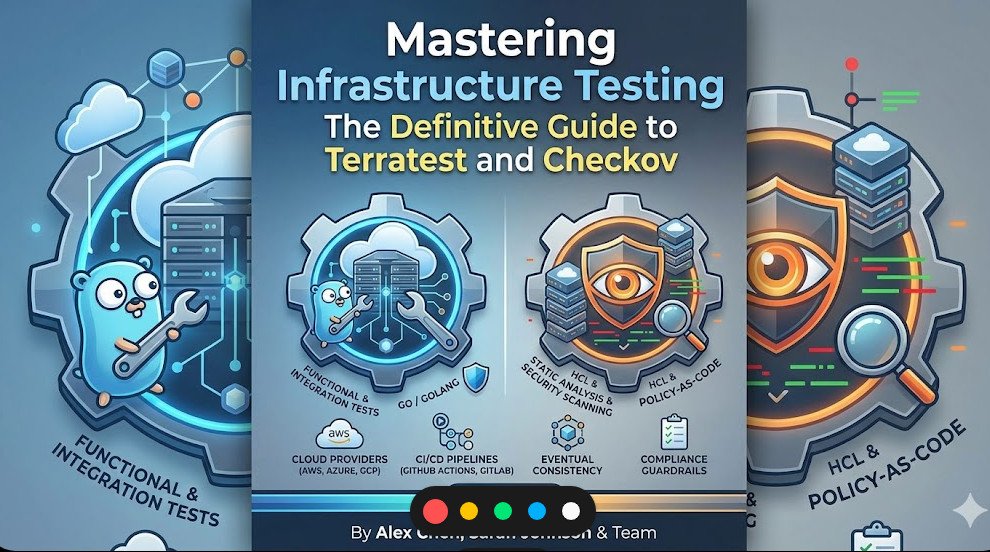
This comprehensive guide dives deep into the architecture and implementation of advanced Infrastructure Testing. We will move beyond simple linting, exploring how to combine static security analysis (using Checkov) with dynamic, end-to-end validation (using Terratest) to create a truly resilient CI/CD pipeline.
Phase 1: Understanding the Pillars of IaC Validation
Before diving into code, we must understand the spectrum of testing required for IaC. Infrastructure Testing is not a single tool; it is a methodology that combines several layers of validation.
1. Static Analysis (Security and Compliance)
Static analysis tools examine your IaC files (YAML, HCL, JSON) without deploying anything. They check for policy violations, security misconfigurations, and adherence to organizational standards.
Checkov is the industry standard here. It scans code against thousands of predefined security and compliance benchmarks (CIS, PCI-DSS, etc.). It acts as a guardrail, catching misconfigurations before they ever reach the cloud provider.
2. Dynamic/Integration Testing (Functionality and State)
Dynamic testing requires the actual deployment of resources into a controlled environment. This validates that the deployed infrastructure works as intended and that the state management is correct.
Terratest, written in Go, is the powerhouse for this. It allows you to write standard unit and integration tests that interact with the cloud provider’s API. You can assert that a resource exists, that it has the correct attributes, or that a service endpoint is reachable.
3. The Synergy: Combining Tools for Full Coverage
The true power lies in the combination. You use Checkov to ensure the plan is secure, and Terratest to ensure the result is functional and reliable. This multi-layered approach is the hallmark of mature DevOps practices.
💡 Pro Tip: Never rely solely on the cloud provider’s native validation. While services like AWS CloudFormation Guard are excellent, they often focus on specific service constraints. Using open-source tools like Checkov and Terratest provides a broader, customizable, and often more immediate feedback loop into your development workflow.
Phase 2: Practical Implementation Workflow
We will simulate a common scenario: deploying a critical, publicly accessible resource (like an S3 bucket) and ensuring it meets both security and functional requirements.
Step 1: Defining the Infrastructure (Terraform)
Assume we have a main.tf file defining an S3 bucket.
Before running terraform plan, we must run Checkov. This ensures that the bucket, for instance, is not accidentally configured to be public or lack encryption.
We execute Checkov against the directory containing our IaC files:
# Checkov scans the current directory for IaC files
checkov --directory . --framework terraform --skip-check CKV_AWS_133
If Checkov detects a violation (e.g., if we had removed acl = "private"), it will fail the build, providing immediate feedback on the security flaw.
Step 3: Dynamic Functional Validation with Terratest
After Checkov passes, we proceed to Terratest. We write a test that assumes the infrastructure has been provisioned and then verifies its properties.
Terratest tests are typically written in Go. The goal is to write a test function that:
Applies the Terraform configuration.
Waits for the resource to be fully provisioned.
Uses the AWS SDK (via Terratest) to query the resource.
Asserts that the queried properties match the expected state (e.g., IsPublicReadAccess = false).
Here is a conceptual snippet of the Go test file (test_s3.go):
package test

import (
    "testing"
    "github.com/gruntwork-io/terratest/modules/aws"
    "github.com/gruntwork-io/terratest/modules/terraform"
)

func TestS3BucketSecurity(t *testing.T) {
    // 1. Setup Terraform backend and apply
    terraformManager := terraform.WithWorkingDirectory("./terraform")
    terraformManager.Apply(t)

    // 2. Get the resource ID
    bucketName := terraform.Output(t, "bucket_name")

    // 3. Assert the security state using AWS SDK calls
    publicAccessBlock := aws.GetPublicAccessBlock(t, bucketName, "us-east-1")

    // Assert that the block is fully enabled
    if !publicAccessBlock.BlockPublicAcls {
        t.Errorf("FAIL: Public ACLs are not blocked for bucket %s", bucketName)
    }
}
This process guarantees that the infrastructure not only looks correct in the code but behaves correctly in the deployed cloud environment.
Phase 3: Advanced Best Practices and Troubleshooting
Achieving mature Infrastructure Testing requires integrating these tools into the core CI/CD pipeline and adopting advanced architectural patterns.
State Management and Testing Isolation
A critical failure point is state management. If your tests run concurrently or modify the state outside of the test scope, results will be unreliable.
Best Practice: Always use dedicated, ephemeral testing environments (e.g., a dev-test-run-uuid) for your tests. This ensures that the test run is isolated and does not interfere with staging or production state.
Policy-as-Code (PaC) Integration
For large enterprises, security policies must be centralized. Tools like Open Policy Agent (OPA), combined with Rego language, allow you to enforce policies that span multiple IaC frameworks (Terraform, Kubernetes, etc.).
Integrating OPA into your pipeline means that before Checkov runs, a policy check can run, providing an additional layer of governance. This moves governance from a reactive audit process to a proactive, preventative gate.
Handling Drift Detection
Infrastructure Testing must account for drift. Drift occurs when a resource is manually modified outside of the IaC pipeline (e.g., a sysadmin logs into the console and changes a tag).
Terratest can be adapted to run periodic drift checks. By comparing the desired state (from the IaC) against the actual state (from the API), you can flag discrepancies and enforce remediation via automated GitOps workflows.
💡 Pro Tip: When scaling your team, understanding the different roles required to maintain this complex pipeline is crucial. If you are looking to deepen your expertise in these specialized areas, explore the various career paths available at https://www.devopsroles.com/.
Troubleshooting Common Failures
Failure Type
Symptom
Root Cause
Solution
Checkov Failure
Build fails during the plan or validate phase with a policy violation.
Security misconfiguration or non-compliance with organizational guardrails.
Identify the CKV ID, update the HCL/YAML, or use an inline skip comment if the risk is accepted: #checkov:skip=CKV_AWS_111:Reason.
Terratest Failure
Test times out or returns 404 Not Found for a resource just created.
Eventual Consistency: The cloud provider’s API hasn’t propagated the resource globally yet.
Use retry.DoWithRetry or resource.Test features in Go rather than hard time.Sleep to minimize test duration while ensuring reliability.
General / CI Failure
“Works on my machine” but fails in GitHub Actions/GitLab CI.
Discrepancies in Provider Versions, missing Secrets, or IAM Role limitations.
Pin versions in versions.tf. Audit the CI Runner’s IAM policy. Ensure TF_VAR_ environment variables are mapped in the pipeline YAML.
The Future of IaC Testing: AI and Observability
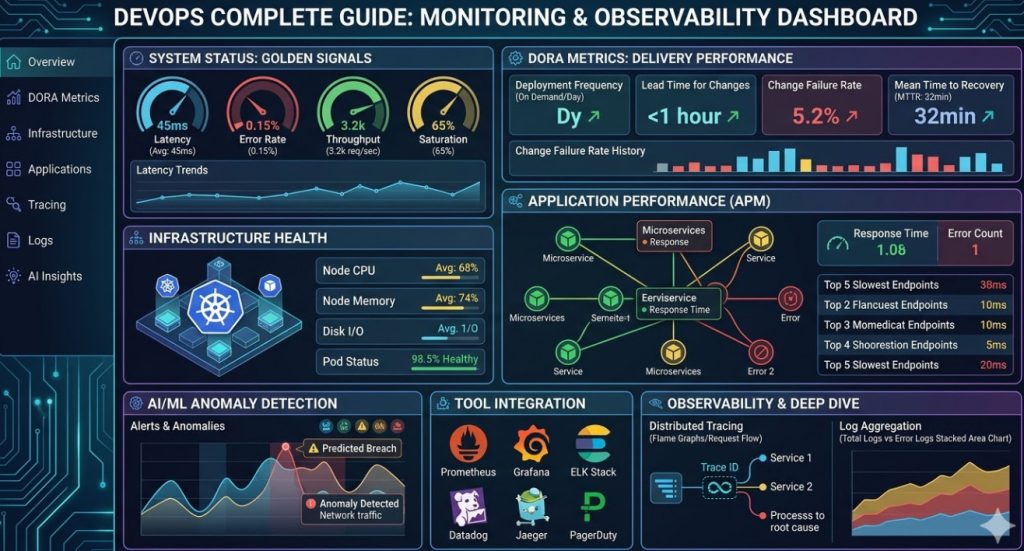
As AI/MLOps matures, Infrastructure Testing will increasingly incorporate predictive modeling. Instead of just checking if a resource is secure, advanced systems will predict if a resource will become insecure under certain load or usage patterns.
This requires integrating your testing results with advanced observability platforms. By feeding the output of Checkov and Terratest into a centralized data lake, you build a comprehensive risk profile for your entire infrastructure stack.
Mastering this combination of static security scanning, dynamic functional testing, and policy enforcement is what separates commodity DevOps teams from elite, resilient engineering organizations. By embedding these checks early and often, you achieve true “shift-left” security and reliability.
You cannot master DevOps without mastering Linux. It is the bedrock of everything we do.
Forget the GUI. If you want to survive, you need to live in the terminal.
Here are the commands I use daily to troubleshoot rogue processes and network bottlenecks.
htop: Interactive process viewer. Better than plain old top.
netstat -tulpn: Shows you exactly what ports are listening on your server.
df -h: Disk space usage. Run this before your logs fill up the partition.
grep -rnw ‘/path/’ -e ‘pattern’: Find specific text inside a massive directory of files.
chmod 755: Fix those annoying permission denied errors (but never use 777).
Docker: A Pillar of the DevOps Complete Guide
Containers revolutionized how we ship software. “It works on my machine” is officially a dead excuse.
If you aren’t packaging your apps in Docker, you are making life needlessly difficult for your entire team.
Let’s look at a bulletproof Dockerfile for a Node.js application.
# Use a slim base image to reduce attack surface
FROM node:18-alpine

# Set the working directory
WORKDIR /app

# Copy package files first for better layer caching
COPY package*.json ./

# Install dependencies cleanly
RUN npm ci --only=production

# Copy the rest of the application
COPY . .

# Expose the correct port
EXPOSE 3000

# Run as a non-root user for security
USER node

# Start the app
CMD ["node", "server.js"]
Notice the npm ci and the USER node directives? That is the difference between an amateur setup and a production-ready container.
For a deeper dive into container history and architecture, Wikipedia’s breakdown of OS-level virtualization is worth your time.
Kubernetes Survival Kit
Kubernetes won the orchestration war. It is complex, frustrating, and absolutely necessary for scale.
You don’t need to memorize every single API resource, but you do need to know how to debug a failing pod.
When things break (and they will break), these are the kubectl commands that will save your job.
kubectl get pods -A: See everything running across all namespaces.
kubectl describe pod [name]: The first place to look when a pod is stuck in CrashLoopBackOff.
kubectl logs [name] -f: Tail the logs of a container in real-time.
kubectl port-forward svc/[name] 8080:80: Access an internal service securely from your local browser.
Infrastructure as Code in This DevOps Complete Guide
Manual provisioning is dead. If it isn’t in Git, it doesn’t exist.
Terraform is the industry standard for IaC. It allows you to manage AWS, GCP, and Azure with the same workflow.
Here is a basic example of provisioning an AWS S3 bucket securely.
What is the best way to start learning DevOps? Start by mastering Linux basics, then move to Git, Docker, and a CI tool like GitHub Actions. Don’t learn everything at once.
Do I need to know how to code? Yes. You don’t need to be a senior software engineer, but writing Python, Go, or Bash scripts is mandatory.
Is Kubernetes overkill for small projects? Absolutely. Stick to Docker Compose or a managed PaaS until your traffic demands cluster orchestration.
How do I handle secrets in my pipelines? Never hardcode secrets. Use a tool like HashiCorp Vault, AWS Secrets Manager, or GitHub Secrets.
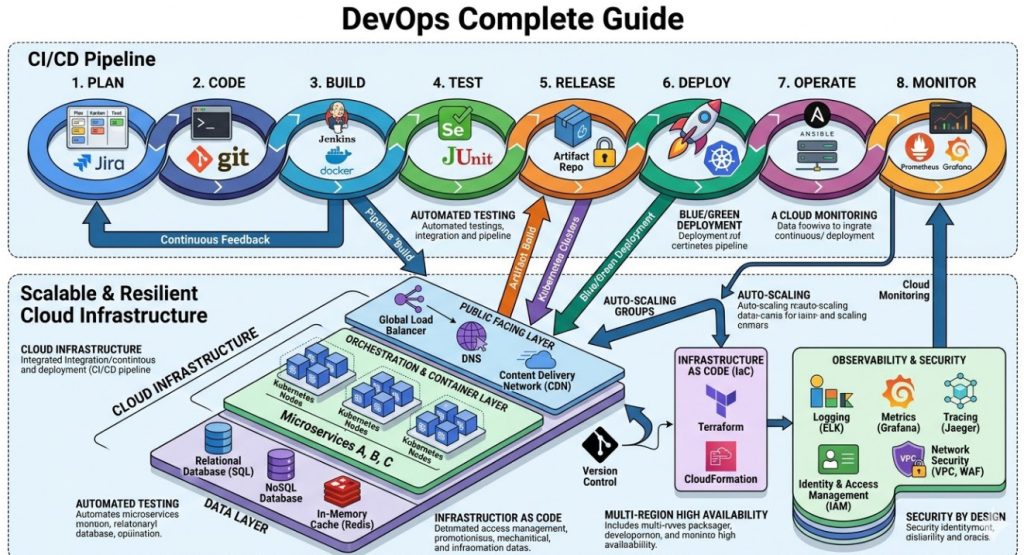
Conclusion: Mastering the modern infrastructure landscape takes time, patience, and a lot of broken code. Keep this DevOps Complete Guide handy, automate everything you can, and remember that simplifying your architecture is always better than adding unnecessary tools. Now go fix those failing builds. Thank you for reading the DevopsRoles page!
I’ve been in the server trenches for nearly 30 years. I remember the exact moment a major media client of mine lost $150,000 in just ten minutes.
The culprit? A catastrophic gated content bypass during a massive pay-per-view launch.
When the database buckled under the sudden surge of traffic, their caching layer panicked. It fell back to a default “fail-open” state.
Suddenly, premium, highly guarded video streams were being served to everyone on the internet. Completely for free.
Understanding the Mechanics of a Gated Content Bypass
So, why does this matter to you?
Because if you monetize digital assets, your authentication layer is your cash register. When traffic spikes, that cash register is the first thing to break.
A gated content bypass doesn’t usually happen because of elite hackers typing furiously in dark rooms. It happens because of architectural bottlenecks.
When 100,000 concurrent users try to log in simultaneously, your identity provider (IdP) chokes. Timeout errors cascade through your microservices.
To keep the site from completely crashing, misconfigured Content Delivery Networks (CDNs) often serve the requested asset anyway. They prioritize availability over authorization.
The True Financial Cost of Gated Content Bypass
It’s not just about the immediate lost sales.
When paying subscribers see non-paying users getting the exact same access during a major event, trust evaporates instantly.
I’ve seen chargeback rates skyrocket to 40% after a high-profile gated content bypass.
Your customer support team gets buried in angry tickets. Your engineering team loses a weekend putting out fires.
7 DevOps Strategies to Prevent Gated Content Bypass
You can’t just throw more RAM at a database and pray. You need strategic decoupling. Here are seven battle-tested strategies.
1. Move Authentication to the Edge
Never let unauthenticated traffic reach your origin servers during a spike.
By using Edge Computing (like Cloudflare Workers or AWS Lambda@Edge), you validate access tokens geographically close to the user.
If the JSON Web Token (JWT) is invalid or missing, the edge node drops the request immediately. Your origin server never even knows the user tried.
2. Implement Strict Rate Limiting
Brute force attacks and scrapers love high-traffic events. They hide in the noise of legitimate traffic.
Set up aggressive rate limiting on your login and authentication endpoints.
You want to block IP addresses that attempt hundreds of unauthorized requests per second before they trigger a gated content bypass.
3. Use “Stale-While-Revalidate” Carefully
Caching is your best friend, until it betrays you.
Many DevOps engineers misconfigure the stale-while-revalidate directive.
Make absolutely sure that this caching rule only applies to public assets, never to URLs containing premium media files.
4. Decouple the Auth Service from Delivery
If your main application database handles both user profiles and authentication, you are asking for trouble.
Split them up. Use an in-memory datastore like Redis strictly for fast token validation.
If you aren’t familiar with its performance limits, read the official Redis documentation. It can handle millions of operations per second.
5. Establish Circuit Breakers
When the authentication service gets slow, a circuit breaker stops sending it requests.
Instead of locking up the whole system waiting for a timeout, the circuit breaker instantly returns a “Service Unavailable” error.
This prevents a system-wide failure that might otherwise result in a fail-open gated content bypass.
6. Pre-Generate Signed URLs
Don’t rely on cookies alone for video streams or large file downloads.
Generate short-lived, cryptographically signed URLs for premium assets. If the URL expires in 60 seconds, it cannot be shared on Reddit.
Even if the CDN is misconfigured, the cloud storage bucket will reject the expired signature.
7. Real-Time Log Monitoring
If a bypass is happening, you need to know in seconds, not hours.
Set up alerting in Datadog or an ELK stack. Watch for a sudden spike in HTTP 200 (Success) responses on protected paths without corresponding Auth logs.
That discrepancy is the smoke. The fire is your revenue burning.
Code Example: Securing the Edge Against Gated Content Bypass
Let’s look at how you stop unauthorized access at the CDN level. This prevents the traffic from ever hitting your fragile backend.
Here is a simplified example of a Cloudflare Worker checking for a valid JWT before serving premium content.
// Edge Authentication Script to prevent gated content bypass
export default {
  async fetch(request, env) {
    const url = new URL(request.url);

    // Only protect premium routes
    if (!url.pathname.startsWith('/premium/')) {
      return fetch(request);
    }

    const authHeader = request.headers.get('Authorization');

    // Fail closed: No header, no access.
    if (!authHeader || !authHeader.startsWith('Bearer ')) {
      return new Response('Unauthorized', { status: 401 });
    }

    const token = authHeader.split(' ')[1];
    const isValid = await verifyJWT(token, env.SECRET_KEY);

    // Fail closed: Invalid token, no access.
    if (!isValid) {
      return new Response('Forbidden', { status: 403 });
    }

    // Pass the request to the origin only if valid
    return fetch(request);
  }
};

async function verifyJWT(token, secret) {
  // Production implementation requires robust crypto validation
  // This is a placeholder for standard JWT decoding logic
  return token === "valid-test-token";
}
Notice the logic here. It defaults to failing closed.
If the token is missing, it fails. If the token is bad, it fails. The origin server is completely shielded from this traffic.
Why Load Testing is Non-Negotiable
You can read all the blogs in the world, but until you simulate a traffic spike, you are flying blind.
A gated content bypass usually rears its head when server CPU utilization crosses 90%.
I highly recommend using tools like K6. You can find their open-source repository on GitHub.
Saturate your authentication endpoints. Watch how your system degrades. Does it show an error, or does it leak data?
Fix the leaks in staging before your users find them in production.
FAQ Section
What is a gated content bypass? It is a vulnerability where users gain access to premium, paywalled, or restricted content without proper authentication, often caused by server overload or caching errors.
Why does high traffic cause a gated content bypass? During traffic spikes, authentication servers can crash. If CDNs or proxies are configured to “fail-open” to keep the site online, they may serve restricted content to unauthorized users.
How do signed URLs help? Signed URLs append a cryptographic signature and an expiration timestamp to a media link. Once the time expires, the cloud provider blocks access, preventing users from sharing the link publicly.
Can a WAF stop a gated content bypass? A Web Application Firewall (WAF) can stop brute-force attacks and malicious scrapers, but it cannot fix a fundamental architectural flaw where your backend fails to validate active sessions.
Conclusion: Preparing for the Worst
High-traffic events should be a time for celebration, not panic attacks in the server room.
By moving authentication to the edge, decoupling your databases, and aggressively load-testing, you can sleep soundly during your next big launch.
Don’t let a gated content bypass ruin your biggest day of the year. Audit your authentication architecture today.
Would you like me to analyze a specific piece of your infrastructure to see where a bypass might occur? Thank you for reading the DevopsRoles page!
Let me tell you about a catastrophic Friday release from back in 2018.
My team pushed a massive update for a global streaming client, all green lights in staging. We popped the champagne.
Ten minutes later, the monitoring board lit up red. Zero traffic from the entire European Union.
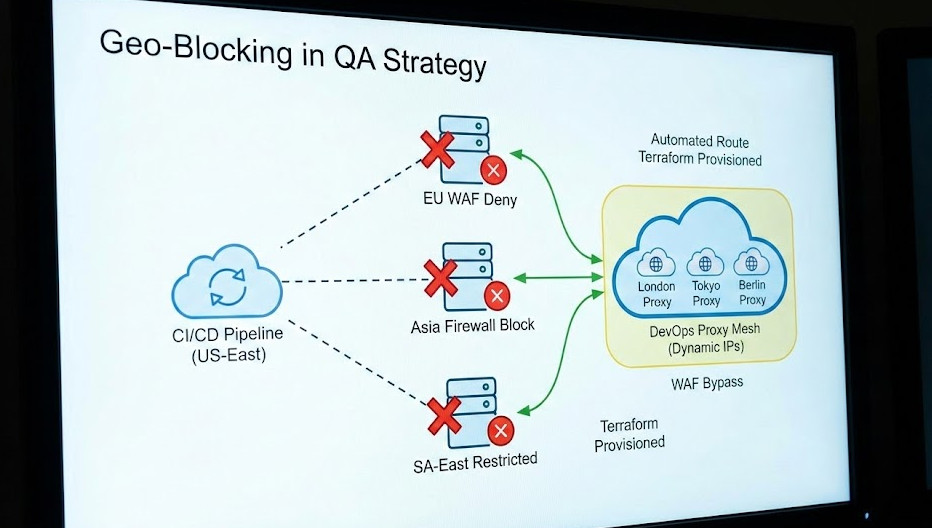
Why? Because our firewalls dropped international requests, and our test suites ran exclusively from a server in Ohio. Tackling Geo-Blocking in QA before production is not an option; it is a survival requirement.
If you have ever tried to test location-specific features, you know the pain. You hit an invisible wall of IP bans and 403 Forbidden errors.
It gets worse when the infrastructure team leaves you completely in the dark. No documentation, no architecture maps, just a vague “figure it out” from upper management.
The Brutal Reality of Geo-Blocking in QA
So, what exactly are we fighting against here?
Modern Web Application Firewalls (WAFs) are ruthless. They use massive databases to cross-reference your testing server’s IP against known geographical locations.
If your CI/CD pipeline lives in AWS US-East, but you are testing a GDPR-compliance banner meant for Germany, the WAF shuts you down immediately.
Testing Geo-Blocking in QA usually leads engineers to reach for the easiest, worst possible tool: a consumer VPN.
I cannot stress this enough: desktop VPNs are useless for automated deployment pipelines.
They drop connections, require manual desktop client interactions, and completely ruin your headless browser tests.
Why Traditional VPNs Fail the DevOps Test
You think your standard $5/month VPN account is going to cut it for a pipeline running 500 tests a minute? Think again.
First, VPN IP addresses are public knowledge. Enterprise firewalls subscribe to lists of known VPN exits and block them instantly.
Second, how do you automate a GUI-based VPN client inside a headless Docker container running on a Linux CI runner?
You don’t. It is a fragile, flaky mess that leads to false negatives in your test results.
We need a programmable, infrastructure-as-code solution. We need a DevOps approach.
Notice that we also spoof the HTML5 Geolocation API coordinates.
Many modern web apps check both the IP address and the browser’s internal GPS coordinates. You must spoof both.
If the IP says London, but the browser API says Ohio, the app will flag you as suspicious.
Need more context on browser permissions? Check the MDN Web Docs for the exact specifications.
Handling the “Without Documentation” Nightmare
Let’s address the elephant in the room. What happens when your own security team refuses to tell you how the WAF is configured?
This is the “without documentation” part of the job that separates the veterans from the rookies.
You have to treat your own application like a black box and reverse-engineer the defenses.
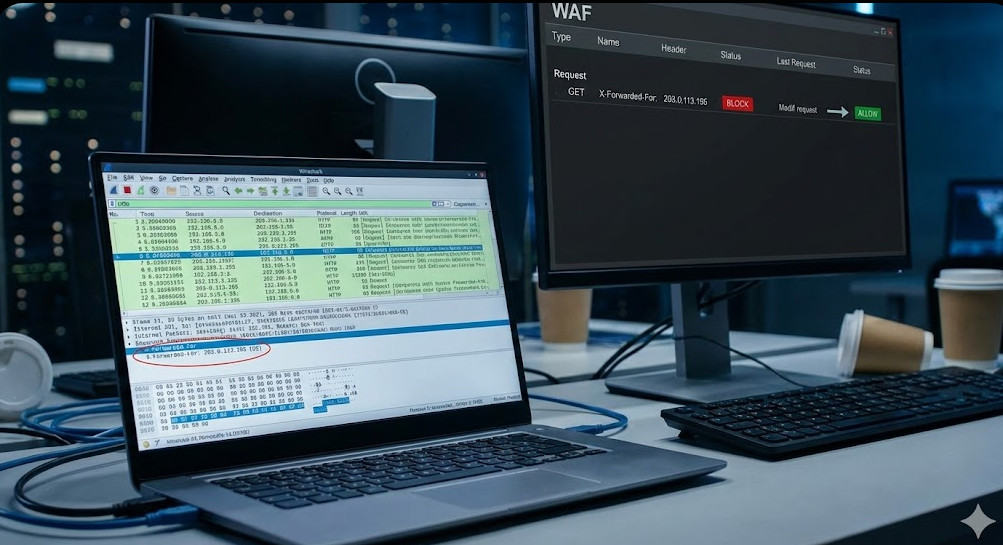
When dealing with Geo-Blocking in QA blind, I start by analyzing HTTP headers.
Header Injection and Packet Sniffing
Sometimes, firewalls aren’t doing deep packet inspection on the IP level.
Instead, they might rely on headers passed through a CDN, like Cloudflare or AWS CloudFront.
You can sometimes bypass the geographic block entirely by injecting specific headers into your test requests.
Try injecting X-Forwarded-For with an IP address from your target region.
Or, if you are behind Cloudflare, look into spoofing the CF-IPCountry header in your lower environments.
This is a dirty trick, but it saves thousands of dollars in infrastructure costs if it works.
Of course, this requires the application code to trust incoming headers, which is a massive security flaw in production.
But in a staging environment? It is a perfectly valid workaround to get your tests passing.
FAQ Section
Why is Geo-Blocking in QA necessary?
Because modern applications display different content, currencies, and compliance banners based on the user’s location. If you don’t test it, your foreign users will encounter fatal bugs.
Can I just use a free proxy list?
Absolutely not. Free proxies are notoriously slow, incredibly insecure, and almost universally blacklisted by enterprise WAFs. You will waste days debugging timeouts.
How much does a DevOps proxy mesh cost?
Pennies. By spinning up a cloud instance strictly for the duration of the 5-minute test run and destroying it immediately, you only pay for fractions of an hour.
What if my WAF blocks cloud provider IPs?
This happens with ultra-strict setups. In this case, you must route your automated tests through residential proxy networks (like Bright Data or Oxylabs), which route traffic through actual home ISPs.
Conclusion: Stop letting undocumented network configurations break your CI/CD pipelines.
By treating your test traffic exactly like your infrastructure—using code, automation, and targeted proxies-you take back control.
Conquering Geo-Blocking in QA isn’t just about making a test pass; it’s about guaranteeing a flawless experience for your global user base. Thank you for reading the DevopsRoles page!
Introduction: Let’s be honest: testing emails in a distributed system is usually an afterthought. But effective Email Flow Validation is the difference between a seamless user onboarding experience and a support ticket nightmare.
I remember the first time I deployed a microservice that was supposed to send “password reset” tokens. It worked perfectly on my local machine.
In production? Crickets. The queue was blocked, and the SMTP relay rejected the credentials.
Why Traditional Email Flow Validation Fails
In the monolith days, testing emails was easy. You had one application, one database, and likely one mail server connection.
Today, with microservices, the complexity explodes.
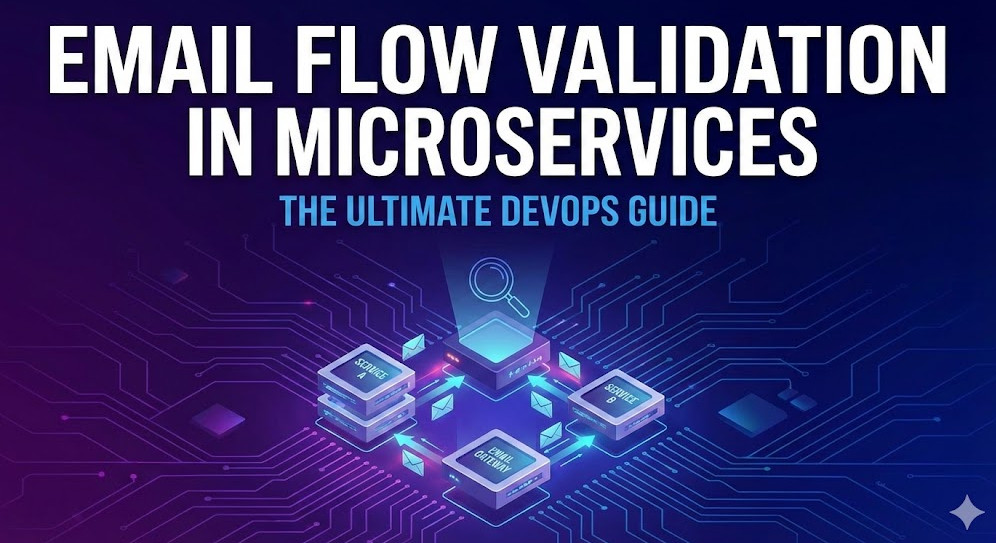
Your “Welcome Email” might involve an Auth Service, a User Service, a Notification Service, and a Message Queue (like RabbitMQ or Kafka) sitting in between.
Standard unit tests mock these interactions. They say, “If I call the send function, assume it returns true.”
But here is the problem:
Mocks don’t catch network latency issues.
Mocks don’t validate that the HTML template actually renders correctly.
Mocks don’t verify if the email subject line was dynamically populated.
True Email Flow Validation requires a real integration test. You need to see the email land in an inbox, parse it, and verify the contents.
The DevOps Approach to Email Testing
To solve this, we need to treat email as a traceable infrastructure component.
We shouldn’t just “fire and forget.” We need a feedback loop. This is where DevOps principles shine.
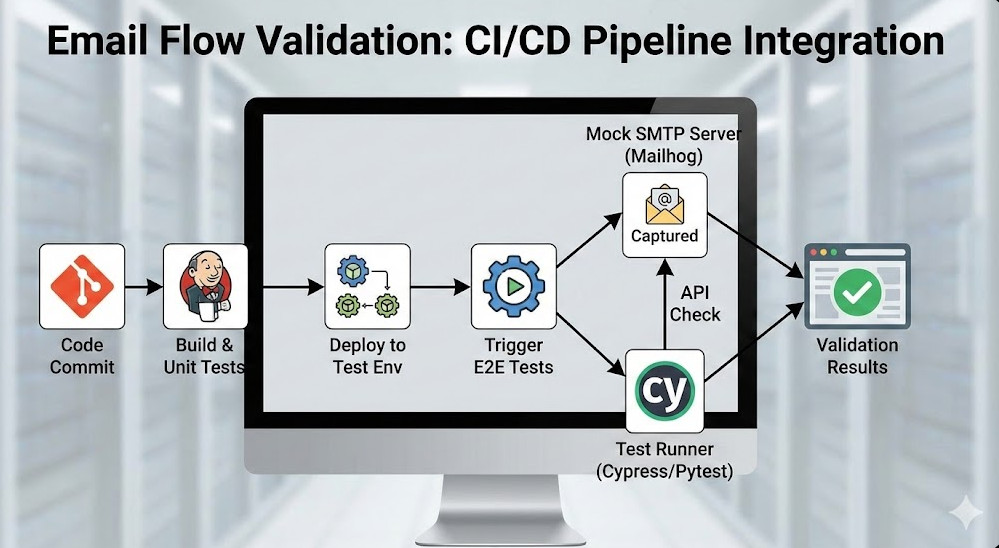
By integrating tools like Mailhog or Mailtrap into your CI/CD pipeline, you can create ephemeral SMTP servers. These catch outgoing emails during test runs, allowing your test suite to query them via API.
This transforms Email Flow Validation from a manual check into an automated gatekeeper.
Architecture Overview
Here is how a robust validation flow looks in a DevOps environment:
Trigger: The test suite triggers an action (e.g., User Registration).
Process: The microservice processes the request and publishes an event.
Consumption: The Notification Service consumes the event and sends an SMTP request.
Capture: A containerized SMTP mock (like Mailhog) captures the email.
Validation: The test suite queries the SMTP mock API to verify the email arrived and contains the correct link.
Step-by-Step Implementation
Let’s get our hands dirty. We will set up a local environment that mimics this flow.
We will use Docker Compose to spin up our services alongside Mailhog for capturing emails.
1. Setting up the Infrastructure
First, define your services. We need our application and the mail catcher.
version: '3.8'
services:
  app:
    build: .
    environment:
      - SMTP_HOST=mailhog
      - SMTP_PORT=1025
    depends_on:
      - mailhog

  mailhog:
    image: mailhog/mailhog
    ports:
      - "1025:1025" # SMTP port
      - "8025:8025" # Web UI / API
This configuration ensures that when your app tries to send an email, it goes straight to Mailhog. No real users get spammed.
2. Writing the Validation Test
Now, let’s look at the code. This is where the magic of Email Flow Validation happens.
We need a script that triggers the email and then asks Mailhog, “Did you get it?”
Here is a Python example using `pytest` and `requests`:
import requests
import time

def test_registration_email_flow():
    # 1. Trigger the registration
    response = requests.post("http://localhost:3000/register", json={
        "email": "test@example.com",
        "password": "securepassword123"
    })
    assert response.status_code == 201

    # 2. Wait for async processing (crucial in microservices)
    time.sleep(2)

    # 3. Query Mailhog API for Email Flow Validation
    mailhog_url = "http://localhost:8025/api/v2/messages"
    messages = requests.get(mailhog_url).json()

    # 4. Filter for our specific email
    email_found = False
    for msg in messages['items']:
        if "test@example.com" in msg['Content']['Headers']['To'][0]:
            email_found = True
            body = msg['Content']['Body']
            assert "Welcome" in body
            assert "Verify your account" in body
            break

    assert email_found, "Email was not captured by Mailhog"
This script is simple but powerful. It validates the entire chain, not just the function call.
In microservices, things don’t happen instantly. The “eventual consistency” model means your email might send 500ms after your test checks for it.
This is the most common cause of flaky tests in Email Flow Validation.
Do not use static `sleep` timers like I did in the simple example above. In a real CI environment, 2 seconds might not be enough.
Instead, use a polling mechanism (retry logic) that checks the mailbox every 500ms for up to 10 seconds.
Advanced Polling Logic
def wait_for_email(recipient, timeout=10):
    start_time = time.time()
    while time.time() - start_time < timeout:
        messages = requests.get("http://localhost:8025/api/v2/messages").json()
        for msg in messages['items']:
            if recipient in msg['Content']['Headers']['To'][0]:
                return msg
        time.sleep(0.5)
    raise Exception(f"Timeout waiting for email to {recipient}")
Tools of the Trade
While we used Mailhog above, several tools can elevate your Email Flow Validation strategy.
Mailhog: Great for local development. Simple, lightweight, Docker-friendly.
Mailtrap: Excellent for staging environments. It offers persistent inboxes and team features.
AWS SES Simulator: If you are heavy on AWS, you can use their simulator, though it is harder to query programmatically.
Choosing the right tool depends on your specific pipeline needs.
Common Pitfalls to Avoid
I have seen many teams fail at this. Here is what you need to watch out for.
1. Ignoring Rate Limits
If you run parallel tests, you might flood your mock server. Ensure your Email Flow Validation infrastructure can handle the load.
2. Hardcoding Content Checks
Marketing teams change email copy all the time. If your test fails because “Welcome!” changed to “Hi there!”, your tests are too brittle.
Validate the structure and critical data (like tokens or links), not the fluff.
3. Forgetting to Clean Up
After a test run, clear the Mailhog inbox. If you don’t, your next test run might validate an old email from a previous session.
# Example API call to delete all messages in Mailhog
curl -X DELETE http://localhost:8025/api/v1/messages
Why This Matters for SEO and User Trust
You might wonder, “Why does a journalist care about email testing?”
Because broken emails break trust. If a user can’t reset their password, they churn. If they churn, your traffic drops.
Reliable Email Flow Validation ensures that your transactional emails—the lifeblood of user retention—are always functioning.
For further reading on the original inspiration for this workflow, check out the source at Dev.to.
FAQ Section
Can I use Gmail for testing? Technically yes, but you will hit rate limits and spam filters immediately. Use a mock server.
How do I test email links? Parse the email body (HTML or Text), extract the href using Regex or a DOM parser, and have your test runner visit that URL.
Is this relevant for monoliths? Absolutely. While Email Flow Validation is critical for microservices, monoliths benefit from the same rigor.
Conclusion: Stop guessing if your emails work. By implementing a robust Email Flow Validation strategy within your DevOps pipeline, you gain confidence, reduce bugs, and sleep better at night. Start small, dockerize your mail server, and automate the loop. Thank you for reading the DevopsRoles page!
In the fast-paced world of modern web development, building robust and scalable applications with React demands more than just proficient coding. It requires a development ecosystem that is consistent, reproducible, and efficient across all team members and stages of the software lifecycle. This is precisely where the power of React Isolated Development Environments DevOps comes into play. The perennial challenge of “it works on my machine” has plagued developers for decades, leading to wasted time, frustrating debugging sessions, and delayed project timelines. By embracing a DevOps approach to isolating React development environments, teams can unlock unparalleled efficiency, streamline collaboration, and ensure seamless transitions from development to production.
This deep-dive guide will explore the critical need for isolated development environments in React projects, delve into the core principles of a DevOps methodology, and highlight the open-source tools that make this vision a reality. We’ll cover practical implementation strategies, advanced best practices, and the transformative impact this approach has on developer productivity and overall project success. Prepare to elevate your React development workflow to new heights of consistency and reliability.
The Imperative for Isolated Development Environments in React
The complexity of modern React applications, often involving numerous dependencies, specific Node.js versions, and intricate build processes, makes environment consistency a non-negotiable requirement. Without proper isolation, developers frequently encounter discrepancies that hinder progress and introduce instability.
The “Works on My Machine” Syndrome
This infamous phrase is a symptom of inconsistent development environments. Differences in operating systems, Node.js versions, global package installations, or even environment variables can cause code that functions perfectly on one developer’s machine to fail inexplicably on another’s. This leads to significant time loss as developers struggle to replicate issues, often resorting to trial-and-error debugging rather than focused feature development.
Ensuring Consistency and Reproducibility
An isolated environment guarantees that every developer, tester, and CI/CD pipeline operates on an identical setup. This means the exact same Node.js version, npm/Yarn packages, and system dependencies are present, eliminating environmental variables as a source of bugs. Reproducibility is key for reliable testing, accurate bug reporting, and confident deployments, ensuring that what works in development will work in staging and production.
Accelerating Developer Onboarding
Bringing new team members up to speed on a complex React project can be a daunting task, often involving lengthy setup guides and troubleshooting sessions. With an isolated environment, onboarding becomes a matter of cloning a repository and running a single command. The entire development stack is pre-configured and ready to go, drastically reducing the time to productivity for new hires and contractors.
Mitigating Dependency Conflicts
React projects rely heavily on a vast ecosystem of npm packages. Managing these dependencies, especially across multiple projects or different versions, can lead to conflicts. Isolated environments, particularly those leveraging containerization, encapsulate these dependencies within their own sandboxes, preventing conflicts with other projects on a developer’s local machine or with global installations.
Core Principles of a DevOps Approach to Environment Isolation
Adopting a DevOps mindset is crucial for successfully implementing and maintaining isolated development environments. It emphasizes automation, collaboration, and continuous improvement across the entire software delivery pipeline.
Infrastructure as Code (IaC)
IaC is the cornerstone of a DevOps approach to environment isolation. Instead of manually configuring environments, IaC defines infrastructure (like servers, networks, and in our case, development environments) using code. For React development, this means defining your Node.js version, dependencies, and application setup in configuration files (e.g., Dockerfiles, Docker Compose files) that are version-controlled alongside your application code. This ensures consistency, enables easy replication, and allows for peer review of environment configurations.
Containerization (Docker)
Containers are the primary technology enabling true environment isolation. Docker, the leading containerization platform, allows developers to package an application and all its dependencies into a single, portable unit. This container can then run consistently on any machine that has Docker installed, regardless of the underlying operating system. For React, a Docker container can encapsulate the Node.js runtime, npm/Yarn, project dependencies, and even the application code itself, providing a pristine, isolated environment.
Automation and Orchestration
DevOps thrives on automation. Setting up and tearing down isolated environments should be an automated process, not a manual one. Tools like Docker Compose automate the orchestration of multiple containers (e.g., a React frontend container, a backend API container, a database container) that together form a complete development stack. This automation extends to CI/CD pipelines, where environments can be spun up for testing and then discarded, ensuring clean and repeatable builds.
Version Control for Environments
Just as application code is version-controlled, so too should environment definitions be. Storing Dockerfiles, Docker Compose files, and other configuration scripts in a Git repository alongside your React project ensures that changes to the environment are tracked, reviewed, and can be rolled back if necessary. This practice reinforces consistency and provides a clear history of environment evolution.
Key Open Source Tools for React Environment Isolation
Leveraging the right open-source tools is fundamental to building effective React Isolated Development Environments DevOps solutions. These tools provide the backbone for containerization, dependency management, and workflow automation.
Docker and Docker Compose: The Foundation
Docker is indispensable for creating isolated environments. A Dockerfile defines the steps to build a Docker image, specifying the base operating system, installing Node.js, copying application files, and setting up dependencies. Docker Compose then allows you to define and run multi-container Docker applications. For a React project, this might involve a container for your React frontend, another for a Node.js or Python backend API, and perhaps a third for a database like MongoDB or PostgreSQL. Docker Compose simplifies the management of these interconnected services, making it easy to spin up and tear down the entire development stack with a single command.
Node.js and npm/Yarn: React’s Core
React applications are built on Node.js, using npm or Yarn for package management. Within an isolated environment, a specific version of Node.js is installed inside the container, ensuring that all developers are using the exact same runtime. This eliminates issues arising from different Node.js versions or globally installed packages conflicting with project-specific requirements. The package.json and package-lock.json (or yarn.lock) files are crucial here, ensuring deterministic dependency installations within the container.
Version Managers (nvm, Volta)
While containers encapsulate Node.js versions, local Node.js version managers like nvm (Node Version Manager) or Volta still have a role. They can be used to manage the Node.js version *on the host machine* for tasks that might run outside a container, or for developing projects that haven’t yet adopted containerization. However, for truly isolated React development, the Node.js version specified within the Dockerfile takes precedence.
Code Editors and Extensions (VS Code, ESLint, Prettier)
Modern code editors like VS Code offer powerful integrations with Docker. Features like “Remote – Containers” allow developers to open a project folder that is running inside a Docker container. This means that all editor extensions (e.g., ESLint, Prettier, TypeScript support) run within the context of the container’s environment, ensuring that linting rules, formatting, and language services are consistent with the project’s defined dependencies and configurations. This seamless integration enhances the developer experience significantly.
CI/CD Tools (Jenkins, GitLab CI, GitHub Actions)
While not directly used for local environment isolation, CI/CD tools are integral to the DevOps approach. They leverage the same container images and Docker Compose configurations used in development to build, test, and deploy React applications. This consistency across environments minimizes deployment risks and ensures that the application behaves identically in all stages of the pipeline.
Practical Implementation: Building Your Isolated React Dev Environment
Setting up a React Isolated Development Environments DevOps workflow involves a few key steps, primarily centered around Docker and Docker Compose. Let’s outline a conceptual approach.
Setting Up Your Dockerfile for React
A basic Dockerfile for a React application typically starts with a Node.js base image. It then sets a working directory, copies the package.json and package-lock.json files, installs dependencies, copies the rest of the application code, and finally defines the command to start the React development server. For example:
# Use an official Node.js runtime as a parent image
FROM node:18-alpine

# Set the working directory
WORKDIR /app

# Copy package.json and package-lock.json
COPY package*.json ./

# Install app dependencies
RUN npm install

# Copy app source code
COPY . .

# Expose the port the app runs on
EXPOSE 3000

# Define the command to run the app
CMD ["npm", "start"]
This Dockerfile ensures that the environment is consistent, regardless of the host machine’s configuration.
Orchestrating with Docker Compose
For a more complex setup, such as a React frontend interacting with a Node.js backend API and a database, Docker Compose is essential. A docker-compose.yml file would define each service, their dependencies, exposed ports, and shared volumes. For instance:
This setup allows developers to bring up the entire application stack with a single docker-compose up command, providing a fully functional and isolated development environment.
Local Development Workflow within Containers
The beauty of this approach is that the local development workflow remains largely unchanged. Developers write code in their preferred editor on their host machine. Thanks to volume mounting (as shown in the Docker Compose example), changes made to the code on the host are immediately reflected inside the container, triggering hot module replacement (HMR) for React applications. This provides a seamless development experience while benefiting from the isolated environment.
Integrating Hot Module Replacement (HMR)
For React development, Hot Module Replacement (HMR) is crucial for a productive workflow. When running React applications inside Docker containers, ensuring HMR works correctly sometimes requires specific configurations. Often, setting environment variables like CHOKIDAR_USEPOLLING=true within the frontend service in your docker-compose.yml can resolve issues related to file change detection, especially on macOS or Windows with Docker Desktop, where file system events might not propagate instantly into the container.
Advanced Strategies and Best Practices
To maximize the benefits of React Isolated Development Environments DevOps, consider these advanced strategies and best practices.
Environment Variables and Configuration Management
Sensitive information and environment-specific configurations (e.g., API keys, database URLs) should be managed using environment variables. Docker Compose allows you to define these directly in the .env file or within the docker-compose.yml. For production, consider dedicated secret management solutions like Docker Secrets or Kubernetes Secrets, or cloud-native services like AWS Secrets Manager or Azure Key Vault, to securely inject these values into your containers.
Volume Mounting for Persistent Data and Code Sync
Volume mounting is critical for two main reasons: persisting data and syncing code. For databases, named volumes (like mongo-data in the example) ensure that data persists even if the container is removed. For code, bind mounts (e.g., ./frontend:/app) synchronize changes between your host machine’s file system and the container’s file system, enabling real-time development and HMR. It’s also good practice to mount /app/node_modules as a separate volume to prevent host-specific node_modules from interfering and to speed up container rebuilds.
Optimizing Container Images for Development
While production images should be as small as possible, development images can prioritize speed and convenience. This might mean including development tools, debuggers, or even multiple Node.js versions if necessary for specific tasks. However, always strive for a balance to avoid excessively large images that slow down build and pull times. Utilize multi-stage builds to create separate, optimized images for development and production.
Security Considerations in Isolated Environments
Even in isolated development environments, security is paramount. Regularly update base images to patch vulnerabilities. Avoid running containers as the root user; instead, create a non-root user within your Dockerfile. Be cautious about exposing unnecessary ports or mounting sensitive host directories into containers. Implement proper access controls for your version control system and CI/CD pipelines.
Scaling with Kubernetes (Brief Mention for Future)
While Docker and Docker Compose are excellent for local development and smaller deployments, for large-scale React applications and complex microservices architectures, Kubernetes becomes the orchestrator of choice. The principles of containerization and IaC learned with Docker translate directly to Kubernetes, allowing for seamless scaling, self-healing, and advanced deployment strategies in production environments.
The Transformative Impact on React Development and Team Collaboration
Embracing React Isolated Development Environments DevOps is not merely a technical adjustment; it’s a paradigm shift that profoundly impacts developer productivity, team dynamics, and overall project quality.
Enhanced Productivity and Focus
Developers spend less time troubleshooting environment-related issues and more time writing code and building features. The confidence that their local environment mirrors production allows them to focus on logic and user experience, leading to faster development cycles and higher-quality output.
Streamlined Code Reviews and Testing
With consistent environments, code reviews become more efficient as reviewers can easily spin up the exact environment used by the author. Testing becomes more reliable, as automated tests run in environments identical to development, reducing the likelihood of environment-specific failures and false positives.
Reduced Deployment Risks
The ultimate goal of DevOps is reliable deployments. By using the same container images and configurations across development, testing, and production, the risk of unexpected issues arising during deployment is significantly reduced. This consistency builds confidence in the deployment process and enables more frequent, smaller releases.
Fostering a Culture of Consistency
This approach cultivates a culture where consistency, automation, and collaboration are valued. It encourages developers to think about the entire software lifecycle, from local development to production deployment, fostering a more holistic and responsible approach to software engineering.
Key Takeaways
Eliminate “Works on My Machine” Issues: Isolated environments ensure consistency across all development stages.
Accelerate Onboarding: New developers can set up their environment quickly and efficiently.
Leverage DevOps Principles: Infrastructure as Code, containerization, and automation are central.
Utilize Open Source Tools: Docker and Docker Compose are foundational for React environment isolation.
Ensure Reproducibility: Consistent environments lead to reliable testing and deployments.
Enhance Productivity: Developers focus on coding, not environment setup and debugging.
Streamline Collaboration: Shared, consistent environments improve code reviews and team synergy.
FAQ Section
Q1: Is isolating React development environments overkill for small projects?
A1: While the initial setup might seem like an extra step, the benefits of isolated environments, even for small React projects, quickly outweigh the overhead. They prevent future headaches related to dependency conflicts, simplify onboarding, and ensure consistency as the project grows or new team members join. It establishes good practices from the start, making scaling easier.
Q2: How do isolated environments handle different Node.js versions for various projects?
A2: This is one of the primary advantages. Each isolated environment (typically a Docker container) specifies its own Node.js version within its Dockerfile. This means you can seamlessly switch between different React projects, each requiring a distinct Node.js version, without any conflicts or the need to manually manage versions on your host machine using tools like nvm or Volta. Each project’s environment is self-contained.
Q3: How do these isolated environments integrate with Continuous Integration/Continuous Deployment (CI/CD) pipelines?
A3: The integration is seamless and highly beneficial. The same Dockerfiles and Docker Compose configurations used for local development can be directly utilized in CI/CD pipelines. This ensures that the build and test environments in CI/CD are identical to the development environments, minimizing discrepancies and increasing confidence in automated tests and deployments. Containers provide a portable, consistent execution environment for every stage of the pipeline.
Conclusion
The journey to mastering React Isolated Development Environments DevOps is a strategic investment that pays dividends in developer productivity, project reliability, and team cohesion. By embracing containerization with Docker, defining environments as code, and automating the setup process, development teams can effectively banish the “works on my machine” syndrome and cultivate a truly consistent, reproducible, and efficient workflow. This approach not only streamlines the development of complex React applications but also fosters a culture of technical excellence and collaboration. As React continues to evolve, adopting these DevOps principles for environment isolation will remain a cornerstone of successful and sustainable web development. Start implementing these strategies today and transform your React development experience. Thank you for reading the DevopsRoles page!
In the fast-paced world of software development, maintaining robust and reliable testing environments is paramount. However, for organizations grappling with legacy JavaScript systems, effective test account management often presents a significant bottleneck. These older codebases, often characterized by monolithic architectures and manual processes, can turn what should be a straightforward task into a time-consuming, error-prone ordeal. This deep dive explores how modern DevOps strategies for legacy JavaScript test account management can revolutionize this critical area, bringing much-needed efficiency, security, and scalability to your development lifecycle.
The challenge isn’t merely about creating user accounts; it’s about ensuring data consistency, managing permissions, securing sensitive information, and doing so repeatedly across multiple environments without introducing delays or vulnerabilities. Without a strategic approach, teams face slow feedback loops, inconsistent test results, and increased operational overhead. By embracing DevOps principles, we can transform this pain point into a streamlined, automated process, empowering development and QA teams to deliver high-quality software faster and more reliably.
The Unique Hurdles of Legacy JavaScript Test Account Management
Legacy JavaScript systems, while foundational to many businesses, often come with inherent complexities that complicate modern development practices, especially around testing. Understanding these specific hurdles is the first step toward implementing effective DevOps strategies for legacy JavaScript test account management.
Manual Provisioning & Configuration Drifts
Many legacy systems rely on manual processes for creating and configuring test accounts. This involves developers or QA engineers manually entering data, configuring settings, or running ad-hoc scripts. This approach is inherently slow, prone to human error, and inconsistent. Over time, test environments diverge, leading to ‘configuration drift’ where no two environments are truly identical. This makes reproducing bugs difficult and invalidates test results, undermining the entire testing effort.
Data Inconsistency & Security Vulnerabilities
Test accounts often require specific data sets to validate various functionalities. In legacy systems, this data might be manually generated, copied from production, or poorly anonymized. This leads to inconsistent test data across environments, making tests unreliable. Furthermore, using real or poorly anonymized production data in non-production environments poses significant security and compliance risks, especially with regulations like GDPR or CCPA. Managing access to these accounts and their associated data manually is a constant security headache.
Slow Feedback Loops & Scalability Bottlenecks
The time taken to provision test accounts directly impacts the speed of testing. If it takes hours or days to set up a new test environment with the necessary accounts, the feedback loop for developers slows down dramatically. This impedes agile development and continuous integration. Moreover, scaling testing efforts for larger projects or parallel testing becomes a significant bottleneck, as manual processes cannot keep pace with demand.
Technical Debt & Knowledge Silos
Legacy systems often accumulate technical debt, including outdated documentation, complex setup procedures, and reliance on specific individuals’ tribal knowledge. When these individuals leave, the knowledge gap can cripple test account management. The lack of standardized, automated procedures perpetuates these silos, making it difficult for new team members to contribute effectively and for the organization to adapt to new testing paradigms.
Core DevOps Principles for Test Account Transformation
Applying fundamental DevOps principles is key to overcoming the challenges of legacy JavaScript test account management. These strategies focus on automation, collaboration, and continuous improvement, transforming a manual burden into an efficient, repeatable process.
Infrastructure as Code (IaC) for Test Environments
IaC is a cornerstone of modern DevOps. By defining and managing infrastructure (including servers, databases, network configurations, and even test accounts) through code, teams can version control their environments, ensuring consistency and reproducibility. For legacy JavaScript systems, this means scripting the setup of virtual machines, containers, or cloud instances that host the application, along with the necessary database schemas and initial data. Tools like Terraform, Ansible, or Puppet can be instrumental here, allowing teams to provision entire test environments, complete with pre-configured test accounts, with a single command.
Automation First: Scripting & Orchestration
The mantra of DevOps is ‘automate everything.’ For test account management, this translates into automating the creation, configuration, and teardown of accounts. This can involve custom scripts (e.g., Node.js scripts interacting with legacy APIs or database directly), specialized tools, or integration with existing identity management systems. Orchestration tools within CI/CD pipelines can then trigger these scripts automatically whenever a new test environment is spun up or a specific test suite requires fresh accounts. This eliminates manual intervention, reduces errors, and significantly speeds up the provisioning process.
Centralized Secrets Management
Test accounts often involve credentials, API keys, and other sensitive information. Storing these securely is critical. Centralized secrets management solutions like HashiCorp Vault, AWS Secrets Manager, Azure Key Vault, or Google Secret Manager provide a secure, auditable way to store and retrieve sensitive data. Integrating these tools into your automated provisioning scripts ensures that credentials are never hardcoded, are rotated regularly, and are only accessible to authorized systems and personnel. This dramatically enhances the security posture of your test environments.
Data Anonymization and Synthetic Data Generation
To address data inconsistency and security risks, DevOps advocates for robust data management strategies. Data anonymization techniques (e.g., masking, shuffling, tokenization) can transform sensitive production data into usable, non-identifiable test data. Even better, synthetic data generation involves creating entirely new, realistic-looking data sets that mimic production data characteristics without containing any real user information. Libraries like Faker.js (for JavaScript) or dedicated data generation platforms can be integrated into automated pipelines to populate databases with fresh, secure test data for each test run, ensuring privacy and consistency.
Implementing DevOps Strategies: A Step-by-Step Approach
Transitioning to automated test account management in legacy JavaScript systems requires a structured approach. Here’s a roadmap for successful implementation.
Assessment and Inventory
Begin by thoroughly assessing your current test account management processes. Document every step, identify bottlenecks, security risks, and areas of manual effort. Inventory all existing test accounts, their configurations, and associated data. Understand the dependencies of your legacy JavaScript application on specific account types and data structures. This initial phase provides a clear picture of the current state and helps prioritize automation efforts.
Tooling Selection
Based on your assessment, select the appropriate tools. This might include:
IaC Tools: Terraform, Ansible, Puppet, Chef for environment provisioning.
Data Generation/Anonymization: Faker.js, custom scripts, specialized data masking tools.
CI/CD Platforms: Jenkins, GitLab CI/CD, GitHub Actions, CircleCI for orchestration.
Scripting Languages: Node.js, Python, Bash for custom automation.
Prioritize tools that integrate well with your existing legacy stack and future technology roadmap.
CI/CD Pipeline Integration
Integrate the automated test account provisioning and data generation into your existing or new CI/CD pipelines. When a developer pushes code, the pipeline should automatically:
Provision a fresh test environment using IaC.
Generate or provision necessary test accounts and data using automation scripts.
Inject credentials securely via secrets management.
Execute automated tests.
Tear down the environment (or reset accounts) after tests complete.
This ensures that every code change is tested against a consistent, clean environment with appropriate test accounts.
Monitoring, Auditing, and Feedback Loops
Implement robust monitoring for your automated processes. Track the success and failure rates of account provisioning, environment spin-up times, and test execution. Establish auditing mechanisms for all access to test accounts and sensitive data, especially those managed by secrets managers. Crucially, create feedback loops where developers and QA engineers can report issues, suggest improvements, and contribute to the evolution of the automation scripts. This continuous feedback is vital for refining and optimizing your DevOps strategies for legacy JavaScript test account management.
Phased Rollout and Iteration
Avoid a ‘big bang’ approach. Start with a small, less critical part of your legacy system. Implement the automation for a specific set of test accounts or a single test environment. Gather feedback, refine your processes and scripts, and then gradually expand to more complex areas. Each iteration should build upon the lessons learned, ensuring a smooth and successful transition.
Benefits Beyond Efficiency: Security, Reliability, and Developer Experience
While efficiency is a primary driver, implementing DevOps strategies for legacy JavaScript test account management yields a multitude of benefits that extend across the entire software development lifecycle.
Enhanced Security Posture
Automated, centralized secrets management eliminates hardcoded credentials and reduces the risk of sensitive data exposure. Data anonymization and synthetic data generation protect real user information, ensuring compliance with privacy regulations. Regular rotation of credentials and auditable access logs further strengthen the security of your test environments, minimizing the attack surface.
Improved Test Reliability and Reproducibility
IaC and automated provisioning guarantee that test environments are consistent and identical every time. This eliminates ‘works on my machine’ scenarios and ensures that test failures are due to actual code defects, not environmental discrepancies. Reproducible environments and test accounts mean that bugs can be reliably recreated and fixed, leading to higher quality software.
Accelerated Development Cycles and Faster Time-to-Market
By drastically reducing the time and effort required for test account setup, development teams can focus more on coding and less on operational overhead. Faster feedback loops from automated testing mean bugs are caught earlier, reducing the cost of fixing them. This acceleration translates directly into faster development cycles and a quicker time-to-market for new features and products.
Empowering Developers with Self-Service Capabilities
With automated systems in place, developers can provision their own test environments and accounts on demand, without waiting for manual intervention from operations teams. This self-service capability fosters greater autonomy, reduces dependencies, and empowers developers to iterate faster and test more thoroughly, improving overall productivity and job satisfaction.
Future-Proofing and Scalability
Adopting DevOps principles for test account management lays the groundwork for future scalability. As your organization grows or your legacy JavaScript systems evolve, the automated infrastructure can easily adapt to increased demand for test environments and accounts. This approach also makes it easier to integrate new testing methodologies, such as performance testing or security testing, into your automated pipelines, ensuring your testing infrastructure remains agile and future-ready.
Overcoming Resistance and Ensuring Adoption
Implementing significant changes, especially in legacy environments, often encounters resistance. Successfully adopting DevOps strategies for legacy JavaScript test account management requires more than just technical prowess; it demands a strategic approach to change management.
Stakeholder Buy-in and Communication
Secure buy-in from all key stakeholders early on. Clearly articulate the benefits – reduced costs, faster delivery, improved security – to management, development, QA, and operations teams. Communicate the vision, the roadmap, and the expected impact transparently. Address concerns proactively and highlight how these changes will ultimately make everyone’s job easier and more effective.
Skill Gaps and Training Initiatives
Legacy systems often mean teams are accustomed to older ways of working. There might be skill gaps in IaC, automation scripting, or secrets management. Invest in comprehensive training programs to upskill your teams. Provide resources, workshops, and mentorship to ensure everyone feels confident and capable in the new automated environment. A gradual learning curve can ease the transition.
Incremental Changes and Proving ROI
As mentioned, a phased rollout is crucial. Start with small, manageable improvements that deliver tangible results quickly. Each successful automation, no matter how minor, builds confidence and demonstrates the return on investment (ROI). Document these successes and use them to build momentum for further adoption. Showing concrete benefits helps overcome skepticism and encourages broader acceptance.
Cultural Shift Towards Automation and Collaboration
Ultimately, DevOps is a cultural shift. Encourage a mindset of ‘automate everything possible’ and foster greater collaboration between development, QA, and operations teams. Break down silos and promote shared responsibility for the entire software delivery pipeline. Celebrate successes, learn from failures, and continuously iterate on processes and tools. This cultural transformation is essential for the long-term success of your DevOps strategies for legacy JavaScript test account management.
Key Takeaways
Legacy JavaScript systems pose unique challenges for test account management, including manual processes, data inconsistency, and security risks.
DevOps principles offer a powerful solution, focusing on automation, IaC, centralized secrets management, and synthetic data generation.
Implementing these strategies involves assessment, careful tool selection, CI/CD integration, and continuous monitoring.
Beyond efficiency, benefits include enhanced security, improved test reliability, faster development cycles, and empowered developers.
Successful adoption requires stakeholder buy-in, addressing skill gaps, incremental changes, and fostering a collaborative DevOps culture.
FAQ Section
Q1: Why is legacy JavaScript specifically challenging for test account management?
Legacy JavaScript systems often lack modern APIs or robust automation hooks, making it difficult to programmatically create and manage test accounts. They might rely on outdated database schemas, manual configurations, or specific environment setups that are hard to replicate consistently. The absence of modern identity management integrations also contributes to the complexity, often forcing teams to resort to manual, error-prone methods.
Q2: What are the essential tools for implementing these DevOps strategies?
Key tools include Infrastructure as Code (IaC) platforms like Terraform or Ansible for environment provisioning, secrets managers such as HashiCorp Vault or AWS Secrets Manager for secure credential handling, and CI/CD pipelines (e.g., Jenkins, GitLab CI/CD) for orchestrating automation. For data, libraries like Faker.js or custom Node.js scripts can generate synthetic data, while database migration tools help manage schema changes. The specific choice depends on your existing tech stack and team expertise.
Q3: How can we ensure data security when automating test account provisioning?
Ensuring data security involves several layers: First, use centralized secrets management to store and inject credentials securely, avoiding hardcoding. Second, prioritize synthetic data generation or robust data anonymization techniques to ensure no sensitive production data is used in non-production environments. Third, implement strict access controls (least privilege) for all automated systems and personnel interacting with test accounts. Finally, regularly audit access logs and rotate credentials to maintain a strong security posture.
Conclusion
The journey to streamline test account management in legacy JavaScript systems with DevOps strategies is a strategic investment that pays dividends across the entire software development lifecycle. By systematically addressing the inherent challenges with automation, IaC, and robust data practices, organizations can transform a significant operational burden into a competitive advantage. This shift not only accelerates development and enhances security but also fosters a culture of collaboration and continuous improvement. Embracing these DevOps principles is not just about managing test accounts; it’s about future-proofing your legacy systems, empowering your teams, and ensuring the consistent delivery of high-quality, secure software in an ever-evolving technological landscape.Thank you for reading the DevopsRoles page!
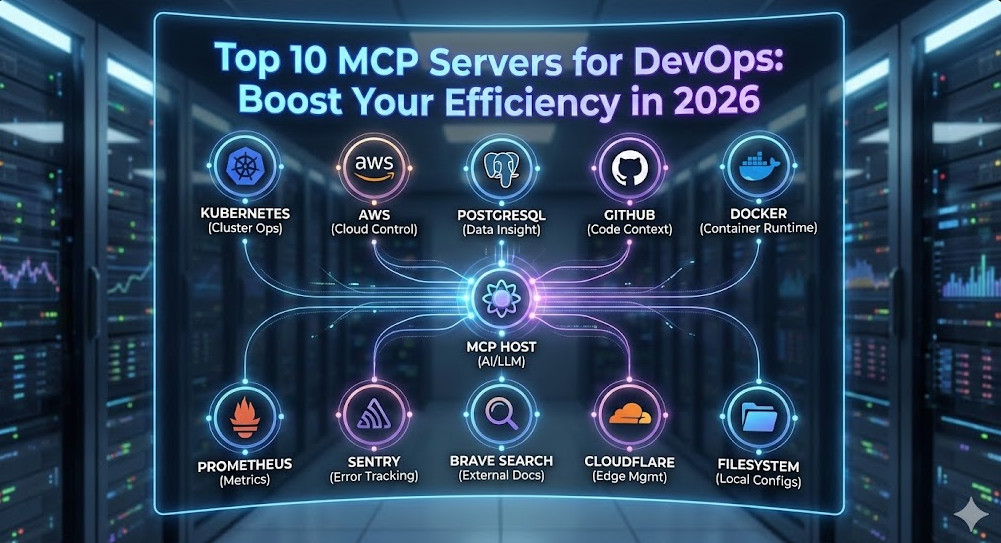
The era of copy-pasting logs into ChatGPT is over. With the widespread adoption of the Model Context Protocol (MCP), AI agents no longer just chat about your infrastructure—they can interact with it. For DevOps engineers, SREs, and Platform teams, this is the paradigm shift we’ve been waiting for.
MCP Servers for DevOps allow your local LLM environment (like Claude Desktop, Cursor, or specialized IDEs) to securely connect to your Kubernetes clusters, production databases, cloud providers, and observability stacks. Instead of asking “How do I query a crashing pod?”, you can now ask your agent to “Check the logs of the crashing pod in namespace prod and summarize the stack trace.”
This guide cuts through the noise of the hundreds of community servers to give you the definitive, production-ready top 10 list for 2026, complete with configuration snippets and security best practices.
What is the Model Context Protocol (MCP)?
Before we dive into the tools, let’s briefly level-set. MCP is an open standard that standardizes how AI models interact with external data and tools. It follows a client-host-server architecture:
Host: The application you interact with (e.g., Claude Desktop, Cursor, VS Code).
Server: A lightweight process that exposes specific capabilities (tools, resources, prompts) via JSON-RPC.
Client: The bridge connecting the Host to the Server.
Pro-Tip for Experts: Most MCP servers run locally via stdio transport, meaning the data never leaves your machine unless the server specifically calls an external API (like AWS or GitHub). This makes MCP significantly more secure than web-based “Plugin” ecosystems.
The Top 10 MCP Servers for DevOps
1. Kubernetes (The Cluster Commander)
The Kubernetes MCP server is arguably the most powerful tool in a DevOps engineer’s arsenal. It enables your AI to run kubectl-like commands to inspect resources, view events, and debug failures.
Key Capabilities: List pods, fetch logs, describe deployments, check events, and inspect YAML configurations.
Why it matters: Instant context. You can say “Why is the payment-service crashing?” and the agent can inspect the events and logs immediately without you typing a single command.
Direct database access allows your AI to understand your schema and data relationships. This is invaluable for debugging application errors that stem from data inconsistencies or bad migrations.
Security Warning: Always configure this with a READ-ONLY database user. Never give an LLM DROP TABLE privileges.
3. AWS (The Cloud Controller)
The official AWS MCP server unifies access to your cloud resources. It respects your local ~/.aws/credentials, effectively allowing the agent to act as you.
Use Case: “List all EC2 instances in us-east-1 that are stopped and estimate the cost savings.”
4. GitHub (The Code Context)
While many IDEs have Git integration, the GitHub MCP server goes deeper. It allows the agent to search issues, read PR comments, and inspect file history across repositories, not just the one you have open.
Often overlooked, the Filesystem MCP server is foundational. It allows the agent to read your local config files, Terraform state (be careful!), and local logs that aren’t in the cloud yet.
Best Practice: explicitly allow-list only specific directories (e.g., /Users/me/projects) rather than your entire home folder.
6. Docker (The Container Whisperer)
Debug local containers faster. The Docker MCP server lets your agent interact with the Docker daemon to check container health, inspect images, and view runtime stats.
Key Capabilities:docker ps, docker logs, docker inspect via natural language.
7. Prometheus (The Metrics Watcher)
Context is nothing without metrics. The Prometheus MCP server connects your agent to your time-series data.
Use Case: “Analyze the CPU usage of the api-gateway over the last hour and tell me if it correlates with the error spikes.”
Value: Eliminates the need to write complex PromQL queries manually for quick checks.
8. Sentry (The Error Hunter)
When an alert fires, you need details. Connecting Sentry allows the agent to retrieve stack traces, user impact data, and release health info directly.
DevOps requires constant documentation lookups. The Brave Search MCP server gives your agent internet access to find the latest error codes, deprecation notices, or Terraform module documentation without hallucinating.
Why Brave? It offers a clean API for search results that is often more “bot-friendly” than standard scrapers.
10. Cloudflare (The Edge Manager)
For modern stacks relying on edge compute, the Cloudflare MCP server is essential. Manage Workers, KV namespaces, and DNS records.
Key Capabilities: List workers, inspect KV keys, check deployment status.
Implementation: The claude_desktop_config.json
To get started, you need to configure your Host application. For Claude Desktop on macOS, this file is located at ~/Library/Application Support/Claude/claude_desktop_config.json.
Here is a production-ready template integrating a few of the top servers. Note the use of environment variables for security.
Note: You will need Node.js installed (`npm` and `npx`) for the examples above.
Security Best Practices for Expert DevOps
Opening your infrastructure to an AI agent requires rigorous security hygiene.
Least Privilege (IAM/RBAC):
For AWS, create a specific IAM User for MCP with ReadOnlyAccess. Do not use your Admin keys.
For Kubernetes, create a ServiceAccount with a restricted Role (e.g., view only) and use that kubeconfig context.
The “Human in the Loop” Rule:
MCP allows tools to perform actions. While “reading” logs is safe, “writing” code or “deleting” resources should always require explicit user confirmation. Most Clients (like Claude Desktop) prompt you before executing a tool command—never disable this feature.
Environment Variable Hygiene:
Avoid hardcoding API keys in your claude_desktop_config.json if you share your dotfiles. Use a secrets manager or reference environment variables that are loaded into the shell session launching the host.
Frequently Asked Questions (FAQ)
Can I run MCP servers via Docker instead of npx?
Yes, and it’s often cleaner. You can replace the command in your config with docker and use run -i --rm ... args. This isolates the server environment from your local Node.js setup.
Is it safe to connect MCP to a production database?
Only if you use a read-only user. We strictly recommend connecting to a read-replica or a sanitized staging database rather than the primary production writer.
What is the difference between Stdio and SSE transport?
Stdio (Standard Input/Output) is used for local servers; the client spawns the process and communicates via pipes. SSE (Server-Sent Events) is used for remote servers (e.g., a server running inside your K8s cluster that your local client connects to over HTTP). Stdio is easier for local setup; SSE is better for shared team resources.
Conclusion
MCP Servers for DevOps are not just a shiny new toy—they are the bridge that turns Generative AI into a practical engineering assistant. By integrating Kubernetes, AWS, and Git directly into your LLM’s context, you reduce context switching and accelerate root cause analysis.
Start small: configure the Filesystem and Kubernetes servers today. Once you experience the speed of debugging a crashing pod using natural language, you won’t want to go back.Thank you for reading the DevopsRoles page!
For years, the industry mantra has been “You build it, you run it.” While this philosophy dismantled silos, it also burdened expert engineering teams with cognitive overload. The sheer complexity of the modern cloud-native landscape—Kubernetes orchestration, Service Mesh implementation, compliance automation, and observability stacks—has birthed a new operational model: DevOps as a Service (DaaS).
This isn’t just about outsourcing CI/CD pipelines. For the expert SRE or Senior DevOps Architect, DaaS represents a fundamental shift from building bespoke infrastructure to consuming standardized, managed platforms. Whether you are building an Internal Developer Platform (IDP) or leveraging a third-party managed service, adopting a DevOps as a Service model aims to decouple developer velocity from infrastructure complexity.
The Architectural Shift: Defining DaaS for the Enterprise
At an expert level, DevOps as a Service is the commoditization of the DevOps toolchain. It transforms the role of the DevOps engineer from a “ticket resolver” and “script maintainer” to a “Platform Engineer.”
The core value proposition addresses the scalability of human capital. If every microservice requires bespoke Helm charts, unique Terraform state files, and custom pipeline logic, the operational overhead scales linearly with the number of services. DaaS abstracts this into a “Vending Machine” model.
Architectural Note: In a mature DaaS implementation, the distinction between “Infrastructure” and “Application” blurs. The platform provides “Golden Paths”—pre-approved, secure, and compliant templates that developers consume via self-service APIs.
Anatomy of a Production-Grade DaaS Platform
A robust DevOps as a Service strategy rests on three technical pillars. It is insufficient to simply subscribe to a SaaS CI tool; the integration layer is where the complexity lies.
1. The Abstracted CI/CD Pipeline
In a DaaS model, pipelines are treated as products. Rather than copy-pasting .gitlab-ci.yml or Jenkinsfiles, teams inherit centralized pipeline libraries. This allows the Platform team to roll out security scanners (SAST/DAST) or policy checks globally by updating a single library version.
2. Infrastructure as Code (IaC) Abstraction
The DaaS approach moves away from raw resource definitions. Instead of defining an AWS S3 bucket directly, a developer defines a “Storage Capability” which the platform resolves to an encrypted, compliant, and tagged S3 bucket.
Here is an example of how a DaaS module might abstract complexity using Terraform:
This abstraction ensures that Infrastructure as Code remains consistent across hundreds of repositories, mitigating “configuration drift.”
Build vs. Buy: The Technical Trade-offs
For the Senior Staff Engineer, the decision to implement DevOps as a Service often comes down to a “Build vs. Buy” analysis. Are you building an internal DaaS (Platform Engineering) or hiring an external DaaS provider?
Factor
Internal DaaS (Platform Eng.)
External Managed DaaS
Control
High. Full customizability of the toolchain.
Medium/Low. constrained by vendor opinion.
Day 2 Operations
High burden. You own the uptime of the CI/CD stack.
Low. SLAs guaranteed by the vendor.
Cost Model
CAPEX heavy (Engineering hours).
OPEX heavy (Subscription fees).
Compliance
Must build custom controls for SOC2/HIPAA.
Often inherits vendor compliance certifications.
Pro-Tip: Avoid the “Not Invented Here” syndrome. If your core business isn’t infrastructure, an external DaaS partner or a highly opinionated managed platform (like Heroku or Vercel for enterprise) is often the superior strategic choice to reduce Time-to-Market.
Security Implications: The Shared Responsibility Model
Adopting DevOps as a Service introduces a specific set of security challenges. When you centralize DevOps logic, you create a high-value target for attackers. A compromise of the DaaS pipeline can lead to a supply chain attack, injecting malicious code into every artifact built by the system.
Hardening the DaaS Interface
Least Privilege: The DaaS agent (e.g., GitHub Actions Runner, Jenkins Agent) must have ephemeral permissions. Use OIDC (OpenID Connect) to assume roles rather than storing long-lived AWS_ACCESS_KEY_ID secrets.
Policy as Code: Implement Open Policy Agent (OPA) to gate deployments. The DaaS platform should reject any infrastructure request that violates compliance rules (e.g., creating a public Load Balancer in a PCI-DSS environment).
Artifact Signing: Ensure the DaaS pipeline signs container images (using tools like Cosign) so that the Kubernetes admission controller only allows trusted images to run.
Frequently Asked Questions (FAQ)
How does DaaS differ from PaaS (Platform as a Service)?
PaaS (like Google App Engine) provides the runtime environment for applications. DevOps as a Service focuses on the delivery pipeline—the tooling, automation, and processes that get code from commit to the PaaS or IaaS. DaaS manages the “How,” while PaaS provides the “Where.”
Is DevOps as a Service cost-effective for large enterprises?
It depends on your “Undifferentiated Heavy Lifting.” If your expensive DevOps engineers are spending 40% of their time patching Jenkins or upgrading K8s clusters, moving to a DaaS model (managed or internal platform) yields a massive ROI by freeing them to focus on application reliability and performance tuning.
What are the risks of vendor lock-in with DaaS?
High. If you build your entire delivery flow around a proprietary DaaS provider’s specific YAML syntax or plugins, migrating away becomes a refactoring nightmare. To mitigate this, rely on open standards like Docker, Kubernetes, and Terraform, using the DaaS provider merely as the orchestrator rather than the logic holder.
Conclusion
DevOps as a Service is not merely a trend; it is the industrialization of software delivery. For expert practitioners, it signals a move away from “crafting” servers to “engineering” platforms.
Whether you choose to build an internal platform or leverage a managed service, the goal remains the same: reduce cognitive load for developers and increase deployment velocity without sacrificing stability. As we move toward 2026, the organizations that succeed will be those that treat their DevOps capabilities not as a series of tickets, but as a reliable, scalable product.
Ready to architect your platform strategy? Start by auditing your current “Day 2” operational costs to determine if a DaaS migration is your next logical step. Thank you for reading the DevopsRoles page!
At the Senior Staff level, we know that DevOps automation is no longer just about writing bash scripts to replace manual server commands. It is about architecting self-sustaining platforms that treat infrastructure, security, and compliance as first-class software artifacts. In an era of microservices sprawl and multi-cloud complexity, the goal is to decouple deployment complexity from developer velocity.
This guide moves beyond the basics of CI/CD. We will explore how to implement rigorous DevOps automation strategies using GitOps patterns, Policy as Code (PaC), and ephemeral environments to achieve the elite performance metrics defined by DORA (DevOps Research and Assessment).
The Shift: From Scripting to Platform Engineering
Historically, automation was imperative: “Run this script to install Nginx.” Today, expert automation is declarative and convergent. We define the desired state, and autonomous controllers ensure the actual state matches it. This shift is crucial for scaling.
When we talk about automating software delivery in 2025, we are orchestrating a complex interaction between:
Governance: Automated guardrails that prevent bad configurations from ever reaching production.
Pro-Tip: Don’t just automate the “Happy Path.” True DevOps automation resilience comes from automating the failure domains—automatic rollbacks based on Prometheus metrics, self-healing infrastructure nodes, and automated certificate rotation.
Core Pillars of Advanced DevOps Automation
1. GitOps: The Single Source of Truth
GitOps elevates DevOps automation by using Git repositories as the source of truth for both infrastructure and application code. Tools like ArgoCD or Flux do not just “deploy”; they continuously reconcile the cluster state with the Git state.
This creates an audit trail for every change and eliminates “configuration drift”—the silent killer of reliability. If a human manually changes a Kubernetes deployment, the GitOps controller detects the drift and reverts it immediately.
2. Policy as Code (PaC)
In a high-velocity environment, manual security reviews are a bottleneck. PaC automates compliance. By using the Open Policy Agent (OPA), you can write policies that reject deployments if they don’t meet security standards (e.g., running as root, missing resource limits).
Here is a practical example of a Rego policy ensuring no container runs as root:
package kubernetes.admission

deny[msg] {
    input.request.kind.kind == "Pod"
    input.request.operation == "CREATE"
    container := input.request.object.spec.containers[_]
    container.securityContext.runAsNonRoot != true
    msg := sprintf("Container '%v' must set securityContext.runAsNonRoot to true", [container.name])
}
Integrating this into your pipeline or admission controller ensures that DevOps automation acts as a security gatekeeper, not just a delivery mechanism.
3. Ephemeral Environments
Static staging environments are often broken or outdated. A mature automation strategy involves spinning up full-stack ephemeral environments for every Pull Request. This allows QA and Product teams to test changes in isolation before merging.
Using tools like Crossplane or Terraform within your CI pipeline, you can provision a namespace, database, and ingress route dynamically, run integration tests, and tear it down automatically to save costs.
Orchestrating the Pipeline: A Modern Approach
To achieve true DevOps automation, your pipeline should resemble an assembly line with distinct stages of verification. It is not enough to simply build a Docker image; you must sign it, scan it, and attest its provenance.
Example: Secure Supply Chain Pipeline
Below is a conceptual high-level workflow for a secure, automated delivery pipeline:
Code Commit: Triggers CI.
Lint & Unit Test: Fast feedback loops.
SAST/SCA Scan: Check for vulnerabilities in code and dependencies.
Build & Sign: Build the artifact and sign it (e.g., Sigstore/Cosign).
Deploy to Ephemeral: Dynamic environment creation.
Integration Tests: E2E testing against the ephemeral env.
GitOps Promotion: CI opens a PR to the infrastructure repo to update the version tag for production.
Advanced Concept: Implement “Progressive Delivery” using a Service Mesh (like Istio or Linkerd). Automate the traffic shift so that a new version receives only 1% of traffic initially. If error rates spike (measured by Prometheus), the automation automatically halts the rollout and reverts traffic to the stable version without human intervention.
Frequently Asked Questions (FAQ)
What is the difference between CI/CD and DevOps Automation?
CI/CD (Continuous Integration/Continuous Delivery) is a subset of DevOps Automation. CI/CD focuses specifically on the software release lifecycle. DevOps automation is broader, encompassing infrastructure provisioning, security policy enforcement, log management, database maintenance, and self-healing operational tasks.
How do I measure the ROI of DevOps Automation?
Focus on the DORA metrics: Deployment Frequency, Lead Time for Changes, Time to Restore Service, and Change Failure Rate. Automation should directly correlate with an increase in frequency and a decrease in lead time and failure rates.
Can you automate too much?
Yes. “Automating the mess” just makes the mess faster. Before applying automation, ensure your processes are optimized. Additionally, avoid automating tasks that require complex human judgment or are done so rarely that the engineering effort to automate exceeds the time saved (xkcd theory of automation).
Conclusion
Mastering DevOps automation requires a mindset shift from “maintaining servers” to “engineering platforms.” By leveraging GitOps for consistency, Policy as Code for security, and ephemeral environments for testing velocity, you build a system that is resilient, scalable, and efficient.
The ultimate goal of automation is to make the right way of doing things the easiest way. As you refine your pipelines, focus on observability and feedback loops—because an automated system that fails silently is worse than a manual one. Thank you for reading the DevopsRoles page!