Tag Archives: DevOps

Mastering Docker Compose Features for Building and Running Agents

Efficiently building and deploying agents across diverse environments is a critical aspect of modern software development and operations. The complexities of managing dependencies, configurations, and networking often lead to significant overhead. This article delves into the powerful Docker Compose features designed to streamline this process, enabling developers and system administrators to orchestrate complex agent deployments with ease. We’ll explore advanced techniques leveraging Docker Compose’s capabilities, providing practical examples and addressing common challenges. Understanding these Docker Compose features is paramount for building robust and scalable agent-based systems.

Understanding the Power of Docker Compose for Agent Deployment

Docker Compose extends the capabilities of Docker by providing a simple YAML file for defining and running multi-container Docker applications. For agent deployment, this translates to defining the agent’s environment, including its dependencies (databases, message brokers, etc.), in a single, manageable file. This approach simplifies the entire lifecycle – from development and testing to production deployment – eliminating the manual configuration hassles associated with individual container management.

Defining Services in the `docker-compose.yml` File

The core of Docker Compose lies in its YAML configuration file, `docker-compose.yml`. This file describes the services (containers) that constitute your agent application. Each service is defined with its image, ports, volumes, environment variables, and dependencies. Here’s a basic example:


version: "3.9"
services:
agent:
image: my-agent-image:latest
ports:
- "8080:8080"
volumes:
- ./agent_data:/data
environment:
- AGENT_NAME=myagent
- API_KEY=your_api_key
database:
image: postgres:14
ports:
- "5432:5432"
environment:
- POSTGRES_USER=agentuser
- POSTGRES_PASSWORD=agentpassword

Networking Between Services

Docker Compose simplifies networking between services. Services defined within the same `docker-compose.yml` file automatically share a network. This eliminates the need for complex network configurations and ensures seamless communication between the agent and its dependencies. For example, the `agent` service in the above example can connect to the `database` service using the hostname `database`.

Advanced Docker Compose Features for Agent Management

Beyond basic service definition, Docker Compose offers a range of advanced Docker Compose features that significantly enhance agent deployment and management.

Using Docker Compose for Environment-Specific Configurations

Maintaining different configurations for development, testing, and production environments is crucial. Docker Compose allows environment-specific configurations by using environment variables or separate `docker-compose.yml` files. For example, you can create a file named `docker-compose.prod.yml` with production-specific settings and use the command `docker compose -f docker-compose.yml -f docker-compose.prod.yml up`.

Scaling Agents with Docker Compose

Docker Compose enables easy scaling of agents. Simply add a `deploy` section to your service definition to specify the desired number of replicas:


services:
agent:
image: my-agent-image:latest
deploy:
replicas: 3

This will create three instances of the `agent` service, distributing the workload and improving resilience.

Secrets Management with Docker Compose

Storing sensitive information like API keys and passwords directly in your `docker-compose.yml` file is a security risk. Docker Compose supports secrets management through environment variables or dedicated secret management solutions. Docker secrets provide a secure way to handle these values without exposing them in your configuration files.

Leveraging Docker Compose for CI/CD Pipelines

Integrating Docker Compose into your CI/CD pipeline streamlines the deployment process. By using Docker Compose to build and test the agent in a consistent environment, you can ensure consistent behavior across different stages of development and deployment. Automated tests can be run using the `docker compose up` and `docker compose down` commands within the CI/CD pipeline.

Optimizing Resource Usage with Docker Compose

Docker Compose offers various options for optimizing resource allocation. You can specify resource limits (CPU and memory) for each service, preventing resource contention and ensuring predictable performance. The `deploy` section can include resource constraints:


deploy:
replicas: 3
resources:
limits:
cpus: "1"
memory: "256m"

Docker Compose Features: Best Practices and Troubleshooting

Effective utilization of Docker Compose requires adherence to best practices and understanding common troubleshooting techniques. Always use version control for your `docker-compose.yml` file, allowing for easy rollback and collaboration. Regularly review your configuration file for potential issues and security concerns.

Frequently Asked Questions

Q1: How do I update my agent image in a running Docker Compose application?

A1: You can use the `docker compose pull` command to update the image, followed by `docker compose up –build` to rebuild and restart the services. Ensure your `docker-compose.yml` file specifies the correct image tag (e.g., `my-agent-image:latest` or a specific version).

Q2: How can I debug a service within a Docker Compose application?

A2: Docker Compose facilitates debugging using the `docker compose exec` command. For instance, `docker compose exec agent bash` allows you to execute commands inside the `agent` container. Utilize tools such as `docker logs` for inspecting container logs to identify errors.

Q3: How do I manage persistent data with Docker Compose?

A3: Employ Docker volumes to store persistent data independently of the container lifecycle. Define the volumes in your `docker-compose.yml` file (as shown in previous examples) ensuring data persists even after container restarts or updates.

Q4: What are some common errors encountered when using Docker Compose?

A4: Common errors include incorrect YAML syntax, missing dependencies, port conflicts, and insufficient resources. Carefully review the error messages, consult the Docker Compose documentation, and verify that your configuration file is properly structured and your system has the necessary resources.

Conclusion

Mastering the Docker Compose features is essential for efficient agent deployment and management. By leveraging its capabilities for defining services, managing networks, handling configurations, scaling deployments, and integrating with CI/CD pipelines, you can significantly improve the reliability and scalability of your agent-based systems. Remember to always prioritize security and best practices when working with Docker Compose to build robust and secure applications. Proficiently using these Docker Compose features will undoubtedly elevate your DevOps workflow.

Further reading: Docker Compose Documentation, Docker Official Website, Docker Blog. Thank you for reading the DevopsRoles page!

Streamline Your Infrastructure: Mastering Ansible AWS Systems Manager

Managing infrastructure at scale can be a daunting task. The complexity grows exponentially with the number of servers, applications, and services involved. This is where automation shines, and Ansible, a powerful automation tool, steps in to simplify the process. However, integrating Ansible effectively with your cloud infrastructure, particularly Amazon Web Services (AWS), requires careful planning and execution. This article dives deep into leveraging Ansible AWS Systems Manager to create a robust and efficient infrastructure management system, addressing common challenges and providing best practices.

Understanding the Power of Ansible AWS Systems Manager Integration

Ansible, known for its agentless architecture and simple YAML configuration, excels at automating IT tasks. AWS Systems Manager (SSM), on the other hand, is a comprehensive management service offering features like patch management, inventory management, and configuration management. Integrating Ansible with SSM unlocks a powerful synergy, enabling you to manage your AWS resources efficiently and securely. This integration allows you to leverage Ansible’s automation capabilities within the familiar AWS ecosystem, simplifying workflows and enhancing scalability.

Key Benefits of Ansible AWS Systems Manager Integration

  • Centralized Management: Manage your entire AWS infrastructure from a single pane of glass using Ansible and SSM.
  • Improved Efficiency: Automate repetitive tasks, reducing manual intervention and human error.
  • Enhanced Security: Implement secure configuration management and compliance checks across your AWS instances.
  • Scalability: Easily manage hundreds or thousands of AWS instances with minimal effort.
  • Cost Optimization: Reduce operational costs by automating tasks and optimizing resource utilization.

Setting Up Ansible AWS Systems Manager

Before you begin, ensure you have the following prerequisites:

  • An AWS account with appropriate IAM permissions.
  • Ansible installed on your local machine or server.
  • The AWS CLI configured with your AWS credentials.
  • The boto3 Python library installed (pip install boto3).

Configuring IAM Roles and Policies

Properly configuring IAM roles is crucial for secure access. Create an IAM role with appropriate permissions for Ansible to interact with SSM. This typically involves attaching policies that grant access to SSM actions such as ssm:SendCommand and ssm:GetInventory. Avoid granting overly permissive access; follow the principle of least privilege.

Installing the AWS Ansible Modules

Install the necessary AWS Ansible modules. You can usually find these in the Ansible Galaxy collection. Use the following command:

ansible-galaxy install amazon.aws

Connecting Ansible to AWS Systems Manager

Use the AWS Ansible modules to interact with SSM. The modules use your configured AWS credentials to authenticate with AWS. A typical playbook might include:


- hosts: all
gather_facts: false
tasks:
- name: Run a command on instances using SSM
aws_ssm_document:
document_name: AWS-RunShellScript
parameters:
commands:
- "echo 'Hello from Ansible and SSM!'"
instance_ids: "{{ instance_ids }}"

Remember to replace instance_ids with your desired instance IDs.

Leveraging Ansible AWS Systems Manager for Automation

Once your environment is configured, you can leverage Ansible AWS Systems Manager for various automation tasks:

Automating Patch Management with Ansible and SSM

SSM provides robust patch management capabilities. You can create Ansible playbooks to automate the patching process for your AWS instances, ensuring they are up-to-date with the latest security fixes. SSM’s built-in patching features can be integrated seamlessly with Ansible for centralized management.

Implementing Configuration Management with Ansible and SSM

Ansible excels at configuration management. By using Ansible playbooks in conjunction with SSM, you can ensure consistent configurations across your AWS instances. This reduces configuration drift and improves operational stability.

Automating Deployment with Ansible and SSM

Simplify application deployments by using Ansible playbooks triggered through SSM. This allows for automated rollouts and rollbacks, reducing deployment risks and downtime.

Advanced Techniques: Optimizing Ansible AWS Systems Manager

For enhanced efficiency and scalability, explore these advanced techniques:

Using Ansible Roles for Reusability

Organize your Ansible playbooks into reusable roles to improve maintainability and reduce redundancy. This promotes consistency across your automation processes.

Implementing Inventory Management with Ansible and SSM

Utilize SSM Inventory to dynamically manage your Ansible inventory, allowing for automatic updates of managed instance information.

Leveraging Ansible Automation Hub

Explore pre-built Ansible content on Ansible Automation Hub for AWS to further streamline your automation workflows.

Frequently Asked Questions

Q1: What are the security considerations when integrating Ansible with AWS Systems Manager?

A1: Prioritize the principle of least privilege when configuring IAM roles. Grant only the necessary permissions for Ansible to interact with SSM. Regularly review and update your IAM policies to ensure security.

Q2: How do I handle errors and exceptions in my Ansible AWS Systems Manager playbooks?

A2: Implement proper error handling within your Ansible playbooks using handlers, notifications, and appropriate exception management techniques. This ensures resilience and enables effective troubleshooting.

Q3: Can I use Ansible AWS Systems Manager to manage on-premises infrastructure?

A3: While Ansible is capable of managing on-premises infrastructure, the integration with AWS Systems Manager is specifically for managing AWS resources. You would need a different approach for managing on-premises infrastructure.

Q4: What are the cost implications of using Ansible AWS Systems Manager?

A4: The cost depends on your AWS usage. SSM and Ansible itself may incur costs associated with EC2 instance usage, data transfer, and other AWS services consumed during automation.

Conclusion

Integrating Ansible with AWS Systems Manager offers a powerful solution for streamlining infrastructure management. By mastering Ansible AWS Systems Manager, you can significantly improve efficiency, security, and scalability of your AWS deployments. Remember to prioritize security best practices and leverage advanced techniques like Ansible roles and SSM inventory to optimize your automation strategy. Effective use of Ansible AWS Systems Manager is key to maintaining a robust and adaptable infrastructure in the dynamic cloud environment.

For further information, refer to the official AWS documentation: AWS Systems Manager Documentation and the Ansible documentation: Ansible Documentation. Thank you for reading the DevopsRoles page!
Accelerate Your Cloud Development: Rapid Prototyping in GCP with Terraform, Docker, GitHub Actions, and Streamlit

In today’s fast-paced development environment, the ability to rapidly prototype and iterate on cloud-based applications is crucial. This article focuses on rapid prototyping GCP, demonstrating how to leverage the power of Google Cloud Platform (GCP) in conjunction with Terraform, Docker, GitHub Actions, and Streamlit to significantly reduce development time and streamline the prototyping process. We’ll explore a robust, repeatable workflow that empowers developers to quickly test, validate, and iterate on their ideas, ultimately leading to faster time-to-market and improved product quality.

Setting Up Your Infrastructure with Terraform

Terraform is an Infrastructure as Code (IaC) tool that allows you to define and manage your GCP infrastructure in a declarative manner. This means you describe the desired state of your infrastructure in a configuration file, and Terraform handles the provisioning and management.

Defining Your GCP Resources

A typical Terraform configuration for rapid prototyping GCP might include resources such as:

  • Compute Engine virtual machines (VMs): Define the specifications of your VMs, including machine type, operating system, and boot disk.
  • Cloud Storage buckets: Create storage buckets to store your application code, data, and dependencies.
  • Cloud SQL instances: Provision database instances if your application requires a database.
  • Virtual Private Cloud (VPC) networks: Configure your VPC network, subnets, and firewall rules to secure your environment.

Example Terraform Code

Here’s a simplified example of a Terraform configuration to create a Compute Engine VM:

resource "google_compute_instance" "default" {

  name         = "prototype-vm"

  machine_type = "e2-medium"

  zone         = "us-central1-a"

  boot_disk {

    initialize_params {

      image = "debian-cloud/debian-9"

    }

  }

}

Containerizing Your Application with Docker

Docker is a containerization technology that packages your application and its dependencies into a single, portable unit. This ensures consistency across different environments, making it ideal for rapid prototyping GCP.

Creating a Dockerfile

A Dockerfile outlines the steps to build your Docker image. It specifies the base image, copies your application code, installs dependencies, and defines the command to run your application.

Example Dockerfile

FROM python:3.9-slim-buster

WORKDIR /app

COPY requirements.txt requirements.txt
RUN pip install --no-cache-dir -r requirements.txt

COPY . .

CMD ["streamlit", "run", "app.py"]

Automating Your Workflow with GitHub Actions

GitHub Actions allows you to automate your development workflow, including building, testing, and deploying your application. This is essential for rapid prototyping GCP, enabling continuous integration and continuous deployment (CI/CD).

Creating a GitHub Actions Workflow

A GitHub Actions workflow typically involves the following steps:

  1. Trigger: Define the events that trigger the workflow, such as pushing code to a repository branch.
  2. Build: Build your Docker image using the Dockerfile.
  3. Test: Run unit and integration tests to ensure the quality of your code.
  4. Deploy: Deploy your Docker image to GCP using tools like `gcloud` or a container registry.

Example GitHub Actions Workflow (YAML)

name: Deploy to GCP
on:
  push:
    branches:
      - main
jobs:
  deploy:
    runs-on: ubuntu-latest
    steps:
      - uses: actions/checkout@v3
      - name: Build Docker Image
        run: docker build -t my-app:latest .
      - name: Login to Google Cloud Container Registry
        run: gcloud auth configure-docker
      - name: Push Docker Image
        run: docker push gcr.io/$PROJECT_ID/my-app:latest
      - name: Deploy to GCP
        run: gcloud compute instances create my-instance --zone=us-central1-a --machine-type=e2-medium --image=gcr.io/$PROJECT_ID/my-app:latest

Building Interactive Prototypes with Streamlit

Streamlit is a Python library that simplifies the creation of interactive web applications. Its ease of use makes it perfectly suited for rapid prototyping GCP, allowing you to quickly build user interfaces to visualize data and interact with your application.

Creating a Streamlit App

A simple Streamlit app might look like this:

import streamlit as st
st.title("My GCP Prototype")
st.write("This is a simple Streamlit app running on GCP.")
name = st.text_input("Enter your name:")
if name:
    st.write(f"Hello, {name}!")

Rapid Prototyping GCP: A Complete Workflow

Combining these technologies creates a powerful workflow for rapid prototyping GCP:

  1. Develop your application code.
  2. Create a Dockerfile to containerize your application.
  3. Write Terraform configurations to define your GCP infrastructure.
  4. Set up a GitHub Actions workflow to automate the build, test, and deployment processes.
  5. Use Streamlit to build an interactive prototype to test and showcase your application.

This iterative process allows for quick feedback loops, enabling you to rapidly iterate on your designs and incorporate user feedback.

Frequently Asked Questions

Q1: What are the benefits of using Terraform for infrastructure management in rapid prototyping?

A1: Terraform provides a declarative approach, ensuring consistency and reproducibility. It simplifies infrastructure setup and teardown, making it easy to spin up and down environments quickly, ideal for the iterative nature of prototyping. This reduces manual configuration errors and speeds up the entire development lifecycle.

Q2: How does Docker improve the efficiency of rapid prototyping in GCP?

A2: Docker ensures consistent environments across different stages of development and deployment. By packaging the application and dependencies, Docker eliminates environment-specific issues that often hinder prototyping. It simplifies deployment to GCP by utilizing container registries and managed services.

Q3: Can I use other CI/CD tools besides GitHub Actions for rapid prototyping on GCP?

A3: Yes, other CI/CD platforms like Cloud Build, Jenkins, or GitLab CI can be integrated with GCP. The choice depends on your existing tooling and preferences. Each offers similar capabilities for automated building, testing, and deployment.

Q4: What are some alternatives to Streamlit for building quick prototypes?

A4: While Streamlit is excellent for rapid development, other options include frameworks like Flask or Django (for more complex applications), or even simpler tools like Jupyter Notebooks for data exploration and visualization within the prototype.

Conclusion

This article demonstrated how to effectively utilize Terraform, Docker, GitHub Actions, and Streamlit to significantly enhance your rapid prototyping GCP capabilities. By adopting this workflow, you can drastically reduce development time, improve collaboration, and focus on iterating and refining your applications. Remember that continuous integration and continuous deployment are key to maximizing the efficiency of your rapid prototyping GCP strategy. Mastering these tools empowers you to rapidly test ideas, validate concepts, and bring innovative cloud solutions to market with unparalleled speed.

For more detailed information on Terraform, consult the official documentation: https://www.terraform.io/docs/index.html

For more on Docker, see: https://docs.docker.com/

For further details on GCP deployment options, refer to: https://cloud.google.com/docs. Thank you for reading the DevopsRoles page!

Revolutionizing Infrastructure as Code: A Deep Dive into Amazon Bedrock Agents

Infrastructure as Code (IaC) has revolutionized how we manage and deploy infrastructure, but even with its efficiency, managing complex systems can still be challenging. This is where the power of AI comes in. Amazon Bedrock, with its powerful foundation models, is changing the game, and Amazon Bedrock Agents are at the forefront of this transformation. This article will explore the capabilities of Amazon Bedrock Agents and how they are streamlining IaC, enabling developers to build, manage, and interact with infrastructure in a more intuitive and efficient way. We’ll delve into practical applications, best practices, and potential future directions, empowering you to leverage this cutting-edge technology.

Understanding Amazon Bedrock and its Agents

Amazon Bedrock offers access to a diverse range of foundation models, providing developers with powerful tools for building AI-powered applications. These models can be utilized for various tasks, including natural language processing, code generation, and more. Amazon Bedrock Agents are built upon these foundation models, acting as intelligent interfaces between developers and the infrastructure they manage. Instead of writing complex scripts or navigating intricate command-line interfaces, developers can interact with their infrastructure using natural language prompts.

How Bedrock Agents Enhance IaC

Traditionally, IaC relies heavily on scripting languages like Terraform or CloudFormation. While powerful, these tools require specialized knowledge and can be complex to manage. Amazon Bedrock Agents simplify this process by bridging the gap between human language and machine execution. This allows for more accessible and intuitive interactions with infrastructure, even for users with limited IaC experience.

  • Simplified Infrastructure Management: Instead of writing lengthy scripts, users can issue natural language requests, such as “create a new EC2 instance with 4 CPUs and 16GB of RAM.” The agent then translates this request into the appropriate IaC code and executes it.
  • Improved Collaboration: The intuitive nature of natural language prompts makes collaboration easier. Teams can communicate infrastructure changes and management tasks more effectively, reducing ambiguity and errors.
  • Reduced Errors: The agent’s ability to validate requests and translate them into accurate code significantly reduces the risk of human error in IaC deployments.
  • Faster Deployment: The streamlined workflow facilitated by Amazon Bedrock Agents significantly accelerates infrastructure deployment times.

Building and Deploying with Amazon Bedrock Agents

While the exact implementation details of Amazon Bedrock Agents are constantly evolving, the general approach involves using a combination of natural language processing and existing IaC tools. The agent acts as an intermediary, translating user requests into executable IaC code. The specific integration with tools like Terraform or CloudFormation will depend on the agent’s design and configuration.

A Practical Example

Let’s imagine a scenario where we need to deploy a new web application. Instead of writing a complex Terraform configuration, we could interact with an Amazon Bedrock Agent using the following prompt: “Deploy a new web server using Amazon ECS, with an autoscaling group, load balancer, and an RDS database. Use a Docker image from my ECR repository named ‘my-web-app’. “

The agent would then parse this request, generate the necessary Terraform (or CloudFormation) code, and execute it. The entire process would be significantly faster and less error-prone than manual scripting.

Advanced Usage and Customization

Amazon Bedrock Agents offer potential for advanced customization. By integrating with other AWS services and leveraging the capabilities of different foundation models, developers can tailor agents to specific needs and workflows. This could involve adding custom commands, integrating with monitoring tools, or creating sophisticated automation workflows.

Amazon Bedrock Agents: Best Practices and Considerations

While Amazon Bedrock Agents offer immense potential, it’s crucial to adopt best practices to maximize their effectiveness and minimize potential risks.

Security Best Practices

  • Access Control: Implement robust access control measures to restrict who can interact with the agent and the infrastructure it manages.
  • Input Validation: Always validate user inputs to prevent malicious commands or unintended actions.
  • Auditing: Maintain detailed logs of all agent interactions and actions performed on the infrastructure.

Optimization and Monitoring

  • Performance Monitoring: Regularly monitor the performance of the agent and its impact on infrastructure deployment times.
  • Error Handling: Implement proper error handling mechanisms to manage unexpected situations and provide informative feedback to users.
  • Regular Updates: Stay updated with the latest versions of the agent and underlying foundation models to benefit from performance improvements and new features.

Frequently Asked Questions

Q1: What are the prerequisites for using Amazon Bedrock Agents?

Currently, access to Amazon Bedrock Agents may require an invitation or participation in a beta program. It is essential to follow AWS announcements and updates for availability information. Basic familiarity with IaC concepts and AWS services is also recommended.

Q2: How do I integrate Amazon Bedrock Agents with my existing IaC workflows?

The integration process will depend on the specific agent implementation. This may involve configuring the agent to connect to your IaC tools (e.g., Terraform, CloudFormation) and setting up appropriate credentials. Detailed instructions should be available in the agent’s documentation.

Q3: What are the limitations of Amazon Bedrock Agents?

While powerful, Amazon Bedrock Agents may have limitations. The accuracy and efficiency of the agent will depend on the underlying foundation models and the clarity of user requests. Complex or ambiguous prompts may lead to incorrect or unexpected results. Furthermore, reliance on a single agent for critical infrastructure management might pose a risk, hence a multi-layered approach is always recommended.

Q4: What is the cost associated with using Amazon Bedrock Agents?

The cost of using Amazon Bedrock Agents will depend on factors such as the number of requests, the complexity of the tasks, and the underlying foundation models used. It is vital to refer to the AWS pricing page for the most current cost information.

Conclusion

Amazon Bedrock Agents represent a significant advancement in Infrastructure as Code, offering a more intuitive and efficient way to manage complex systems. By leveraging the power of AI, these agents simplify infrastructure management, accelerate deployment times, and reduce errors. While still in its early stages of development, the potential for Amazon Bedrock Agents is immense. By adopting best practices and understanding the limitations, developers and operations teams can unlock significant efficiency gains and transform their IaC workflows. As the technology matures, Amazon Bedrock Agents will undoubtedly play an increasingly crucial role in the future of cloud infrastructure management.

Further reading: Amazon Bedrock Official Documentation, AWS Blogs, AWS CloudFormation Documentation. Thank you for reading the DevopsRoles page!
Secure Your AWS Resources with Terraform AWS Verified Access and Google OIDC

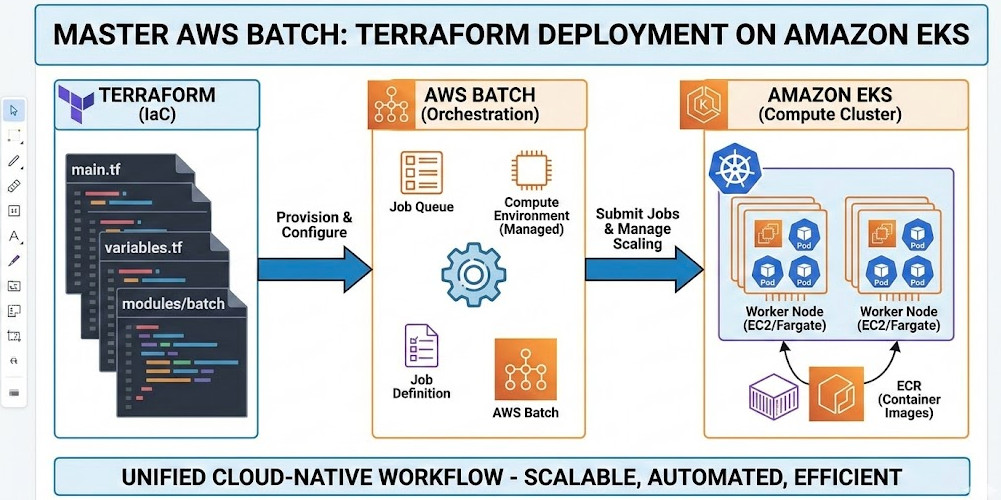
Establishing secure access to your AWS resources is paramount. Traditional methods often lack the granularity and automation needed for modern cloud environments. This article delves into leveraging Terraform AWS Verified Access with Google OIDC (OpenID Connect) to create a robust, automated, and highly secure access control solution. We’ll guide you through the process, from initial setup to advanced configurations, ensuring you understand how to implement Terraform AWS Verified Access effectively.

Understanding AWS Verified Access and OIDC

AWS Verified Access is a fully managed service that enables secure, zero-trust access to your AWS resources. It verifies the identity and posture of users and devices before granting access, minimizing the attack surface. Integrating it with Google OIDC enhances security by leveraging Google’s robust identity and access management (IAM) system. This approach eliminates the need to manage and rotate numerous AWS IAM credentials, simplifying administration and improving security.

Key Benefits of Using AWS Verified Access with Google OIDC

  • Enhanced Security: Leverages Google’s secure authentication mechanisms.
  • Simplified Management: Centralized identity management through Google Workspace or Cloud Identity.
  • Automation: Terraform enables Infrastructure as Code (IaC), automating the entire deployment process.
  • Zero Trust Model: Access is granted based on identity and posture, not network location.
  • Improved Auditability: Detailed logs provide comprehensive audit trails.

Setting up Google OIDC

Before configuring Terraform AWS Verified Access, you need to set up your Google OIDC provider. This involves creating a service account in your Google Cloud project and generating its credentials.

Creating a Google Service Account

  1. Navigate to the Google Cloud Console and select your project.
  2. Go to IAM & Admin > Service accounts.
  3. Click “CREATE SERVICE ACCOUNT”.
  4. Provide a name (e.g., “aws-verified-access”).
  5. Assign the “Cloud Identity and Access Management (IAM) Admin” role. Adjust roles based on your specific needs.
  6. Click “Create”.
  7. Download the JSON key file. Keep this file secure; it contains sensitive information.

Configuring the Google OIDC Provider

You’ll need the Client ID from your Google service account JSON key file. This will be used in your Terraform configuration.

Implementing Terraform AWS Verified Access

Now, let’s build the Terraform AWS Verified Access infrastructure using the Google OIDC provider. This example assumes you have already configured your AWS credentials for Terraform.

Terraform Code for AWS Verified Access


resource "aws_verified_access_trust_provider" "google_oidc" {
  name                = "google-oidc-provider"
  provider_type       = "oidc"
  server_url          = "https://accounts.google.com/.well-known/openid-configuration"
  client_id           = "YOUR_GOOGLE_CLIENT_ID" # Replace with your Client ID
  issuer_url          = "https://accounts.google.com"
}

resource "aws_verified_access_instance" "example" {
  name                 = "example-instance"
  trust_providers_ids = [aws_verified_access_trust_provider.google_oidc.id]
  device_policy {
    allowed_device_types = ["MOBILE", "DESKTOP"]
  }
}

Remember to replace YOUR_GOOGLE_CLIENT_ID with your actual Google Client ID. This configuration creates an OIDC trust provider and an AWS Verified Access instance that uses the provider.

Advanced Configurations

This basic configuration can be expanded to include:

  • Resource Policies: Define fine-grained access control to specific AWS resources.
  • Custom Device Policies: Implement stricter device requirements for access.
  • Conditional Access: Combine Verified Access with other security measures like MFA.
  • Integration with other IAM systems: Extend your identity and access management to other providers.

Terraform AWS Verified Access: Best Practices

Implementing secure Terraform AWS Verified Access requires careful planning and execution. Following best practices ensures robust security and maintainability.

Security Best Practices

  • Use the principle of least privilege: Grant only the necessary permissions.
  • Regularly review and update your access policies.
  • Monitor access logs and audit trails for suspicious activity.
  • Store sensitive credentials securely, using secrets management tools.

IaC Best Practices

  • Version control your Terraform code.
  • Use a modular approach to manage your infrastructure.
  • Employ automated testing to verify your configurations.
  • Follow a structured deployment process.

Frequently Asked Questions

Q1: Can I use AWS Verified Access with other identity providers besides Google OIDC?

Yes, AWS Verified Access supports various identity providers, including SAML and other OIDC providers. You will need to adjust the Terraform configuration accordingly, using the relevant provider details.

Q2: How do I manage access to specific AWS resources using AWS Verified Access?

You manage resource access by defining resource policies associated with your Verified Access instance. These policies specify which resources are accessible and under what conditions. These policies are often expressed using IAM policies within the Terraform configuration.

Q3: What happens if a user’s device doesn’t meet the specified device policy requirements?

If a user’s device does not meet the specified requirements (e.g., OS version, security patches), access will be denied. The user will receive an appropriate error message indicating the reason for the denial.

Q4: How can I monitor the activity and logs of AWS Verified Access?

AWS CloudTrail logs all Verified Access activity. You can access these logs through the AWS Management Console or programmatically using the AWS SDKs. This provides a detailed audit trail for compliance and security monitoring.

Conclusion

Implementing Terraform AWS Verified Access with Google OIDC provides a powerful and secure way to manage access to your AWS resources. By leveraging the strengths of both services, you create a robust, automated, and highly secure infrastructure. Remember to carefully plan your implementation, follow best practices, and continuously monitor your environment to maintain optimal security. Effective use of Terraform AWS Verified Access significantly enhances your organization’s cloud security posture.

For further information, consult the official AWS Verified Access documentation: https://aws.amazon.com/verified-access/ and the Google Cloud documentation on OIDC: https://cloud.google.com/docs/authentication/production. Also consider exploring HashiCorp’s Terraform documentation for detailed examples and best practices: https://www.terraform.io/. Thank you for reading the DevopsRoles page!

Deploying Terraform on AWS with Control Tower

This comprehensive guide will walk you through the process of deploying Terraform on AWS, leveraging the capabilities of AWS Control Tower to establish a secure and well-governed infrastructure-as-code (IaC) environment. We’ll cover setting up your environment, configuring Control Tower, writing and deploying Terraform code, and managing your infrastructure effectively. Understanding how to effectively utilize Terraform on AWS is crucial for any organization aiming for efficient and repeatable cloud deployments.

Setting Up Your AWS Environment and Control Tower

Before you can begin deploying Terraform on AWS, you need a properly configured AWS environment and AWS Control Tower. Control Tower provides a centralized governance mechanism, ensuring consistency and compliance across your AWS accounts.

1. Creating an AWS Account

If you don’t already have an AWS account, you’ll need to create one. Ensure you choose a suitable support plan based on your needs. The free tier offers a good starting point for experimentation.

2. Enabling AWS Control Tower

Next, enable AWS Control Tower. This involves deploying a landing zone, which sets up the foundational governance and security controls for your organization. Follow the AWS Control Tower documentation for detailed instructions. This includes defining organizational units (OUs) to manage access and policies.

  • Step 1: Navigate to the AWS Control Tower console.
  • Step 2: Follow the guided setup to create your landing zone.
  • Step 3: Choose the appropriate AWS Regions for your deployment.

3. Configuring IAM Roles

Properly configuring IAM roles is critical for secure access to AWS resources. Terraform on AWS requires specific IAM permissions to interact with AWS services. Create an IAM role with permissions necessary for deploying your infrastructure. This should adhere to the principle of least privilege.

Deploying Terraform on AWS: A Practical Example

This section demonstrates deploying a simple EC2 instance using Terraform on AWS. This example assumes you have Terraform installed and configured with appropriate AWS credentials.

1. Writing the Terraform Configuration File (main.tf)


terraform {
  required_providers {
    aws = {
      source  = "hashicorp/aws"
      version = "~> 4.0"
    }
  }
}

provider "aws" {
  region = "us-west-2" # Replace with your desired region
}

resource "aws_instance" "example" {
  ami           = "ami-0c55b31ad2299a701" # Replace with a suitable AMI ID for your region
  instance_type = "t2.micro"
}

2. Initializing and Deploying Terraform

After creating your main.tf file, navigate to the directory in your terminal and execute the following commands:

  1. terraform init: This downloads the necessary AWS provider plugins.
  2. terraform plan: This shows you a preview of the changes Terraform will make.
  3. terraform apply: This applies the changes and deploys the EC2 instance.

3. Destroying the Infrastructure

When you’re finished, use terraform destroy to remove the deployed resources. Always review the plan before applying any destructive changes.

Advanced Terraform Techniques with AWS Control Tower

Leveraging Control Tower alongside Terraform on AWS allows for more sophisticated deployments and enhanced governance. This section explores some advanced techniques.

1. Using Modules for Reusability

Terraform modules promote code reuse and maintainability. Create modules for common infrastructure components, such as VPCs, subnets, and security groups. This improves consistency and reduces errors.

2. Implementing Security Best Practices

Utilize Control Tower’s security controls alongside Terraform on AWS. This includes managing IAM roles effectively, adhering to least privilege principles, and implementing security groups and network ACLs to control access to your resources. Always use version control for your Terraform code.

3. Integrating with Other AWS Services

Terraform on AWS integrates seamlessly with many AWS services. Consider incorporating services like:

  • AWS S3: For storing configuration files and state.
  • AWS CloudFormation: For orchestrating complex deployments.
  • AWS CloudWatch: For monitoring infrastructure health and performance.

4. Using Workspaces for Different Environments

Employ Terraform workspaces to manage different environments (e.g., development, staging, production) using the same codebase. This helps maintain separation and reduces risk.

Implementing CI/CD with Terraform and AWS Control Tower

Integrating Terraform on AWS within a CI/CD pipeline enhances automation and allows for streamlined deployments. Utilize tools like GitHub Actions or Jenkins to trigger Terraform deployments based on code changes.

Frequently Asked Questions

Q1: What are the benefits of using Terraform with AWS Control Tower?

Using Terraform on AWS in conjunction with Control Tower significantly improves governance and security. Control Tower ensures your infrastructure adheres to defined policies, while Terraform provides repeatable and efficient deployments. This combination minimizes risks and allows for more streamlined operations.

Q2: How do I manage Terraform state securely?

Store your Terraform state securely using AWS services like S3, backed by KMS encryption. This protects your infrastructure configuration and prevents unauthorized modifications.

Q3: What are some common pitfalls to avoid when using Terraform on AWS?

Common pitfalls include insufficient IAM permissions, incorrect region settings, and neglecting to properly manage your Terraform state. Always thoroughly test your deployments in a non-production environment before applying to production.

Conclusion

This guide has detailed the process of deploying Terraform on AWS, emphasizing the benefits of integrating with AWS Control Tower for enhanced governance and security. By mastering these techniques, you can establish a robust, repeatable, and secure infrastructure-as-code workflow. Remember, consistent adherence to security best practices is paramount when deploying Terraform on AWS, especially when leveraging the centralized governance features of Control Tower. Proper planning and testing are key to successful and reliable deployments.

For more detailed information, refer to the official Terraform AWS Provider documentation and the AWS Control Tower documentation. Thank you for reading the DevopsRoles page!

Master Network Automation: Unleashing the Power of NAPALM and Ansible

In today’s dynamic IT landscape, manual network configuration is a relic of the past. The complexity and scale of modern networks demand automation for efficiency, consistency, and scalability. This article delves into the world of network automation, focusing on two powerful tools: NAPALM (Network Automation and Programmability Abstraction Layer with Multivendor support) and Ansible. We’ll explore how to leverage these tools to streamline your network management processes, reduce human error, and ultimately, improve operational efficiency. This guide will equip you with the knowledge and skills to implement robust network automation solutions.

Understanding the Need for Network Automation

Traditional network management relies heavily on manual commands and configurations, a process prone to errors and inconsistencies. Scaling this approach across a large network becomes increasingly challenging and time-consuming. Network automation addresses these challenges by automating repetitive tasks, enabling efficient provisioning, and improving overall network management. The benefits extend to faster deployment, reduced operational costs, and improved network uptime.

  • Reduced human error: Automation minimizes the risk of misconfigurations leading to outages or security vulnerabilities.
  • Increased efficiency: Automating repetitive tasks frees up network engineers to focus on higher-level tasks.
  • Improved scalability: Automation simplifies managing large and complex networks.
  • Enhanced consistency: Automated configurations ensure consistent network behavior across all devices.

Introducing NAPALM: Simplifying Network Device Interaction

NAPALM is a Python library that provides a consistent API for interacting with various network devices, regardless of their vendor. This abstraction layer simplifies the process of retrieving and configuring network device parameters. Instead of learning vendor-specific CLI commands, you use a standardized NAPALM API, significantly reducing the learning curve and promoting code reusability.

Key NAPALM Features:

  • Multi-vendor support: NAPALM supports a wide range of network devices from different vendors, including Cisco, Juniper, Arista, and more.
  • Consistent API: Provides a unified interface for accessing network device information and performing configurations.
  • Python-based: Leverages the power and versatility of the Python programming language.
  • Open-source: Actively developed and maintained by the community, ensuring ongoing support and improvements.

Practical Example: Retrieving Interface Information with NAPALM

The following code snippet demonstrates how to use NAPALM to connect to a Cisco IOS device and retrieve interface information:

from napalm import get_network_driver
driver = get_network_driver('ios')
device = driver('192.168.1.100', 'username', 'password')
device.open()
interfaces = device.get_interfaces()
print(interfaces)
device.close()

This example requires the installation of the NAPALM library: pip install napalm. Replace ‘192.168.1.100’, ‘username’, and ‘password’ with your device credentials.

Ansible: Automating Network Configuration and Management

Ansible is a powerful automation tool that simplifies the configuration and management of network devices. It uses a declarative approach, defining the desired state of the network, and Ansible ensures the network devices reach that state. Ansible’s agentless architecture simplifies deployment and management. It utilizes SSH to connect to devices, eliminating the need for agents on each network device.

Key Ansible Features for Network Automation:

  • Agentless architecture: Simplifies deployment and reduces overhead.
  • YAML configuration files: Provides a human-readable and easily manageable configuration format.
  • Idempotency: Ensures that configurations are applied consistently, without causing unintended changes on repeated executions.
  • Modules for network devices: Offers a rich set of modules specifically designed for managing network devices.

Ansible Playbook Example: Configuring Interface Description

This playbook utilizes the NAPALM Ansible module to configure the description of an interface on a network device:

---

- hosts: cisco_devices

  connection: network_cli

  gather_facts: false

  tasks:

    - name: Configure interface description

      napalm_config:

        commit: true

        replace: false

        config:

          - interface: GigabitEthernet1/1

            description: "Connection to Server Rack"

This playbook requires the Ansible NAPALM module. You’ll need to define your cisco_devices inventory file appropriately.

Integrating NAPALM and Ansible for Enhanced Network Automation

Combining NAPALM and Ansible creates a powerful synergy for network automation. NAPALM provides the consistent API for interacting with diverse network devices, while Ansible handles the orchestration and automation of the configuration process. This combination allows for efficient and scalable network management.

Benefits of Integration:

  • Increased efficiency: Automate complex tasks, significantly reducing manual effort.
  • Improved consistency: Apply configurations consistently across multiple devices and vendors.
  • Enhanced scalability: Easily manage large and complex networks with minimal effort.
  • Reduced operational costs: Streamline network management processes, lowering operational expenses.

Network Automation Best Practices

Successful network automation requires careful planning and implementation. Consider these best practices:

  • Modular design: Break down complex tasks into smaller, manageable modules.
  • Version control: Use Git or similar tools to manage your Ansible playbooks and configurations.
  • Testing: Thoroughly test your automation scripts in a controlled environment before deploying them to production.
  • Error handling: Implement robust error handling to prevent issues and ensure smooth operation.
  • Security: Secure your Ansible control server and network devices appropriately.

Frequently Asked Questions

Q1: What are the prerequisites for using NAPALM and Ansible for network automation?

A1: You’ll need Python installed for NAPALM and Ansible installed on your control server. You also require network device credentials (username and password) and SSH access to your network devices.

Q2: How do I choose the right network automation tools for my environment?

A2: The choice depends on your network size, complexity, and specific requirements. For smaller networks, simpler tools might suffice, while larger, more complex networks might benefit from more comprehensive solutions like Ansible and NAPALM combined. Evaluate your needs and choose accordingly.

Q3: What are some common challenges in implementing network automation?

A3: Common challenges include initial investment in learning the tools and developing automation scripts, managing access credentials securely, ensuring sufficient testing, and addressing potential compatibility issues between different network devices and versions.

Q4: Is network automation secure?

A4: Network automation, if implemented correctly, can enhance security by reducing human error and providing consistent configurations. However, proper security measures must be taken, including secure credential management, secure communication protocols (SSH), and regular security audits.

Conclusion

Network automation, using tools like NAPALM and Ansible, is crucial for modern network management. By embracing these technologies, organizations can significantly improve efficiency, reduce errors, and increase scalability. This article provided a foundation for understanding and implementing network automation. Remember to start small, focus on automating critical tasks, and always prioritize thorough testing before deploying to production. Mastering network automation requires ongoing learning and adaptation to new technologies and best practices.

Further reading: NAPALM Documentation, Ansible Documentation, Network to Code. Thank you for reading the DevopsRoles page!

Revolutionizing IT Operations with AI-Powered Automation: Red Hat Ansible Lightspeed

The modern IT landscape demands agility, efficiency, and scalability. Manual processes simply can’t keep pace with the rapid evolution of cloud-native architectures and the increasing complexity of IT infrastructure. This is where AI-Powered Automation steps in, offering a transformative solution to streamline workflows, reduce operational costs, and enhance overall IT efficiency. Red Hat Ansible Lightspeed, leveraging the power of artificial intelligence, is at the forefront of this revolution, offering a game-changing approach to automation.

Understanding Ansible Lightspeed

Red Hat Ansible Lightspeed is a powerful extension of Ansible, a leading automation platform. It employs machine learning algorithms to intelligently analyze your existing Ansible playbooks and infrastructure, providing recommendations for optimization and automation enhancements. This intelligent automation transcends simple scripting; it learns from past actions, predicts future needs, and adapts to changing environments, significantly accelerating deployment speeds and improving operational efficiency.

Key Features of Ansible Lightspeed

  • Intelligent Playbook Recommendations: Lightspeed analyzes your existing playbooks to identify potential improvements in terms of structure, efficiency, and best practices.
  • Predictive Analytics: Based on historical data, Lightspeed can predict potential issues and proactively suggest solutions, minimizing downtime and operational disruptions.
  • Automated Remediation: Lightspeed can autonomously resolve identified issues, taking corrective actions without manual intervention for routine tasks, freeing up human operators for more complex challenges.
  • Enhanced Security: By automating security checks and remediation processes, Lightspeed helps improve the security posture of your infrastructure.
  • Scalable Automation: Easily manage and automate tasks across increasingly complex and distributed infrastructure environments.

AI-Powered Automation with Ansible Lightspeed: A Practical Example

Let’s imagine a scenario where you have hundreds of servers requiring regular security patching. Manually deploying these patches across your entire infrastructure is time-consuming, error-prone, and inefficient. Ansible Lightspeed can automate this process. By analyzing your server inventory and patch management policies, Lightspeed can create an optimized playbook that automatically patches all servers according to your defined schedule and security requirements.

This automation not only saves significant time and resources but also minimizes the risk of human error, ensuring consistent and reliable patch deployments across your entire fleet.

Implementation Steps

  1. Integration: Integrate Ansible Lightspeed into your existing Ansible infrastructure.
  2. Analysis: Allow Lightspeed to analyze your current Ansible playbooks and infrastructure configuration.
  3. Optimization: Review Lightspeed’s recommendations and apply the suggested improvements.
  4. Monitoring: Continuously monitor the performance of your automated processes and fine-tune configurations as needed.

Advanced Usage of Ansible Lightspeed

Ansible Lightspeed isn’t limited to simple task automation. Its capabilities extend to more complex scenarios, including:

  • Complex Infrastructure Management: Lightspeed can automate the management of multifaceted cloud-native environments.
  • Continuous Integration/Continuous Delivery (CI/CD): Integrate Lightspeed into your CI/CD pipelines to automate deployment processes and improve release cycles.
  • Predictive Maintenance: Lightspeed can predict potential hardware failures, allowing for proactive maintenance and preventing costly downtime.
  • Automated Rollbacks: In the event of a failed deployment, Lightspeed can automate the rollback process, minimizing disruption.

Code Example (Illustrative):

While the specifics of Lightspeed interaction depend on the context and the tasks being automated, a basic Ansible playbook might look something like this:

- hosts: all

  become: true

  tasks:

    - name: Install necessary packages

      apt:

        name: "{{ item }}"

        state: present

      with_items:

        - nginx

        - mysql-server

Lightspeed would then analyze this playbook, suggesting potential improvements based on best practices, such as using more efficient modules or structuring tasks in a more optimal way. It could also suggest the use of more sophisticated Ansible features to further optimize the automation.

Benefits of AI-Powered Automation

Adopting AI-Powered Automation through Ansible Lightspeed delivers significant advantages:

  • Increased Efficiency: Automate repetitive tasks, freeing up IT staff for more strategic initiatives.
  • Reduced Operational Costs: Lower labor costs through automation and improved resource utilization.
  • Improved Reliability: Minimize human errors and ensure consistent execution of tasks.
  • Enhanced Scalability: Easily handle growing infrastructure needs without sacrificing efficiency.
  • Faster Deployment Cycles: Accelerate the deployment of new applications and services.

Frequently Asked Questions

Q1: Is Ansible Lightspeed compatible with my existing Ansible infrastructure?

Ansible Lightspeed is designed to integrate seamlessly with existing Ansible deployments. However, it’s essential to check the compatibility requirements based on your Ansible version and infrastructure setup. Refer to the official Red Hat Ansible Lightspeed documentation for detailed compatibility information.

Q2: How secure is Ansible Lightspeed?

Security is a paramount concern. Ansible Lightspeed is built with security in mind, adhering to Red Hat’s rigorous security standards. It employs secure communication channels and integrates seamlessly with existing security infrastructure. However, appropriate security practices must still be followed within the Ansible environment itself, such as controlling access to the system and ensuring proper authentication mechanisms.

Q3: What level of expertise is required to use Ansible Lightspeed effectively?

While a basic understanding of Ansible is beneficial, Ansible Lightspeed is designed to be relatively user-friendly. The platform’s intuitive interface and intelligent recommendations minimize the need for extensive Ansible expertise. However, some degree of familiarity with Ansible concepts and terminology is recommended for effective utilization.

Q4: What is the cost of Ansible Lightspeed?

The cost of Ansible Lightspeed is typically bundled with Red Hat’s Ansible offerings. The specific pricing depends on the chosen subscription level and other factors. Refer to Red Hat’s official pricing page for the most up-to-date information.

Conclusion

Red Hat Ansible Lightspeed represents a significant advancement in IT automation. By harnessing the power of AI-Powered Automation, it empowers organizations to streamline operations, optimize workflows, and accelerate deployment cycles. The benefits extend beyond simple task automation; Lightspeed enables predictive maintenance, proactive issue resolution, and ultimately, a more efficient and resilient IT infrastructure. Implementing Ansible Lightspeed is a strategic investment that delivers significant long-term returns in terms of increased efficiency, reduced operational costs, and improved IT agility. Remember to carefully plan your implementation, considering compatibility and integration with your existing systems for optimal results. Thank you for reading the DevopsRoles page!
Red Hat Ansible Automation Platform
Red Hat Ansible Documentation
Ansible Official Website

Mastering AWS Accounts: Deploy and Customize with Terraform and Control Tower

Managing multiple AWS accounts can quickly become a complex undertaking. Maintaining consistency, security, and compliance across a sprawling landscape of accounts requires robust automation and centralized governance. This article will demonstrate how to leverage Terraform and AWS Control Tower to efficiently manage and customize your AWS accounts, focusing on best practices for AWS Accounts Terraform deployments. We’ll cover everything from basic account creation to advanced configuration, providing you with the knowledge to streamline your multi-account AWS strategy.

Understanding the Need for Automated AWS Account Management

Manually creating and configuring AWS accounts is time-consuming, error-prone, and scales poorly. As your organization grows, so does the number of accounts needed for different environments (development, testing, production), teams, or projects. This decentralized approach leads to inconsistencies in security configurations, cost optimization strategies, and compliance adherence. Automating account provisioning and management with AWS Accounts Terraform offers several key advantages:

  • Increased Efficiency: Automate repetitive tasks, saving time and resources.
  • Improved Consistency: Ensure consistent configurations across all accounts.
  • Enhanced Security: Implement standardized security policies and controls.
  • Reduced Errors: Minimize human error through automation.
  • Better Scalability: Easily manage a growing number of accounts.

Leveraging Terraform for AWS Account Management

Terraform is an Infrastructure-as-Code (IaC) tool that allows you to define and provision infrastructure resources in a declarative manner. Using Terraform for AWS Accounts Terraform management provides a powerful and repeatable way to create, configure, and manage your AWS accounts. Below is a basic example of a Terraform configuration to create an AWS account using the AWS Organizations API:

terraform {

  required_providers {

    aws = {

      source  = "hashicorp/aws"

      version = "~> 4.0"

    }

  }

}

provider "aws" {

  region = "us-west-2"

}

resource "aws_organizations_account" "example" {

  email          = "your_email@example.com"

  name           = "example-account"

}

This simple example creates a new account. However, for production environments, you’ll need more complex configurations to handle IAM roles, security groups, and other crucial components.

Integrating AWS Control Tower with Terraform

AWS Control Tower provides a centralized governance mechanism for managing multiple AWS accounts. Combining Terraform with Control Tower allows you to leverage the benefits of both: the automation of Terraform and the governance and security capabilities of Control Tower. Control Tower enables the creation of landing zones, which define the baseline configurations for new accounts.

Creating a Landing Zone with Control Tower

Before using Terraform to create accounts within a Control Tower-managed environment, you need to set up a landing zone. This involves configuring various AWS services like Organizations, IAM, and VPCs. Control Tower provides a guided process for this setup. This configuration ensures that each new account inherits consistent security policies and governance settings.

Provisioning Accounts with Terraform within a Control Tower Landing Zone

Once the landing zone is established, you can use Terraform to provision new accounts within that landing zone. This ensures that each new account adheres to the established governance and security standards. The exact Terraform configuration will depend on your specific landing zone settings. You might need to adjust the configuration to accommodate specific IAM roles, policies, and resource limits imposed by the landing zone.

Advanced AWS Accounts Terraform Configurations

Beyond basic account creation, Terraform can handle advanced configurations:

Customizing Account Settings

Terraform allows fine-grained control over various account settings, including:

  • IAM Roles: Define custom IAM roles and policies for each account.
  • Resource Limits: Set appropriate resource limits to control costs and prevent unexpected usage spikes.
  • Security Groups: Configure security groups to manage network access within and between accounts.
  • Service Control Policies (SCPs): Enforce granular control over allowed AWS services within the accounts.

Implementing Tagging Strategies

Consistent tagging across all AWS resources and accounts is crucial for cost allocation, resource management, and compliance. Terraform can automate the application of tags during account creation and resource provisioning. A well-defined tagging strategy will significantly improve your ability to manage and monitor your AWS infrastructure.

Integrating with Other AWS Services

Terraform’s flexibility allows you to integrate with other AWS services such as AWS Config, CloudTrail, and CloudWatch for monitoring and logging across your accounts. This comprehensive monitoring enhances security posture and operational visibility. For example, you can use Terraform to automate the setup of CloudWatch alarms to alert on critical events within your accounts.

Frequently Asked Questions

Q1: Can Terraform manage existing AWS accounts?

While Terraform excels at creating new accounts, it doesn’t directly manage existing ones. However, you can use Terraform to manage the resources *within* existing accounts, ensuring consistency across your infrastructure.

Q2: What are the security considerations when using Terraform for AWS Accounts Terraform?

Securely managing your Terraform configurations is paramount. Use appropriate IAM roles with least privilege access, store your Terraform state securely (e.g., in AWS S3 with encryption), and regularly review and update your configurations. Consider using Terraform Cloud or other remote backends to manage your state file securely.

Q3: How can I handle errors during account creation with Terraform?

Terraform provides robust error handling capabilities. You can use error checking mechanisms within your Terraform code, implement retry mechanisms, and leverage notification systems (like email or PagerDuty) to be alerted about failures during account provisioning.

Q4: How do I manage the cost of running this setup?

Careful planning and resource allocation are critical to managing costs. Using tagging strategies for cost allocation, setting resource limits, and regularly reviewing your AWS bills will help. Automated cost optimization tools can also aid in minimizing cloud spending.

Conclusion

Effectively managing multiple AWS accounts is a critical aspect of modern cloud infrastructure. By combining the power of Terraform and AWS Control Tower, you gain a robust, automated, and secure solution for provisioning, configuring, and managing your AWS accounts. Mastering AWS Accounts Terraform is key to building a scalable and reliable cloud architecture. Remember to always prioritize security best practices when working with infrastructure-as-code and ensure your configurations are regularly reviewed and updated.

For further reading and detailed documentation, refer to the official AWS documentation on Organizations and Control Tower, and the HashiCorp Terraform documentation. AWS Organizations Documentation AWS Control Tower Documentation Terraform AWS Provider Documentation. Thank you for reading the DevopsRoles page!

Securing Your Docker Deployments: The DockSec Security Layer

Docker has revolutionized software development and deployment, offering unparalleled efficiency and portability. However, the simplicity of Docker’s image-based approach can inadvertently introduce security vulnerabilities if not carefully managed. This article delves into the critical need for a robust security layer in your Docker workflow and explores how a comprehensive approach, encompassing what we’ll term the DockSec Security Layer, can mitigate these risks. We’ll examine best practices, common pitfalls, and practical strategies to ensure your Dockerized applications are secure throughout their lifecycle.

Understanding Docker Security Vulnerabilities

Docker’s inherent flexibility, while beneficial, can be exploited. Improperly configured Dockerfiles can lead to a range of security issues, including:

  • Unpatched Base Images: Using outdated base images exposes your application to known vulnerabilities. Regular updates are crucial.
  • Unnecessary Packages: Including superfluous packages increases the attack surface. A minimal image is a safer image.
  • Hardcoded Credentials: Embedding sensitive information directly in Dockerfiles is a major security risk. Always use environment variables or secrets management.
  • Privilege Escalation: Running containers with excessive privileges allows attackers to gain control beyond the container’s intended scope.
  • Supply Chain Attacks: Compromised base images or malicious packages in your Dockerfile can compromise your entire application.

The DockSec Security Layer: A Multifaceted Approach

The concept of a DockSec Security Layer refers to a holistic strategy encompassing several key elements to enhance Docker security. It’s not a single tool but rather a comprehensive methodology.

1. Secure Base Images

Always prioritize official and regularly updated base images from trusted sources like Docker Hub. Regularly scan your base images for known vulnerabilities using tools like Clair or Trivy.

2. Minimizing Image Size

Smaller images are less susceptible to attacks due to their reduced attack surface. Remove unnecessary packages and layers during image creation. Utilize multi-stage builds to separate build dependencies from runtime dependencies.

Example (Multi-stage build):

FROM golang:1.20 AS builder

WORKDIR /app

COPY . .

RUN go build -o main .

FROM alpine:latest

WORKDIR /app

COPY --from=builder /app/main .

CMD ["./main"]

3. Secure Configuration

Avoid running containers as root. Use non-root users and restrict privileges using capabilities. Leverage security best practices like least privilege principle and defense in depth.

4. Secret Management

Never hardcode sensitive information like passwords, API keys, or database credentials directly into your Dockerfiles. Utilize environment variables or dedicated secrets management solutions like HashiCorp Vault or AWS Secrets Manager.

5. Vulnerability Scanning

Regularly scan your Docker images for known vulnerabilities using automated tools. Integrate vulnerability scanning into your CI/CD pipeline to ensure timely detection and remediation.

6. Image Signing and Verification

Implement image signing to verify the integrity and authenticity of your Docker images. This helps prevent tampering and ensures that only trusted images are deployed.

7. Runtime Security

Monitor your running containers for suspicious activity. Utilize security tools that provide real-time insights into container behavior and resource usage.

The DockSec Security Layer: Best Practices

Implementing the DockSec Security Layer requires a proactive approach. Here are some best practices:

  • Regularly Update Base Images: Stay up-to-date with security patches for base images.
  • Utilize Automated Security Scanning: Integrate vulnerability scanning into your CI/CD pipeline.
  • Implement Image Signing and Verification: Ensure the integrity and authenticity of your images.
  • Monitor Container Runtime Behavior: Use security tools to detect and respond to suspicious activity.
  • Follow the Principle of Least Privilege: Run containers with minimal necessary privileges.
  • Use Immutable Infrastructure: Employ immutable infrastructure principles to manage updates and security more efficiently.

Frequently Asked Questions

Q1: What is the difference between a Dockerfile and a Docker image?

A Dockerfile is a text document that contains all the commands a user could call on the command line to assemble an image. A Docker image is a read-only template with instructions for creating a Docker container. The Dockerfile is used to build the Docker image.

Q2: How can I scan my Docker images for vulnerabilities?

Several tools can scan Docker images for vulnerabilities, including Clair, Trivy, and Anchore Engine. These tools analyze the image’s contents, including its base image and installed packages, to identify known security weaknesses.

Q3: What are some common mistakes to avoid when building secure Docker images?

Common mistakes include using outdated base images, running containers as root, hardcoding credentials, and failing to perform regular vulnerability scans. Careful attention to detail and adherence to best practices are key to building secure Docker images.

Q4: How important is using a non-root user within a Docker container?

Running containers as a non-root user is crucial for security. If a container is compromised, a non-root user significantly limits the damage an attacker can inflict. Restricting privileges reduces the potential impact of vulnerabilities.

Q5: What are some advanced techniques for enhancing Docker security?

Advanced techniques include implementing fine-grained access control using SELinux or AppArmor, employing network policies to restrict container communication, and utilizing container orchestration platforms (like Kubernetes) with built-in security features.

Conclusion

Building secure Docker applications requires a comprehensive and proactive approach. By implementing the DockSec Security Layer, which encompasses secure base images, minimized image size, secure configurations, robust secret management, regular vulnerability scanning, and diligent runtime monitoring, you can significantly reduce the risk of security breaches. Remember, a strong DockSec Security Layer is not a one-time effort but an ongoing process requiring continuous monitoring, updates, and adaptation to evolving threats. Prioritizing security from the outset is crucial for the long-term success and security of your Dockerized applications. Thank you for reading the DevopsRoles page!

For further reading on Docker security, refer to the official Docker documentation: https://docs.docker.com/security/ and the OWASP Docker Security Guide: https://owasp.org/www-project-top-ten/OWASP_Top_Ten_2017/Top_10-2017_A10-Insufficient_Security_Software_Update_Management (Note: this link points to a relevant OWASP topic; a direct Docker security guide might not be available in one single link).