Category Archives: Kubernetes

Learn Kubernetes with DevOpsRoles.com. Access comprehensive guides and tutorials to orchestrate containerized applications and streamline your DevOps processes with Kubernetes.

Kubernetes DRA: Optimize GPU Workloads with Dynamic Resource Allocation

For years, Kubernetes Platform Engineers and SREs have operated under a rigid constraint: the Device Plugin API. While it served the initial wave of containerization well, its integer-based resource counting (e.g., nvidia.com/gpu: 1) is fundamentally insufficient for modern, high-performance AI/ML workloads. It lacks the nuance to handle topology awareness, arbitrary constraints, or flexible device sharing at the scheduler level.

Enter Kubernetes DRA (Dynamic Resource Allocation). This is not just a patch; it is a paradigm shift in how Kubernetes requests and manages hardware accelerators. By moving resource allocation logic out of the Kubelet and into the control plane (via the Scheduler and Resource Drivers), DRA allows for complex claim lifecycles, structured parameters, and significantly improved cluster utilization.

The Latency of Legacy: Why Device Plugins Are Insufficient

To understand the value of Kubernetes DRA, we must first acknowledge the limitations of the standard Device Plugin framework. In the “classic” model, the Scheduler is essentially blind. It sees nodes as bags of counters (Capacity/Allocatable). It does not know which specific GPU it is assigning, nor its topology (PCIe switch locality, NVLink capabilities) relative to other requested devices.

Pro-Tip: In the classic model, the actual device assignment happens at the Kubelet level, long after scheduling. If a Pod lands on a node that has free GPUs but lacks the specific topology required for efficient distributed training, you incur a silent performance penalty or a runtime failure.

The Core Limitations

  • Opaque Integers: You cannot request “A GPU with 24GB VRAM.” You can only request “1 Unit” of a device, requiring complex node labeling schemes to separate hardware tiers.
  • Late Binding: Allocation happens at container creation time (StartContainer), making it impossible for the scheduler to make globally optimal decisions based on device attributes.
  • No Cross-Pod Sharing: Device Plugins generally assume exclusive access or rigid time-slicing, lacking native API support for dynamic sharing of a specific device instance across Pods.

Architectural Deep Dive: How Kubernetes DRA Works

Kubernetes DRA decouples the resource definition from the Pod spec. It introduces a new API group, resource.k8s.io, and a set of Custom Resource Definitions (CRDs) that treat hardware requests similarly to Persistent Volume Claims (PVCs).

1. The Shift to Control Plane Allocation

Unlike Device Plugins, DRA involves the Scheduler directly. When utilizing the new Structured Parameters model (promoted in K8s 1.30+), the scheduler can make decisions based on the actual attributes of the devices without needing to call out to an external driver for every Pod decision, dramatically reducing scheduling latency compared to early alpha DRA implementations.

2. Core API Objects

If you are familiar with PVCs and StorageClasses, the DRA mental model will feel intuitive.

API Object Role Analogy
ResourceClass Defines the driver and common parameters for a type of hardware. StorageClass
ResourceClaim A request for a specific device instance satisfying certain constraints. PVC (Persistent Volume Claim)
ResourceSlice Published by the driver; advertises available resources and their attributes to the cluster. PV (but dynamic and granular)
DeviceClass (New in Structured Parameters) Defines a set of configuration presets or hardware selectors. Hardware Profile

Implementing DRA: A Practical Workflow

Let’s look at how to implement Kubernetes DRA for a GPU workload. We assume a cluster running Kubernetes 1.30+ with the DynamicResourceAllocation feature gate enabled.

Step 1: The ResourceClass

First, the administrator defines a class that points to the specific DRA driver (e.g., the NVIDIA DRA driver).

apiVersion: resource.k8s.io/v1alpha2
kind: ResourceClass
metadata:
  name: nvidia-gpu
driverName: dra.nvidia.com
structuredParameters: true  # Enabling the high-performance scheduler path

Step 2: The ResourceClaimTemplate

Instead of embedding requests in the Pod spec, we create a template. This allows the Pod to generate a unique ResourceClaim upon creation. Notice how we can now specify arbitrary selectors, not just counts.

apiVersion: resource.k8s.io/v1alpha2
kind: ResourceClaimTemplate
metadata:
  name: gpu-claim-template
spec:
  metadata:
    labels:
      app: deep-learning
  spec:
    resourceClassName: nvidia-gpu
    parametersRef:
      kind: GpuConfig
      name: v100-high-mem
      apiGroup: dra.nvidia.com

Step 3: The Pod Specification

The Pod references the claim template. The Kubelet ensures the container is not started until the claim is “Allocated” and “Reserved.”

apiVersion: v1
kind: Pod
metadata:
  name: model-training-pod
spec:
  containers:
  - name: trainer
    image: nvidia/cuda:12.0-base
    command: ["/bin/sh", "-c", "nvidia-smi; sleep 3600"]
    resources:
      claims:
      - name: gpu-access
  resourceClaims:
  - name: gpu-access
    source:
      resourceClaimTemplateName: gpu-claim-template

Advanced Concept: Unlike PVCs, ResourceClaims have a allocationMode. Setting this to WaitForFirstConsumer (similar to storage) ensures that the GPU is not locked to a node until the Pod is actually scheduled, preventing resource fragmentation.

Structured Parameters: The “Game Changer” for Scheduler Performance

Early iterations of DRA had a major flaw: the Scheduler had to communicate with a sidecar controller via gRPC for every pod to check if a claim could be satisfied. This was too slow for large clusters.

Structured Parameters (introduced in KEP-3063) solves this.

  • How it works: The Driver publishes ResourceSlice objects containing the device inventory and opaque parameters. However, the constraints are defined in a standardized format that the Scheduler understands natively.
  • The Result: The generic Kubernetes Scheduler can calculate which node satisfies a ResourceClaim entirely in-memory, without network round-trips to external drivers. It only calls the driver for the final “Allocation” confirmation.

Best Practices for Production DRA

As you migrate from Device Plugins to DRA, keep these architectural constraints in mind:

  1. Namespace Isolation: Unlike device plugins which are node-global, ResourceClaims are namespaced. This provides better multi-tenancy security but requires stricter RBAC management for the resource.k8s.io API group.
  2. CDI Integration: DRA relies heavily on the Container Device Interface (CDI) for the actual injection of device nodes into containers. Ensure your container runtime (containerd/CRI-O) is updated to a version that supports CDI injection fully.
  3. Monitoring: The old metric kubelet_device_plugin_allocations will no longer tell the full story. You must monitor `ResourceClaim` statuses. A claim stuck in Pending often indicates that no `ResourceSlice` satisfies the topology constraints.

Frequently Asked Questions (FAQ)

Is Kubernetes DRA ready for production?

As of Kubernetes 1.30, DRA is in Beta. While the API is stabilizing, the ecosystem of drivers (Intel, NVIDIA, AMD) is still maturing. For critical, high-uptime production clusters, a hybrid approach is recommended: keep critical workloads on Device Plugins and experiment with DRA for batch AI jobs.

Can I use DRA and Device Plugins simultaneously?

Yes. You can run the NVIDIA Device Plugin and the NVIDIA DRA Driver on the same node. However, you must ensure they do not manage the same physical devices to avoid conflicts. Typically, this is done by using node labels to segregate “Legacy Nodes” from “DRA Nodes.”

Does DRA support GPU sharing (MIG/Time-Slicing)?

Yes, and arguably better than before. DRA allows drivers to expose “Shared” claims where multiple Pods reference the same `ResourceClaim` object, or where the driver creates multiple slices representing fractions of a physical GPU (e.g., MIG instances) with distinct attributes.

Conclusion

Kubernetes DRA represents the maturation of Kubernetes as a platform for high-performance computing. By treating devices as first-class schedulable resources rather than opaque counters, we unlock the ability to manage complex topologies, improve cluster density, and standardize how we consume hardware.

While the migration requires learning new API objects like ResourceClaim and ResourceSlice, the control it offers over GPU workloads makes it an essential upgrade for any serious AI/ML platform team. Thank you for reading the DevopsRoles page!

Kubernetes Migration: Strategies & Best Practices

For the modern enterprise, the question is no longer if you will adopt cloud-native orchestration, but how you will manage the transition. Kubernetes migration is rarely a linear process; it is a complex architectural shift that demands a rigorous understanding of distributed systems, state persistence, and networking primitives. Whether you are moving legacy monoliths from bare metal to K8s, or orchestrating a multi-cloud cluster-to-cluster shift, the margin for error is nonexistent.

This guide is designed for Senior DevOps Engineers and SREs. We will bypass the introductory concepts and dive straight into the strategic patterns, technical hurdles of stateful workloads, and zero-downtime cutover techniques required for a successful production migration.

The Architectural Landscape of Migration

A successful Kubernetes migration is 20% infrastructure provisioning and 80% application refactoring and data gravity management. Before a single YAML manifest is applied, the migration path must be categorized based on the source and destination architectures.

Types of Migration Contexts

  • V2C (VM to Container): The classic modernization path. Requires containerization (Dockerfiles), defining resource limits, and decoupling configuration from code (12-Factor App adherence).
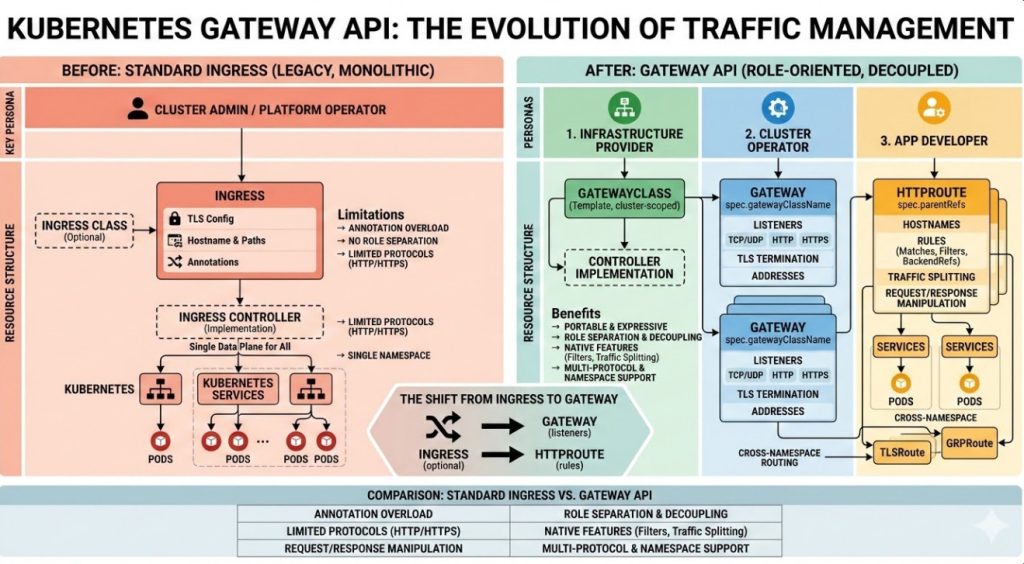
  • C2C (Cluster to Cluster): Moving from on-prem OpenShift to EKS, or GKE to EKS. This involves handling API version discrepancies, CNI (Container Network Interface) translation, and Ingress controller mapping.
  • Hybrid/Multi-Cloud: Spanning workloads across clusters. Complexity lies in service mesh implementation (Istio/Linkerd) and consistent security policies.

GigaCode Pro-Tip: In C2C migrations, strictly audit your API versions using tools like kubent (Kube No Trouble) before migration. Deprecated APIs in the source cluster (e.g., v1beta1 Ingress) will cause immediate deployment failures in a newer destination cluster version.

Strategic Patterns: The 6 Rs in a K8s Context

While the “6 Rs” of cloud migration are standard, their application in a Kubernetes migration is distinct.

1. Rehost (Lift and Shift)

Wrapping a legacy binary in a container without code changes. While fast, this often results in “fat containers” that behave like VMs (using SupervisorD, lacking liveness probes, local logging).

Best for: Low-criticality internal apps or immediate datacenter exits.

2. Replatform (Tweak and Shift)

Moving to containers while replacing backend services with cloud-native equivalents. For example, migrating a local MySQL instance inside a VM to Amazon RDS or Google Cloud SQL, while the application moves to Kubernetes.

3. Refactor (Re-architect)

Breaking a monolith into microservices to fully leverage Kubernetes primitives like scaling, self-healing, and distinct release cycles.

Technical Deep Dive: Migrating Stateful Workloads

Stateless apps are trivial to migrate. The true challenge in any Kubernetes migration is Data Gravity. Handling StatefulSets and PersistentVolumeClaims (PVCs) requires ensuring data integrity and minimizing Return to Operation (RTO) time.

CSI and Volume Snapshots

Modern migrations rely heavily on the Container Storage Interface (CSI). If you are migrating between clusters (C2C), you cannot simply “move” a PV. You must replicate the data.

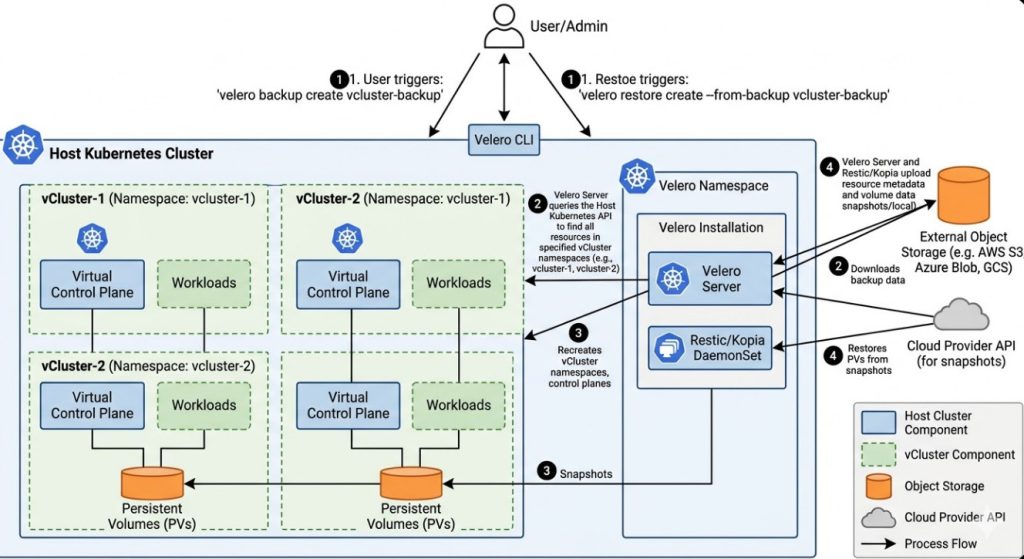
Migration Strategy: Velero with Restic/Kopia

Velero is the industry standard for backing up and restoring Kubernetes cluster resources and persistent volumes. For storage backends that do not support native snapshots across different providers, Velero integrates with Restic (or Kopia in newer versions) to perform file-level backups of PVC data.

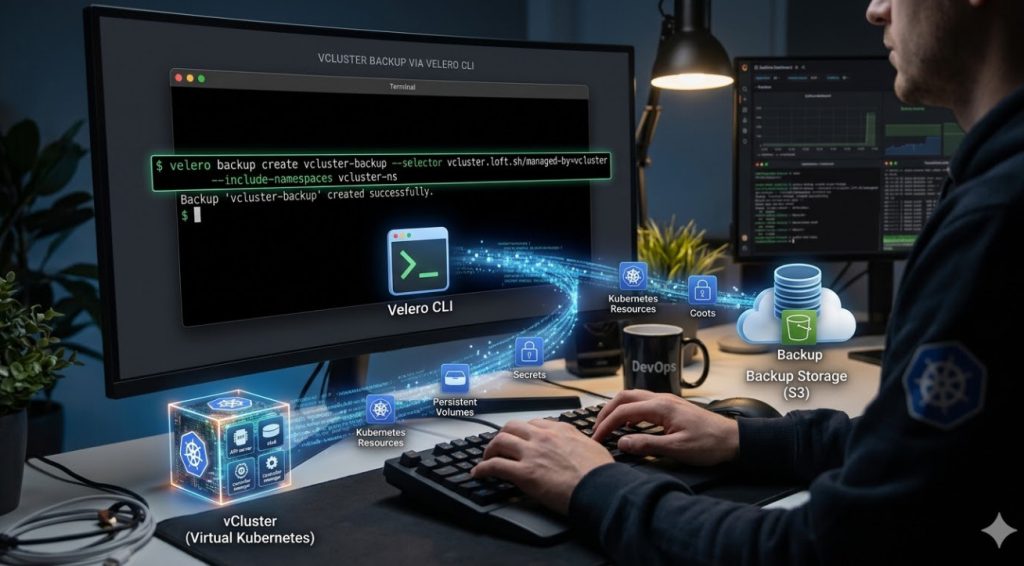
# Example: Creating a backup including PVCs using Velero
velero backup create migration-backup \
  --include-namespaces production-app \
  --default-volumes-to-fs-backup \
  --wait

Upon restoration in the target cluster, Velero reconstructs the Kubernetes objects (Deployments, Services, PVCs) and hydrates the data into the new StorageClass defined in the destination.

Database Migration Patterns

For high-throughput databases, file-level backup/restore is often too slow (high downtime). Instead, utilize replication:

  1. Setup a Replica: Configure a read-replica in the destination Kubernetes cluster (or managed DB service) pointing to the source master.
  2. Sync: Allow replication lag to drop to near zero.
  3. Promote: During the maintenance window, stop writes to the source, wait for the final sync, and promote the destination replica to master.

Zero-Downtime Cutover Strategies

Once the workload is running in the destination environment, switching traffic is the highest-risk phase. A “Big Bang” DNS switch is rarely advisable for high-traffic systems.

1. DNS Weighted Routing (Canary Cutover)

Utilize DNS providers (like AWS Route53 or Cloudflare) to shift traffic gradually. Start with a 5% weight to the new cluster’s Ingress IP.

2. Ingress Shadowing (Dark Traffic)

Before the actual cutover, mirror production traffic to the new cluster to validate performance without affecting real users. This can be achieved using Service Mesh capabilities (like Istio) or Nginx ingress annotations.

# Example: Nginx Ingress Mirroring Annotation
apiVersion: networking.k8s.io/v1
kind: Ingress
metadata:
  name: production-ingress
  annotations:
    nginx.ingress.kubernetes.io/mirror-target-service: "new-cluster-endpoint"
spec:
  rules:
  - host: api.example.com
    http:
      paths:
      - path: /
        pathType: Prefix
        backend:
          service:
            name: legacy-service
            port:
              number: 80

CI/CD and GitOps Adaptation

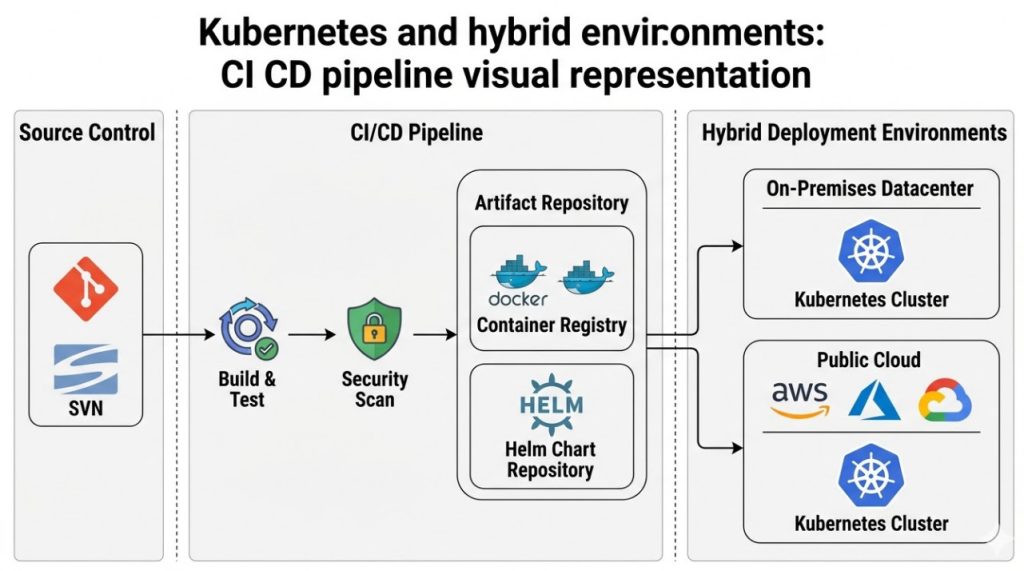
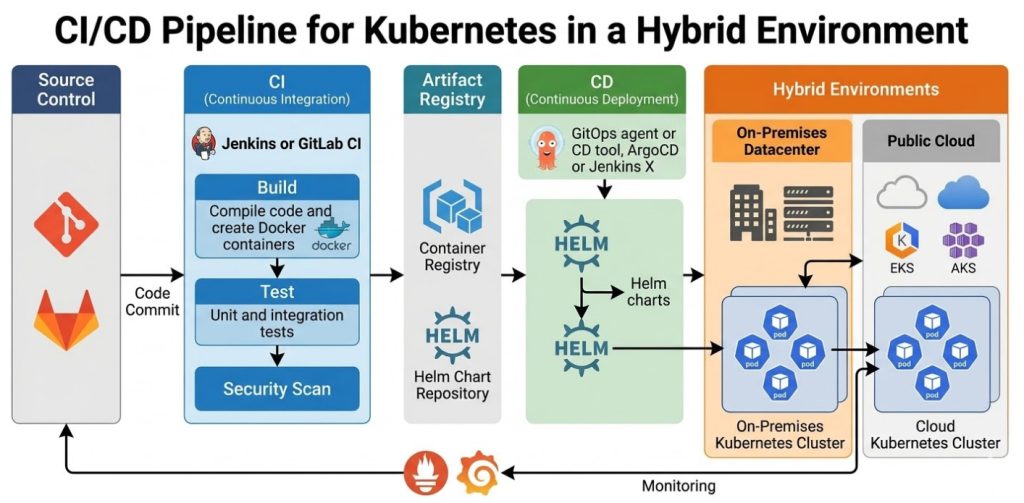
A Kubernetes migration is the perfect opportunity to enforce GitOps. Migrating pipeline logic (Jenkins, GitLab CI) directly to Kubernetes manifests managed by ArgoCD or Flux ensures that the “source of truth” for your infrastructure is version controlled.

When migrating pipelines:

  • Abstraction: Replace complex imperative deployment scripts (kubectl apply -f ...) with Helm Charts or Kustomize overlays.
  • Secret Management: Move away from environment variables stored in CI tools. Adopt Secrets Store CSI Driver (Vault/AWS Secrets Manager) or Sealed Secrets.

Frequently Asked Questions (FAQ)

How do I handle disparate Ingress Controllers during migration?

If moving from AWS ALB Ingress to Nginx Ingress, the annotations will differ significantly. Use a “Translation Layer” approach: Use Helm to template your Ingress resources. Define values files for the source (ALB) and destination (Nginx) that render the correct annotations dynamically, allowing you to deploy to both environments from the same codebase during the transition.

What is the biggest risk in Kubernetes migration?

Network connectivity and latency. Often, migrated services in the new cluster need to communicate with legacy services left behind on-prem or in a different VPC. Ensure you have established robust peering, VPNs, or Transit Gateways before moving applications to prevent timeouts.

Should I migrate stateful workloads to Kubernetes at all?

This is a contentious topic. For experts, the answer is: “Yes, if you have the operational maturity.” Operators (like the Prometheus Operator or Postgres Operator) make managing stateful apps easier, but if your team lacks deep K8s storage knowledge, offloading state to managed services (RDS, Cloud SQL) lowers the migration risk profile significantly.

Conclusion

Kubernetes migration is a multifaceted engineering challenge that extends far beyond simple containerization. It requires a holistic strategy encompassing data persistence, traffic shaping, and observability.

By leveraging tools like Velero for state transfer, adopting GitOps for configuration consistency, and utilizing weighted DNS for traffic cutovers, you can execute a migration that not only modernizes your stack but does so with minimal risk to the business. The goal is not just to be on Kubernetes, but to operate a platform that is resilient, scalable, and easier to manage than the legacy system it replaces. Thank you for reading the DevopsRoles page!

Boost Kubernetes: Fast & Secure with AKS Automatic

For years, the “Promise of Kubernetes” has been somewhat at odds with the “Reality of Kubernetes.” While K8s offers unparalleled orchestration capabilities, the operational overhead for Platform Engineering teams is immense. You are constantly balancing node pool sizing, OS patching, upgrade cadences, and security baselining. Enter Kubernetes AKS Automatic.

This is not just another SKU; it is Microsoft’s answer to the “NoOps” paradigm, structurally similar to GKE Autopilot but deeply integrated into the Azure ecosystem. For expert practitioners, AKS Automatic represents a shift from managing infrastructure to managing workload definitions.

In this guide, we will dissect the architecture of Kubernetes AKS Automatic, evaluate the trade-offs regarding control vs. convenience, and provide Terraform implementation strategies for production-grade environments.

The Architectural Shift: Why AKS Automatic Matters

In a Standard AKS deployment, the responsibility model is split. Microsoft manages the Control Plane, but you own the Data Plane (Worker Nodes). If a node runs out of memory, or if an OS patch fails, that is your pager going off.

Kubernetes AKS Automatic changes this ownership model. It applies an opinionated configuration that enforces best practices by default.

1. Node Autoprovisioning (NAP)

Forget about calculating the perfect VM size for your node pools. AKS Automatic utilizes Node Autoprovisioning. Instead of static Virtual Machine Scale Sets (VMSS) that you define, NAP analyzes the pending pods in the scheduler. It looks at CPU/Memory requests, taints, and tolerations, and then spins up the exact compute resources required to fit those pods.

Pro-Tip: Under the Hood
NAP functions similarly to the open-source project Karpenter. It bypasses the traditional Cluster Autoscaler’s logic of scaling existing groups and instead provisions just-in-time compute capacity directly against the Azure Compute API.

2. Guardrails and Policies

AKS Automatic comes with Azure Policy enabled and configured in “Deny” mode for critical security baselines. This includes:

  • Disallowing Privileged Containers: Unless explicitly exempted.
  • Enforcing Resource Quotas: Pods without resource requests may be mutated or rejected to ensure the scheduler can make accurate placement decisions.
  • Network Security: Strict network policies are applied by default.

Deep Dive: Technical Specifications

For the Senior SRE, understanding the boundaries of the platform is critical. Here is what the stack looks like:

FeatureSpecification in AKS Automatic
CNI PluginAzure CNI Overlay (Powered by Cilium)
IngressManaged NGINX (via Application Routing add-on)
Service MeshIstio (Managed add-on available and recommended)
OS UpdatesFully Automated (Node image upgrades handled by Azure)
SLAProduction SLA (Uptime SLA) enabled by default

Implementation: Deploying AKS Automatic via Terraform

As of the latest Azure providers, deploying an Automatic cluster requires specific configuration flags. Below is a production-ready snippet using the azurerm provider.

Note: Ensure you are using an azurerm provider version > 3.100 or the 4.x series.

resource "azurerm_kubernetes_cluster" "aks_automatic" {
  name                = "aks-prod-automatic-01"
  location            = azurerm_resource_group.rg.location
  resource_group_name = azurerm_resource_group.rg.name
  dns_prefix          = "aks-prod-auto"

  # The key differentiator for Automatic SKU
  sku_tier = "Standard" # Automatic features are enabled via run_command or specific profile flags in current GA
  
  # Automatic typically requires Managed Identity
  identity {
    type = "SystemAssigned"
  }

  # Enable the Automatic feature profile
  # Note: Syntax may vary slightly based on Preview/GA status updates
  auto_scaler_profile {
    balance_similar_node_groups = true
  }

  # Network Profile defaults for Automatic
  network_profile {
    network_plugin      = "azure"
    network_plugin_mode = "overlay"
    network_policy      = "cilium"
    load_balancer_sku   = "standard"
  }

  # Enabling the addons associated with Automatic behavior
  maintenance_window {
    allowed {
        day   = "Saturday"
        hours = [21, 23]
    }
  }
  
  tags = {
    Environment = "Production"
    ManagedBy   = "Terraform"
  }
}

Note on IaC: Microsoft is rapidly iterating on the Terraform provider support for the specific sku_tier = "Automatic" alias. Always check the official Terraform AzureRM documentation for the breaking changes in the latest provider release.

The Trade-offs: What Experts Need to Know

Moving to Kubernetes AKS Automatic is not a silver bullet. You are trading control for operational velocity. Here are the friction points you must evaluate:

1. No SSH Access

You generally cannot SSH into the worker nodes. The nodes are treated as ephemeral resources.

The Fix: Use kubectl debug node/<node-name> -it --image=mcr.microsoft.com/dotnet/runtime-deps:6.0 to launch a privileged ephemeral container for debugging.

2. DaemonSet Complexity

Since you don’t control the node pools, running DaemonSets (like heavy security agents or custom logging forwarders) can be trickier. While supported, you must ensure your DaemonSets tolerate the taints applied by the Node Autoprovisioning logic.

3. Cost Implications

While you save on “slack” capacity (because you don’t have over-provisioned static node pools waiting for traffic), the unit cost of compute in managed modes can sometimes be higher than Spot instances managed manually. However, for 90% of enterprises, the reduction in engineering hours spent on upgrades outweighs the raw compute premium.

Frequently Asked Questions (FAQ)

Is AKS Automatic suitable for stateful workloads?

Yes. AKS Automatic supports Azure Disk and Azure Files CSI drivers. However, because nodes can be recycled more aggressively by the autoprovisioner, ensure your applications handle `SIGTERM` gracefully and that your Persistent Volume Claims (PVCs) utilize Retain policies where appropriate to prevent accidental data loss during rapid scaling events.

Can I use Spot Instances with AKS Automatic?

Yes, AKS Automatic supports Spot VMs. You define this intent in your workload manifest (PodSpec) using nodeSelector or tolerations specifically targeting spot capability, and the provisioner will attempt to fulfill the request with Spot capacity.

How does this differ from GKE Autopilot?

Conceptually, they are identical. The main difference lies in the ecosystem integration. AKS Automatic is deeply coupled with Azure Monitor, Azure Policy, and the specific versions of Azure CNI. If you are a multi-cloud shop, the developer experience (DX) is converging, but the underlying network implementation (Overlay vs VPC-native) differs.

Conclusion

Kubernetes AKS Automatic is the maturity of the cloud-native ecosystem manifesting in a product. It acknowledges that for most organizations, the value is in the application, not in curating the OS version of the worker nodes.

For the expert SRE, AKS Automatic allows you to refocus your efforts on higher-order problems: Service Mesh configurations, progressive delivery strategies (Canary/Blue-Green), and application resilience, rather than nursing a Node Pool upgrade at 2 AM.

Next Step: If you are running a Standard AKS cluster today, try creating a secondary node pool with Node Autoprovisioning enabled (preview features permitting) or spin up a sandbox AKS Automatic cluster to test your Helm charts against the stricter security policies. Thank you for reading the DevopsRoles page!

Building the Largest Kubernetes Cluster: 130k Nodes & Beyond

The official upstream documentation states that a single Kubernetes Cluster supports up to 5,000 nodes. For the average enterprise, this is overkill. For hyperscalers and platform engineers designing the next generation of cloud infrastructure, it’s merely a starting point.

When we talk about managing a fleet of 130,000 nodes, we enter a realm where standard defaults fail catastrophically. We are no longer just configuring software; we are battling the laws of physics regarding network latency, etcd storage quotas, and Go routine scheduling. This article dissects the architectural patterns, kernel tuning, and control plane sharding required to push a Kubernetes Cluster (or a unified fleet of clusters) to these extreme limits.

The “Singularity” vs. The Fleet: Defining the 130k Boundary

Before diving into the sysctl flags, let’s clarify the architecture. Running 130k nodes in a single control plane is currently theoretically impossible with vanilla upstream Kubernetes due to the etcd hard storage limit (8GB recommended max) and the sheer volume of watch events.

Achieving this scale requires one of two approaches:

  1. The “Super-Cluster” (Heavily Modified): Utilizing sharded API servers and segmented etcd clusters (splitting events from resources) to push a single cluster ID towards 10k–15k nodes.
  2. The Federated Fleet: Managing 130k nodes across multiple clusters via a unified control plane (like Karmada or custom controllers) that abstracts the “cluster” concept away from the user.

We will focus on optimizing the unit—the Kubernetes Cluster—to its absolute maximum, as these optimizations are prerequisites for any large-scale fleet.

Phase 1: Surgical Etcd Tuning

At scale, etcd is almost always the first bottleneck. In a default Kubernetes Cluster, etcd stores both cluster state (Pods, Services) and high-frequency events. At 10,000+ nodes, the write IOPS from Kubelet heartbeats and event recording will bring the cluster to its knees.

1. Vertical Sharding of Etcd

You must split your etcd topology. Never run events in the same etcd instance as your cluster configuration.

# Example API Server flags to split storage
--etcd-servers="https://etcd-main-0:2379,https://etcd-main-1:2379,..."
--etcd-servers-overrides="/events#https://etcd-events-0:2379,https://etcd-events-1:2379,..."

2. Compression and Quotas

The default 2GB quota is insufficient. Increase the backend quota to 8GB (the practical safety limit). Furthermore, enable compression in the API server to reduce the payload size hitting etcd.

Pro-Tip: Monitor the etcd_mvcc_db_total_size_in_bytes metric religiously. If this hits the quota, your cluster enters a read-only state. Implement aggressive defragmentation schedules (e.g., every hour) for the events cluster, as high churn creates massive fragmentation.

Phase 2: The API Server & Control Plane

The kube-apiserver is the CPU-hungry brain. In a massive Kubernetes Cluster, the cost of serialization and deserialization (encoding/decoding JSON/Protobuf) dominates CPU cycles.

Priority and Fairness (APF)

Introduced to prevent controller loops from dDoSing the API server, APF is critical at scale. You must define custom FlowSchemas and PriorityLevelConfigurations. The default “catch-all” buckets will fill up instantly with 10k nodes, causing legitimate administrative calls (`kubectl get pods`) to time out.

apiVersion: flowcontrol.apiserver.k8s.io/v1beta3
kind: PriorityLevelConfiguration
metadata:
  name: system-critical-high
spec:
  type: Limited
  limited:
    assuredConcurrencyShares: 50
    limitResponse:
      type: Queue

Disable Unnecessary API Watches

Every node runs a kube-proxy and a kubelet. If you have 130k nodes, that is 130k watchers. If a significantly scoped change happens (like an EndpointSlice update), the API server must serialize that update 130k times.

  • Optimization: Use EndpointSlices instead of Endpoints.
  • Optimization: Set --watch-cache-sizes manually for high-churn resources to prevent cache misses which force expensive calls to etcd.

Phase 3: The Scheduler Throughput Challenge

The default Kubernetes scheduler evaluates every feasible node to find the “best” fit. With 130k nodes (or even 5k), scanning every node is O(N) complexity that results in massive scheduling latency.

You must tune the percentageOfNodesToScore parameter.

apiVersion: kubescheduler.config.k8s.io/v1
kind: KubeSchedulerConfiguration
profiles:
  - schedulerName: default-scheduler
percentageOfNodesToScore: 5  # Only look at 5% of nodes before making a decision

By lowering this to 5% (or even less in hyperscale environments), you trade a theoretical “perfect” placement for the ability to actually schedule pods in a reasonable timeframe.

Phase 4: Networking (CNI) at Scale

In a massive Kubernetes Cluster, iptables is the enemy. It relies on linear list traversal for rule updates. At 5,000 services, iptables becomes a noticeable CPU drag. At larger scales, it renders the network unusable.

IPVS vs. eBPF

While IPVS (IP Virtual Server) uses hash tables and offers O(1) complexity, modern high-scale clusters are moving entirely to eBPF (Extended Berkeley Packet Filter) solutions like Cilium.

  • Why: eBPF bypasses the host networking stack for pod-to-pod communication, significantly reducing latency and CPU overhead.
  • Identity Management: At 130k nodes, storing IP-to-Pod mappings is expensive. eBPF-based CNIs can use identity-based security policies rather than IP-based, which scales better in high-churn environments.

Phase 5: The Node (Kubelet) Perspective

Often overlooked, the Kubelet itself can dDoS the control plane.

  • Heartbeats: Adjust --node-status-update-frequency. In a 130k node environment (likely federated), you do not need 10-second heartbeats. Increasing this to 1 minute drastically reduces API server load.
  • Image Pulls: Serialize image pulls (`–serialize-image-pulls=false`) carefully. While parallel pulling is faster, it can spike disk I/O and network bandwidth, causing the node to go NotReady under load.

Frequently Asked Questions (FAQ)

What is the hard limit for a single Kubernetes Cluster?

As of Kubernetes v1.29+, the official scalability thresholds are 5,000 nodes, 150,000 total pods, and 300,000 total containers. Exceeding this requires significant customization of the control plane, specifically around etcd storage and API server caching mechanisms.

How do Alibaba and Google run larger clusters?

Tech giants often run customized versions of Kubernetes. They utilize techniques like “Cell” architectures (sharding the cluster into smaller failure domains), custom etcd storage drivers, and highly optimized networking stacks that replace standard Kube-Proxy implementations.

Should I use Federation or one giant cluster?

For 99% of use cases, Federation (multi-cluster) is superior. It provides better isolation, simpler upgrades, and drastically reduces the blast radius of a failure. Managing a single Kubernetes Cluster of 10k+ nodes is a high-risk operational endeavor.

Conclusion

Building a Kubernetes Cluster that scales toward the 130k node horizon is less about installing software and more about systems engineering. It requires a deep understanding of the interaction between the etcd key-value store, the Go runtime scheduler, and the Linux kernel networking stack.

While the allure of a single massive cluster is strong, the industry best practice for reaching this scale involves a sophisticated fleet management strategy. However, applying the optimizations discussed here-etcd sharding, APF tuning, and eBPF networking-will make your clusters, regardless of size, more resilient and performant. Thank you for reading the DevopsRoles page!

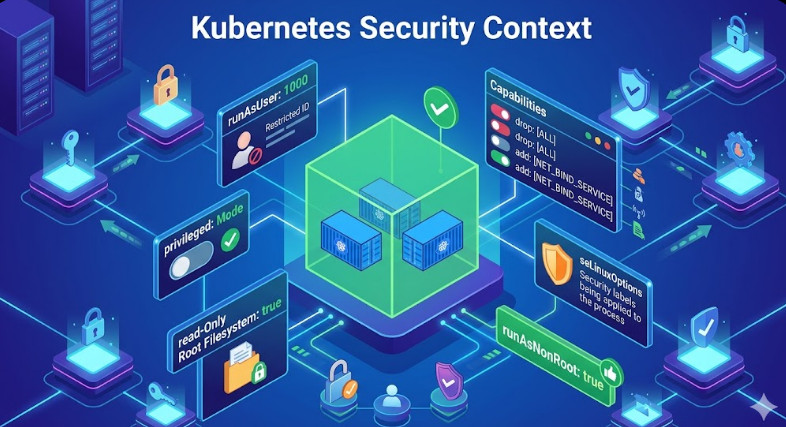
Kubernetes Security Diagram: Cheatsheet for Developers

Kubernetes has revolutionized how we deploy and manage applications, but its power and flexibility come with significant complexity, especially regarding security. For developers and DevOps engineers, navigating the myriad of security controls can be daunting. This is where a Kubernetes Security Diagram becomes an invaluable tool. It provides a mental model and a visual cheatsheet to understand the layered nature of K8s security, helping you build more resilient and secure applications from the ground up. This article will break down the components of a comprehensive security diagram, focusing on practical steps you can take at every layer.

Why a Kubernetes Security Diagram is Essential

A secure system is built in layers, like an onion. A failure in one layer should be contained by the next. Kubernetes is no different. Its architecture is inherently distributed and multi-layered, spanning from the physical infrastructure to the application code running inside a container. A diagram helps to:

  • Visualize Attack Surfaces: It allows teams to visually map potential vulnerabilities at each layer of the stack.
  • Clarify Responsibilities: In a cloud environment, the shared responsibility model can be confusing. A diagram helps delineate where the cloud provider’s responsibility ends and yours begins.
  • Enable Threat Modeling: By understanding how components interact, you can more effectively brainstorm potential threats and design appropriate mitigations.
  • Improve Communication: It serves as a common language for developers, operations, and security teams to discuss and improve the overall K8s security posture.

The most effective way to structure this diagram is by following the “4Cs of Cloud Native Security” model: Cloud, Cluster, Container, and Code. Let’s break down each layer.

Deconstructing the Kubernetes Security Diagram: The 4Cs

Imagine your Kubernetes environment as a set of concentric circles. The outermost layer is the Cloud (or your corporate data center), and the innermost is your application Code. Securing the system means applying controls at each of these boundaries.

Layer 1: Cloud / Corporate Data Center Security

This is the foundation upon which everything else is built. If your underlying infrastructure is compromised, no amount of cluster-level security can save you. Security at this layer involves hardening the environment where your Kubernetes nodes run.

Key Controls:

  • Network Security: Isolate your cluster’s network using Virtual Private Clouds (VPCs), subnets, and firewalls (Security Groups in AWS, Firewall Rules in GCP). Restrict all ingress and egress traffic to only what is absolutely necessary.
  • IAM and Access Control: Apply the principle of least privilege to the cloud provider’s Identity and Access Management (IAM). Users and service accounts that interact with the cluster infrastructure (e.g., creating nodes, modifying load balancers) should have the minimum required permissions.
  • Infrastructure Hardening: Ensure the virtual machines or bare-metal servers acting as your nodes are secure. This includes using hardened OS images, managing SSH key access tightly, and ensuring physical security if you’re in a private data center.
  • Provider-Specific Best Practices: Leverage security services offered by your cloud provider. For example, use AWS’s Key Management Service (KMS) for encrypting EBS volumes used by your nodes. Following frameworks like the AWS Well-Architected Framework is crucial.

Layer 2: Cluster Security

This layer focuses on securing the Kubernetes components themselves. It’s about protecting both the control plane (the “brains”) and the worker nodes (the “muscle”).

Control Plane Security

  • API Server: This is the gateway to your cluster. Secure it by enabling strong authentication (e.g., client certificates, OIDC) and authorization (RBAC). Disable anonymous access and limit access to trusted networks.
  • etcd Security: The `etcd` datastore holds the entire state of your cluster, including secrets. It must be protected. Encrypt `etcd` data at rest, enforce TLS for all client communication, and strictly limit access to only the API server.
  • Kubelet Security: The Kubelet is the agent running on each worker node. Use flags like --anonymous-auth=false and --authorization-mode=Webhook to prevent unauthorized requests.

Worker Node & Network Security

  • Node Hardening: Run CIS (Center for Internet Security) benchmarks against your worker nodes to identify and remediate security misconfigurations.
  • Network Policies: By default, all pods in a cluster can communicate with each other. This is a security risk. Use NetworkPolicy resources to implement network segmentation and restrict pod-to-pod communication based on labels.

Here’s an example of a NetworkPolicy that only allows ingress traffic from pods with the label app: frontend to pods with the label app: backend on port 8080.

apiVersion: networking.k8s.io/v1
kind: NetworkPolicy
metadata:
  name: backend-allow-frontend
  namespace: default
spec:
  podSelector:
    matchLabels:
      app: backend
  policyTypes:
  - Ingress
  ingress:
  - from:
    - podSelector:
        matchLabels:
          app: frontend
    ports:
    - protocol: TCP
      port: 8080

Layer 3: Container Security

This layer is all about securing the individual workloads running in your cluster. Security must be addressed both at build time (the container image) and at run time (the running container).

Image Security (Build Time)

  • Use Minimal Base Images: Start with the smallest possible base image (e.g., Alpine, or “distroless” images from Google). Fewer packages mean a smaller attack surface.
  • Vulnerability Scanning: Integrate image scanners (like Trivy, Clair, or Snyk) into your CI/CD pipeline to detect and block images with known vulnerabilities before they are ever pushed to a registry.
  • Don’t Run as Root: Define a non-root user in your Dockerfile and use the USER instruction.

Runtime Security

  • Security Contexts: Use Kubernetes SecurityContext to define privilege and access control settings for a Pod or Container. This is your most powerful tool for hardening workloads at runtime.
  • Pod Security Admission (PSA): The successor to Pod Security Policies, PSA enforces security standards (like Privileged, Baseline, Restricted) at the namespace level, preventing insecure pods from being created.
  • Runtime Threat Detection: Deploy tools like Falco or other commercial solutions to monitor container behavior in real-time and detect suspicious activity (e.g., a shell spawning in a container, unexpected network connections).

This manifest shows a pod with a restrictive securityContext, ensuring it runs as a non-root user with a read-only filesystem.

apiVersion: v1
kind: Pod
metadata:
  name: secure-pod-example
spec:
  containers:
  - name: nginx
    image: nginx:1.21
    securityContext:
      runAsNonRoot: true
      runAsUser: 1001
      allowPrivilegeEscalation: false
      readOnlyRootFilesystem: true
      capabilities:
        drop:
        - "ALL"
  # You need a writable volume for temporary files
  volumes:
  - name: tmp
    emptyDir: {}

Layer 4: Code Security

The final layer is the application code itself. A secure infrastructure can still be compromised by a vulnerable application.

Key Controls:

  • Secret Management: Never hardcode secrets (API keys, passwords, certificates) in your container images or manifests. Use Kubernetes Secrets, or for more robust security, integrate an external secrets manager like HashiCorp Vault or AWS Secrets Manager.
  • Role-Based Access Control (RBAC): If your application needs to talk to the Kubernetes API, grant it the bare minimum permissions required using a dedicated ServiceAccount, Role, and RoleBinding.
  • Service Mesh: For complex microservices architectures, consider using a service mesh like Istio or Linkerd. A service mesh can enforce mutual TLS (mTLS) for all service-to-service communication, provide fine-grained traffic control policies, and improve observability.

Here is an example of an RBAC Role that only allows a ServiceAccount to get and list pods in the default namespace.

apiVersion: rbac.authorization.k8s.io/v1
kind: Role
metadata:
  namespace: default
  name: pod-reader
rules:
- apiGroups: [""] # "" indicates the core API group
  resources: ["pods"]
  verbs: ["get", "list", "watch"]
---
apiVersion: rbac.authorization.k8s.io/v1
kind: RoleBinding
metadata:
  name: read-pods
  namespace: default
subjects:
- kind: ServiceAccount
  name: my-app-sa # The ServiceAccount used by your application
  apiGroup: ""
roleRef:
  kind: Role
  name: pod-reader
  apiGroup: rbac.authorization.k8s.io

Frequently Asked Questions

What is the most critical layer in Kubernetes security?

Every layer is critical. A defense-in-depth strategy is essential. However, the Cloud/Infrastructure layer is the foundation. A compromise at this level can undermine all other security controls you have in place.

How do Network Policies improve Kubernetes security?

They enforce network segmentation at Layer 3/4 (IP/port). By default, Kubernetes has a flat network where any pod can talk to any other pod. Network Policies act as a firewall for your pods, ensuring that workloads can only communicate with the specific services they are authorized to, drastically reducing the “blast radius” of a potential compromise.

What is the difference between Pod Security Admission (PSA) and Security Context?

SecurityContext is a setting within a Pod’s manifest that defines the security parameters for that specific workload (e.g., runAsNonRoot). Pod Security Admission (PSA) is a cluster-level admission controller that enforces security standards across namespaces. PSA acts as a gatekeeper, preventing pods that don’t meet a certain security standard (e.g., those requesting privileged access) from even being created in the first place.

Conclusion

Securing Kubernetes is not a one-time task but an ongoing process that requires vigilance at every layer of the stack. Thinking in terms of a layered defense model, as visualized by a Kubernetes Security Diagram based on the 4Cs, provides a powerful framework for developers and operators. It helps transform a complex ecosystem into a manageable set of security domains. By systematically applying controls at the Cloud, Cluster, Container, and Code layers, you can build a robust K8s security posture and confidently deploy your applications in production. Thank you for reading the DevopsRoles page!

Microservices Docker Kubernetes: A Comprehensive Guide

Building and deploying modern applications presents unique challenges. Traditional monolithic architectures struggle with scalability, maintainability, and deployment speed. Enter Microservices Docker Kubernetes, a powerful combination that addresses these issues head-on. This guide delves into the synergy between microservices, Docker, and Kubernetes, providing a comprehensive understanding of how they work together to streamline application development and deployment. We’ll cover everything from the fundamentals to advanced concepts, enabling you to confidently leverage this technology stack for your next project.

Understanding Microservices Architecture

Microservices architecture breaks down a large application into smaller, independent services. Each service focuses on a specific business function, allowing for greater modularity and flexibility. This approach offers several key advantages:

  • Improved Scalability: Individual services can be scaled independently based on demand.
  • Enhanced Maintainability: Smaller codebases are easier to understand, modify, and maintain.
  • Faster Deployment Cycles: Changes to one service don’t require redeploying the entire application.
  • Technology Diversity: Different services can use different technologies best suited for their specific tasks.

However, managing numerous independent services introduces its own set of complexities. This is where Docker and Kubernetes come into play.

Docker: Containerization for Microservices

Docker simplifies the packaging and deployment of microservices using containers. A Docker container packages an application and its dependencies into a single unit, ensuring consistent execution across different environments. This eliminates the “it works on my machine” problem, a common frustration in software development. Key Docker benefits in a Microservices Docker Kubernetes context include:

  • Portability: Containers run consistently across various platforms (development, testing, production).
  • Isolation: Containers isolate applications and their dependencies, preventing conflicts.
  • Lightweight: Containers are more lightweight than virtual machines, optimizing resource usage.
  • Version Control: Docker images can be versioned and managed like code, simplifying deployments and rollbacks.

Example: Dockerizing a Simple Microservice

Let’s consider a simple “Hello World” microservice written in Python:

This Dockerfile builds a Docker image containing the Python application and its dependencies. You can then build and run the image using the following commands:

from flask import Flask

app = Flask(__name__)

@app.route("/")
def hello():
    return "Hello, World!"

if __name__ == "__main__":
    app.run(debug=True, host='0.0.0.0', port=5000)

To Dockerize this, create a Dockerfile:

FROM python:3.9-slim-buster

WORKDIR /app

COPY requirements.txt .
RUN pip install --no-cache-dir -r requirements.txt

COPY . .

CMD ["python", "app.py"]

This Dockerfile builds a Docker image containing the Python application and its dependencies. You can then build and run the image using the following commands:

docker build -t hello-world .
docker run -p 5000:5000 hello-world

Microservices Docker Kubernetes: Orchestration with Kubernetes

While Docker simplifies containerization, managing numerous containers across multiple hosts requires a robust orchestration system. Kubernetes excels in this role. Kubernetes automates the deployment, scaling, and management of containerized applications. In the context of Microservices Docker Kubernetes, Kubernetes provides:

  • Automated Deployment: Kubernetes automates the deployment of containers across a cluster of machines.
  • Self-Healing: Kubernetes monitors containers and automatically restarts or replaces failed ones.
  • Horizontal Scaling: Kubernetes scales applications up or down based on demand.
  • Service Discovery: Kubernetes provides a service discovery mechanism, allowing microservices to easily find each other.
  • Load Balancing: Kubernetes distributes traffic across multiple instances of a service.

Kubernetes Deployment Example

A typical Kubernetes deployment manifest (YAML) for our “Hello World” microservice looks like this:


apiVersion: apps/v1
kind: Deployment
metadata:
name: hello-world-deployment
spec:
replicas: 3
selector:
matchLabels:
app: hello-world
template:
metadata:
labels:
app: hello-world
spec:
containers:
- name: hello-world-container
image: hello-world
ports:
- containerPort: 5000

This YAML file defines a deployment that creates three replicas of our “Hello World” microservice. You can apply this configuration using kubectl apply -f deployment.yaml.

Advanced Concepts in Microservices Docker Kubernetes

Building robust Microservices Docker Kubernetes deployments requires understanding more advanced concepts:

1. Ingress Controllers

Ingress controllers manage external access to your Kubernetes cluster, routing traffic to specific services. Popular options include Nginx and Traefik.

2. Service Meshes

Service meshes like Istio and Linkerd provide advanced capabilities like traffic management, security, and observability for microservices running in Kubernetes.

3. CI/CD Pipelines

Continuous Integration/Continuous Delivery (CI/CD) pipelines automate the build, test, and deployment process, improving efficiency and reducing errors. Tools like Jenkins, GitLab CI, and CircleCI integrate well with Docker and Kubernetes.

4. Monitoring and Logging

Effective monitoring and logging are crucial for maintaining a healthy and performant microservices architecture. Tools like Prometheus, Grafana, and Elasticsearch provide valuable insights into your application’s behavior.

Frequently Asked Questions

Q1: What are the benefits of using Docker and Kubernetes together?

Docker provides consistent containerized environments, while Kubernetes orchestrates those containers across a cluster, automating deployment, scaling, and management. This combination enables efficient and scalable microservices deployments.

Q2: Is Kubernetes suitable for all applications?

While Kubernetes is powerful, it might be overkill for small applications or those with simple deployment requirements. For simpler needs, simpler container orchestration solutions might be more appropriate.

Q3: How do I choose the right Kubernetes distribution?

Various Kubernetes distributions exist, including managed services (GKE, AKS, EKS) and self-hosted options (Rancher, Kubeadm). The choice depends on your infrastructure needs, budget, and expertise. Managed services often simplify operations but might be more expensive.

Q4: What are some common challenges when migrating to a microservices architecture?

Migrating to microservices can be complex, requiring careful planning and execution. Challenges include increased operational overhead, inter-service communication, data consistency, and monitoring complexity. A phased approach is often recommended.

Conclusion

Implementing a successful Microservices Docker Kubernetes architecture requires careful consideration of various factors. Understanding the strengths and weaknesses of each component – microservices for application design, Docker for containerization, and Kubernetes for orchestration – is crucial. By combining these technologies, you can create highly scalable, resilient, and maintainable applications. Remember to start with a well-defined strategy, focusing on incremental improvements and continuous learning as you build and deploy your microservices. Mastering Microservices Docker Kubernetes is a journey, not a destination, so embrace the learning process and leverage the vast resources available to optimize your workflow.

For further reading, refer to the official Kubernetes documentation here and Docker documentation here. Understanding the intricacies of service meshes is also highly recommended, and you can find more information about Istio here.Thank you for reading the DevopsRoles page!

Docker Swarm vs Kubernetes: Choosing the Right Container Orchestration Platform

Choosing the right container orchestration platform is crucial for any organization looking to deploy and manage containerized applications at scale. Two prominent players in this space are Docker Swarm and Kubernetes. Understanding the nuances of Docker Swarm Kubernetes and their respective strengths and weaknesses is vital for making an informed decision. This article provides a comprehensive comparison of these platforms, helping you determine which best suits your needs and infrastructure. We’ll delve into their architecture, features, scalability, and ease of use, ultimately guiding you towards the optimal solution for your container orchestration requirements.

Understanding Container Orchestration

Before diving into the specifics of Docker Swarm Kubernetes, let’s establish a foundational understanding of container orchestration. In essence, container orchestration automates the deployment, scaling, and management of containerized applications across a cluster of machines. This automation simplifies complex tasks, ensuring high availability, efficient resource utilization, and streamlined workflows. Without orchestration, managing even a small number of containers can become incredibly challenging, especially in dynamic environments.

Docker Swarm: Simplicity and Ease of Use

Docker Swarm is a native clustering solution for Docker. Its primary advantage lies in its simplicity and ease of use, making it a great choice for developers already familiar with the Docker ecosystem. Swarm integrates seamlessly with Docker Engine, requiring minimal learning curve to get started.

Architecture and Functionality

Docker Swarm employs a simple, master-worker architecture. A single manager node coordinates the cluster, while worker nodes execute containers. This architecture simplifies deployment and management, particularly for smaller-scale deployments. Swarm uses a built-in service discovery mechanism, making it straightforward to manage and scale applications.

Pros and Cons of Docker Swarm

  • Pros: Simple to learn and use, easy integration with Docker, good for smaller deployments, minimal operational overhead.
  • Cons: Less feature-rich compared to Kubernetes, limited scalability for large-scale deployments, less mature ecosystem and community support.

Kubernetes: Robustness and Scalability

Kubernetes, often referred to as K8s, is a far more powerful and complex container orchestration platform. While it has a steeper learning curve than Docker Swarm, it offers significantly enhanced features, scalability, and community support, making it the preferred choice for large-scale deployments and complex application architectures.

Architecture and Functionality

Kubernetes employs a more sophisticated master-worker architecture with a richer set of components, including a control plane (master nodes) and a data plane (worker nodes). The control plane manages the cluster state, schedules deployments, and ensures the health of the pods. The data plane hosts the actual containers.

Key Kubernetes Concepts

  • Pods: The smallest deployable unit in Kubernetes, typically containing one or more containers.
  • Deployments: Manage the desired state of a set of pods, ensuring the correct number of replicas are running.
  • Services: Abstract away the underlying pods, providing a stable IP address and DNS name for accessing applications.
  • Namespaces: Isolate resources and applications within the cluster, enhancing organization and security.

Pros and Cons of Kubernetes

  • Pros: Highly scalable and robust, extensive feature set, large and active community support, rich ecosystem of tools and integrations, supports advanced features like autoscaling and self-healing.
  • Cons: Steeper learning curve, more complex to manage, greater operational overhead, requires more advanced infrastructure knowledge.

Docker Swarm vs. Kubernetes: A Detailed Comparison

This section presents a direct comparison of Docker Swarm Kubernetes across various key aspects. This detailed analysis will assist in your decision-making process, allowing you to choose the most appropriate platform based on your needs.

FeatureDocker SwarmKubernetes
ScalabilityLimited, suitable for smaller deploymentsHighly scalable, designed for large-scale deployments
ComplexitySimple and easy to useComplex and requires advanced knowledge
Learning CurveShallowSteep
Feature RichnessBasic featuresExtensive features, including advanced networking, storage, and security
Community SupportSmaller communityLarge and active community
EcosystemLimited ecosystemRich ecosystem of tools and integrations
CostGenerally lower operational costsPotentially higher operational costs due to complexity

Choosing Between Docker Swarm and Kubernetes

The choice between Docker Swarm Kubernetes depends heavily on your specific needs and circumstances. Consider the following factors:

  • Scale of Deployment: For small-scale deployments with simple applications, Docker Swarm is sufficient. For large-scale deployments requiring high availability, scalability, and advanced features, Kubernetes is the better choice.
  • Team Expertise: If your team has extensive experience with Docker and a relatively small application, Docker Swarm is a good starting point. If your team has the skills and experience for the complexities of Kubernetes, it opens a world of advanced features and scaling options.
  • Application Complexity: Simple applications can be effectively managed with Docker Swarm. Complex applications requiring advanced networking, storage, and security features benefit from Kubernetes’ extensive capabilities.
  • Long-term Vision: If you anticipate significant growth in the future, Kubernetes is a more future-proof investment.

Frequently Asked Questions

Q1: Can I migrate from Docker Swarm to Kubernetes?

A1: Yes, migrating from Docker Swarm to Kubernetes is possible, although it requires planning and effort. Tools and strategies exist to help with the migration process, but it’s not a trivial undertaking. The complexity of the migration depends on the size and complexity of your application and infrastructure.

Q2: What are some common Kubernetes best practices?

A2: Some key Kubernetes best practices include using namespaces to organize resources, defining clear deployment strategies, utilizing persistent volumes for data storage, implementing proper resource requests and limits for containers, and employing robust monitoring and logging solutions.

Q3: Is Kubernetes suitable for small teams?

A3: While Kubernetes is commonly associated with large-scale deployments, it can be used by smaller teams. Managed Kubernetes services simplify many operational aspects, making it more accessible. However, smaller teams should carefully assess their resources and expertise before adopting Kubernetes.

Q4: What is the difference in cost between Docker Swarm and Kubernetes?

A4: The direct cost of Docker Swarm and Kubernetes is minimal (mostly just the compute resources required to run the cluster). The difference lies in operational cost. Docker Swarm generally has a lower operational cost due to its simplicity, while Kubernetes can be more expensive due to the increased complexity and potentially higher resource needs.

Conclusion

Choosing between Docker Swarm Kubernetes requires careful consideration of your specific needs and resources. Docker Swarm offers a simpler, more accessible solution for smaller-scale deployments, while Kubernetes provides the robustness and scalability needed for complex, large-scale applications. Understanding the strengths and weaknesses of each platform empowers you to make the right choice for your container orchestration strategy. Ultimately, the best choice depends on your current needs, projected growth, and team expertise. Weigh the pros and cons carefully to select the platform that best aligns with your long-term goals for your containerized infrastructure.

For further information, consult the official documentation for Docker Swarm and Kubernetes.

Additionally, explore articles and tutorials on Kubernetes from reputable sources to deepen your understanding. Thank you for reading the DevopsRoles page!

The Difference Between DevOps Engineer, SRE, and Cloud Engineer Explained

Introduction

In today’s fast-paced technology landscape, roles like DevOps Engineer, Site Reliability Engineer (SRE), and Cloud Engineer have become vital in the world of software development, deployment, and system reliability. Although these roles often overlap, they each serve distinct functions within an organization. Understanding the difference between DevOps Engineers, SREs, and Cloud Engineers is essential for anyone looking to advance their career in tech or make informed hiring decisions.

In this article, we’ll dive deep into each of these roles, explore their responsibilities, compare them, and help you understand which career path might be right for you.

What Is the Role of a DevOps Engineer?

DevOps Engineer: Overview

A DevOps Engineer is primarily focused on streamlining the software development lifecycle (SDLC) by bringing together development and operations teams. This role emphasizes automation, continuous integration, and deployment (CI/CD), with a primary goal of reducing friction between development and operations to improve overall software delivery speed and quality.

Key Responsibilities:

  • Continuous Integration/Continuous Deployment (CI/CD): DevOps Engineers set up automated pipelines that allow code to be continuously tested, built, and deployed into production.
  • Infrastructure as Code (IaC): Using tools like Terraform and Ansible, DevOps Engineers define and manage infrastructure through code, enabling version control, consistency, and repeatability.
  • Monitoring and Logging: DevOps Engineers implement monitoring tools to track system health, identify issues, and ensure uptime.
  • Collaboration: They act as a bridge between the development and operations teams, ensuring effective communication and collaboration.

Skills Required:

  • Automation tools (Jenkins, GitLab CI)
  • Infrastructure as Code (IaC) tools (Terraform, Ansible)
  • Scripting (Bash, Python)
  • Monitoring tools (Prometheus, Grafana)

What Is the Role of a Site Reliability Engineer (SRE)?

Site Reliability Engineer (SRE): Overview

The role of an SRE is primarily focused on maintaining the reliability, scalability, and performance of large-scale systems. While SREs share some similarities with DevOps Engineers, they are more focused on system reliability and uptime. SREs typically work with engineering teams to ensure that services are reliable and can handle traffic spikes or other disruptions.

Key Responsibilities:

  • System Reliability: SREs ensure that the systems are reliable and meet Service Level Objectives (SLOs), which are predefined metrics like uptime and performance.
  • Incident Management: They develop and implement strategies to minimize system downtime and reduce the time to recovery when outages occur.
  • Capacity Planning: SREs ensure that systems can handle future growth by predicting traffic spikes and planning accordingly.
  • Automation and Scaling: Similar to DevOps Engineers, SREs automate processes, but their focus is more on reliability and scaling.

Skills Required:

  • Deep knowledge of cloud infrastructure (AWS, GCP, Azure)
  • Expertise in monitoring tools (Nagios, Prometheus)
  • Incident response and root cause analysis
  • Scripting and automation (Python, Go)

What Is the Role of a Cloud Engineer?

Cloud Engineer: Overview

A Cloud Engineer specializes in the design, deployment, and management of cloud-based infrastructure and services. They work closely with both development and operations teams to ensure that cloud resources are utilized effectively and efficiently.

Key Responsibilities:

  • Cloud Infrastructure Management: Cloud Engineers design, deploy, and manage the cloud infrastructure that supports an organization’s applications.
  • Security and Compliance: They ensure that the cloud infrastructure is secure and compliant with industry regulations and standards.
  • Cost Optimization: Cloud Engineers work to minimize cloud resource costs by optimizing resource utilization.
  • Automation and Monitoring: Like DevOps Engineers, Cloud Engineers implement automation, but their focus is on managing cloud resources specifically.

Skills Required:

  • Expertise in cloud platforms (AWS, Google Cloud, Microsoft Azure)
  • Cloud networking and security best practices
  • Knowledge of containerization (Docker, Kubernetes)
  • Automation and Infrastructure as Code (IaC) tools

The Difference Between DevOps Engineer, SRE, and Cloud Engineer

While all three roles—DevOps Engineer, Site Reliability Engineer, and Cloud Engineer—are vital to the smooth functioning of tech operations, they differ in their scope, responsibilities, and focus areas.

Key Differences in Focus:

  • DevOps Engineer: Primarily focused on bridging the gap between development and operations, with an emphasis on automation and continuous deployment.
  • SRE: Focuses on the reliability, uptime, and performance of systems, typically dealing with large-scale infrastructure and high availability.
  • Cloud Engineer: Specializes in managing and optimizing cloud infrastructure, ensuring efficient resource use and securing cloud services.

Similarities:

  • All three roles emphasize automation, collaboration, and efficiency.
  • They each use tools that facilitate CI/CD, monitoring, and scaling.
  • A solid understanding of cloud platforms is crucial for all three roles, although the extent of involvement may vary.

Career Path Comparison:

  • DevOps Engineers often move into roles like Cloud Architects or SREs.
  • SREs may specialize in site reliability or move into more advanced infrastructure management roles.
  • Cloud Engineers often transition into Cloud Architects or DevOps Engineers, given the overlap between cloud management and deployment practices.

FAQs

  • What is the difference between a DevOps Engineer and a Cloud Engineer?
    A DevOps Engineer focuses on automating the SDLC, while a Cloud Engineer focuses on managing cloud resources and infrastructure.
  • What are the key responsibilities of a Site Reliability Engineer (SRE)?
    SREs focus on maintaining system reliability, performance, and uptime. They also handle incident management and capacity planning.
  • Can a Cloud Engineer transition into a DevOps Engineer role?
    Yes, with a strong understanding of automation and CI/CD, Cloud Engineers can transition into DevOps roles.
  • What skills are essential for a DevOps Engineer, SRE, or Cloud Engineer?
    Skills in automation tools, cloud platforms, monitoring systems, and scripting are essential for all three roles.
  • How do DevOps Engineers and SREs collaborate in a tech team?
    While DevOps Engineers focus on automation and CI/CD, SREs work on ensuring reliability, which often involves collaborating on scaling and incident response.
  • What is the career growth potential for DevOps Engineers, SREs, and Cloud Engineers?
    All three roles have significant career growth potential, with opportunities to move into leadership roles like Cloud Architect, Engineering Manager, or Site Reliability Manager.

External Links

  1. What is DevOps? – Amazon Web Services (AWS)
  2. Site Reliability Engineering: Measuring and Managing Reliability
  3. Cloud Engineering: Best Practices for Cloud Infrastructure
  4. DevOps vs SRE: What’s the Difference? – Atlassian
  5. Cloud Engineering vs DevOps – IBM

Conclusion

Understanding the difference between DevOps Engineer, SRE, and Cloud Engineer is crucial for professionals looking to specialize in one of these roles or for businesses building their tech teams. Each role offers distinct responsibilities and skill sets, but they also share some common themes, such as automation, collaboration, and system reliability. Whether you are seeking a career in one of these areas or are hiring talent for your organization, knowing the unique aspects of these roles will help you make informed decisions.

As technology continues to evolve, these positions will remain pivotal in ensuring that systems are scalable, reliable, and secure. Choose the role that best aligns with your skills and interests to contribute effectively to modern tech teams. Thank you for reading the DevopsRoles page!

Making K8s APIs Simpler for All Kubernetes Users

Introduction

Kubernetes (K8s) has revolutionized container orchestration, but its API complexities often challenge users. As Kubernetes adoption grows, simplifying K8s APIs ensures greater accessibility and usability for developers, DevOps engineers, and IT administrators. This article explores methods, tools, and best practices for making K8s APIs simpler for all Kubernetes users.

Why Simplifying K8s APIs Matters

Challenges with Kubernetes APIs

  • Steep Learning Curve: New users find K8s API interactions overwhelming.
  • Complex Configuration: YAML configurations and manifests require precision.
  • Authentication & Authorization: Managing RBAC (Role-Based Access Control) adds complexity.
  • API Versioning Issues: Deprecation and updates can break applications.

Strategies for Simplifying Kubernetes APIs

1. Using Kubernetes Client Libraries

Kubernetes provides client libraries for various programming languages, such as:

These libraries abstract raw API calls, providing simplified methods for managing Kubernetes resources.

2. Leveraging Kubernetes Operators

Operators automate complex workflows, reducing the need for manual API interactions. Some popular operators include:

  • Cert-Manager: Automates TLS certificate management.
  • Prometheus Operator: Simplifies monitoring stack deployment.
  • Istio Operator: Eases Istio service mesh management.

3. Implementing Helm Charts

Helm, the Kubernetes package manager, simplifies API interactions by allowing users to deploy applications using predefined templates. Benefits of Helm include:

  • Reusable Templates: Reduce redundant YAML configurations.
  • Version Control: Easily manage different application versions.
  • Simple Deployment: One command (helm install) instead of multiple API calls.

4. Using Kubernetes API Aggregation Layer

The API Aggregation Layer enables extending Kubernetes APIs with custom endpoints. Benefits include:

  • Custom API Resources: Reduce reliance on default Kubernetes API.
  • Enhanced Performance: Aggregated APIs optimize resource calls.

5. Adopting CRDs (Custom Resource Definitions)

CRDs simplify Kubernetes API interactions by allowing users to create custom resources tailored to specific applications. Examples include:

  • Defining custom workload types
  • Automating deployments with unique resource objects
  • Managing application-specific settings

6. Streamlining API Access with Service Meshes

Service meshes like Istio, Linkerd, and Consul simplify Kubernetes API usage by:

  • Automating Traffic Management: Reduce manual API configurations.
  • Improving Security: Provide built-in encryption and authentication.
  • Enhancing Observability: Offer tracing and monitoring features.

7. Using API Gateways

API gateways abstract Kubernetes API complexities by handling authentication, request routing, and response transformations. Examples:

  • Kong for Kubernetes
  • NGINX API Gateway
  • Ambassador API Gateway

8. Automating API Calls with Kubernetes Operators

Kubernetes operators manage lifecycle tasks without manual API calls. Examples include:

  • ArgoCD Operator: Automates GitOps deployments.
  • Crossplane Operator: Extends Kubernetes API for cloud-native infrastructure provisioning.

Practical Examples

Example 1: Deploying an Application Using Helm

helm install myapp stable/nginx

Instead of multiple kubectl apply commands, Helm simplifies the process with a single command.

Example 2: Accessing Kubernetes API Using Python Client

from kubernetes import client, config
config.load_kube_config()
v1 = client.CoreV1Api()
print(v1.list_pod_for_all_namespaces())

This Python script fetches all running pods using the Kubernetes API without requiring manual API calls.

Example 3: Creating a Custom Resource Definition (CRD)

apiVersion: apiextensions.k8s.io/v1
kind: CustomResourceDefinition
metadata:
  name: myresources.example.com
spec:
  group: example.com
  versions:
  - name: v1
    served: true
    storage: true
  scope: Namespaced
  names:
    plural: myresources
    singular: myresource
    kind: MyResource
    shortNames:
    - mr

CRDs allow users to define new resource types, making Kubernetes APIs more adaptable.

FAQs

1. Why is Kubernetes API complexity a challenge?

Kubernetes APIs involve intricate configurations, authentication mechanisms, and multiple versions, making them difficult to manage for beginners and experts alike.

2. How does Helm simplify Kubernetes API usage?

Helm provides predefined templates that reduce repetitive API calls, ensuring seamless application deployment.

3. What are Custom Resource Definitions (CRDs) in Kubernetes?

CRDs extend Kubernetes APIs, allowing users to define custom objects that suit their application needs.

4. How do service meshes help in API simplification?

Service meshes manage traffic routing, security, and observability without requiring manual API modifications.

5. Which tools help in abstracting Kubernetes API complexity?

Helm, Operators, CRDs, Service Meshes, API Gateways, and Kubernetes client libraries all contribute to simplifying Kubernetes API interactions.

External Resources

Conclusion

Making K8s APIs simpler for all Kubernetes users is crucial for enhancing adoption, usability, and efficiency. By leveraging tools like Helm, Operators, CRDs, and API Gateways, users can streamline interactions with Kubernetes, reducing complexity and boosting productivity. Kubernetes will continue evolving, and simplifying API access remains key to fostering innovation and growth in cloud-native ecosystems.Thank you for reading the DevopsRoles page!

Kubernetes vs OpenShift: A Comprehensive Guide to Container Orchestration

Introduction

In the realm of software development, containerization has revolutionized how applications are built, deployed, and managed. At the heart of this revolution are two powerful tools: Kubernetes and OpenShift. Both platforms are designed to manage containers efficiently, but they differ significantly in their features, ease of use, and enterprise capabilities. This article delves into the world of Kubernetes and OpenShift, comparing their core functionalities and highlighting scenarios where each might be the better choice.

Overview of Kubernetes vs OpenShift

Kubernetes

Kubernetes is an open-source container orchestration system originally developed by Google. It automates the deployment, scaling, and management of containerized applications. Kubernetes offers a flexible framework that can be installed on various platforms, including cloud services like AWS and Azure, as well as Linux distributions such as Ubuntu and Debian.

OpenShift

OpenShift, developed by Red Hat, is built on top of Kubernetes and extends its capabilities by adding features like integrated CI/CD pipelines, enhanced security, and a user-friendly interface. It is often referred to as a Platform-as-a-Service (PaaS) because it provides a comprehensive set of tools for enterprise applications, including support for Docker container images.

Core Features Comparison

Kubernetes Core Features

  • Container Orchestration: Automates deployment, scaling, and management of containers.
  • Autoscaling: Dynamically adjusts the number of replicas based on resource utilization.
  • Service Discovery: Enables communication between services within the cluster.
  • Health Checking and Self-Healing: Automatically detects and replaces unhealthy pods.
  • Extensibility: Supports a wide range of plugins and extensions.

OpenShift Core Features

  • Integrated CI/CD Pipelines: Simplifies application development and deployment processes.
  • Developer-Friendly Workflows: Offers a web console for easy application deployment and management.
  • Built-in Monitoring and Logging: Provides insights into application performance and issues.
  • Enhanced Security: Includes strict security policies and secure-by-default configurations.
  • Enterprise Support: Offers dedicated support and periodic updates for commercial versions.

Deployment and Management

Kubernetes Deployment

Kubernetes requires manual configuration for networking, storage, and security policies, which can be challenging for beginners. It is primarily managed through the kubectl command-line interface, offering fine-grained control but requiring a deep understanding of Kubernetes concepts.

OpenShift Deployment

OpenShift simplifies deployment tasks with its intuitive web console, allowing users to deploy applications with minimal effort. It integrates well with Red Hat Enterprise Linux Atomic Host (RHELAH), Fedora, or CentOS, though this limits platform flexibility compared to Kubernetes.

Scalability and Performance

Kubernetes Scalability

Kubernetes offers flexible scaling options, both vertically and horizontally, and employs built-in load-balancing mechanisms to ensure optimal performance and high availability.

OpenShift Scalability

OpenShift is optimized for enterprise workloads, providing enhanced performance and reliability features such as optimized scheduling and resource quotas. It supports horizontal autoscaling based on metrics like CPU or memory utilization.

Ecosystem and Community Support

Kubernetes Community

Kubernetes boasts one of the largest and most active open-source communities, offering extensive support, resources, and collaboration opportunities. The ecosystem includes a wide range of tools for container runtimes, networking, storage, CI/CD, and monitoring.

OpenShift Community

OpenShift has a smaller community primarily supported by Red Hat developers. While it offers dedicated support for commercial versions, the open-source version (OKD) relies on self-support.

Examples in Action

Basic Deployment with Kubernetes

To deploy a simple web application using Kubernetes, you would typically create a YAML file defining the deployment and service, then apply it using kubectl.

apiVersion: apps/v1
kind: Deployment
metadata:
  name: web-app
spec:
  replicas: 3
  selector:
    matchLabels:
      app: web-app
  template:
    metadata:
      labels:
        app: web-app
    spec:
      containers:
      - name: web-app
        image: nginx:latest
        ports:
        - containerPort: 80

---

apiVersion: v1
kind: Service
metadata:
  name: web-app-service
spec:
  selector:
    app: web-app
  ports:
  - name: http
    port: 80
    targetPort: 80
  type: LoadBalancer

Advanced CI/CD with OpenShift

OpenShift integrates seamlessly with Jenkins for CI/CD pipelines. You can create custom Jenkins images and automate application testing and deployment using OpenShift’s source-to-image feature.

# Example of creating a Jenkins image in OpenShift
oc new-app jenkins-ephemeral --name=jenkins
oc expose svc jenkins

Frequently Asked Questions

Q: What is the primary difference between Kubernetes and OpenShift?

A: Kubernetes is a basic container orchestration platform, while OpenShift is built on Kubernetes and adds features like CI/CD pipelines, enhanced security, and a user-friendly interface.

Q: Which platform is more scalable?

A: Both platforms are scalable, but Kubernetes offers more flexible scaling options, while OpenShift is optimized for enterprise workloads with features like optimized scheduling.

Q: Which has better security features?

A: OpenShift has stricter security policies and secure-by-default configurations, making it more secure out of the box compared to Kubernetes.

Q: What kind of support does each platform offer?

A: Kubernetes has a large community-driven support system, while OpenShift offers dedicated commercial support and self-support for its open-source version.

Conclusion

Choosing between Kubernetes and OpenShift depends on your specific needs and environment. Kubernetes provides flexibility and a wide range of customization options, making it ideal for those who prefer a hands-on approach. OpenShift, on the other hand, offers a more streamlined experience with built-in features that simplify application development and deployment, especially in enterprise settings. Whether you’re looking for a basic container orchestration system or a comprehensive platform with integrated tools, understanding the differences between Kubernetes and OpenShift will help you make an informed decision. Thank you for reading the DevopsRoles page!

For more information on Kubernetes and OpenShift, visit: