

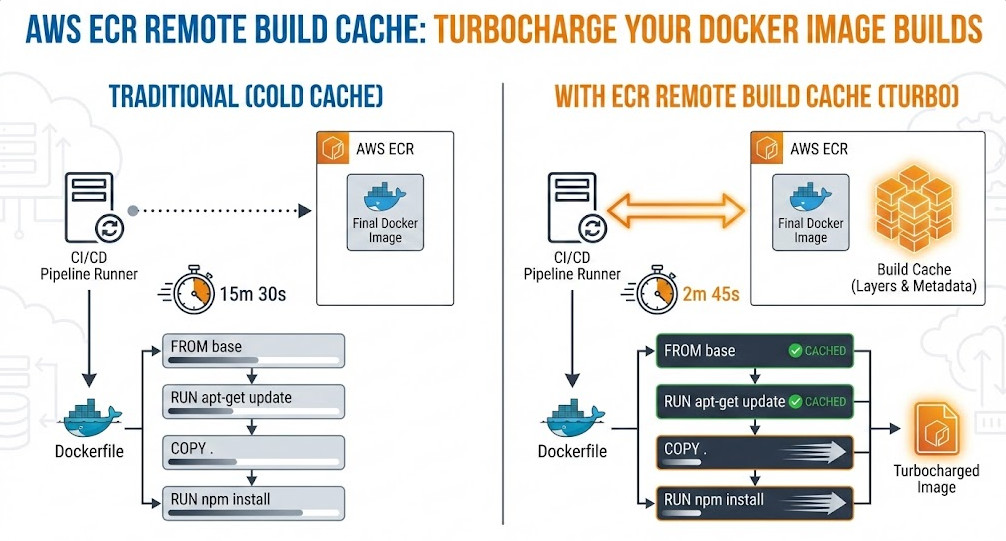
For high-velocity DevOps teams, the “cold cache” problem in ephemeral CI runners is a persistent bottleneck. You spin up a fresh runner, pull your base image, and then watch helplessly as Docker rebuilds layers that haven’t changed simply because the local context is empty. While solutions like inline caching helped, they bloated image sizes. S3 backends added latency.
The arrival of native support for ECR Remote Build Cache changes the game. By leveraging the advanced caching capabilities of Docker BuildKit and the OCI-compliant nature of Amazon Elastic Container Registry (ECR), you can now store cache artifacts directly alongside your images with high throughput and low latency. This guide explores how to implement this architecture to drastically reduce build times in your CI/CD pipelines.
Table of Contents
The Evolution of Build Caching: Why ECR?
Before diving into implementation, it is crucial to understand where the ECR Remote Build Cache fits in the Docker optimization hierarchy. Experts know that layer caching is the single most effective way to speed up builds, but the storage mechanism of that cache dictates its efficacy in a distributed environment.
- Local Cache: Fast but useless in ephemeral CI environments (GitHub Actions, AWS CodeBuild) where the workspace is wiped after every run.
- Inline Cache (`–cache-from`): Embeds cache metadata into the image itself.
Drawback: Increases the final image size and requires pulling the full image to extract cache data, wasting bandwidth. - Registry Cache (`type=registry`): The modern standard. It pushes cache blobs to a registry as a separate artifact.
The ECR Advantage: AWS ECR now fully supports the OCI artifacts and manifest lists required by BuildKit, allowing for granular, high-performance cache retrieval without the overhead of S3 or the bloat of inline caching.
Pro-Tip for SREs: Unlike inline caching, the ECR Remote Build Cache allows you to use
mode=max. This caches intermediate layers, not just the final stage layers. For multi-stage builds common in Go or Rust applications, this can prevent re-compiling dependencies even if the final image doesn’t contain them.
Architecture: How BuildKit Talks to ECR
The mechanism relies on the Docker BuildKit engine. When you execute a build with the type=registry exporter, BuildKit creates a cache manifest list. This list references the actual cache layers (blobs) stored in ECR.
Because ECR supports OCI 1.1 standards, it can distinguish between a runnable container image and a cache artifact, even though they reside in the same repository infrastructure. This allows your CI runners to pull only the cache metadata needed to determine a cache hit, rather than downloading gigabytes of previous images.
Implementation Guide
1. Prerequisites
Ensure your environment is prepped with the following:
- Docker Engine: Version 20.10.0+ (BuildKit enabled by default).
- Docker Buildx: The CLI plugin is required to access advanced cache exporters.
- IAM Permissions: Your CI role needs standard
ecr:GetAuthorizationToken,ecr:BatchCheckLayerAvailability,ecr:PutImage, andecr:InitiateLayerUpload.
2. Configuring the Buildx Driver
The default Docker driver often limits scope. For advanced caching, create a new builder instance using the docker-container driver. This unlocks features like multi-platform builds and advanced garbage collection.
# Create and bootstrap a new builder
docker buildx create --name ecr-builder \
  --driver docker-container \
  --use

# Verify the builder is running
docker buildx inspect --bootstrap
3. The Build Command
Here is the production-ready command to build an image and push both the image and the cache to ECR. Note the separation of tags: one for the runnable image (`:latest`) and one for the cache (`:build-cache`).
export ECR_REPO="123456789012.dkr.ecr.us-east-1.amazonaws.com/my-app"

docker buildx build \
  --platform linux/amd64,linux/arm64 \
  -t $ECR_REPO:latest \
  --cache-to type=registry,ref=$ECR_REPO:build-cache,mode=max,image-manifest=true,oci-mediatypes=true \
  --cache-from type=registry,ref=$ECR_REPO:build-cache \
  --push \
  .
Key Flags Explained:
mode=max: Caches all intermediate layers. Essential for multi-stage builds.image-manifest=true: Generates an image manifest for the cache, ensuring better compatibility with ECR’s lifecycle policies and visual inspection in the AWS Console.oci-mediatypes=true: Forces the use of standard OCI media types, preventing compatibility issues with stricter registry parsers.
CI/CD Integration: GitHub Actions Example
Below is a robust GitHub Actions workflow snippet that authenticates with AWS and utilizes the setup-buildx-action to handle the plumbing.
name: Build and Push to ECR

on:
  push:
    branches: [ "main" ]

jobs:
  build:
    runs-on: ubuntu-latest
    permissions:
      id-token: write # Required for AWS OIDC
      contents: read

    steps:
      - name: Checkout Code
        uses: actions/checkout@v4

      - name: Configure AWS Credentials
        uses: aws-actions/configure-aws-credentials@v4
        with:
          role-to-assume: arn:aws:iam::123456789012:role/GitHubActionsRole
          aws-region: us-east-1

      - name: Login to Amazon ECR
        id: login-ecr
        uses: aws-actions/amazon-ecr-login@v2

      - name: Set up Docker Buildx
        uses: docker/setup-buildx-action@v3

      - name: Build and Push
        uses: docker/build-push-action@v5
        env:
          ECR_REGISTRY: ${{ steps.login-ecr.outputs.registry }}
          ECR_REPOSITORY: my-app
        with:
          context: .
          push: true
          tags: ${{ env.ECR_REGISTRY }}/${{ env.ECR_REPOSITORY }}:latest
          # Advanced Cache Configuration
          cache-from: type=registry,ref=${{ env.ECR_REGISTRY }}/${{ env.ECR_REPOSITORY }}:build-cache
          cache-to: type=registry,ref=${{ env.ECR_REGISTRY }}/${{ env.ECR_REPOSITORY }}:build-cache,mode=max,image-manifest=true,oci-mediatypes=true
Expert Considerations: Storage & Lifecycle Management
One common pitfall when implementing ECR Remote Build Cache with mode=max is the rapid accumulation of untagged storage layers. Since BuildKit generates unique blobs for intermediate layers, your ECR storage costs can spike if left unchecked.
The Lifecycle Policy Fix
Do not apply a blanket “expire untagged images” policy immediately, as cache blobs often appear as untagged artifacts to the ECR control plane. Instead, use the tagPrefixList to protect your cache tags specifically, or rely on the fact that BuildKit manages the cache manifest references.
However, a safer approach for high-churn environments is to use a dedicated ECR repository for cache (e.g., my-app-cache) separate from your production images. This allows you to apply aggressive lifecycle policies to the cache repo (e.g., “expire artifacts older than 7 days”) without risking your production releases.
Frequently Asked Questions (FAQ)
1. Is ECR Remote Cache faster than S3-backed caching?
Generally, yes. While S3 is highly performant, using type=registry with ECR leverages the optimized Docker registry protocol. It avoids the overhead of the S3 API translation layer and benefits from ECR’s massive concurrent transfer limits within the AWS network.
2. Does this support multi-architecture builds?
Absolutely. This is one of the strongest arguments for using the ECR Remote Build Cache. BuildKit can store cache layers for both amd64 and arm64 in the same registry reference (manifest list), allowing a runner on one architecture to potentially benefit from architecture-independent layer caching (like copying source code) generated by another.
3. Why am I seeing “blob unknown” errors?
This usually happens if an aggressive ECR Lifecycle Policy deletes the underlying blobs referenced by your cache manifest. Ensure your lifecycle policies account for the active duration of your development sprints.

Conclusion
The ECR Remote Build Cache represents a maturation of cloud-native CI/CD. It moves us away from hacked-together solutions involving tarballs and S3 buckets toward a standardized, OCI-compliant method that integrates natively with the Docker toolchain.
By implementing the type=registry cache backend with mode=max, you aren’t just saving minutes on build times; you are reducing compute costs and accelerating the feedback loop for your entire engineering organization. For expert AWS teams, this is no longer an optional optimization—it is the standard. Thank you for reading the DevopsRoles page!