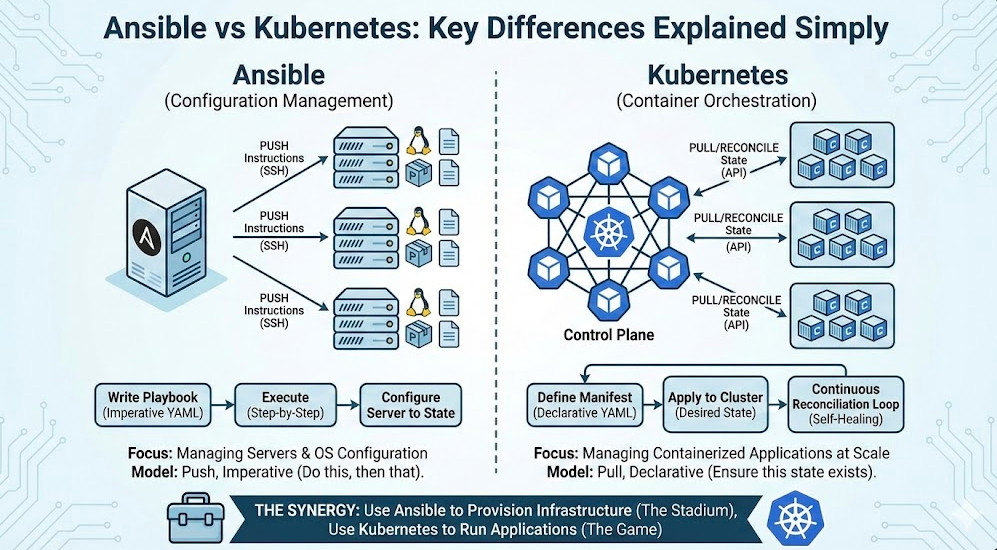
In the modern DevOps landscape, the debate often surfaces: Ansible vs Kubernetes. While both are indispensable heavyweights in the open-source automation ecosystem, comparing them directly is often like comparing a hammer to a 3D printer. They both build things, but the fundamental mechanics, philosophies, and use cases differ radically.
If you are an engineer designing a cloud-native platform, understanding the boundary where Configuration Management ends and Container Orchestration begins is critical. In this guide, we will dissect the architectural differences, explore the “Mutable vs. Immutable” infrastructure paradigms, and demonstrate why the smartest teams use them together.
Table of Contents
The Core Distinction: Scope and Philosophy
At a high level, the confusion stems from the fact that both tools use YAML and both “manage software.” However, they operate at different layers of the infrastructure stack.
Ansible: Configuration Management
Ansible is a Configuration Management (CM) tool. Its primary job is to configure operating systems, install packages, and manage files on existing servers. It follows a procedural or imperative model (mostly) where tasks are executed in a specific order to bring a machine to a desired state.
Pro-Tip for Experts: While Ansible modules are idempotent, the playbook execution is linear. Ansible connects via SSH (agentless), executes a Python script, and disconnects. It does not maintain a persistent “watch” over the state of the system once the playbook finishes.
Kubernetes: Container Orchestration
Kubernetes (K8s) is a Container Orchestrator. Its primary job is to schedule, scale, and manage the lifecycle of containerized applications across a cluster of nodes. It follows a strictly declarative model based on Control Loops.
Pro-Tip for Experts: Unlike Ansible’s “fire and forget” model, Kubernetes uses a Reconciliation Loop. The Controller Manager constantly watches the current state (in etcd) and compares it to the desired state. If a Pod dies, K8s restarts it automatically. If you delete a Deployment’s pod, K8s recreates it. Ansible would not fix this configuration drift until the next time you manually ran a playbook.
Architectural Deep Dive: How They Work
To truly understand the Ansible vs Kubernetes dynamic, we must look at how they communicate with infrastructure.
Ansible Architecture: Push Model
[Image of Ansible Architecture]
Ansible utilizes a Push-based architecture.
- Control Node: Where you run the `ansible-playbook` command.
- Inventory: A list of IP addresses or hostnames.
- Transport: SSH (Linux) or WinRM (Windows).
- Execution: Pushes small Python programs to the target, executes them, and captures the output.
Kubernetes Architecture: Pull/Converge Model
[Image of Kubernetes Architecture]
Kubernetes utilizes a complex distributed architecture centered around an API.
- Control Plane: The API Server, Scheduler, and Controllers.
- Data Store: etcd (stores the state).
- Worker Nodes: Run the `kubelet` agent.
- Execution: The `kubelet` polls the API Server (Pull), sees a generic assignment (e.g., “Run Pod X”), and instructs the container runtime (Docker/containerd) to spin it up.
Code Comparison: Installing Nginx
Let’s look at how a simple task—getting an Nginx server running—differs in implementation.
Ansible Playbook (Procedural Setup)
Here, we are telling the server exactly what steps to take to install Nginx on the bare metal OS.
---
- name: Install Nginx
  hosts: webservers
  become: yes
  tasks:
    - name: Ensure Nginx is installed
      apt:
        name: nginx
        state: present
        update_cache: yes

    - name: Start Nginx service
      service:
        name: nginx
        state: started
        enabled: yes
Kubernetes Manifest (Declarative State)
Here, we describe the desired result. We don’t care how K8s installs it or on which node it lands; we just want 3 copies running.
apiVersion: apps/v1
kind: Deployment
metadata:
  name: nginx-deployment
spec:
  replicas: 3
  selector:
    matchLabels:
      app: nginx
  template:
    metadata:
      labels:
        app: nginx
    spec:
      containers:
      - name: nginx
        image: nginx:1.14.2
        ports:
        - containerPort: 80
Detailed Comparison Table
Below is a technical breakdown of Ansible vs Kubernetes across key operational vectors.
| Feature | Ansible | Kubernetes |
|---|---|---|
| Primary Function | Configuration Management (CM) | Container Orchestration |
| Infrastructure Paradigm | Mutable (Updates existing servers) | Immutable (Replaces containers/pods) |
| Architecture | Agentless, Push Model (SSH) | Agent-based, Pull/Reconcile Model |
| State Management | Check mode / Idempotent runs | Continuous Reconciliation Loop (Self-healing) |
| Language | Python (YAML for config) | Go (YAML for config) |
| Scaling | Manual (Update inventory + run playbook) | Automatic (Horizontal Pod Autoscaler) |
Better Together: The Synergy
The most effective DevOps engineers don’t choose between Ansible and Kubernetes; they use them to complement each other.
1. Infrastructure Provisioning (Day 0)
Kubernetes cannot install itself (easily). You need physical or virtual servers configured with the correct OS dependencies, networking settings, and container runtimes before K8s can even start.
The Workflow: Use Ansible to provision the underlying infrastructure, harden the OS, and install container runtimes (containerd/CRI-O). Then, use tools like Kubespray (which is essentially a massive set of Ansible Playbooks) to bootstrap the Kubernetes cluster.
2. The Ansible Operator
For teams deep in Ansible knowledge who are moving to Kubernetes, the Ansible Operator SDK is a game changer. It allows you to wrap standard Ansible roles into a Kubernetes Operator. This brings the power of the K8s “Reconciliation Loop” to Ansible automation.
Frequently Asked Questions (FAQ)
Can Ansible replace Kubernetes?
No. While Ansible can manage Docker containers directly using the `docker_container` module, it lacks the advanced scheduling, service discovery, self-healing, and auto-scaling capabilities inherent to Kubernetes. For simple, single-host container deployments, Ansible is sufficient. For distributed microservices, you need Kubernetes.
Can Kubernetes replace Ansible?
Partially, but not fully. Kubernetes excels at managing the application layer. However, it cannot manage the underlying hardware, OS patches, or kernel tuning of the nodes it runs on. You still need a tool like Ansible (or Terraform/Ignition) to manage the base infrastructure.
What is Kubespray?
Kubespray is a Kubernetes incubator project that uses Ansible playbooks to deploy production-ready Kubernetes clusters. It bridges the gap, allowing you to use Ansible’s inventory management to build K8s clusters.
Conclusion
When analyzing Ansible vs Kubernetes, the verdict is clear: they are tools for different stages of the lifecycle. Ansible excels at the imperative setup of servers and the heavy lifting of OS configuration. Kubernetes reigns supreme at the declarative management of containerized applications at scale.
The winning strategy? Use Ansible to build the stadium (infrastructure), and use Kubernetes to manage the game (applications) played inside it.
Would you like me to generate a sample Ansible playbook for bootstrapping a Kubernetes worker node?
Thank you for reading the DevopsRoles page!