

Let me tell you about a catastrophic Friday release from back in 2018.
My team pushed a massive update for a global streaming client, all green lights in staging. We popped the champagne.
Ten minutes later, the monitoring board lit up red. Zero traffic from the entire European Union.
Why? Because our firewalls dropped international requests, and our test suites ran exclusively from a server in Ohio. Tackling Geo-Blocking in QA before production is not an option; it is a survival requirement.
If you have ever tried to test location-specific features, you know the pain. You hit an invisible wall of IP bans and 403 Forbidden errors.
It gets worse when the infrastructure team leaves you completely in the dark. No documentation, no architecture maps, just a vague “figure it out” from upper management.

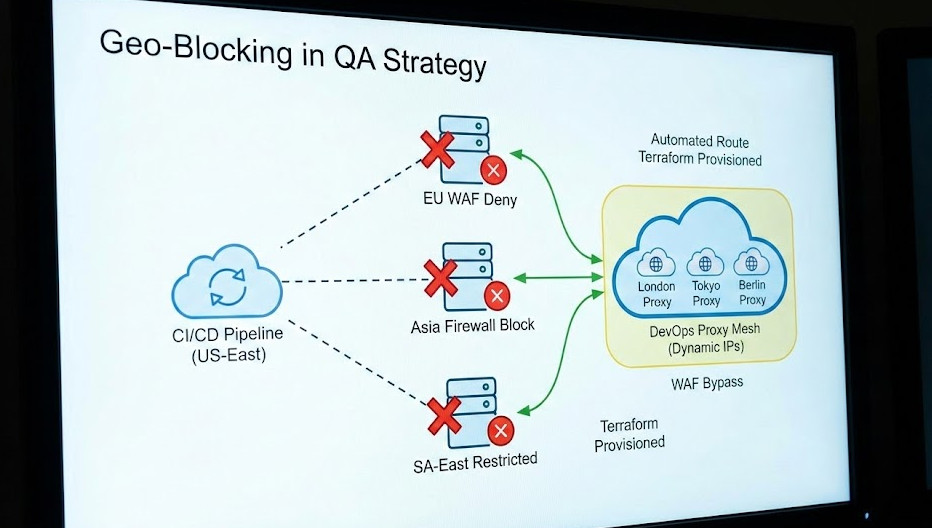
Table of Contents
The Brutal Reality of Geo-Blocking in QA
So, what exactly are we fighting against here?
Modern Web Application Firewalls (WAFs) are ruthless. They use massive databases to cross-reference your testing server’s IP against known geographical locations.
If your CI/CD pipeline lives in AWS US-East, but you are testing a GDPR-compliance banner meant for Germany, the WAF shuts you down immediately.
Testing Geo-Blocking in QA usually leads engineers to reach for the easiest, worst possible tool: a consumer VPN.
I cannot stress this enough: desktop VPNs are useless for automated deployment pipelines.
They drop connections, require manual desktop client interactions, and completely ruin your headless browser tests.
Why Traditional VPNs Fail the DevOps Test
You think your standard $5/month VPN account is going to cut it for a pipeline running 500 tests a minute? Think again.
First, VPN IP addresses are public knowledge. Enterprise firewalls subscribe to lists of known VPN exits and block them instantly.
Second, how do you automate a GUI-based VPN client inside a headless Docker container running on a Linux CI runner?
You don’t. It is a fragile, flaky mess that leads to false negatives in your test results.
We need a programmable, infrastructure-as-code solution. We need a DevOps approach.
If you want to read a great community perspective on this exact struggle, check out this developer’s breakdown on overcoming geo-blocking without documentation.
A DevOps-Driven Approach to Geo-Blocking in QA
If we want reliable automated testing across borders, we have to build our own proxy mesh.
This means deploying lightweight, disposable proxy servers in the target regions. We spin them up, route our tests through them, and tear them down.
This completely solves the Geo-Blocking in QA problem because the WAF sees legitimate cloud provider IPs from the correct region.
It is fast, it is scalable, and best of all, it is entirely controllable via code.
Let’s look at how I set this up for a major e-commerce client last year.
Step 1: Automated Infrastructure with Terraform
We start by writing a Terraform script to deploy a tiny EC2 instance or DigitalOcean droplet in our target country.
For this example, let’s say we need to simulate a user in London. We deploy the server and install a simple Squid proxy on it.
We run this as a pre-test step in our GitHub Actions pipeline.
# Terraform snippet to spin up a UK proxy
resource "aws_instance" "uk_proxy" {
  ami           = "ami-0abcdef1234567890" # Ubuntu Server
  instance_type = "t3.micro"
  region        = "eu-west-2" # London

  user_data = <<-EOF
              #!/bin/bash
              apt-get update
              apt-get install -y squid
              systemctl enable squid
              systemctl start squid
              EOF

  tags = {
    Name = "QA-Geo-Proxy-UK"
  }
}
Now, we have a clean, untainted IP address physically located in the UK.
Because we spun it up dynamically, it’s highly unlikely to be on a WAF blacklist yet.
For a deeper dive into managing infrastructure states, read up on the official HashiCorp documentation.
Step 2: Routing the QA Tests
The next hurdle is getting your automated test framework to actually use this new proxy.
Whether you use Selenium, Cypress, or Playwright, you must inject the proxy configuration into the browser context.
This is where most junior QA engineers get stuck. They try to route the whole CI server’s traffic, which breaks the connection to the code repository.
You only want to route the browser’s traffic. Here is how you do it in Playwright.
// Playwright setup for Geo-Blocking in QA
const { chromium } = require('playwright');

async function runGeoTest(proxyIp) {
  const browser = await chromium.launch({
    proxy: {
      server: `http://${proxyIp}:3128`,
    }
  });

  const context = await browser.newContext({
    geolocation: { longitude: -0.1276, latitude: 51.5072 }, // London coords
    permissions: ['geolocation']
  });

  const page = await context.newPage();
  await page.goto('https://your-app-url.com');

  // Verify region-specific content here
  console.log("Successfully bypassed regional blocks!");

  await browser.close();
}
Notice that we also spoof the HTML5 Geolocation API coordinates.
Many modern web apps check both the IP address and the browser’s internal GPS coordinates. You must spoof both.
If the IP says London, but the browser API says Ohio, the app will flag you as suspicious.
Need more context on browser permissions? Check the MDN Web Docs for the exact specifications.
Handling the “Without Documentation” Nightmare
Let’s address the elephant in the room. What happens when your own security team refuses to tell you how the WAF is configured?
This is the “without documentation” part of the job that separates the veterans from the rookies.
You have to treat your own application like a black box and reverse-engineer the defenses.
When dealing with Geo-Blocking in QA blind, I start by analyzing HTTP headers.
Header Injection and Packet Sniffing
Sometimes, firewalls aren’t doing deep packet inspection on the IP level.
Instead, they might rely on headers passed through a CDN, like Cloudflare or AWS CloudFront.
You can sometimes bypass the geographic block entirely by injecting specific headers into your test requests.
Try injecting X-Forwarded-For with an IP address from your target region.
Or, if you are behind Cloudflare, look into spoofing the CF-IPCountry header in your lower environments.
This is a dirty trick, but it saves thousands of dollars in infrastructure costs if it works.
Of course, this requires the application code to trust incoming headers, which is a massive security flaw in production.
But in a staging environment? It is a perfectly valid workaround to get your tests passing.


FAQ Section
- Why is Geo-Blocking in QA necessary?
Because modern applications display different content, currencies, and compliance banners based on the user’s location. If you don’t test it, your foreign users will encounter fatal bugs.
- Can I just use a free proxy list?
Absolutely not. Free proxies are notoriously slow, incredibly insecure, and almost universally blacklisted by enterprise WAFs. You will waste days debugging timeouts.
- How much does a DevOps proxy mesh cost?
Pennies. By spinning up a cloud instance strictly for the duration of the 5-minute test run and destroying it immediately, you only pay for fractions of an hour.
- What if my WAF blocks cloud provider IPs?
This happens with ultra-strict setups. In this case, you must route your automated tests through residential proxy networks (like Bright Data or Oxylabs), which route traffic through actual home ISPs.
Conclusion: Stop letting undocumented network configurations break your CI/CD pipelines.
By treating your test traffic exactly like your infrastructure—using code, automation, and targeted proxies-you take back control.
Conquering Geo-Blocking in QA isn’t just about making a test pass; it’s about guaranteeing a flawless experience for your global user base. Thank you for reading the DevopsRoles page!