In this tutorial, How to fix the error Vagrant No VirtualBox Guest Additions installation is found. I use a laptop and run the command vagrant up for the NFS server then the error “umount: /mnt: not mounted“
ERROR umount: /mnt: not mounted
E:\Vagrant_VMS\NFS_server>vagrant up

Error: Nothing to do
Unmounting Virtualbox Guest Additions ISO from: /mnt
umount: /mnt: not mounted
==> servernfs: Checking for guest additions in VM...
    servernfs: No guest additions were detected on the base box for this VM! Guest
    servernfs: additions are required for forwarded ports, shared folders, host only
    servernfs: networking, and more. If SSH fails on this machine, please install
    servernfs: the guest additions and repackage the box to continue.
    servernfs:
    servernfs: This is not an error message; everything may continue to work properly,
    servernfs: in which case you may ignore this message.
The following SSH command responded with a non-zero exit status.
Vagrant assumes that this means the command failed!

umount /mnt

Stdout from the command:


Stderr from the command:

umount: /mnt: not mounted
Vagrant No VirtualBox Guest Additions installation found fixed
I have uninstalled vagrant-vbguest and installed vagrant-vbguest.
The output uninstall and install vagrant-vbguest as below
E:\Vagrant_VMS\NFS_server>vagrant plugin uninstall vagrant-vbguest
Uninstalling the 'vagrant-vbguest' plugin...
Successfully uninstalled micromachine-3.0.0
Successfully uninstalled vagrant-vbguest-0.27.0

E:\Vagrant_VMS\NFS_server>vagrant plugin install vagrant-vbguest --plugin-version 0.21
Installing the 'vagrant-vbguest --version '0.21'' plugin. This can take a few minutes...
Fetching micromachine-3.0.0.gem
Fetching vagrant-vbguest-0.21.0.gem
Installed the plugin 'vagrant-vbguest (0.21.0)'!
As a result, I have to fix it!
E:\Vagrant_VMS\NFS_server>vagrant reload
==> servernfs: Attempting graceful shutdown of VM...
==> servernfs: Checking if box 'centos/7' version '2004.01' is up to date...
==> servernfs: Clearing any previously set forwarded ports...
==> servernfs: Clearing any previously set network interfaces...
==> servernfs: Preparing network interfaces based on configuration...
    servernfs: Adapter 1: nat
    servernfs: Adapter 2: hostonly
==> servernfs: Forwarding ports...
    servernfs: 22 (guest) => 2222 (host) (adapter 1)
==> servernfs: Booting VM...
==> servernfs: Waiting for machine to boot. This may take a few minutes...
    servernfs: SSH address: 127.0.0.1:2222
    servernfs: SSH username: vagrant
    servernfs: SSH auth method: private key
    servernfs: Warning: Connection aborted. Retrying...
==> servernfs: Machine booted and ready!
[servernfs] GuestAdditions 6.1.14 running --- OK.
==> servernfs: Checking for guest additions in VM...
==> servernfs: Configuring and enabling network interfaces...
==> servernfs: Rsyncing folder: /cygdrive/e/MyData/Vagrant_VMS/NFS_server/ => /vagrant
==> servernfs: Rsyncing folder: /cygdrive/e/MyData/Vagrant_VMS/NFS_server/NFS_Volumn/ => /home/vagrant/nfs_test
==> servernfs: Machine already provisioned. Run `vagrant provision` or use the `--provision`
==> servernfs: flag to force provisioning. Provisioners marked to run always will still run.
Youtube Vagrant No VirtualBox Guest Additions installation found [Fixed]
Conclusion
You have fixed Vagrant No VirtualBox. I hope will this your helpful. Thank you for reading the DevopsRoles page!
In this tutorial, How to Install Vagrant and VirtualBox on Fedora. You use Vagrant for DevOps professionals and coder sysadmin. I will be installing VirtualBox and Vagrant on My Laptop is Fedora 32.
How to Install Vagrant and VirtualBox
Check CPU has Intel VT or AMD-V Virtualization extensions
cd /tmp/
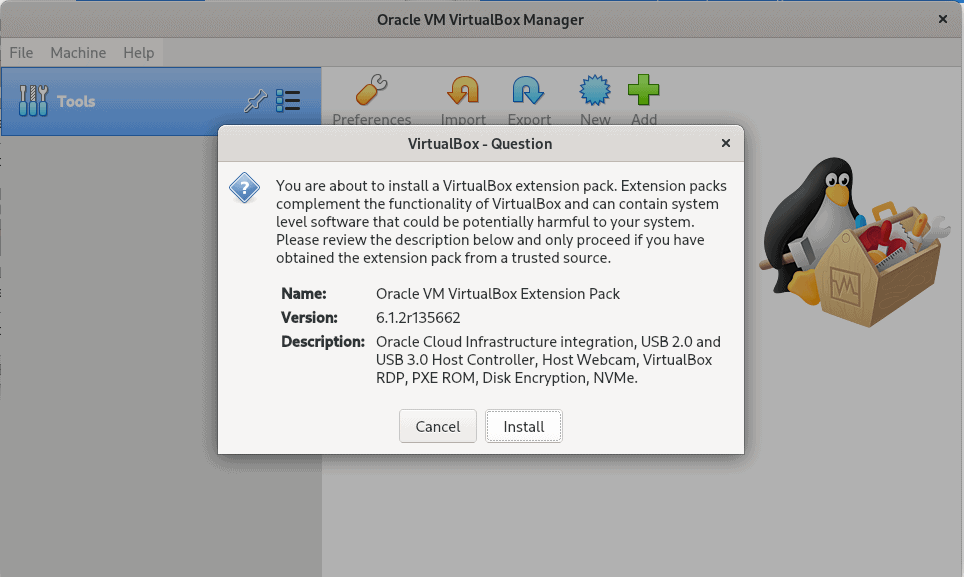
wget https://download.virtualbox.org/virtualbox/6.1.2/Oracle_VM_VirtualBox_Extension_Pack-6.1.2.vbox-extpack
Install the extension pack by clicking on the Downloaded file. The picture below
Install Vagrant on Fedora
Run command on your terminal as below
dnf -y install vagrant
Test Vagrant and Virtualbox
Create a minimal Vagrantfile
$ mkdir vagrant-test
$ cd vagrant-test
$ vi Vagrantfile
An example that also sets the amount of memory and number of CPUs in the Vagrantfile file
[huupv@localhost vagrant-test]$ cat Vagrantfile
Vagrant.configure("2") do |config|
  config.ssh.insert_key = false
  config.vm.provider :virtualbox do |vb|
    vb.memory = 256
    vb.cpus = 1
  end

  config.vm.define "DevopsRoles" do |server01|
    server01.vm.hostname = "DevopsRoles.com"
    server01.vm.box = "centos/7"
    #server01.vm.network :private_network, ip: "192.168.3.4"
  end
end
The output on my terminal as below
huupv@localhost vagrant-test]$ vagrant up
Bringing machine 'DevopsRoles' up with 'virtualbox' provider...
==> DevopsRoles: Box 'centos/7' could not be found. Attempting to find and install...
    DevopsRoles: Box Provider: virtualbox
    DevopsRoles: Box Version: >= 0
==> DevopsRoles: Loading metadata for box 'centos/7'
    DevopsRoles: URL: https://vagrantcloud.com/centos/7
==> DevopsRoles: Adding box 'centos/7' (v2004.01) for provider: virtualbox
    DevopsRoles: Downloading: https://vagrantcloud.com/centos/boxes/7/versions/2004.01/providers/virtualbox.box
Download redirected to host: cloud.centos.org
    DevopsRoles: Calculating and comparing box checksum...
==> DevopsRoles: Successfully added box 'centos/7' (v2004.01) for 'virtualbox'!
==> DevopsRoles: Importing base box 'centos/7'...
==> DevopsRoles: Matching MAC address for NAT networking...
==> DevopsRoles: Checking if box 'centos/7' version '2004.01' is up to date...
==> DevopsRoles: Setting the name of the VM: vagrant-test_DevopsRoles_1601910055210_96696
==> DevopsRoles: Clearing any previously set network interfaces...
==> DevopsRoles: Preparing network interfaces based on configuration...
    DevopsRoles: Adapter 1: nat
==> DevopsRoles: Forwarding ports...
    DevopsRoles: 22 (guest) => 2222 (host) (adapter 1)
==> DevopsRoles: Running 'pre-boot' VM customizations...
==> DevopsRoles: Booting VM...
==> DevopsRoles: Waiting for machine to boot. This may take a few minutes...
    DevopsRoles: SSH address: 127.0.0.1:2222
    DevopsRoles: SSH username: vagrant
    DevopsRoles: SSH auth method: private key
==> DevopsRoles: Machine booted and ready!
==> DevopsRoles: Checking for guest additions in VM...
    DevopsRoles: No guest additions were detected on the base box for this VM! Guest
    DevopsRoles: additions are required for forwarded ports, shared folders, host only
    DevopsRoles: networking, and more. If SSH fails on this machine, please install
    DevopsRoles: the guest additions and repackage the box to continue.
    DevopsRoles:
    DevopsRoles: This is not an error message; everything may continue to work properly,
    DevopsRoles: in which case you may ignore this message.
==> DevopsRoles: Setting hostname...
==> DevopsRoles: Rsyncing folder: /home/huupv/vagrant-test/ => /vagrant
Conclusion
You have to install and run Vagrant using VirtualBox. I hope will this your helpful. Thank you for reading the DevopsRoles page!