
In high-velocity engineering organizations, the “move fast and break things” mantra often collides violently with security compliance and cost governance. As you scale AWS infrastructure using Infrastructure as Code (IaC), manual code reviews become the primary bottleneck. For expert practitioners utilizing Terraform Cloud or Enterprise, the solution isn’t slowing down-it’s automating governance. This is the domain of Terraform Sentinel Policy.
Sentinel is HashiCorp’s embedded policy-as-code framework. Unlike external linting tools that check syntax, Sentinel sits directly in the provisioning path, intercepting the Terraform plan before execution. It allows SREs and Platform Engineers to define granular, logic-based guardrails that enforce CIS benchmarks, limit blast radius, and control costs without hindering developer velocity. In this guide, we will bypass the basics and dissect how to architect, write, and test advanced Sentinel policies for enterprise-grade AWS environments.
Table of Contents
The Architecture of Policy Enforcement
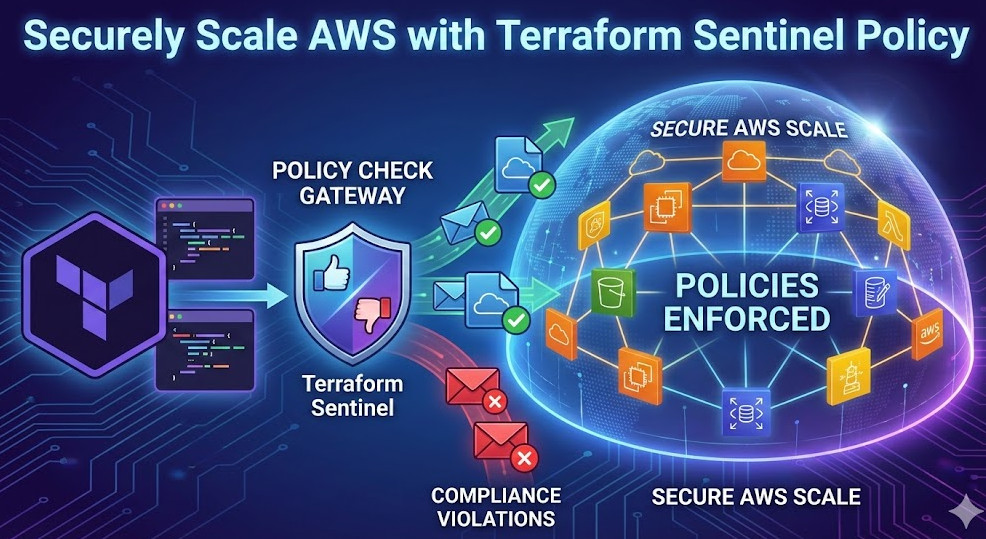
To leverage Terraform Sentinel Policy effectively, one must understand where it lives in the lifecycle. Sentinel runs in a sandboxed environment within the Terraform Cloud/Enterprise execution layer. It does not have direct access to the internet or your cloud provider APIs; instead, it relies on imports to make decisions based on context.
When a run is triggered:
- Plan Phase: Terraform generates the execution plan.
- Policy Check: Sentinel evaluates the plan against your defined policy sets.
- Decision: The run is allowed, halted (Hard Mandatory), or flagged for override (Soft Mandatory).
- Apply Phase: Provisioning occurs only if the policy check passes.
Pro-Tip: The
tfplan/v2import is the standard for accessing resource data. Avoid the legacytfplanimport as it lacks the detailed resource changes structure required for complex AWS resource evaluations.
Anatomy of an AWS Sentinel Policy
A robust policy typically consists of three phases: Imports, Filtering, and Evaluation. Let’s examine a scenario where we must ensure all AWS S3 buckets have server-side encryption enabled.
1. The Setup
First, we define our imports and useful helper functions to filter the plan for specific resource types.
import "tfplan/v2" as tfplan

# Filter resources by type
get_resources = func(type) {
  resources = {}
  for tfplan.resource_changes as address, rc {
    if rc.type is type and
       (rc.change.actions contains "create" or rc.change.actions contains "update") {
      resources[address] = rc
    }
  }
  return resources
}

# Fetch all S3 Buckets
s3_buckets = get_resources("aws_s3_bucket")
2. The Logic Rule
Next, we iterate through the filtered resources to validate their configuration. Note the use of the all quantifier, which ensures the rule returns true only if every instance passes the check.
# Rule: specific encryption configuration check
encryption_enforced = rule {
  all s3_buckets as _, bucket {
    keys(bucket.change.after) contains "server_side_encryption_configuration" and
    length(bucket.change.after.server_side_encryption_configuration) > 0
  }
}

# Main Rule
main = rule {
  encryption_enforced
}
This policy inspects the after state—the predicted state of the resource after the apply—ensuring that we are validating the final outcome, not just the code written in main.tf.
Advanced AWS Scaling Patterns
Scaling securely on AWS requires more than just resource configuration checks. It requires context-aware policies. Here are two advanced patterns for expert SREs.
Pattern 1: Cost Control via Instance Type Allow-Listing
To prevent accidental provisioning of expensive x1e.32xlarge instances, use a policy that compares requested types against an allowed list.
# Allowed EC2 types
allowed_types = ["t3.micro", "t3.small", "m5.large"]

# Check function
instance_type_allowed = rule {
  all get_resources("aws_instance") as _, instance {
    instance.change.after.instance_type in allowed_types
  }
}
Pattern 2: Enforcing Mandatory Tags for Cost Allocation
At scale, untagged resources are “ghost resources.” You can enforce that every AWS resource created carries specific tags (e.g., CostCenter, Environment).
mandatory_tags = ["CostCenter", "Environment"]

validate_tags = rule {
  all get_resources("aws_instance") as _, instance {
    all mandatory_tags as t {
      keys(instance.change.after.tags) contains t
    }
  }
}
Testing and Mocking Policies
Writing policy is development. Therefore, it requires testing. You should never push a Terraform Sentinel Policy to production without verifying it against mock data.
Use the Sentinel CLI to generate mocks from real Terraform plans:
$ terraform plan -out=tfplan
$ terraform show -json tfplan > plan.json
$ sentinel apply -trace policy.sentinel
By creating a suite of test cases (passing and failing mocks), you can integrate policy testing into your CI/CD pipeline, ensuring that a change to the governance logic doesn’t accidentally block legitimate deployments.
Enforcement Levels: The Deployment Strategy
When rolling out new policies, avoid the “Big Bang” approach. Sentinel offers three enforcement levels:
- Advisory: Logs a warning but allows the run to proceed. Ideal for testing new policies in production without impact.
- Soft Mandatory: Halts the run but allows administrators to override. Useful for edge cases where human judgment is required.
- Hard Mandatory: Halts the run explicitly. No overrides. Use this for strict security violations (e.g., public S3 buckets, open security group 0.0.0.0/0).
Frequently Asked Questions (FAQ)
How does Sentinel differ from OPA (Open Policy Agent)?
While OPA is a general-purpose policy engine using Rego, Sentinel is embedded deeply into the HashiCorp ecosystem. Sentinel’s integration with Terraform Cloud allows it to access data from the Plan, Configuration, and State without complex external setups. However, OPA is often used for Kubernetes (Gatekeeper), whereas Sentinel excels in the Terraform layer.
Can I access cost estimates in my policy?
Yes. Terraform Cloud generates a cost estimate for every plan. By importing tfrun, you can write policies that deny infrastructure changes if the delta in monthly cost exceeds a certain threshold (e.g., increasing the bill by more than $500/month).
Does Sentinel affect the performance of Terraform runs?
Sentinel executes after the plan is calculated. While the execution time of the policy itself is usually negligible (milliseconds to seconds), extensive API calls within the policy (if using external HTTP imports) can add latency. Stick to using the standard tfplan imports for optimal performance.

Conclusion
Implementing Terraform Sentinel Policy is a definitive step towards maturity in your cloud operating model. It shifts security left, turning vague compliance documents into executable code that scales with your AWS infrastructure. By treating policy as code—authoring, testing, and versioning it—you empower your developers to deploy faster with the confidence that the guardrails will catch any critical errors.
Start small: Audit your current AWS environment, identify the top 3 risks (e.g., unencrypted volumes, open security groups), and implement them as Advisory policies today. Thank you for reading the DevopsRoles page!