The shift toward GitOps has fundamentally changed how enterprise infrastructure is managed. For organizations moving beyond cloud-native environments, deploying a robust, scalable Kubernetes cluster like K3s on-prem presents unique challenges. These challenges span networking, state management, and maintaining immutable infrastructure definitions.
If you are tasked with deploying a mission-critical, self-hosted Kubernetes environment, relying on manual configuration or simple manifests is a recipe for drift and instability. The solution lies in treating your entire infrastructure definition—from the cluster bootstrap to the application deployment—as code.
This guide is designed for senior DevOps, MLOps, and SecOps engineers. We will move beyond basic tutorials to deep-dive into the architecture, specifically focusing on how to write a custom k0rdent template from scratch to achieve a truly declarative and repeatable k3s on-prem deployment.
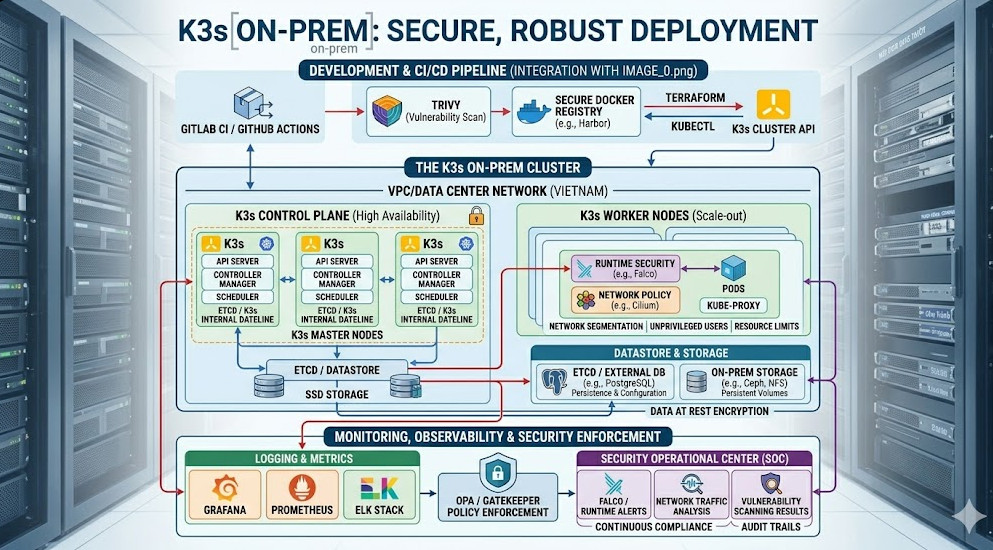
Table of Contents
Phase 1: Core Architecture and the GitOps Mandate
Why K3s for On-Prem Environments?
K3s, developed by Rancher, is purpose-built for edge and resource-constrained environments. Its lightweight nature, coupled with its simple installation process, makes it an ideal candidate for k3s on-prem deployments. Unlike full-blown distributions that might require complex dependencies, K3s provides a streamlined Kubernetes experience without sacrificing enterprise-grade features.
However, simply installing K3s is not enough. The true power comes from adopting the GitOps methodology. GitOps mandates that Git is the single source of truth for the desired state of your entire system. All changes must flow through pull requests (PRs), ensuring auditability and rollback capability.
Understanding k0rdent and Templating
While tools like ArgoCD and FluxCD are the primary GitOps operators, they consume definitions. When we talk about writing a custom k0rdent template, we are talking about creating a highly parameterized, reusable YAML structure that acts as a blueprint.
k0rdent (or similar templating engines like Helm combined with Kustomize) allows us to abstract away the specifics of the cluster environment. Instead of writing 50 YAML files for a given application, we write one template and pass variables like namespace, image_tag, and replica_count.
This is critical for achieving true infrastructure parity across multiple physical sites or clusters. When building a k3s on-prem stack, you might have three distinct clusters (Dev, Staging, Prod), but they should all be defined by the same core template, only varying by environment-specific parameters.
The Architectural Flow
The ideal k3s on-prem GitOps loop looks like this:
- Developer Commits: A developer submits a PR defining a change (e.g., updating a service manifest).
- CI Pipeline Executes: The CI pipeline validates the manifest, runs security scans, and generates the final, rendered YAML.
- Git Repository Update: The rendered, validated manifest is committed to the designated Git branch (the “Source of Truth”).
- CD Operator Syncs: The GitOps operator (e.g., ArgoCD) detects the change in the Git repository and automatically applies the manifest to the live k3s on-prem cluster.
This entire process ensures that the cluster state always matches the state defined in Git.
Phase 2: Practical Implementation – Writing the Custom Template
Let’s assume we need to deploy a standard microservice stack (Ingress Controller, Database, and a Web App) across our k3s on-prem cluster. We will use a conceptual k0rdent approach to parameterize this deployment.
Step 1: Defining the Template Structure
A custom template must handle common elements like resource limits, network policies, and service accounts, which are often forgotten in basic deployments.
We start with a base template file, deployment-template.yaml, which uses placeholders (e.g., {{.image}}, {{.replicas}}).
# deployment-template.yaml
apiVersion: apps/v1
kind: Deployment
metadata:
  name: {{.appName}}-deployment
  labels:
    app: {{.appName}}
spec:
  replicas: {{.replicas}}
  selector:
    matchLabels:
      app: {{.appName}}
  template:
    metadata:
      labels:
        app: {{.appName}}
    spec:
      containers:
      - name: main-container
        image: {{.image}}:{{.tag}}
        ports:
        - containerPort: 8080
        resources:
          limits:
            cpu: "500m"
            memory: "512Mi"
          requests:
            cpu: "250m"
            memory: "256Mi"
---
apiVersion: v1
kind: Service
metadata:
  name: {{.appName}}-service
spec:
  selector:
    app: {{.appName}}
  ports:
    - port: 80
      targetPort: 8080
Step 2: Parameterizing the Values
Next, we define the values file, values.yaml, which provides the concrete inputs for our template. This separation of concerns is key to maintainability.
# values.yaml for the 'billing-service'
appName: billing-service
image: registry.internal/billing
tag: v1.2.3
replicas: 3
Step 3: Rendering the Manifest (The CI Step)
In a real CI pipeline (e.g., Jenkins, GitLab CI), a dedicated step uses the templating engine to merge these two files, generating the final, immutable YAML manifest.
# Example command executed in the CI pipeline
k0rdent render --template deployment-template.yaml --values values.yaml > billing-service-manifest.yaml
The resulting billing-service-manifest.yaml is what gets committed to the Git repository. This manifest is the source of truth that the GitOps operator will enforce on the k3s on-prem cluster.
💡 Pro Tip: When designing your custom templates, always include a mandatory ResourceQuota manifest alongside your deployment. This prevents resource exhaustion and ensures that every application adheres to predefined CPU/memory boundaries, which is crucial in multi-tenant k3s on-prem environments.
Phase 3: Senior-Level Best Practices and Advanced Security
Achieving basic functionality is one thing; building a resilient, secure, and observable platform is another. For senior engineers, the focus shifts from if it works, to how it fails and how it can be exploited.
1. Network Policy Enforcement
In an on-prem environment, network segmentation is paramount. Never assume that a pod can talk to any other pod. You must enforce NetworkPolicies.
When templating, you must include a placeholder for the network policy definition. This policy should restrict ingress and egress traffic to only necessary endpoints.
# Example NetworkPolicy template snippet
apiVersion: networking.k8s.io/v1
kind: NetworkPolicy
metadata:
  name: {{.appName}}-policy
spec:
  podSelector:
    matchLabels:
      app: {{.appName}}
  policyTypes:
    - Ingress
    - Egress
  ingress:
    - from:
      - podSelector:
          matchLabels:
            app: ingress-controller
      ports:
        - port: 80
          protocol: TCP
2. Secrets Management and External Vault Integration
Never hardcode secrets in your templates or values files. For k3s on-prem, the best practice is to integrate with an external, dedicated secrets manager like HashiCorp Vault.
The CI pipeline should not just commit the manifest; it should also manage the necessary Secrets Store CSI Driver definitions. This driver allows Kubernetes to dynamically mount secrets from Vault into the pod filesystem at runtime, keeping the actual secret values out of Git entirely.
3. Observability and Monitoring Hooks
A production-grade k3s on-prem stack requires robust observability. Your templates must account for:
- Metrics Endpoints: Ensuring every deployed application exposes standard
/metricsendpoints. - ServiceMonitors: Defining
ServiceMonitorCRDs (if using Prometheus Operator) to automatically scrape metrics from the newly deployed service. - Alerting Rules: Including corresponding
Alertingrules in the template definition to ensure that if a replica count drops or latency spikes, the operations team is immediately notified.
4. Handling Cluster Upgrades and Drift
The most common failure point in k3s on-prem is configuration drift. Over time, manual fixes or hotfixes can bypass the GitOps loop, causing the cluster state to diverge from Git.
To mitigate this, implement read-only access for manual changes. All changes must be funneled through the templating system and PR workflow. If drift is detected, the GitOps operator must be configured to automatically reconcile the cluster back to the defined state in Git.
💡 Pro Tip: For advanced auditing, consider implementing an admission controller (like Kyverno or OPA Gatekeeper) that intercepts all API requests. This controller can enforce policies that reject any resource definition that does not adhere to the required template structure or that attempts to use unapproved labels, effectively locking down the cluster to the GitOps workflow.
Conclusion: Achieving True Infrastructure Immutability
Mastering k3s on-prem deployment using GitOps and custom templating is not just about deployment—it’s about establishing an immutable operational paradigm. By treating your infrastructure definition as code and utilizing powerful templating tools like k0rdent, you achieve unparalleled repeatability, security, and auditability.
If your team is looking to deepen their knowledge of modern platform engineering and advanced DevOps roles, exploring resources like the one detailing the k3s on-prem guide can provide excellent foundational knowledge. Furthermore, understanding the nuances of platform architecture is a core skill for those interested in advancing their careers in the field of DevOps Roles.
By adopting this rigorous, template-driven approach, you transform your cluster from a collection of running services into a predictable, version-controlled, and highly resilient platform.