In the modern enterprise landscape, the CI/CD pipeline is the central nervous system of software delivery. It must be fast, reliable, and utterly secure. However, even the most talented engineering teams can fall victim to subtle technical debt within their automation scripts.
This article is not just a checklist. It is an architectural blueprint for achieving true, scalable Continuous Delivery. We will dissect the common pitfalls—the GitHub Actions mistakes—that lead to brittle, slow, and non-compliant pipelines.
Table of Contents
- 1 Executive Summary: The Shift from Automation to Architecture
- 2 🛠️ Prerequisites: The DevOps Toolkit
- 3 🏗️ Architectural Blueprint: The Resilient Pipeline Design
- 4 🚀 Implementation & Automation: Optimizing the Workflow
- 5 🛡️ SecOps & Observability: The Enterprise Mandate
- 6 📈 Scaling, Edge Cases & Cost Optimization (FinOps)
- 7 📜 Conclusion: The Veteran’s Verdict
- 8 ❓ FAQ: Expert Q&A on Production CI/CD
Executive Summary: The Shift from Automation to Architecture
The core challenge facing modern DevOps teams is moving beyond simple “scripting” and embracing true “architecture.” A pipeline must be designed for failure, not just success.
The Problem: Many teams treat GitHub Actions as a simple shell script runner. This leads to inefficient dependency management, excessive resource consumption, and poor security posture.
The Solution: Adopt a modular, layered approach. Utilize advanced features like caching, matrix builds, and composite actions. This transforms your workflow from a fragile sequence of steps into a resilient, high-availability delivery mechanism.
Key Takeaways for DevOps Leads:
- Prioritize Caching: Never re-download dependencies unless absolutely necessary.
- Modularize Everything: Use composite actions to break down large, complex jobs.
- Enforce Security by Default: Implement strict Role-Based Access Control (RBAC) and never hardcode secrets.
- Think Parallel: Design workflows to execute independent tasks concurrently to maximize speed.
🛠️ Prerequisites: The DevOps Toolkit
Before optimizing, you must ensure the foundational tooling is robust. These requirements assume an enterprise-grade, multi-repository setup.
| Component | Required Tooling | Minimum Version | Hardware Spec (Min) | Skill Level | Why It’s Critical |
| Source Control | GitHub Enterprise | Latest Stable | N/A | Intermediate | Branch protection and OIDC support. |
| Workflow Definition | YAML / GitHub Actions | N/A | N/A | Intermediate | Orchestrates the build/deploy logic. |
| Containerization | Docker | 20.10+ | 4 vCPU / 8 GB RAM | Advanced | Ensures environment parity across runners. |
| Build/Test Runner | GH Actions Runner | Latest | 2 vCPU / 4 GB RAM | Intermediate | Self-hosted runners require dedicated compute. |
| Infrastructure Code | Terraform HCL | 1.5+ | N/A | Advanced | Required for import blocks and check blocks. |
| State Backend | S3 / GCS / Azure Blob | N/A | N/A | Advanced | Crucial for locking and team collaboration. |
| Secret Management | HashiCorp Vault / KMS | N/A | N/A | Advanced | Avoids hardcoding credentials in YAML files. |
🏗️ Architectural Blueprint: The Resilient Pipeline Design
The goal is to achieve maximum throughput with minimum resource waste. We are moving away from monolithic workflows toward a decoupled, service-oriented architecture within the CI/CD context.
Design Pattern: The Fan-Out/Fan-In Model
Instead of running all tests sequentially, we use a “Fan-Out” model. Independent tasks (Unit Tests, Linting, Security Scans) run in parallel. The “Fan-In” stage only executes if all parallel jobs pass, ensuring rapid feedback.
Why this approach wins in production:
- Speed: Parallel execution drastically reduces overall job time.
- Isolation: Failure in one job does not halt the entire pipeline, allowing for granular debugging.
- Scalability: It naturally supports scaling by adding more parallel runners.
🚀 Implementation & Automation: Optimizing the Workflow
The biggest mistake is writing redundant, sequential steps. We must leverage YAML features to optimize the execution path.
Here is a production-grade example of a highly optimized workflow that demonstrates caching and parallel testing.
name: Optimized CI/CD Pipeline

on:
  push:
    branches: [ main ]

jobs:
  build:
    runs-on: ubuntu-latest
    steps:
    - uses: actions/checkout@v4
    - name: Cache Dependencies
      uses: actions/cache@v3
      with:
        path: ~/.npm
        key: ${{ runner.os }}-npm-${{ hashFiles('**/package-lock.json') }}
    - name: Install Dependencies
      run: npm ci
    - name: Build Application
      run: npm run build

  test:
    needs: build # Ensures testing only starts if build succeeds
    runs-on: ubuntu-latest
    strategy:
      matrix:
        node-version: [18.x, 20.x] # Parallel testing across multiple versions
    steps:
    - uses: actions/checkout@v4
    - name: Setup Node.js ${{ matrix.node-version }}
      uses: actions/setup-node@v4
      with:
        node-version: ${{ matrix.node-version }}
    - name: Install Dependencies
      run: npm ci
    - name: Run Unit Tests
      run: npm test -- --coverage
AdSense Break
Analysis of the Code:
- Caching: The
actions/cache@v3step prevents the costly re-downloading ofnode_moduleson every run. This is critical for speed. - Parallelism: The
strategy: matrixblock ensures that unit tests run simultaneously across multiple specified Node versions. - Dependencies: The
needs: buildkeyword enforces a strict dependency graph, preventing testing from starting if the build step fails.
🛡️ SecOps & Observability: The Enterprise Mandate
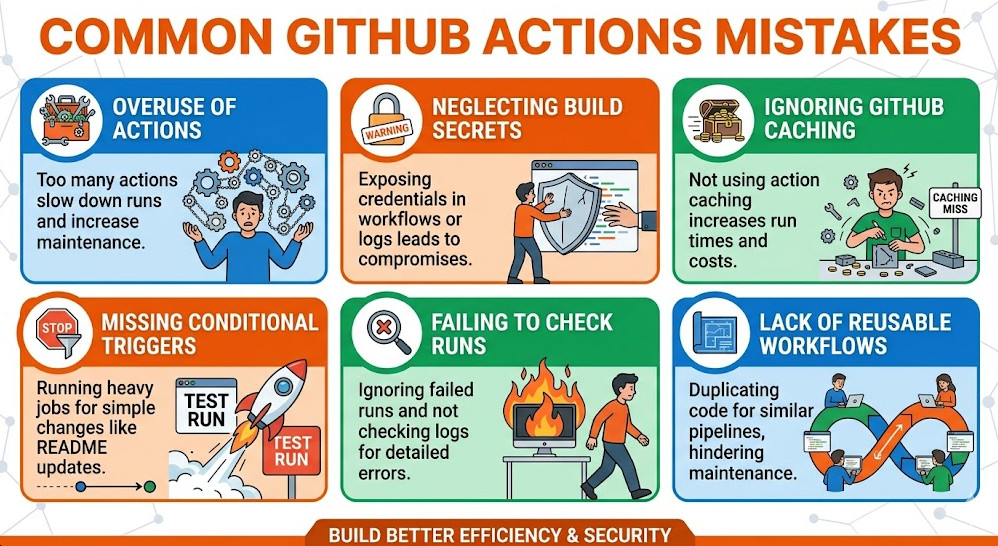
A fast pipeline that is insecure is worthless. The second major category of GitHub Actions mistakes involves neglecting security and observability.
1. Secrets Management and RBAC
Never use environment variables for secrets. Always use the native GitHub Secrets Manager. Furthermore, limit the scope of secrets.
- Principle of Least Privilege: A job that only needs to read a deployment key should not have write access to the repository.
- Action: Use
if: github.event_name == 'workflow_dispatch'to restrict manual triggers only to authorized users.
2. Compliance and Drift Detection
Compliance requires knowing what ran and who approved it.
- Audit Logs: Ensure your organization’s audit logs are centralized and immutable.
- Policy Enforcement: Implement required steps to check for infrastructure drift using tools like Terraform Plan checks before any
applycommand is run.
3. Observability
A pipeline must report more than just “Success” or “Failure.”
- Metrics: Capture duration, resource usage, and success rates for every job.
- Logging: Structure logs using JSON format. This allows downstream monitoring tools (like Splunk or Datadog) to parse and alert on specific failure patterns, rather than just displaying raw text.
📈 Scaling, Edge Cases & Cost Optimization (FinOps)
As your application grows, your CI/CD load will increase dramatically. Ignoring resource efficiency is a major GitHub Actions mistake that leads to unexpected costs and rate limiting.
Handling High Load and Failure Modes
- Rate Limiting: Be aware of GitHub’s API rate limits. For large-scale deployments, consider using self-hosted runners.
- Self-Hosted Runners: These runners give you complete control over the environment, bypassing many cloud-specific rate limits. They are essential for maximum scalability.
- Failure Handling: Always wrap critical commands in
try/catchlogic (or equivalent shell constructs likeset -e) to ensure that a minor failure doesn’t cause a cascade of unrelated errors.
FinOps: Resource Efficiency
The most overlooked mistake is running full, heavy builds when only a minor change occurred.
- Path Filtering: Use
paths:filtering in your workflow definition. If only documentation changes, do not run the full backend build. - Dependency Optimization: Only install dependencies required for the specific job. If the test job doesn’t need the build tools, don’t install them.
📜 Conclusion: The Veteran’s Verdict
The evolution of CI/CD is relentless. GitHub Actions is a powerful tool, but its power is only realized through architectural discipline.
The mistake is not in the tool; it is in the process. By adopting a modular, security-first, and performance-optimized approach—by eliminating the GitHub Actions mistakes discussed here—you move from merely automating tasks to building a reliable, self-healing delivery platform.
Focus on making the pipeline invisible. When the deployment process is flawless, fast, and secure, your engineering team can focus on innovation, not on debugging brittle YAML files.
❓ FAQ: Expert Q&A on Production CI/CD
Q: How do I handle secrets that need to be used by multiple, independent jobs in a single workflow?
A: Do not pass the secret directly. Instead, define a dedicated, secure action that retrieves the secret from the vault (e.g., HashiCorp Vault or AWS Secrets Manager) and outputs it as an ephemeral, job-scoped variable. This limits exposure and enhances security compliance.
Q: My pipeline is fast, but I still get rate-limited errors. What is the architectural fix?
A: The definitive fix is migrating to self-hosted runners. These runners operate within your private network, giving you full control over the compute resources and bypassing GitHub’s public API rate limits, which is crucial for high availability.
Q: What is the difference between needs: and dependencies: in GitHub Actions?
A: The needs: keyword is the modern, explicit way to define job dependencies. It ensures that a job will not start until all specified prerequisite jobs have completed successfully. Always use needs: for clear dependency graphing.
Q: Is it better to use Docker containers for every job, or rely on the default runner environment?
A: For maximum portability and isolation, always containerize your job environment. By defining the exact OS, libraries, and runtime versions in a Dockerfile, you eliminate “works on my machine” syndrome and guarantee consistency across all environments.
Q: I am struggling to keep up with the latest DevOps best practices. Where should I start?
A: Start by formalizing your internal processes. Adopt a “GitOps” mindset, where the desired state of your entire infrastructure is stored in Git. For more detailed guides on modern SRE workflows, check out DevOps best practices.