Welcome to the ultimate DevOps Complete Guide. If you are reading this, you are probably tired of late-night pager alerts and broken CI/CD pipelines.
I get it. Back in 2015, I brought down a production database for six hours because of a rogue Bash script. It was a nightmare.
That is exactly why you need a rock-solid system. The industry has changed, and flying blind simply doesn’t cut it anymore.
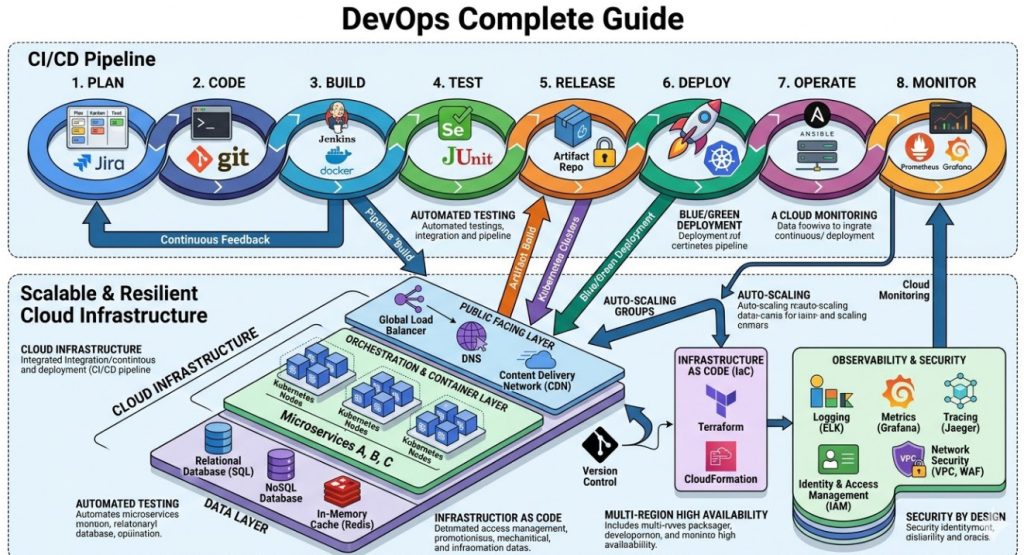
Table of Contents
Why You Need This DevOps Complete Guide Now
Things move fast. What worked three years ago is now legacy technical debt.
Are you still clicking around the AWS console to provision servers? Stop doing that immediately.
Real engineers use code to define infrastructure. It is predictable, repeatable, and saves you from catastrophic human error.
In this guide, we are going to strip away the noise. No theoretical nonsense. Just commands, code, and hard-earned truth.
Before we go deeper, you should also bookmark this related resource: [Internal Link: 10 Terraform Anti-Patterns You Must Avoid].
Linux Fundamentals Cheatsheet
You cannot master DevOps without mastering Linux. It is the bedrock of everything we do.
Forget the GUI. If you want to survive, you need to live in the terminal.
Here are the commands I use daily to troubleshoot rogue processes and network bottlenecks.
- htop: Interactive process viewer. Better than plain old top.
- netstat -tulpn: Shows you exactly what ports are listening on your server.
- df -h: Disk space usage. Run this before your logs fill up the partition.
- grep -rnw ‘/path/’ -e ‘pattern’: Find specific text inside a massive directory of files.
- chmod 755: Fix those annoying permission denied errors (but never use 777).
Docker: A Pillar of the DevOps Complete Guide
Containers revolutionized how we ship software. “It works on my machine” is officially a dead excuse.
If you aren’t packaging your apps in Docker, you are making life needlessly difficult for your entire team.
Let’s look at a bulletproof Dockerfile for a Node.js application.
# Use a slim base image to reduce attack surface
FROM node:18-alpine

# Set the working directory
WORKDIR /app

# Copy package files first for better layer caching
COPY package*.json ./

# Install dependencies cleanly
RUN npm ci --only=production

# Copy the rest of the application
COPY . .

# Expose the correct port
EXPOSE 3000

# Run as a non-root user for security
USER node

# Start the app
CMD ["node", "server.js"]
Notice the npm ci and the USER node directives? That is the difference between an amateur setup and a production-ready container.
For a deeper dive into container history and architecture, Wikipedia’s breakdown of OS-level virtualization is worth your time.
Kubernetes Survival Kit
Kubernetes won the orchestration war. It is complex, frustrating, and absolutely necessary for scale.
You don’t need to memorize every single API resource, but you do need to know how to debug a failing pod.
When things break (and they will break), these are the kubectl commands that will save your job.
- kubectl get pods -A: See everything running across all namespaces.
- kubectl describe pod [name]: The first place to look when a pod is stuck in CrashLoopBackOff.
- kubectl logs [name] -f: Tail the logs of a container in real-time.
- kubectl port-forward svc/[name] 8080:80: Access an internal service securely from your local browser.
Infrastructure as Code in This DevOps Complete Guide
Manual provisioning is dead. If it isn’t in Git, it doesn’t exist.
Terraform is the industry standard for IaC. It allows you to manage AWS, GCP, and Azure with the same workflow.
Here is a basic example of provisioning an AWS S3 bucket securely.
resource "aws_s3_bucket" "secure_storage" {
  bucket = "my-company-secure-backups-2026"
}

resource "aws_s3_bucket_public_access_block" "secure_storage_block" {
  bucket = aws_s3_bucket.secure_storage.id

  block_public_acls       = true
  block_public_policy     = true
  ignore_public_acls      = true
  restrict_public_buckets = true
}
Always block public access by default. I have seen startups bleed data because they forgot that simple rule.
You can find thousands of community modules to speed up your workflow on the official Terraform GitHub repository.
The CI/CD Pipeline Mindset
Continuous Integration and Continuous Deployment are not just tools. They represent a cultural shift.
Your goal should be simple: Developers push code, and the system handles the rest safely.
A good pipeline includes linting, unit testing, security scanning, and automated rollbacks.
If your deployment requires a 10-page runbook, your pipeline is failing you.
Monitoring: The Final Piece of the DevOps Complete Guide
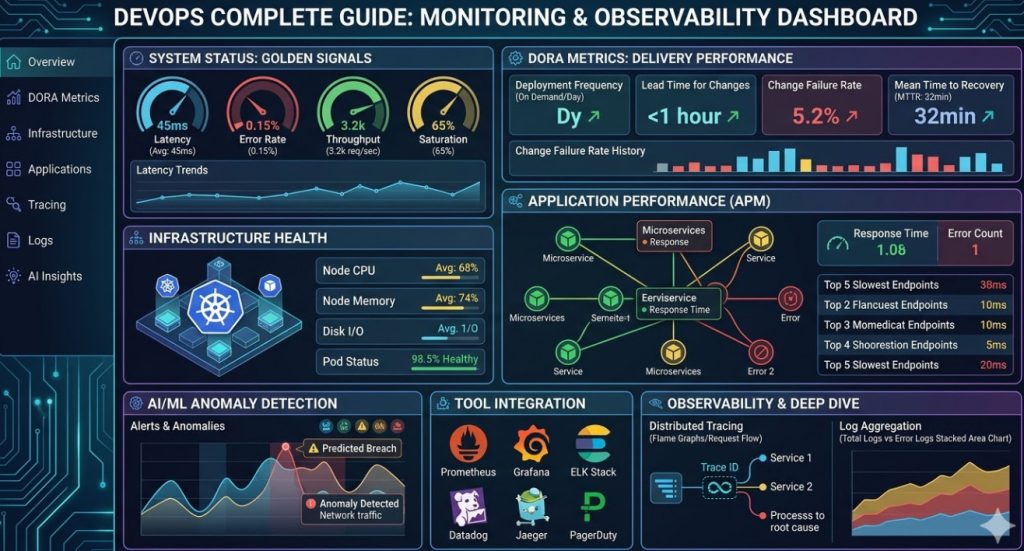
You cannot fix what you cannot see. Observability is critical.
Prometheus and Grafana are my go-to stack for metrics. They are open-source, powerful, and wildly popular.
Set alerts for high CPU, memory leaks, and most importantly, an increase in HTTP 500 errors.
Don’t alert on CPU usage alone. Alert on things that actually impact the end user’s experience.
For more details, check the official documentation.
FAQ Section
- What is the best way to start learning DevOps? Start by mastering Linux basics, then move to Git, Docker, and a CI tool like GitHub Actions. Don’t learn everything at once.
- Do I need to know how to code? Yes. You don’t need to be a senior software engineer, but writing Python, Go, or Bash scripts is mandatory.
- Is Kubernetes overkill for small projects? Absolutely. Stick to Docker Compose or a managed PaaS until your traffic demands cluster orchestration.
- How do I handle secrets in my pipelines? Never hardcode secrets. Use a tool like HashiCorp Vault, AWS Secrets Manager, or GitHub Secrets.
Conclusion: Mastering the modern infrastructure landscape takes time, patience, and a lot of broken code. Keep this DevOps Complete Guide handy, automate everything you can, and remember that simplifying your architecture is always better than adding unnecessary tools. Now go fix those failing builds. Thank you for reading the DevopsRoles page!