Tag Archives: Linux Security

Securing Digital Identities: Top 5 Linux Password Managers in 2024

Introduction

Linux Password Managers, protecting online credentials is paramount, especially for Linux users, who often prioritize security and privacy. A dependable password manager not only simplifies your login process but also bolsters your online safety by creating and storing complex passwords. This article explores the best Linux password managers in 2024, highlighting their security features and user-friendliness.

Why Linux Users Need a Dedicated Password Manager

Linux users, typically tech-savvy and security-conscious, demand password managers that provide robust security while integrating seamlessly with Linux operating systems. Due to Linux’s diverse ecosystem, compatibility and support are crucial factors in selecting an appropriate password manager.

Top 5 Linux Password Managers for 2024

Each password manager listed below is selected for its unique strengths to suit different preferences and needs:

  1. NordPass: Best for Usability
    NordPass excels with its user-friendly interface and robust integration across platforms, including Linux. It features tools like password health, data breach scanners, and secure notes. Its zero-knowledge architecture ensures that your data remains private. Learn more about NordPass here.
  2. 1Password: Best for Privacy
    Known for its strong privacy and security measures, 1Password employs end-to-end encryption and offers features like Watchtower for alerts on security breaches and vulnerable passwords. It’s ideal for those who prioritize privacy. More about 1Password can be found here.
  3. Keeper: Best for Beginners
    Keeper’s intuitive design and excellent customer support make it suitable for newcomers to password management. It features robust password generation, secure file storage, and an easy-to-use dashboard. Despite its simplicity, it maintains rigorous security. Discover more about Keeper here.
  4. RoboForm: Best Free Option
    RoboForm’s strong free version includes unlimited password storage, form filling, and password audits, making it a top choice for users seeking a cost-effective yet feature-rich solution. Learn more about RoboForm here.
  5. Enpass: Best for Families with Lifetime Protection
    Enpass is ideal for families, offering a one-time purchase for a lifetime license, which is economical over the long term. Its family plan includes multiple vaults, secure sharing, and an offline mode for added privacy. Explore Enpass here.


Conclusion

Selecting the right password manager for Linux depends on your specific needs, whether they concern usability, privacy, ease for beginners, cost-effectiveness, or suitability for family use. Each option listed offers robust security features designed to enhance your online experience while safeguarding your digital assets.

Consider your priorities and try out a few of these options – most offer free trials or versions – to find the ideal match for your Linux setup. Thank you for reading the DevopsRoles page!

HISTCONTROL ignorespace Force history in Linux

Introduction

How to Force history not to remember a particular command using HISTCONTROL ignorespace in Linux. When executing a command, you can use HISTCONTROL with ignorespace and precede the command with a space to ensure it’s ignored in your command history.

This might be tempting for junior sysadmins seeking discretion, but it’s essential to grasp how ignorespace functions. As a best practice, it’s generally discouraged to purposefully hide commands from your history, as transparency and accountability are crucial in system administration and troubleshooting.

What is HISTCONTROL?

HISTCONTROL is an environment variable in Linux that defines how your command history is managed. It allows you to specify which commands should be recorded in your history and which should be excluded. This can help you maintain a cleaner and more efficient command history.

ignorespace – An Option for HISTCONTROL

One of the settings you can use with HISTCONTROL is ignorespace. When ignorespace is included in the value of HISTCONTROL, any command line that begins with a space character will not be recorded in your command history. This can be incredibly handy for preventing sensitive information, such as passwords, from being stored in your history.

Working with HISTCONTROL ignorespace

Step 1: Check Your Current HISTCONTROL Setting

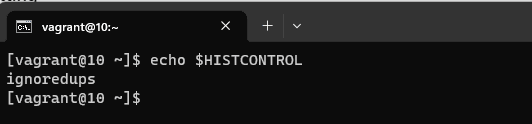
Before you start using HISTCONTROL with ignorespace, it’s a good idea to check your current HISTCONTROL setting. Open a terminal and run the following command:

echo $HISTCONTROL

This will display your current HISTCONTROL setting. If it’s empty or doesn’t include ignorespace, you can proceed to the next step.

Step 2: Set HISTCONTROL to ignorespace

To enable ignorespace in your HISTCONTROL, you can add the following line to your shell configuration file (e.g., ~/.bashrc for Bash users):

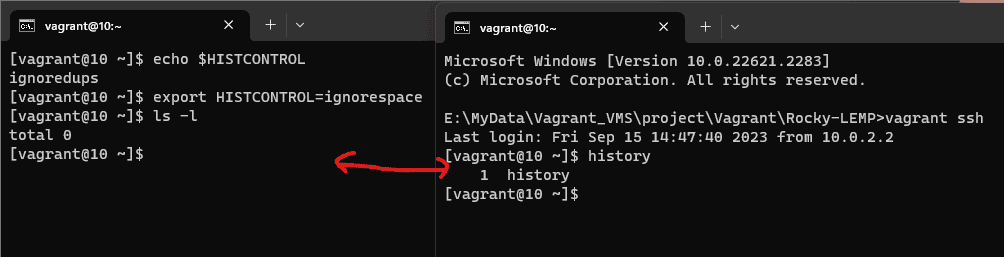
export HISTCONTROL=ignorespace

After making this change, be sure to reload your shell configuration or start a new terminal session for the changes to take effect.

Step 3: Test ignorespace

Now that you’ve set HISTCONTROL to ignorespace, you can test its functionality. Try entering a command with a leading space, like this:

 ls -l

Notice that the space at the beginning of the command is intentional. This command will not be recorded in your command history because of the ignorespace setting.

Step 4: Verify Your Command History

To verify that the command you just entered is not in your history, you can display your command history using the history command:

history

Conclusion

utilizing HISTCONTROL with ignorespace empowers you to better manage your Linux command history. This feature proves especially useful when excluding commands with sensitive data or temporary experiments. Understanding and harnessing HISTCONTROL ignorespace and its options, like ignorespace, enhances both the efficiency and security of your Linux command line experience.

Remember that these settings are user-specific, so individual configuration is necessary for each user on a multi-user system. Armed with this knowledge, you can exercise greater control over your command history and enhance your overall command line efficiency in Linux. You can Force history not to remember a particular command using HISTCONTROL ignorespace