Tag Archives: Docker Compose

How to use docker compose with Podman on Linux

Introduction

Using docker compose with Podman on Linux is a straightforward process, especially because Podman is designed to be a drop-in replacement for Docker. This means you can use Podman to run software that was written for Docker, such as Docker Compose, without modifying the Dockerfile or docker-compose.yml files.

Setting up Docker Compose with Podman

Here’s a step-by-step guide to using docker-compose with Podman on Linux:

1. Install Podman

First, ensure that Podman is installed on your system. You can install Podman using your package manager. For example, on Ubuntu:

sudo apt update
sudo apt install -y podman

On Fedora or CentOS:

sudo dnf install -y podman

2. Install Docker Compose

You also need Docker Compose. Install it using pip:

sudo pip3 install docker-compose

3. Set Up Podman to Mimic Docker

You need to configure Podman to mimic Docker. This involves setting up alias and ensuring that socket files are correctly handled.

You can alias Docker commands to Podman for your user by adding the following line to your ~/.bashrc or ~/.zshrc:

alias docker=podman

After adding the alias, apply the changes:

source ~/.bashrc  # or ~/.zshrc

4. Configure Docker Compose for Podman

To make Docker Compose use Podman, and point to the DOCKER_HOST environment variable to Podman’s socket. You can do this on the fly or by setting it permanently in your shell configuration file:

export DOCKER_HOST=unix:///run/user/$(id -u)/podman/podman.sock

For permanent configuration, add the above line to your ~/.bashrc or ~/.zshrc.

5. Run Docker Compose

Now, you can use Docker Compose as you normally would:

docker-compose up

or if you have not aliased docker to podman, you can explicitly tell Docker Compose to use Podman:

DOCKER_HOST=unix:///run/user/$(id -u)/podman/podman.sock docker-compose up

6. Troubleshooting

If you encounter permissions issues with the Podman socket or other related errors, make sure that your user is in the appropriate group to manage Podman containers, and check that the socket path in DOCKER_HOST is correct.

7. Consider Podman Compose

Podman team has developed podman-compose which is a script to help Podman manage full application lifecycles using docker-compose format. It might be beneficial to use podman-compose if you face any compatibility issues:

pip3 install podman-compose

Then use it similarly to Docker Compose:

podman-compose up
Conclusion

This guide should help you set up a working environment using Podman and Docker Compose on a Linux system. I hope will this your helpful. Thank you for reading the DevopsRoles page!

Docker compose run Grafana 8

Introduction

In this tutorial, how to run Grafana version 8 using Docker-compose. Now, we will use Docker compose run Grafana version 8.

Docker compose run Grafana

Grafana Docker container

I will create a folder for Grafana on the Host Ubuntu OS.

sudo mkdir -p /home/huupv/docker/grafana/data
sudo mkdir -p /home/huupv/docker/compose-files/Grafana
cd /home/huupv/docker/compose-files/Grafana

Create a new docker-compose.yml file with the following

version: "3.5"

services:
  grafana8:
    image: grafana/grafana:latest
    network_mode: "bridge"
    container_name: grafana8
	# user: "1000" # needs to be `id -u` // alternatively chown the grafana/data dir to 472:472
    volumes:
      - /home/huupv/docker/grafana/data:/var/lib/grafana
    ports:
      - "3000:3000"
    restart: always

The change port if you want.

The deploy Grafana

sudo docker-compose up -d

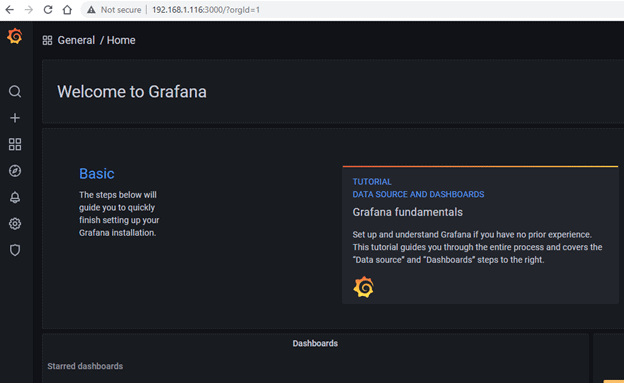
Your open browser the following URL: http://yourIP:3000

To log in for the first time, use the admin:admin username and password combination.

Login the success

The during start Grafana error [fixed it]

Code Error Grafana

huupv@ubuntu:~/docker/compose-files/grafana$ sudo docker ps
CONTAINER ID   IMAGE                    COMMAND                  CREATED          STATUS                         PORTS                                                                                        NAMES
4e1f6f81da09   grafana/grafana:latest   "/run.sh"                27 seconds ago   Restarting (1) 3 seconds ago                                                                                                grafana8
304a31a535c5   telegraf:latest          "/entrypoint.sh tele…"   3 hours ago      Up 2 hours                     0.0.0.0:8092->8092/tcp, 8092/udp, 0.0.0.0:8094->8094/tcp, 8125/udp, 0.0.0.0:8125->8125/tcp   telegraf
5909e05dd5bd   influxdb:latest          "/entrypoint.sh infl…"   3 hours ago      Up 2 hours                     0.0.0.0:8086->8086/tcp                                                                       influxdb2
huupv@ubuntu:~/docker/compose-files/grafana$ sudo docker logs grafana8
GF_PATHS_DATA='/var/lib/grafana' is not writable.
You may have issues with file permissions, more information here: http://docs.grafana.org/installation/docker/#migrate-to-v51-or-later
mkdir: can't create directory '/var/lib/grafana/plugins': Permission denied
GF_PATHS_DATA='/var/lib/grafana' is not writable.
You may have issues with file permissions, more information here: http://docs.grafana.org/installation/docker/#migrate-to-v51-or-later
mkdir: can't create directory '/var/lib/grafana/plugins': Permission denied
GF_PATHS_DATA='/var/lib/grafana' is not writable.
You may have issues with file permissions, more information here: http://docs.grafana.org/installation/docker/#migrate-to-v51-or-later
mkdir: can't create directory '/var/lib/grafana/plugins': Permission denied
GF_PATHS_DATA='/var/lib/grafana' is not writable.
You may have issues with file permissions, more information here: http://docs.grafana.org/installation/docker/#migrate-to-v51-or-later
mkdir: can't create directory '/var/lib/grafana/plugins': Permission denied
GF_PATHS_DATA='/var/lib/grafana' is not writable.
You may have issues with file permissions, more information here: http://docs.grafana.org/installation/docker/#migrate-to-v51-or-later
mkdir: can't create directory '/var/lib/grafana/plugins': Permission denied
GF_PATHS_DATA='/var/lib/grafana' is not writable.
You may have issues with file permissions, more information here: http://docs.grafana.org/installation/docker/#migrate-to-v51-or-later
mkdir: can't create directory '/var/lib/grafana/plugins': Permission denied
GF_PATHS_DATA='/var/lib/grafana' is not writable.
You may have issues with file permissions, more information here: http://docs.grafana.org/installation/docker/#migrate-to-v51-or-later
mkdir: can't create directory '/var/lib/grafana/plugins': Permission denied
GF_PATHS_DATA='/var/lib/grafana' is not writable.
You may have issues with file permissions, more information here: http://docs.grafana.org/installation/docker/#migrate-to-v51-or-later
mkdir: can't create directory '/var/lib/grafana/plugins': Permission denied
GF_PATHS_DATA='/var/lib/grafana' is not writable.
You may have issues with file permissions, more information here: http://docs.grafana.org/installation/docker/#migrate-to-v51-or-later
mkdir: can't create directory '/var/lib/grafana/plugins': Permission denied

Fixed it

huupv@ubuntu:~/docker/compose-files/grafana$ id -u
1001

# user: "1000" # needs to be `id -u` // alternatively chown the grafana/data dir to 472:472


huupv@ubuntu:~/docker/compose-files/grafana$ sudo chown 472:472 /home/huupv/docker/grafana/data

Result, Docker compose run Grafana 8.

huupv@ubuntu:~/docker/compose-files/grafana$ sudo docker ps
CONTAINER ID   IMAGE                    COMMAND                  CREATED         STATUS                          PORTS                                                                                        NAMES
4e1f6f81da09   grafana/grafana:latest   "/run.sh"                5 minutes ago   Restarting (1) 50 seconds ago                                                                                                grafana8
304a31a535c5   telegraf:latest          "/entrypoint.sh tele…"   3 hours ago     Up 2 hours                      0.0.0.0:8092->8092/tcp, 8092/udp, 0.0.0.0:8094->8094/tcp, 8125/udp, 0.0.0.0:8125->8125/tcp   telegraf
5909e05dd5bd   influxdb:latest          "/entrypoint.sh infl…"   3 hours ago     Up 2 hours                      0.0.0.0:8086->8086/tcp                                                                       influxdb2
huupv@ubuntu:~/docker/compose-files/grafana$ sudo docker restart grafana8
grafana8

huupv@ubuntu:~/docker/compose-files/grafana$ sudo chown 472:472 /home/huupv/docker/grafana/data
huupv@ubuntu:~/docker/compose-files/grafana$ ls -ld  /home/huupv/docker/grafana/data
drwxrwxr-x 2 472 472 4096 Aug  8 21:23 /home/huupv/docker/grafana/data

huupv@ubuntu:~$ sudo docker ps
CONTAINER ID   IMAGE                    COMMAND                  CREATED       STATUS       PORTS                                                                                        NAMES
c4d40e897c36   grafana/grafana:latest   "/run.sh"                2 hours ago   Up 2 hours   0.0.0.0:3000->3000/tcp                                                                       grafana8
304a31a535c5   telegraf:latest          "/entrypoint.sh tele…"   5 hours ago   Up 4 hours   0.0.0.0:8092->8092/tcp, 8092/udp, 0.0.0.0:8094->8094/tcp, 8125/udp, 0.0.0.0:8125->8125/tcp   telegraf
5909e05dd5bd   influxdb:latest          "/entrypoint.sh infl…"   5 hours ago   Up 4 hours   0.0.0.0:8086->8086/tcp                                                                       influxdb2
huupv@ubuntu:~$

Conclusion

Using Docker Compose, you’ve successfully launched Grafana 8. This tutorial aims to be a helpful resource for your monitoring setup. Thank you for choosing DevopsRoles for guidance. We appreciate your engagement and are here to support your continued learning in Docker and software deployment.