Introduction: I have seen it happen more times than I care to count. A team spends months locking down their production cluster, configuring firewalls, and auditing every line of code. Yet, they leave their staging area wide open. Securing development environments is rarely a priority until it is too late.
I remember a specific incident in 2018. A junior dev pushed a hardcoded API key to a public repo because the dev cluster “didn’t matter.”
That key granted access to the production S3 bucket. Disaster ensued.
The truth is, attackers know your production environment is a fortress. That is why they attack your supply chain first.
In this guide, we are going to fix that. We will look at practical, battle-tested ways to handle securing development environments within Kubernetes.
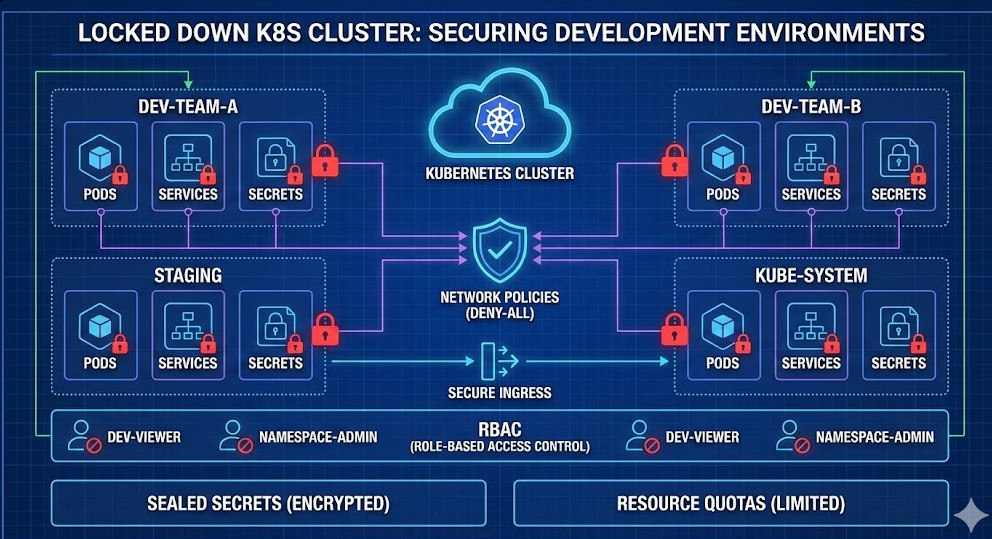
Table of Contents
- 1 Why Securing Development Environments is Non-Negotiable
- 2 1. Network Policies: The First Line of Defense
- 3 2. RBAC: Stop Giving Everyone Cluster-Admin
- 4 3. Secrets Management: No More Plain Text
- 5 4. Limit Resources and Quotas
- 6 5. Automated Scanning in the CI/CD Pipeline
- 7 A Practical Checklist for DevSecOps
- 8 Common Pitfalls to Avoid
Why Securing Development Environments is Non-Negotiable
Let’s be honest for a second. We treat development clusters like the Wild West.
Developers want speed. Security teams want control. Usually, speed wins.
But here is the reality check: your development environment is a mirror of production. If an attacker owns your dev environment, they understand your architecture.
They see your variable names. They see your endpoints. They see your logic.
Securing development environments isn’t just about preventing downtime; it is about protecting your intellectual property and preventing lateral movement.
The “It’s Just Dev” Fallacy
- Misconfiguration leakage: Dev configs often accidentally make it to prod.
- Credential theft: Developers often have elevated privileges in dev.
- Resource hijacking: Cryptominers love unsecured dev clusters.
So, how do we lock this down without making our developers hate us? Let’s dive into the technical details.
1. Network Policies: The First Line of Defense
By default, Kubernetes allows all pods to talk to all other pods. In a development environment, this is convenient. It is also dangerous.
If one compromised pod can scan your entire network, you have failed at securing development environments effectively.
You must implement a “Deny-All” policy by default. Then, whitelist only what is necessary.
Here is a standard NetworkPolicy I use to isolate namespaces:
apiVersion: networking.k8s.io/v1
kind: NetworkPolicy
metadata:
  name: default-deny-all
  namespace: development
spec:
  podSelector: {}
  policyTypes:
  - Ingress
  - Egress
This simple YAML file stops everything. It forces developers to think about traffic flow.
Does the frontend really need to talk to the metrics server? Probably not.
For more on network isolation, check the official Kubernetes Network Policies documentation.
2. RBAC: Stop Giving Everyone Cluster-Admin
I get it. `kubectl create clusterrolebinding` is easy.
It solves the “permission denied” errors instantly. But giving every developer `cluster-admin` access is a catastrophic failure in securing development environments.
If a developer’s laptop is compromised, the attacker now owns your cluster.
Implementing Namespace-Level Permissions
Instead, use Role-Based Access Control (RBAC) to restrict developers to their specific namespace.
They should be able to delete pods in `dev-team-a`, but they should not be able to list secrets in `kube-system`.
apiVersion: rbac.authorization.k8s.io/v1
kind: Role
metadata:
  namespace: dev-team-a
  name: dev-manager
rules:
- apiGroups: ["", "apps"]
  resources: ["pods", "deployments", "services"]
  verbs: ["get", "list", "watch", "create", "update", "patch", "delete"]
This approach limits the blast radius. It ensures that a mistake (or a breach) in one environment stays there.
3. Secrets Management: No More Plain Text
If I see one more `configMap` containing a database password, I might scream.
Kubernetes Secrets are base64 encoded, not encrypted. Anyone with API access can read them. This is not sufficient for securing development environments.
You need an external secrets manager. Tools like HashiCorp Vault or AWS Secrets Manager are industry standards.
However, for a lighter Kubernetes-native approach, I recommend using Sealed Secrets.
How Sealed Secrets Work
- You encrypt the secret locally using a public key.
- You commit the encrypted “SealedSecret” to Git (yes, it is safe).
- The controller in the cluster decrypts it using the private key.
This enables GitOps without exposing credentials. It bridges the gap between usability and security.
4. Limit Resources and Quotas
Security is also about availability. A junior dev writing a memory leak loop can crash a shared node.
I once saw a single Java application consume 64GB of RAM in a dev cluster, evicting the ingress controller.
Securing development environments requires resource quotas.
apiVersion: v1
kind: ResourceQuota
metadata:
  name: compute-quota
  namespace: development
spec:
  hard:
    requests.cpu: "4"
    requests.memory: 16Gi
    limits.cpu: "8"
    limits.memory: 32Gi
This ensures that no single namespace can starve the others. It promotes good hygiene. If your app needs 8GB of RAM to run “Hello World,” you have bigger problems.
5. Automated Scanning in the CI/CD Pipeline
You cannot secure what you do not see. Manual audits are dead.
You must integrate security scanning into your CI/CD pipeline. This is often called “Shifting Left.”
Before a container ever reaches the development cluster, it should be scanned for vulnerabilities.
Tools of the Trade
- Trivy: Excellent for scanning container images and filesystems.
- Kube-bench: Checks your cluster against the CIS Kubernetes Benchmark.
- OPA (Open Policy Agent): Enforces custom policies (e.g., “No images from Docker Hub”).
If an image has a critical CVE, the build should fail. Period.
Do not allow vulnerable code to even enter the ecosystem. That is the proactive approach to securing development environments.
A Practical Checklist for DevSecOps
We have covered a lot of ground. Here is a summary to help you prioritize:
- Isolate Networks: Use NetworkPolicies to block cross-namespace traffic.
- Lock Down Access: Use RBAC. No `cluster-admin` for devs.
- Encrypt Secrets: Never commit plain text secrets. Use Vault or Sealed Secrets.
- Set Limits: Prevent resource exhaustion with Quotas.
- Scan Early: Automate vulnerability scanning in your CI/CD.
For a deeper dive into these configurations, check out this great guide on practical Kubernetes security.
Common Pitfalls to Avoid
Even with the best intentions, teams fail. Why?
Usually, it is friction. If security makes development painful, developers will bypass it.
“Security at the expense of usability comes at the expense of security.”
Make the secure path the easy path. Automate the creation of secure namespaces. Provide templates for NetworkPolicies.
Don’t just say “no.” Say “here is how to do it safely.”
FAQ Section
Q: Does securing development environments slow down the team?
A: Initially, yes. There is a learning curve. But fixing a security breach takes weeks. Configuring RBAC takes minutes.
Q: Can I just use a separate cluster for every developer?
A: You can, using tools like vCluster. It creates virtual clusters inside a host cluster. It is a fantastic way to achieve isolation.
Q: How often should I audit my dev environment?
A: Continuously. Use automated tools to audit daily. Do a manual review quarterly.
Conclusion:
Securing development environments is not glamorous. It won’t get you a keynote at KubeCon. But it might save your company.
We need to stop treating development clusters as playgrounds. They are part of your infrastructure. They contain your code, your secrets, and your future releases.
Start small. Implement a NetworkPolicy today. Review your RBAC tomorrow.
Take the steps. Lock it down. Sleep better at night.
Thank you for reading the DevopsRoles page!