
The container revolution promised unprecedented agility. For the self-hosting enterprise, Docker represents the pinnacle of control and portability. You own the stack, you own the security perimeter.
However, this very control introduces immense responsibility. A single misconfigured Dockerfile or an unpatched base image can create a catastrophic blast radius. By 2026, the threat landscape has evolved far beyond simple port scanning. Attackers now target the supply chain, the build process, and the runtime kernel itself.
This guide is not a checklist. It is an architectural mandate. We will detail the hardened, production-grade practices required to treat your container platform as the hardened citadel it must be.
Table of Contents
- 1 Executive Summary: The Hardening Mandate
- 2 Prerequisites: The Toolchain Mandate
- 3 Architectural Blueprint: The Secure Build-to-Runtime Lifecycle
- 4 Implementation & Automation: The Hardened Pipeline (YAML/Bash)
- 5 SecOps & Observability: Closing the Loop
- 6 Scaling, Edge Cases & Cost Optimization (FinOps)
- 7 Conclusion: The Veteran’s Verdict
- 8 FAQ: Expert Questions for Production Readiness
Executive Summary: The Hardening Mandate
The core challenge for self-hosters is moving from a reactive security posture (patching vulnerabilities) to a proactive, immutable security architecture.
Our solution centers on three pillars:
- Shift Left Security: Integrating scanning and policy enforcement into the CI/CD pipeline, making security a non-negotiable build requirement.
- Least Privilege Runtime: Ensuring that containers run with the absolute minimum necessary capabilities (Seccomp, AppArmor, non-root users).
- Immutable Infrastructure: Treating every deployment artifact as read-only and ephemeral. If it changes, it must be rebuilt and re-scanned.
Key Takeaways for DevOps Leads & SREs:
- Never run containers as
root. Always define a non-root user in theDockerfile. - Implement mandatory image signing and verification (e.g., Notary or Cosign).
- Use dedicated, minimal base images (e.g.,
scratch,alpine, or Distroless) to reduce the attack surface dramatically. - Treat your container registry as a security gate, not just storage.

Prerequisites: The Toolchain Mandate
To achieve enterprise-grade security, you cannot rely on basic tooling. You need a layered, integrated stack.
| Component | Note on Your Selection |
| Kubernetes | Version 1.28+ is a great choice as it includes stable Sidecar Containers and improved CSI features. |
| Terraform | 1.5+ is critical because it introduced the import block, making it much easier to bring existing “click-ops” infra into code. |
| Runtime Security | If you choose Cilium, you get the benefit of eBPF-based security, which is significantly more performant than standard IPTables. |
Architectural Blueprint: The Secure Build-to-Runtime Lifecycle
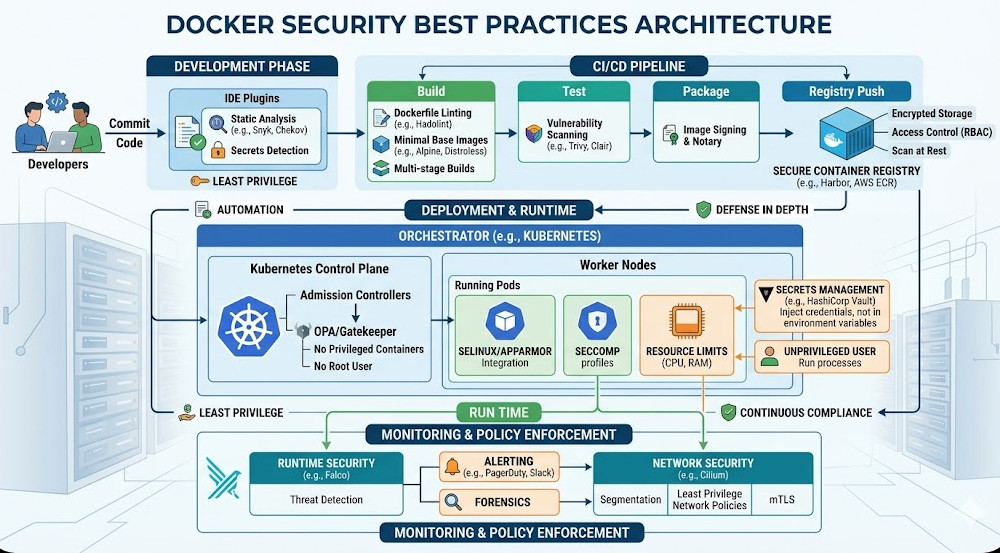
The architecture must enforce security at every single stage. We are designing a continuous, verifiable chain of custody for every container image.
The Logic Flow:
- Source Code Commit: Developer pushes code to a private Git repository.
- CI Trigger: The CI pipeline starts, pulling the code.
- Build & Scan (The Gate): The image is built using multi-stage Dockerfiles. Crucially, the resulting image is immediately scanned (Trivy) for CVEs and secrets. If the scan fails, the build halts instantly.
- Policy Enforcement: The image must pass a policy check (e.g., no root user, no unnecessary packages).
- Registry Push & Signing: The image is pushed to a hardened registry (Harbor). It is then cryptographically signed (e.g., using Cosign/Notary).
- Deployment: The orchestrator (K8s) is configured to only pull and deploy images that possess a valid signature and pass the required security context.
- Runtime Monitoring: Falco monitors the running container for anomalous behavior (e.g., shell execution, unexpected file writes).
This approach eliminates the possibility of deploying an unvetted or compromised artifact.
Implementation & Automation: The Hardened Pipeline (YAML/Bash)
The security of the system is defined by the quality of the automation. We use a combination of Dockerfile best practices and a CI/CD YAML workflow.
1. The Secure Dockerfile (Best Practice)
The Dockerfile must be minimal and non-root.
# STAGE 1: Builder (Use a full image for compilation)
FROM golang:1.22-alpine AS builder
WORKDIR /app
COPY go.mod go.sum ./
RUN go mod download
COPY . .
RUN CGO_ENABLED=0 go build -o /app/main ./cmd/api

# STAGE 2: Final Minimal Runtime (The true source of security)
# Use a Distroless image to eliminate shell, package managers, and libraries.
FROM gcr.io/distroless/cc-debian11
WORKDIR /
COPY --from=builder /app/main /app/main
ENTRYPOINT ["/app/main"]
# Note: No USER directive is needed here as Distroless images are inherently minimal.
2. The CI/CD Pipeline Workflow (YAML Example)
This pseudo-YAML demonstrates the critical steps: Build, Scan, Sign, Deploy.
stages:
  - build
  - scan
  - push_and_sign
  - deploy

build_image:
  stage: build
  script:
    - docker build -t $CI_REGISTRY/app:$CI_COMMIT_SHA .
    - docker push -t $CI_REGISTRY/app:$CI_COMMIT_SHA .

scan_image:
  stage: scan
  script:
    # Run vulnerability scan against the newly built image
    - trivy image --exit-code 1 --severity CRITICAL,HIGH $CI_REGISTRY/app:$CI_COMMIT_SHA
  allow_failure: false # CRITICAL: Failure here MUST halt the pipeline

sign_image:
  stage: push_and_sign
  script:
    # Push the image and attach a cryptographic signature
    - cosign sign --key $COSIGN_KEY $CI_REGISTRY/app:$CI_COMMIT_SHA
  needs: [scan_image]

deploy_to_k8s:
  stage: deploy
  script:
    # Apply K8s manifest, ensuring the image pull policy requires signature verification
    - kubectl apply -f k8s/deployment.yaml
  environment: production
  when: manual # Requires manual approval after successful signing
SecOps & Observability: Closing the Loop
Security is not a feature; it is a continuous process. We must secure the control plane, the data plane, and the observability layer itself.
1. Runtime Security (The Behavioral Layer)
The biggest risk is a container doing something it was never intended to do. We must monitor behavior, not just vulnerabilities.
- Seccomp & AppArmor: Always enforce these Linux kernel security profiles. They restrict the system calls a process can make, effectively limiting the container’s kernel access.
- Read-Only Filesystems: Configure the container to run with a read-only root filesystem. This prevents an attacker from writing malicious binaries or modifying configuration files.
- Network Policy: Use Kubernetes Network Policies to enforce strict micro-segmentation. A frontend container should only talk to the API service on port 8080, and nothing else.
2. Secrets Management (The Golden Rule)
Never bake secrets into the image, the Dockerfile, or the environment variables of the CI/CD runner.
Use a dedicated, centralized vault. The application should authenticate to the vault at startup and retrieve its necessary credentials dynamically. This is the only acceptable pattern for production environments.
3. Observability and Drift Detection
Monitoring must cover more than just CPU usage.
- Metrics: Track container restarts, resource utilization, and network ingress/egress rates. Sudden spikes or drops are immediate indicators of compromise.
- Logs: Aggregate logs into a centralized SIEM (Security Information and Event Management) system. Look for patterns like repeated failed authentication attempts or unexpected process execution.
- Model/Data Drift: If your application relies on external data sources or ML models, monitor the inputs and outputs. A sudden change in data distribution suggests upstream compromise or data poisoning.
Scaling, Edge Cases & Cost Optimization (FinOps)
Security and performance are often treated as opposing forces. In reality, they are deeply intertwined. A well-secured, minimal container is inherently more efficient.
Handling High Load and Failure Modes
For true enterprise scalability, assume failure is not an option.
- Resource Limits: Always define CPU and memory limits (
resources: limits:in K8s). This prevents a single runaway container from causing a Denial of Service (DoS) to the entire node. - Pod Anti-Affinity: Use anti-affinity rules to ensure that critical services (like the database and the API gateway) are never scheduled on the same physical node. This maximizes fault tolerance.
- Horizontal Pod Autoscaler (HPA): Configure HPA to scale the number of replicas based on actual CPU utilization or custom metrics (e.g., queue depth).
Cost Optimization Through Security
Security practices are often seen as cost centers, but they are actually cost savers.
- Minimal Images: Using
scratchor Distroless images drastically reduces the image size. Smaller images mean faster pulls, less storage cost in the registry, and a smaller attack surface to maintain. - Right-Sizing: By rigorously defining resource limits and monitoring actual usage, you prevent “resource hoarding.” This allows you to right-size your cluster nodes, directly impacting your cloud spend (FinOps).
Conclusion: The Veteran’s Verdict
The days of “good enough” security are over. In 2026, running a self-hosted container platform requires the discipline of a financial institution.
The shift from simple containerization to secure, immutable, policy-driven containerization is the defining challenge of modern DevOps. By adopting a “Shift Left” mindset—where security is coded into the build process—and enforcing strict runtime controls, you move beyond merely running containers to trusting them.
Mastering these advanced Docker security best practices is no longer a niche skill; it is the baseline requirement for any SRE or DevOps professional aiming for high-reliability, mission-critical systems.
FAQ: Expert Questions for Production Readiness
Q1: What is the single biggest security mistake self-hosters make?
A: Running containers as root or using base images that contain unnecessary packages (like full OS distributions). This maximizes the potential damage if a vulnerability is exploited. Always use non-root users and minimal base images.
Q2: Is network segmentation enough for security?
A: No. Network segmentation (like using Network Policies) is crucial, but it is only one layer. You must combine it with runtime controls (Seccomp/AppArmor) and process-level monitoring (Falco). Security is a depth-in-defense model.
Q3: How do I handle secrets in a complex, multi-service microservice architecture?
A: Never use environment variables for secrets. Implement a centralized, external secret vault (Vault, etc.). The application should use a dedicated sidecar container or CSI driver to retrieve secrets dynamically at runtime, ensuring the secret never touches the image or the deployment manifest.
Q4: If I use Kubernetes, does that negate the need for Docker security best practices?
A: Absolutely not. Kubernetes is an orchestration layer, not a security layer. It manages the deployment, but the underlying container image, the Dockerfile, and the runtime configuration must still adhere to the strictest security standards.
Q5: How do I prove to an auditor that my container is secure?
A: You must provide an auditable, immutable trail. This means showing the successful execution of the entire pipeline: Code Commit -> Successful Scan Report (Trivy/Clair) -> Signed Artifact (Cosign) -> Deployment Manifest with Policy Enforcement.
For more comprehensive guidance on DevOps best practices and SRE workflows, visit devopsroles.com.