
Introduction: Finding the absolute best Docker containers for agentic developers used to feel like chasing ghosts in the machine.
I’ve been deploying software for nearly three decades. Back in the late 90s, we were cowboy-coding over FTP.
Today? We have autonomous AI systems writing, debugging, and executing code for us. It is a completely different battlefield.
But giving an AI agent unrestricted access to your local machine is a rookie mistake. I’ve personally watched a hallucinating agent try to format a host drive.

Sandboxing isn’t just a best practice anymore; it is your only safety net. If you don’t containerize your agents, you are building a time bomb.
So, why does this matter right now? Because building AI that *acts* requires infrastructure that *protects*.
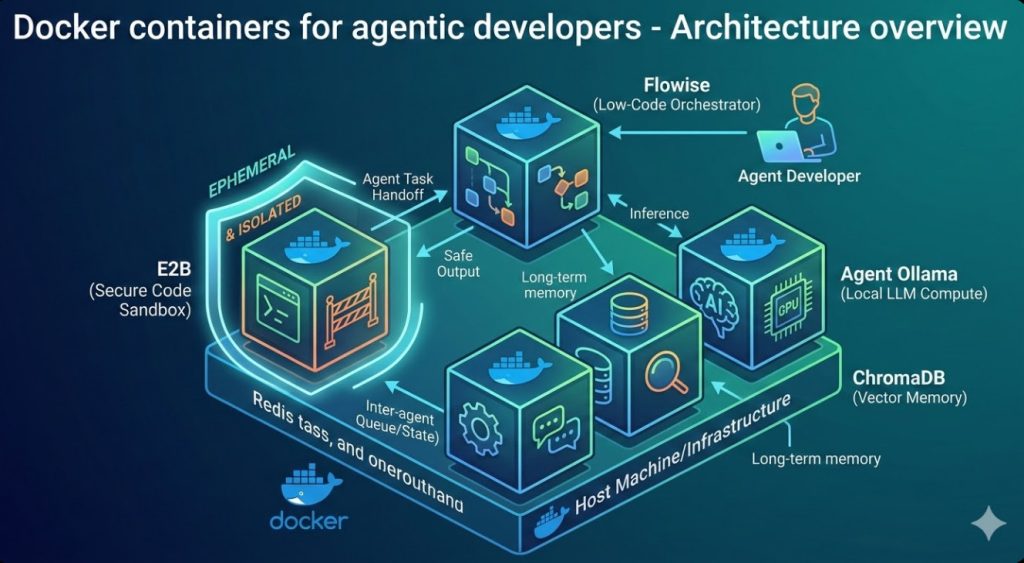
Let’s look at the actual stack. These are the five essential tools you need to survive.
Table of Contents
The Core Stack: 5 Docker containers for agentic developers
If you are building autonomous systems, you need specialized environments. Standard web-app setups won’t cut it anymore.
Your agents need memory, compute, and safe playgrounds. Let’s break down the exact configurations I use on a daily basis.
For more industry context on how this ecosystem is evolving, check out this recent industry coverage.
1. Ollama: The Local Compute Engine
Running agent loops against external APIs will bankrupt you. Trust me, I’ve seen the AWS bills.
When an agent gets stuck in a retry loop, it can fire off thousands of tokens a minute. You need local compute.
Ollama is the gold standard for running large language models locally inside a container.
- Zero API Costs: Run unlimited agent loops on your own hardware.
- Absolute Privacy: Your proprietary codebase never leaves your machine.
- Low Latency: Eliminate network lag when your agent needs to make rapid, sequential decisions.
Here is the exact `docker-compose.yml` snippet I use to get Ollama running with GPU support.
version: '3.8'
services:
  ollama:
    image: ollama/ollama:latest
    container_name: agent_ollama
    ports:
      - "11434:11434"
    volumes:
      - ollama_data:/root/.ollama
    deploy:
      resources:
        reservations:
          devices:
            - driver: nvidia
              count: 1
              capabilities: [gpu]

volumes:
  ollama_data:
Pro tip: Always mount a volume for your models. You do not want to re-download a 15GB Llama 3 model every time you rebuild.
2. ChromaDB: The Agent’s Long-Term Memory
An agent without memory is just a glorified autocomplete script. It will forget its overarching goal three steps into the task.
Vector databases are the hippocampus of your AI. They store embeddings so your agent can recall past interactions.
I prefer ChromaDB for local agentic workflows. It is lightweight, fast, and plays incredibly well with Python.
Deploying it via Docker ensures your agent’s memory persists across reboots. This is vital for long-running autonomous tasks.
# Quick start ChromaDB container
docker run -d \
  --name chromadb \
  -p 8000:8000 \
  -v ./chroma_data:/chroma/chroma \
  -e IS_PERSISTENT=TRUE \
  chromadb/chroma:latest
If you want to dive deeper into optimizing these setups, check out my guide here: [Internal Link: How to Optimize Docker Images for AI Workloads].
Advanced Environments: Docker containers for agentic developers
Once you have compute and memory, you need execution. This is where things get dangerous.
You are literally telling a machine to write code and run it. If you do this on your host OS, you are playing with fire.
3. E2B (Code Execution Sandbox)
E2B is a godsend for the modern builder. It provides secure, isolated environments specifically for AI agents.
When your agent writes a Python script to scrape a website or crunch data, it runs inside this sandbox.
If the agent writes an infinite loop or tries to access secure environment variables, the damage is contained.
- Ephemeral Environments: The sandbox spins up in milliseconds and dies when the task is done.
- Custom Runtimes: You can pre-install massive data science libraries so the agent doesn’t waste time running
pip install.
You can read more about the theory behind autonomous safety on Wikipedia’s overview of Intelligent Agents.
4. Flowise: The Visual Orchestrator
Sometimes, raw code isn’t enough. Debugging multi-agent systems via terminal output is a nightmare.
I learned this the hard way when I had three agents stuck in a conversational deadlock for an hour.
Flowise provides a drag-and-drop UI for LangChain. Running it in a Docker container gives you a centralized dashboard.
services:
  flowise:
    image: flowiseai/flowise:latest
    container_name: agent_flowise
    restart: always
    environment:
      - PORT=3000
    ports:
      - "3000:3000"
    volumes:
      - ~/.flowise:/root/.flowise
It allows you to visually map out which agent talks to which tool. It is essential for complex architectures.
5. Redis: The Multi-Agent Message Broker
When you graduate from single agents to multi-agent swarms, you hit a communication bottleneck.
Agent A needs to hand off structured data to Agent B. Doing this via REST APIs gets clunky fast.
Redis, acting as a message broker and task queue (usually paired with Celery), solves this elegantly.
It is the battle-tested standard. A simple Redis container can handle thousands of inter-agent messages per second.
- Pub/Sub Capabilities: Broadcast events to multiple agents simultaneously.
- State Management: Keep track of which agent is handling which piece of the overarching task.
FAQ on Docker containers for agentic developers
- Do I need a GPU for all of these? No. Only the LLM engine (like Ollama or vLLM) strictly requires a GPU for reasonable speeds. The rest run fine on standard CPUs.
- Why not just use virtual machines? VMs are too slow to boot. Agents need ephemeral environments that spin up in milliseconds, which is exactly what containers provide.
- Are these Docker containers for agentic developers secure? By default, no. You must implement strict network policies and drop root privileges inside your Dockerfiles to ensure true sandboxing. Check the official Docker security documentation for best practices.
Conclusion: We are standing at the edge of a massive shift in software engineering. The days of writing every line of code yourself are ending.
But the responsibility of managing the infrastructure has never been higher. You are no longer just a coder; you are a system architect for digital workers.
Deploying these Docker containers for agentic developers gives you the control, safety, and speed needed to build the future. Would you like me to walk you through writing a custom Dockerfile for an E2B sandbox environment? Thank you for reading the DevopsRoles page!
