The shift from Jupyter notebooks to production-grade infrastructure is often the “valley of death” for AI projects. While data scientists excel at model tuning, the operational reality of managing API quotas, secure context retrieval, and scalable inference endpoints requires rigorous engineering. This is where Generative AI with Terraform becomes the critical bridge between experimental code and reliable, scalable application delivery.
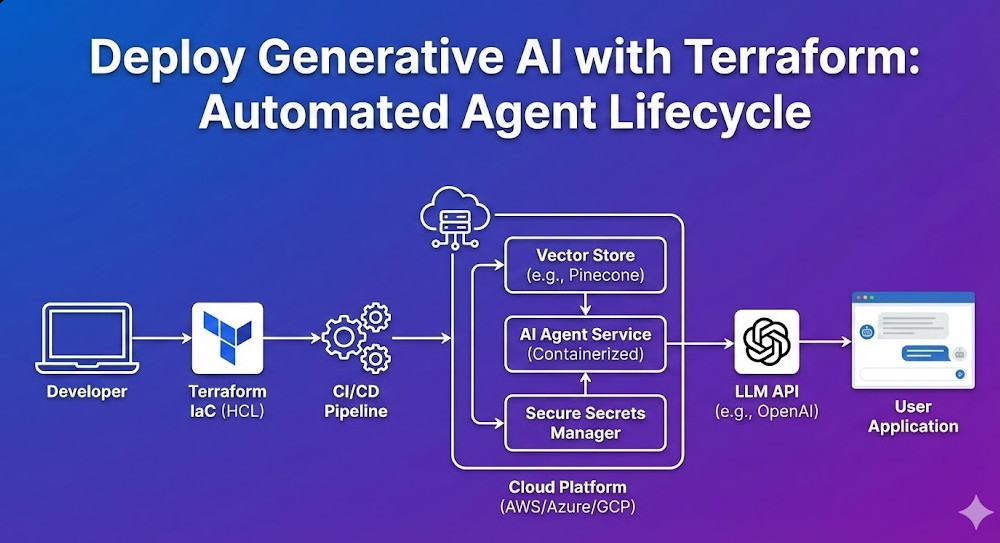
In this guide, we will bypass the basics of “what is IaC” and focus on architecting a robust automated lifecycle for Generative AI agents. We will cover provisioning vector databases for RAG (Retrieval-Augmented Generation), securing LLM credentials via Secrets Manager, and deploying containerized agents using Amazon ECS—all defined strictly in HCL.
Table of Contents
The Architecture of AI-Native Infrastructure
When we talk about deploying Generative AI with Terraform, we are typically orchestrating three distinct layers. Unlike traditional web apps, AI applications require specialized state management for embeddings and massive compute bursts for inference.
- Knowledge Layer (RAG): Vector databases (e.g., Pinecone, Milvus, or AWS OpenSearch) to store embeddings.
- Inference Layer (Compute): Containers hosting the orchestration logic (LangChain/LlamaIndex) running on ECS, EKS, or Lambda.
- Model Gateway (API): Secure interfaces to foundation models (AWS Bedrock, OpenAI, Anthropic).
Pro-Tip for SREs: Avoid managing model weights directly in Terraform state. Terraform is designed for infrastructure state, not gigabyte-sized binary blobs. Use Terraform to provision the S3 buckets and permissions, but delegate the artifact upload to your CI/CD pipeline or DVC (Data Version Control).
1. Provisioning the Knowledge Base (Vector Store)
For a RAG architecture, the vector store is your database. Below is a production-ready pattern for deploying an AWS OpenSearch Serverless collection, which serves as a highly scalable vector store compatible with LangChain.
resource "aws_opensearchserverless_collection" "agent_memory" {
  name        = "gen-ai-agent-memory"
  type        = "VECTORSEARCH"
  description = "Vector store for Generative AI embeddings"

  depends_on = [aws_opensearchserverless_security_policy.encryption]
}

resource "aws_opensearchserverless_security_policy" "encryption" {
  name        = "agent-memory-encryption"
  type        = "encryption"
  policy      = jsonencode({
    Rules = [
      {
        ResourceType = "collection"
        Resource = ["collection/gen-ai-agent-memory"]
      }
    ],
    AWSOwnedKey = true
  })
}

output "vector_endpoint" {
  value = aws_opensearchserverless_collection.agent_memory.collection_endpoint
}
This HCL snippet ensures that encryption is enabled by default—a non-negotiable requirement for enterprise AI apps handling proprietary data.
2. Securing LLM Credentials
Hardcoding API keys is a cardinal sin in DevOps, but in GenAI, it’s also a financial risk due to usage-based billing. We leverage AWS Secrets Manager to inject keys into our agent’s environment at runtime.
resource "aws_secretsmanager_secret" "openai_api_key" {
  name        = "production/gen-ai/openai-key"
  description = "API Key for OpenAI Model Access"
}

resource "aws_iam_role_policy" "ecs_task_secrets" {
  name = "ecs-task-secrets-access"
  role = aws_iam_role.ecs_task_execution_role.id

  policy = jsonencode({
    Version = "2012-10-17"
    Statement = [
      {
        Action = "secretsmanager:GetSecretValue"
        Effect = "Allow"
        Resource = aws_secretsmanager_secret.openai_api_key.arn
      }
    ]
  })
}
By explicitly defining the IAM policy, we adhere to the principle of least privilege. The container hosting the AI agent can strictly access only the specific secret required for inference.
3. Deploying the Agent Runtime (ECS Fargate)
For agents that require long-running processes (e.g., maintaining WebSocket connections or processing large documents), AWS Lambda often hits timeout limits. ECS Fargate provides a serverless container environment perfect for hosting Python-based LangChain agents.
resource "aws_ecs_task_definition" "agent_task" {
  family                   = "gen-ai-agent"
  network_mode             = "awsvpc"
  requires_compatibilities = ["FARGATE"]
  cpu                      = 1024
  memory                   = 2048
  execution_role_arn       = aws_iam_role.ecs_task_execution_role.arn

  container_definitions = jsonencode([
    {
      name      = "agent_container"
      image     = "${aws_ecr_repository.agent_repo.repository_url}:latest"
      essential = true
      secrets   = [
        {
          name      = "OPENAI_API_KEY"
          valueFrom = aws_secretsmanager_secret.openai_api_key.arn
        }
      ]
      environment = [
        {
          name  = "VECTOR_DB_ENDPOINT"
          value = aws_opensearchserverless_collection.agent_memory.collection_endpoint
        }
      ]
      logConfiguration = {
        logDriver = "awslogs"
        options = {
          "awslogs-group"         = "/ecs/gen-ai-agent"
          "awslogs-region"        = var.aws_region
          "awslogs-stream-prefix" = "ecs"
        }
      }
    }
  ])
}
This configuration dynamically links the output of your vector store resource (created in Step 1) into the container’s environment variables. This creates a self-healing dependency graph where infrastructure updates automatically propagate to the application configuration.
4. Automating the Lifecycle with Terraform & CI/CD
Deploying Generative AI with Terraform isn’t just about the initial setup; it’s about the lifecycle. As models drift and prompts need updating, you need a pipeline that handles redeployment without downtime.
The “Blue/Green” Strategy for AI Agents
AI agents are non-deterministic. A prompt change that works for one query might break another. Implementing a Blue/Green deployment strategy using Terraform is crucial.
- Infrastructure (Terraform): Defines the Load Balancer and Target Groups.
- Application (CodeDeploy): Shifts traffic from the old agent version (Blue) to the new version (Green) gradually.
Using the AWS CodeDeploy Terraform resource, you can script this traffic shift to automatically rollback if error rates spike (e.g., if the LLM starts hallucinating or timing out).
Frequently Asked Questions (FAQ)
Can Terraform manage the actual LLM models?
Generally, no. Terraform is for infrastructure. While you can use Terraform to provision an Amazon SageMaker Endpoint or an EC2 instance with GPU support, the model weights themselves (the artifacts) are better managed by tools like DVC or MLflow. Terraform sets the stage; the ML pipeline puts the actors on it.
How do I handle GPU provisioning for self-hosted LLMs in Terraform?
If you are hosting open-source models (like Llama 3 or Mistral), you will need to specify instance types with GPU acceleration. In the aws_instance or aws_launch_template resource, ensure you select the appropriate instance type (e.g., g5.2xlarge or p3.2xlarge) and utilize a deeply integrated AMI (Amazon Machine Image) like the AWS Deep Learning AMI.
Is Terraform suitable for prompt management?
No. Prompts are application code/configuration, not infrastructure. Storing prompts in Terraform variables creates unnecessary friction. Store prompts in a dedicated database or as config files within your application repository.
Conclusion
Deploying Generative AI with Terraform transforms a fragile experiment into a resilient enterprise asset. By codifying the vector storage, compute environment, and security policies, you eliminate the “it works on my machine” syndrome that plagues AI development.
The code snippets provided above offer a foundational skeleton. As you scale, look into modularizing these resources into reusable Terraform Modules to empower your data science teams to spin up compliant environments on demand. Thank you for reading the DevopsRoles page!

