Table of Contents
Introduction
How to BASH create a new file with content in Linux? In Bash scripting, there are multiple ways to use Bash create new file and populate it with content.
In this tutorial, we will explore three common methods to create a new file with content in Bash. You can use the commands line below
- touch command to create an empty file: touch FILENAME
- cat command to create a text file: cat > FILENAME
Write the contents to a file:
cat << “EOF” > /path/to/yourfilename
write the contents to a file
Use cat HERO DOCUMENT write content file
EOF
For example, My bash create new file with content.
I will create file jarservice in /etc/init.d/jarservice to java run jar as service on centos 6 as below.
#!/bin/bash
# Author: HuuPV2
yourservice=jarservice
touch /etc/init.d/$yourservice

cat << "EOF" > /etc/init.d/$yourservice
#!/bin/bash
SERVICE_NAME=$yourservice
PATH_TO_JAR=/path/to/yourapplication.jar
LOG_DIR=/var/log/yourapplication.log
PID_PATH_FILE=/var/run/yourapplication.pid
case $1 in
  start)
     echo "Starting $SERVICE_NAME ..."
     if [ ! -f $PID_PATH_FILE ]; then
        nohup java -jar $PATH_TO_JAR >> $LOG_DIR 2>&1&
        echo $! > $PID_PATH_FILE
        echo "$SERVICE_NAME started ..."
     else
        echo "$SERVICE_NAME is already running ..."
     fi
     ;;
  stop)
     if [ -f $PID_PATH_FILE ]; then
        PID=$(cat $PID_PATH_FILE);
        echo "$SERVICE_NAME stoping ..."
        kill $PID;
        echo "$SERVICE_NAME stopped ..."
        rm $PID_PATH_FILE
     else
        echo "$SERVICE_NAME is not running ..."
     fi
     ;;
     *)
     echo $"Usage: $0 {start|stop}"
     exit 2
esac
EOF
chmod +x /etc/init.d/$yourservice
echo "Welcome to www.devopsroles.com"
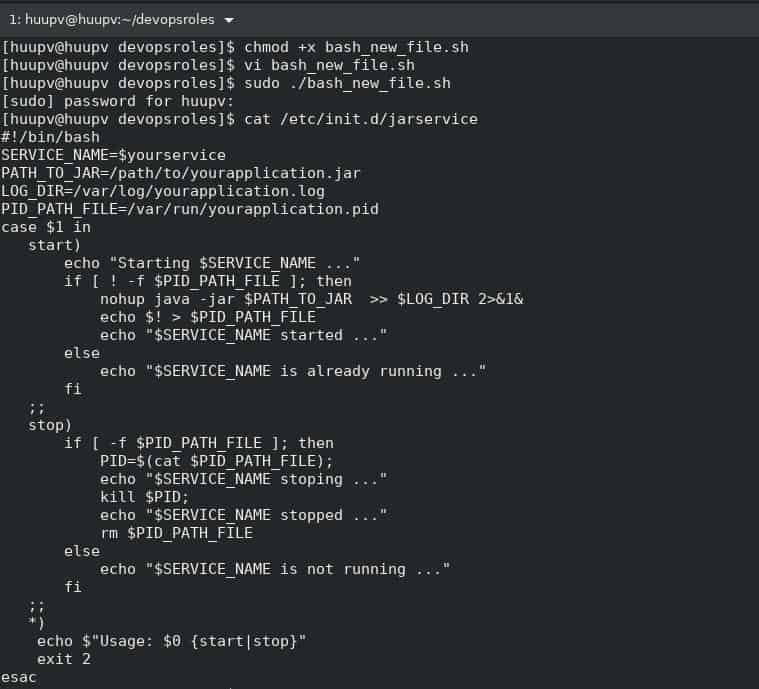
Run Bash create a new file with content
[huupv@huupv devopsroles]$ chmod +x bash_new_file.sh
[huupv@huupv devopsroles]$ sudo ./bash_new_file.sh
The screen output terminal:
Conclusion
Creating a new file with content in Bash is a straightforward task. By utilizing methods such as echo with output redirection, here documents, or printf with output redirection, you can generate files with ease.
Through the article, you can use Bash create new file with content as above. I hope will this your helpful. For more details refer to Bash script.