For years, AWS Batch and Amazon EKS (Elastic Kubernetes Service) operated in parallel universes. Batch excelled at queue management and compute provisioning for high-throughput workloads, while Kubernetes won the war for container orchestration. With the introduction of AWS Batch support for EKS, we can finally unify these paradigms.
This convergence allows you to leverage the robust job scheduling of AWS Batch while utilizing the namespace isolation, sidecars, and familiarity of your existing EKS clusters. However, orchestrating this integration via Infrastructure as Code (IaC) is non-trivial. It requires precise IAM trust relationships, Kubernetes RBAC (Role-Based Access Control) configuration, and specific compute environment parameters.
In this guide, we will bypass the GUI entirely. We will architect and deploy a production-ready AWS Batch Terraform EKS solution, focusing on the nuances that trip up even experienced engineers.
GigaCode Pro-Tip:
Unlike standard EC2 compute environments, AWS Batch on EKS does not manage the EC2 instances directly. Instead, it submits Pods to your cluster. This means your EKS Nodes (Node Groups) must already exist and scale appropriately (e.g., using Karpenter or Cluster Autoscaler) to handle the pending Pods injected by Batch.
Table of Contents
Architecture: How Batch Talks to Kubernetes
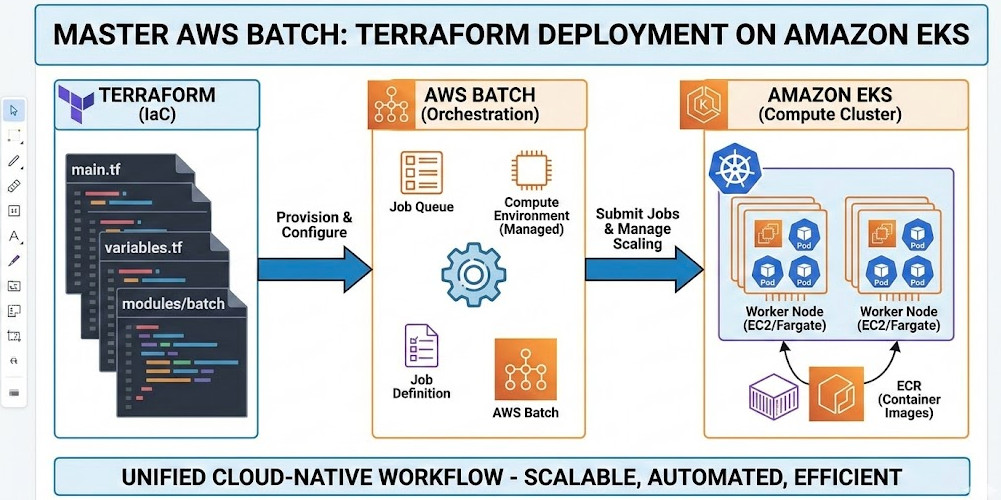
Before writing Terraform, understand the control flow:
- Job Submission: You submit a job to an AWS Batch Job Queue.
- Translation: AWS Batch translates the job definition into a Kubernetes
PodSpec. - API Call: The AWS Batch Service Principal interacts with the EKS Control Plane (API Server) to create the Pod.
- Execution: The Pod is scheduled on an available node in your EKS cluster.
This flow implies two critical security boundaries we must bridge with Terraform: IAM (AWS permissions) and RBAC (Kubernetes permissions).
Step 1: IAM Roles for Batch Service
AWS Batch needs a specific service-linked role or a custom IAM role to communicate with the EKS cluster. For strict security, we define a custom role.
resource "aws_iam_role" "batch_eks_service_role" {
  name = "aws-batch-eks-service-role"

  assume_role_policy = jsonencode({
    Version = "2012-10-17"
    Statement = [
      {
        Action = "sts:AssumeRole"
        Effect = "Allow"
        Principal = {
          Service = "batch.amazonaws.com"
        }
      }
    ]
  })
}

resource "aws_iam_role_policy_attachment" "batch_eks_policy" {
  role       = aws_iam_role.batch_eks_service_role.name
  policy_arn = "arn:aws:iam::aws:policy/AWSBatchServiceRole"
}
Step 2: Preparing the EKS Cluster (RBAC)
This is the most common failure point for AWS Batch Terraform EKS deployments. Even with the correct IAM role, Batch cannot schedule Pods if the Kubernetes API rejects the request.
We must map the IAM role created in Step 1 to a Kubernetes user, then grant that user permissions via a ClusterRole and ClusterRoleBinding. We can use the HashiCorp Kubernetes Provider for this.
2.1 Define the ClusterRole
resource "kubernetes_cluster_role" "aws_batch_cluster_role" {
  metadata {
    name = "aws-batch-cluster-role"
  }

  rule {
    api_groups = [""]
    resources  = ["namespaces"]
    verbs      = ["get", "list", "watch"]
  }

  rule {
    api_groups = [""]
    resources  = ["nodes"]
    verbs      = ["get", "list", "watch"]
  }

  rule {
    api_groups = [""]
    resources  = ["pods"]
    verbs      = ["get", "list", "watch", "create", "delete", "patch"]
  }

  rule {
    api_groups = ["rbac.authorization.k8s.io"]
    resources  = ["clusterroles", "clusterrolebindings"]
    verbs      = ["get", "list"]
  }
}
2.2 Bind the Role to the IAM User
You must ensure the IAM role ARN matches the user configured in your aws-auth ConfigMap (or EKS Access Entries if using the newer API). Here, we create the binding assuming the user is mapped to aws-batch.
resource "kubernetes_cluster_role_binding" "aws_batch_cluster_role_binding" {
  metadata {
    name = "aws-batch-cluster-role-binding"
  }

  role_ref {
    api_group = "rbac.authorization.k8s.io"
    kind      = "ClusterRole"
    name      = kubernetes_cluster_role.aws_batch_cluster_role.metadata[0].name
  }

  subject {
    kind      = "User"
    name      = "aws-batch" # This must match the username in aws-auth
    api_group = "rbac.authorization.k8s.io"
  }
}
Step 3: The Terraform Compute Environment
Now we define the aws_batch_compute_environment resource. The key differentiator here is the compute_resources block type, which must be set to FARGATE_SPOT, FARGATE, EC2, or SPOT, and strictly linked to the EKS configuration.
resource "aws_batch_compute_environment" "eks_batch_ce" {
  compute_environment_name = "eks-batch-compute-env"
  type                     = "MANAGED"
  service_role             = aws_iam_role.batch_eks_service_role.arn

  eks_configuration {
    eks_cluster_arn      = data.aws_eks_cluster.main.arn
    kubernetes_namespace = "batch-jobs" # Ensure this namespace exists!
  }

  compute_resources {
    type               = "EC2" # Or FARGATE
    max_vcpus          = 256
    min_vcpus          = 0

    # Note: For EKS, security_group_ids and subnets might be ignored
    # if you are relying on existing Node Groups, but are required for validation.
    security_group_ids = [aws_security_group.batch_sg.id]
    subnets            = module.vpc.private_subnets

    instance_types = ["c5.large", "m5.large"]
  }

  depends_on = [
    aws_iam_role_policy_attachment.batch_eks_policy,
    kubernetes_cluster_role_binding.aws_batch_cluster_role_binding
  ]
}
Technical Note:
When using EKS, theinstance_typesand subnets defined in the Batch Compute Environment are primarily used by Batch to calculate scaling requirements. However, the actual Pod placement depends on the Node Groups (or Karpenter provisioners) available in your EKS cluster.
Step 4: Job Queues and Definitions
Finally, we wire up the Job Queue and a basic Job Definition. In the EKS context, the Job Definition looks different—it wraps Kubernetes properties.
resource "aws_batch_job_queue" "eks_batch_jq" {
  name                 = "eks-batch-queue"
  state                = "ENABLED"
  priority             = 10
  compute_environments = [aws_batch_compute_environment.eks_batch_ce.arn]
}

resource "aws_batch_job_definition" "eks_job_def" {
  name        = "eks-job-def"
  type        = "container"

  # Crucial: EKS Job Definitions define node properties differently
  eks_properties {
    pod_properties {
      host_network = false
      containers {
        image = "public.ecr.aws/amazonlinux/amazonlinux:latest"
        command = ["/bin/sh", "-c", "echo 'Hello from EKS Batch'; sleep 30"]

        resources {
          limits = {
            cpu    = "1.0"
            memory = "1024Mi"
          }
          requests = {
            cpu    = "0.5"
            memory = "512Mi"
          }
        }
      }
    }
  }
}
Best Practices for Production
- Use Karpenter: Standard Cluster Autoscaler can be sluggish with Batch spikes. Karpenter observes the unschedulable Pods created by Batch and provisions nodes in seconds.
- Namespace Isolation: Always isolate Batch workloads in a dedicated Kubernetes namespace (e.g.,
batch-jobs). ConfigureResourceQuotason this namespace to prevent Batch from starving your microservices. - Logging: Ensure your EKS nodes have Fluent Bit or similar log forwarders installed. Batch logs in the console are helpful, but aggregating them into CloudWatch or OpenSearch via the node’s daemonset is superior for debugging.
Frequently Asked Questions (FAQ)
Can I use Fargate with AWS Batch on EKS?
Yes. You can specify FARGATE or FARGATE_SPOT in your compute resources. However, you must ensure you have a Fargate Profile in your EKS cluster that matches the namespace and labels defined in your Batch Job Definition.
Why is my Job stuck in RUNNABLE status?
This is the classic “It’s DNS” of Batch. In EKS, RUNNABLE usually means Batch has successfully submitted the Pod to the API Server, but the Pod is Pending. Check your K8s events (kubectl get events -n batch-jobs). You likely lack sufficient capacity (Node Groups not scaling) or have a `Taint/Toleration` mismatch.
How does this compare to standard Batch on EC2?
Standard Batch manages the ASG (Auto Scaling Group) for you. Batch on EKS delegates the infrastructure management to you (or your EKS autoscaler). EKS offers better unification if you already run K8s, but standard Batch is simpler if you just need raw compute without K8s management overhead.
Conclusion
Integrating AWS Batch with Amazon EKS using Terraform provides a powerful, unified compute plane for high-performance computing. By explicitly defining your IAM trust boundaries and Kubernetes RBAC permissions, you eliminate the “black box” magic and gain full control over your batch processing lifecycle.
Start by deploying the IAM roles and RBAC bindings defined above. Once the permissions handshake is verified, layer on the Compute Environment and Job Queues. Your infrastructure is now ready to process petabytes at scale. Thank you for reading the DevopsRoles page!