Introduction: Building an AI-Powered CI/CD Copilot is no longer a luxury; it is a tactical survival mechanism for modern engineering teams.
I remember the dark days of 3 AM pager duties, staring at an endless, blinding sea of red Jenkins console outputs.
It drains your soul, kills your team’s velocity, and burns through your infrastructure budget.
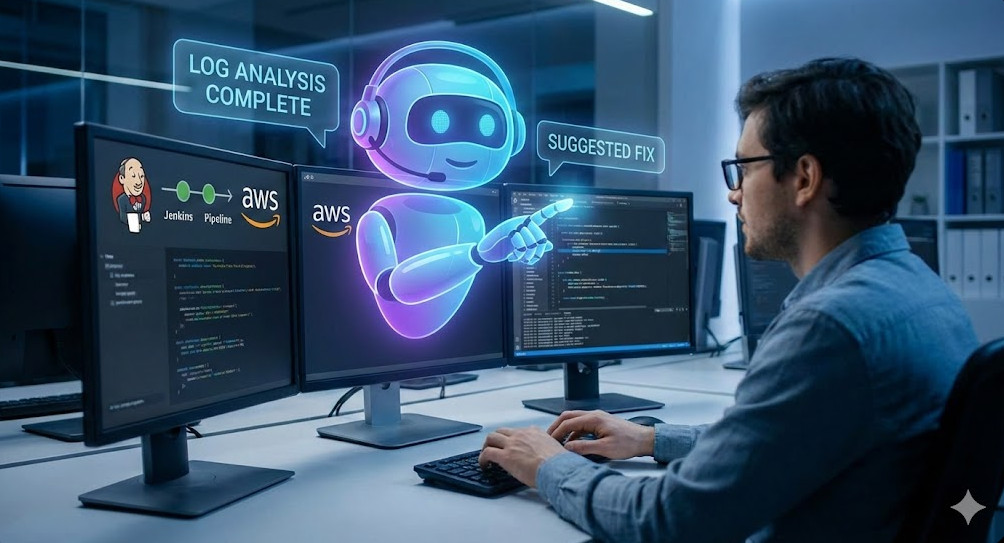
Table of Contents
- 1 Why Your Team Desperately Needs an AI-Powered CI/CD Copilot Today
- 2 Building the AWS Lambda Brain for your AI-Powered CI/CD Copilot
- 3 Advanced Prompt Engineering for your AI-Powered CI/CD Copilot
- 4 Securing Your AI-Powered CI/CD Copilot
- 5 War Story: How the AI-Powered CI/CD Copilot Saved a Friday Deployment
Why Your Team Desperately Needs an AI-Powered CI/CD Copilot Today
Let’s talk raw facts. Developers waste countless hours debugging trivial build errors.
Missing dependencies. Syntax typos. Obscure npm registry timeouts. Sound familiar?
That is wasted money. Pure and simple.
An AI-Powered CI/CD Copilot acts as your tirelessly vigilant senior DevOps engineer.
It reads the logs, finds the exact error, cuts through the noise, and immediately suggests the fix.
The Architecture Behind the AI-Powered CI/CD Copilot
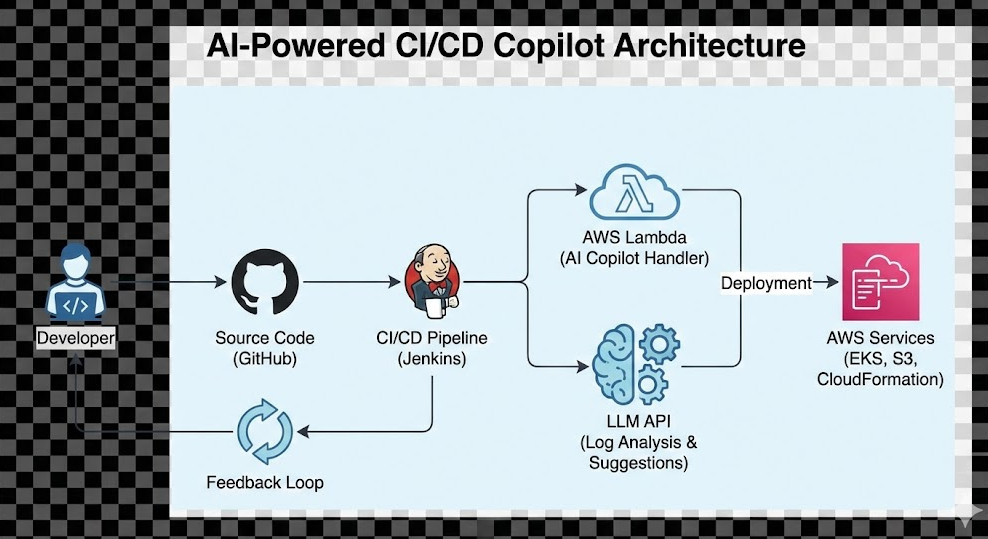
We are gluing together two massive cloud powerhouses here: Jenkins and AWS Lambda.
Jenkins handles the heavy lifting of your pipeline execution. When it fails, it screams for help.
That scream is a webhook payload sent directly over the wire to AWS.
AWS Lambda is the brain of the operation. It catches the webhook, parses the failure, and interfaces with a Large Language Model.
Read the inspiration for this architecture in the original AWS Builders documentation.
Building the AWS Lambda Brain for your AI-Powered CI/CD Copilot
You need a runtime environment that is ridiculously fast and lightweight.
Python is my absolute go-to for Lambda engineering.
We will use the standard `json` library and standard HTTP requests to keep dependencies at zero.
Check the official AWS Lambda documentation if you need to brush up on handler structures.
import json
import urllib.request
import os

def lambda_handler(event, context):
    # The AI-Powered CI/CD Copilot execution starts here
    body = json.loads(event.get('body', '{}'))
    build_url = body.get('build_url')

    print(f"Analyzing failed build: {build_url}")

    # 1. Fetch raw console logs from Jenkins API
    # 2. Sanitize and send logs to LLM API (OpenAI/Anthropic)
    # 3. Return parsed analysis to Slack or Teams

    return {
        'statusCode': 200,
        'body': json.dumps('Copilot analysis successfully triggered.')
    }
Pretty standard stuff, right? But the real magic happens in the prompt engineering.
You must give the LLM incredibly strict context. Tell it to be a harsh, uncompromising expert.
It needs to spit out the exact CLI commands or code changes needed to fix the Jenkins pipeline, nothing else.
Connecting Jenkins to the AI-Powered CI/CD Copilot
Now, let’s look at the Jenkins side of this battlefield.
You are probably using declarative pipelines. If you aren’t, you need to migrate yesterday.
We need to surgically modify the `post` block in your Jenkinsfile.
Read up on Jenkins Pipeline Syntax to master post-build webhooks.
pipeline {
    agent any
    stages {
        stage('Build & Test') {
            steps {
                sh 'make build'
            }
        }
    }
    post {
        failure {
            script {
                echo "Critical Failure! Engaging the AI Copilot..."
                // Send secure webhook to AWS API Gateway -> Lambda
                sh """
                    curl -X POST -H 'Content-Type: application/json' \
                    -d '{"build_url": "${env.BUILD_URL}"}' \
                    https://your-api-gateway-id.execute-api.us-east-1.amazonaws.com/prod/analyze
                """
            }
        }
    }
}
When the build crashes and burns, Jenkins automatically fires the payload.
The Lambda wakes up, pulls the console text via the Jenkins API, and gets to work immediately.
Advanced Prompt Engineering for your AI-Powered CI/CD Copilot
Let’s dig deeper into the actual prompt engineering mechanics.
A naive prompt will yield absolute garbage. You can’t just send a log and say “Fix this.”
LLMs are incredibly smart, but they lack your specific repository’s historical context.
You must spoon-feed them the boundaries of reality.
Here is a blueprint for the system prompt I use in production environments:
“You are a Senior Principal DevOps engineer. Analyze the following Jenkins build log. Identify the exact root cause of the failure. Provide a step-by-step fix. Format the exact shell commands needed in Markdown code blocks. Keep the explanation under 3 sentences and be brutally concise.”
See what I did there? Ruthless constraints.
By forcing the AI-Powered CI/CD Copilot to output strictly in code blocks, you can programmatically parse them.
Securing Your AI-Powered CI/CD Copilot
Security is not an afterthought. Not when an AI is reading your proprietary stack traces.
Let’s talk about AWS IAM (Identity and Access Management).
Your Lambda function must run under a draconian principle of least privilege.
It only needs permission to write logs to CloudWatch and perhaps invoke the LLM API.
If you are pulling Jenkins API tokens, use AWS Secrets Manager. Never, ever hardcode your keys.
- Create a dedicated, isolated IAM role for the Lambda execution.
- Attach inline policies strictly limited to necessary ARNs.
- Implement a rigorous log scrubber before sending data to the outside world.
That last point is absolutely critical to your company’s survival.
Jenkins logs often leak environment variables, database passwords, or AWS access keys.
You must write a regex function in your Python script to sanitize the payload.
If an API token leaks into an LLM training dataset, you are having a very bad day.
The AI-Powered CI/CD Copilot must be entirely blind to your cryptographic secrets.
Cost Analysis: Running an AI-Powered CI/CD Copilot
Let’s talk dollars and cents, because executives love ROI.
How much does this serverless architecture actually cost to run at enterprise scale?
Shockingly little. The compute overhead is practically a rounding error.
AWS Lambda offers one million free requests per month on the free tier.
Unless your team is failing a million builds a month (in which case, you have bigger problems), the compute is free.
The real cost comes from the LLM API tokens.
You are looking at fractions of a single cent per log analysis.
Compare that to a Senior Engineer making $150k a year spending 40 minutes debugging a YAML typo.
The AI-Powered CI/CD Copilot pays for itself on the very first day of deployment.
Check out my other guide on [Internal Link: Scaling AWS Lambda for Enterprise DevOps] to see how to handle high throughput.
War Story: How the AI-Powered CI/CD Copilot Saved a Friday Deployment
I remember a massive, high-stakes migration project last October.
We were porting a legacy monolithic application over to an EKS Kubernetes cluster.
The Helm charts were a tangled mess. Node dependencies were failing silently in the background.
Jenkins was throwing generic exit code 137 errors. Out of memory. But why?
We spent four hours staring at Grafana dashboards, application logs, and pod metrics.
Then, I hooked up the first raw prototype of our AI-Powered CI/CD Copilot.
Within 15 seconds, it parsed 10,000 lines of logs and highlighted a hidden Java memory leak in the integration test suite.
It suggested adding `-XX:+HeapDumpOnOutOfMemoryError` to the Maven options to catch the heap.
We found the memory leak in the very next automated run.
That is the raw power of having a tireless, instant pair of eyes on your pipelines.
FAQ Section
- Is this architecture expensive to maintain? No. Serverless functions require zero patching. The LLM APIs cost pennies per pipeline run.
- Can it automatically commit code fixes? Technically, yes. But I strongly recommend keeping a human in the loop. Approvals matter for compliance.
- What if the Jenkins logs exceed token limits? Excellent question. You must truncate the logs. Send only the last 200 lines to the AI, where the actual stack trace lives.
Conclusion: Your engineering time is vastly better spent building revenue-generating features, not parsing cryptic Jenkins errors. Building an AI-Powered CI/CD Copilot is the highest ROI infrastructure project you can tackle this quarter. Stop doing manual log reviews and let the machines do what they do best. Thank you for reading the DevopsRoles page!

