

In this tutorial, How do I use Vagrant create multiple VMs loop? Multiple Vagrant Virtual Machine on Vagrantfile. How to create Multiple VMs with multiple IP loop. Vagrant the essential for DevOps Roles.
Vagrant create multiple VMs loops
For example, I creating two servers with Vagrantfile as below
Vagrant.configure("2") do |config|
config.ssh.insert_key = false
config.vm.provider :virtualbox do |vb|
  vb.memory = 256
  vb.cpus = 1
end
# Application server 1.
config.vm.define "app1" do |app1|
  app1.vm.hostname = "app1.dev"
  app1.vm.box = "centos/7"
  app1.vm.network :private_network, ip: "192.168.3.4"
end
# Database server.
config.vm.define "db" do |db|
  db.vm.hostname = "db.dev"
  db.vm.box = "centos/7"
  db.vm.network :private_network, ip: "192.168.3.5"
end
end
Now, How to Vagrant create N Virtual Machine with different IPs in a loop.
Vagrant.configure("2") do |config|

config.ssh.insert_key = false
config.vm.provider :virtualbox do |vb|
  vb.memory = 256
  vb.cpus = 1
end

#Disabling the default /vagrant share
config.vm.synced_folder ".", "/vagrant", disabled: true
MACHINE = ["app1.dev","db.dev"]
N = 1

(0..N).each do |i|
config.vm.define "server#{i}" do |node|
  node.vm.hostname = MACHINE[i]
  node.vm.box = "centos/7"
  node.vm.network :private_network, ip: "192.168.3.#{10+i}"
end
end
Note: Change N and MACHINE variable is right for you
To run the first vagrant up a Virtual Machine, to starts vagrant environment
[huupv@huupv example01]$ vagrant up
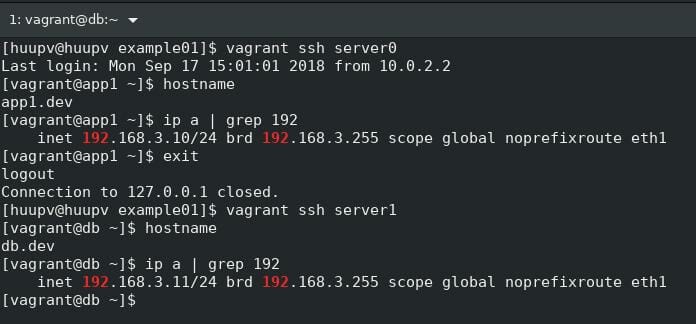
The result, Vagrant create multiple VMs loops

Conclusion
Thought the article, you can use Vagrant create multiple VMs loops as above. I hope will this your helpful. Thank you for reading the DevopsRoles page!
You are missing an “end” at the end of code.