The era of copy-pasting logs into ChatGPT is over. With the widespread adoption of the Model Context Protocol (MCP), AI agents no longer just chat about your infrastructure—they can interact with it. For DevOps engineers, SREs, and Platform teams, this is the paradigm shift we’ve been waiting for.
MCP Servers for DevOps allow your local LLM environment (like Claude Desktop, Cursor, or specialized IDEs) to securely connect to your Kubernetes clusters, production databases, cloud providers, and observability stacks. Instead of asking “How do I query a crashing pod?”, you can now ask your agent to “Check the logs of the crashing pod in namespace prod and summarize the stack trace.”
This guide cuts through the noise of the hundreds of community servers to give you the definitive, production-ready top 10 list for 2026, complete with configuration snippets and security best practices.
Table of Contents
- 1 What is the Model Context Protocol (MCP)?
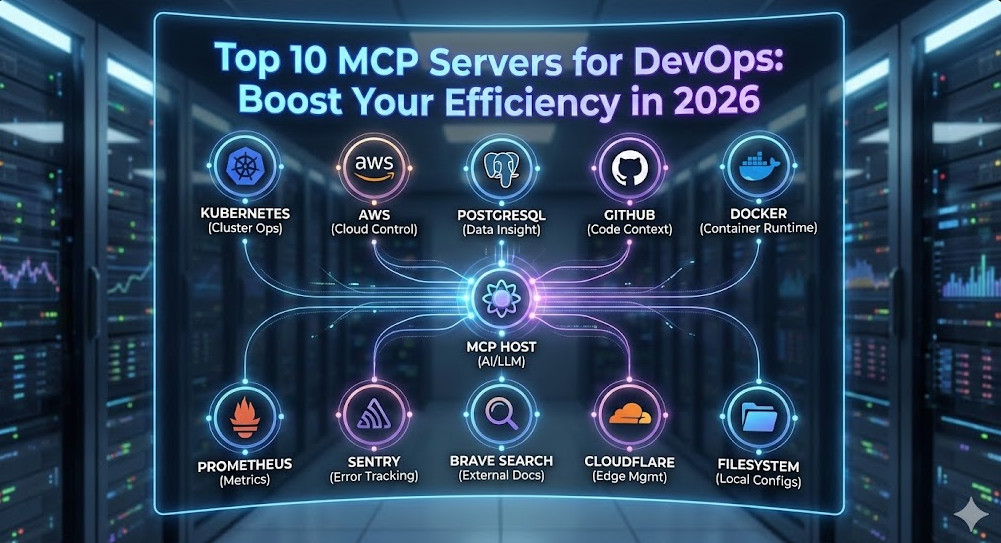
- 2 The Top 10 MCP Servers for DevOps
- 2.1 1. Kubernetes (The Cluster Commander)
- 2.2 2. PostgreSQL (The Data Inspector)
- 2.3 3. AWS (The Cloud Controller)
- 2.4 4. GitHub (The Code Context)
- 2.5 5. Filesystem (The Local Anchor)
- 2.6 6. Docker (The Container Whisperer)
- 2.7 7. Prometheus (The Metrics Watcher)
- 2.8 8. Sentry (The Error Hunter)
- 2.9 9. Brave Search (The External Brain)
- 2.10 10. Cloudflare (The Edge Manager)
- 3 Implementation: The claude_desktop_config.json
- 4 Security Best Practices for Expert DevOps
- 5 Frequently Asked Questions (FAQ)
- 6 Conclusion
What is the Model Context Protocol (MCP)?
Before we dive into the tools, let’s briefly level-set. MCP is an open standard that standardizes how AI models interact with external data and tools. It follows a client-host-server architecture:
- Host: The application you interact with (e.g., Claude Desktop, Cursor, VS Code).
- Server: A lightweight process that exposes specific capabilities (tools, resources, prompts) via JSON-RPC.
- Client: The bridge connecting the Host to the Server.
Pro-Tip for Experts: Most MCP servers run locally via
stdiotransport, meaning the data never leaves your machine unless the server specifically calls an external API (like AWS or GitHub). This makes MCP significantly more secure than web-based “Plugin” ecosystems.
The Top 10 MCP Servers for DevOps
1. Kubernetes (The Cluster Commander)
The Kubernetes MCP server is arguably the most powerful tool in a DevOps engineer’s arsenal. It enables your AI to run kubectl-like commands to inspect resources, view events, and debug failures.
- Key Capabilities: List pods, fetch logs, describe deployments, check events, and inspect YAML configurations.
- Why it matters: Instant context. You can say “Why is the payment-service crashing?” and the agent can inspect the events and logs immediately without you typing a single command.
{
  "kubernetes": {
    "command": "npx",
    "args": ["-y", "@modelcontextprotocol/server-kubernetes"]
  }
}
2. PostgreSQL (The Data Inspector)
Direct database access allows your AI to understand your schema and data relationships. This is invaluable for debugging application errors that stem from data inconsistencies or bad migrations.
- Key Capabilities: Inspect table schemas, run read-only SQL queries, analyze indexes.
- Security Warning: Always configure this with a READ-ONLY database user. Never give an LLM
DROP TABLEprivileges.
3. AWS (The Cloud Controller)
The official AWS MCP server unifies access to your cloud resources. It respects your local ~/.aws/credentials, effectively allowing the agent to act as you.
- Key Capabilities: List EC2 instances, read S3 buckets, check CloudWatch logs, inspect Security Groups.
- Use Case: “List all EC2 instances in us-east-1 that are stopped and estimate the cost savings.”
4. GitHub (The Code Context)
While many IDEs have Git integration, the GitHub MCP server goes deeper. It allows the agent to search issues, read PR comments, and inspect file history across repositories, not just the one you have open.
- Key Capabilities: Search repositories, read file contents, manage issues/PRs, inspect commit history.
5. Filesystem (The Local Anchor)
Often overlooked, the Filesystem MCP server is foundational. It allows the agent to read your local config files, Terraform state (be careful!), and local logs that aren’t in the cloud yet.
- Best Practice: explicitly allow-list only specific directories (e.g.,
/Users/me/projects) rather than your entire home folder.
6. Docker (The Container Whisperer)
Debug local containers faster. The Docker MCP server lets your agent interact with the Docker daemon to check container health, inspect images, and view runtime stats.
- Key Capabilities:
docker ps,docker logs,docker inspectvia natural language.
7. Prometheus (The Metrics Watcher)
Context is nothing without metrics. The Prometheus MCP server connects your agent to your time-series data.
- Use Case: “Analyze the CPU usage of the
api-gatewayover the last hour and tell me if it correlates with the error spikes.” - Value: Eliminates the need to write complex PromQL queries manually for quick checks.
8. Sentry (The Error Hunter)
When an alert fires, you need details. Connecting Sentry allows the agent to retrieve stack traces, user impact data, and release health info directly.
- Key Capabilities: Search issues, retrieve latest event details, list project stats.
9. Brave Search (The External Brain)
DevOps requires constant documentation lookups. The Brave Search MCP server gives your agent internet access to find the latest error codes, deprecation notices, or Terraform module documentation without hallucinating.
- Why Brave? It offers a clean API for search results that is often more “bot-friendly” than standard scrapers.
10. Cloudflare (The Edge Manager)
For modern stacks relying on edge compute, the Cloudflare MCP server is essential. Manage Workers, KV namespaces, and DNS records.
- Key Capabilities: List workers, inspect KV keys, check deployment status.
Implementation: The claude_desktop_config.json
To get started, you need to configure your Host application. For Claude Desktop on macOS, this file is located at ~/Library/Application Support/Claude/claude_desktop_config.json.
Here is a production-ready template integrating a few of the top servers. Note the use of environment variables for security.
{
  "mcpServers": {
    "kubernetes": {
      "command": "npx",
      "args": ["-y", "@modelcontextprotocol/server-kubernetes"]
    },
    "postgres": {
      "command": "npx",
      "args": ["-y", "@modelcontextprotocol/server-postgres", "postgresql://readonly_user:securepassword@localhost:5432/mydb"]
    },
    "github": {
      "command": "npx",
      "args": ["-y", "@modelcontextprotocol/server-github"],
      "env": {
        "GITHUB_PERSONAL_ACCESS_TOKEN": "your-token-here"
      }
    },
    "filesystem": {
      "command": "npx",
      "args": ["-y", "@modelcontextprotocol/server-filesystem", "/Users/yourname/workspace"]
    }
  }
}
Note: You will need Node.js installed (`npm` and `npx`) for the examples above.
Security Best Practices for Expert DevOps
Opening your infrastructure to an AI agent requires rigorous security hygiene.
- Least Privilege (IAM/RBAC):
- For AWS, create a specific IAM User for MCP with
ReadOnlyAccess. Do not use your Admin keys. - For Kubernetes, create a ServiceAccount with a restricted Role (e.g.,
viewonly) and use that kubeconfig context.
- For AWS, create a specific IAM User for MCP with
- The “Human in the Loop” Rule:
MCP allows tools to perform actions. While “reading” logs is safe, “writing” code or “deleting” resources should always require explicit user confirmation. Most Clients (like Claude Desktop) prompt you before executing a tool command—never disable this feature.
- Environment Variable Hygiene:
Avoid hardcoding API keys in your
claude_desktop_config.jsonif you share your dotfiles. Use a secrets manager or reference environment variables that are loaded into the shell session launching the host.
Frequently Asked Questions (FAQ)
Can I run MCP servers via Docker instead of npx?
Yes, and it’s often cleaner. You can replace the command in your config with docker and use run -i --rm ... args. This isolates the server environment from your local Node.js setup.
Is it safe to connect MCP to a production database?
Only if you use a read-only user. We strictly recommend connecting to a read-replica or a sanitized staging database rather than the primary production writer.
What is the difference between Stdio and SSE transport?
Stdio (Standard Input/Output) is used for local servers; the client spawns the process and communicates via pipes. SSE (Server-Sent Events) is used for remote servers (e.g., a server running inside your K8s cluster that your local client connects to over HTTP). Stdio is easier for local setup; SSE is better for shared team resources.
Conclusion
MCP Servers for DevOps are not just a shiny new toy—they are the bridge that turns Generative AI into a practical engineering assistant. By integrating Kubernetes, AWS, and Git directly into your LLM’s context, you reduce context switching and accelerate root cause analysis.
Start small: configure the Filesystem and Kubernetes servers today. Once you experience the speed of debugging a crashing pod using natural language, you won’t want to go back.Thank you for reading the DevopsRoles page!
Ready to deploy? Check out the Official MCP Servers Repository to find the latest configurations.