If you are reading this, you’ve likely moved past the “Hello World” stage of Infrastructure as Code. You aren’t just spinning up a single EC2 instance; you are orchestrating fleets. Whether you are managing high-throughput Celery nodes, Kubernetes worker pools, or self-hosted Terraform Workers (Terraform Cloud Agents), the game changes at scale.
In this guide, we dive deep into the architecture of deploying resilient, immutable worker nodes. We will move beyond basic resource blocks and explore lifecycle management, drift detection strategies, and the “cattle not pets” philosophy that distinguishes a Junior SysAdmin from a Staff Engineer.
Table of Contents
The Philosophy of Immutable Terraform Workers
When we talk about Terraform Workers in an expert context, we are usually discussing compute resources that perform background processing. The biggest mistake I see in production environments is treating these workers as mutable infrastructure—servers that are patched, updated, and nursed back to health.
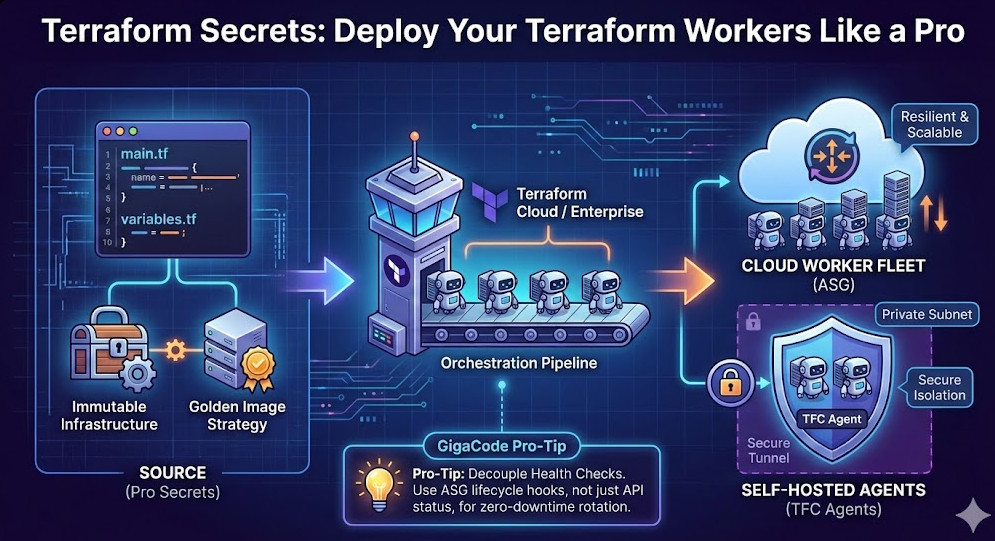
To deploy workers like a pro, you must embrace Immutability. Your Terraform configuration should not describe changes to a worker; it should describe the replacement of a worker.
GigaCode Pro-Tip: Stop using
remote-execprovisioners to configure your workers. It introduces brittleness and makes yourterraform applydependent on SSH connectivity and runtime package repositories. Instead, shift left. Use HashiCorp Packer to bake your dependencies into a Golden Image, and use Terraform solely for orchestration.
Architecting Resilient Worker Fleets
Let’s look at the actual HCL required to deploy a robust fleet of workers. We aren’t just using aws_instance; we are using Launch Templates and Auto Scaling Groups (ASGs) to ensure self-healing capabilities.
1. The Golden Image Strategy
Your Terraform Workers should boot instantly. If your user_data script takes 15 minutes to install Python dependencies, your autoscaling events will be too slow to handle traffic spikes.
data "aws_ami" "worker_golden_image" {
  most_recent = true
  owners      = ["self"]

  filter {
    name   = "name"
    values = ["my-worker-image-v*"]
  }

  filter {
    name   = "tag:Status"
    values = ["production"]
  }
}
2. Zero-Downtime Rotation with Lifecycle Blocks
One of the most powerful yet underutilized features for managing workers is the lifecycle meta-argument. When you update a Launch Template, Terraform’s default behavior might be aggressive.
To ensure you don’t kill active jobs, use create_before_destroy within your resource definitions. This ensures new workers are healthy before the old ones are terminated.
resource "aws_autoscaling_group" "worker_fleet" {
  name                = "worker-asg-${aws_launch_template.worker.latest_version}"
  min_size            = 3
  max_size            = 10
  vpc_zone_identifier = module.vpc.private_subnets

  launch_template {
    id      = aws_launch_template.worker.id
    version = "$Latest"
  }

  instance_refresh {
    strategy = "Rolling"
    preferences {
      min_healthy_percentage = 90
    }
  }

  lifecycle {
    create_before_destroy = true
    ignore_changes        = [load_balancers, target_group_arns]
  }
}
Specific Use Case: Terraform Cloud Agents (Self-Hosted Workers)
Sometimes, “Terraform Workers” refers specifically to Terraform Cloud Agents. These are specialized workers you deploy in your own private network to execute Terraform runs on behalf of Terraform Cloud (TFC) or Terraform Enterprise (TFE). This allows TFC to manage resources behind your corporate firewall without whitelisting public IPs.
Security & Isolation
When deploying TFC Agents, security is paramount. These workers hold the “Keys to the Kingdom”—they need broad IAM permissions to provision infrastructure.
- Network Isolation: Deploy these workers in private subnets with no ingress access, only egress (443) to
app.terraform.io. - Ephemeral Tokens: Do not hardcode the TFC Agent Token. Inject it via a secrets manager (like AWS Secrets Manager or HashiCorp Vault) at runtime.
- Single-Use Agents: For maximum security, configure your agents to terminate after a single job (if your architecture supports high churn) to prevent credential caching attacks.
# Example: Passing a TFC Agent Token securely via User Data
resource "aws_launch_template" "tfc_agent" {
  name_prefix   = "tfc-agent-"
  image_id      = data.aws_ami.ubuntu.id
  instance_type = "t3.medium"

  user_data = base64encode(<<-EOF
              #!/bin/bash
              # Fetch token from Secrets Manager (requires IAM role)
              export TFC_AGENT_TOKEN=$(aws secretsmanager get-secret-value --secret-id tfc-agent-token --query SecretString --output text)

              # Start the agent container
              docker run -d --restart always \
                --name tfc-agent \
                -e TFC_AGENT_TOKEN=$TFC_AGENT_TOKEN \
                -e TFC_AGENT_NAME="worker-$(hostname)" \
                hashicorp/tfc-agent:latest
              EOF
  )
}
Advanced Troubleshooting & Drift Detection
Even the best-architected Terraform Workers can experience drift. This happens when a process on the worker changes a configuration file, or a manual intervention occurs.
Detecting “Zombie” Workers
A common failure mode is a worker that passes the EC2 status check but fails the application health check. Terraform generally looks at the cloud provider API status.
The Solution: decouple your health checks. Use Terraform to provision the infrastructure, but rely on the Autoscaling Group’s health_check_type = "ELB" (if using Load Balancers) or custom CloudWatch alarms to terminate unhealthy instances. Terraform’s job is to define the state of the fleet, not monitor the health of the application process inside it.
Frequently Asked Questions (FAQ)
1. Should I use Terraform count or for_each for worker nodes?
For identical worker nodes (like an ASG), you generally shouldn’t use either—you should use an Autoscaling Group resource which handles the count dynamically. However, if you are deploying distinct workers (e.g., “Worker-High-CPU” vs “Worker-High-Mem”), use for_each. It allows you to add or remove specific workers without shifting the index of all other resources, which happens with count.
2. How do I handle secrets on my Terraform Workers?
Never commit secrets to your Terraform state or code. Use IAM Roles (Instance Profiles) attached to the workers. The code running on the worker should use the AWS SDK (or equivalent) to fetch secrets from a managed service like AWS Secrets Manager or Vault at runtime.
3. What is the difference between Terraform Workers and Cloudflare Workers?
This is a common confusion. Terraform Workers (in this context) are compute instances managed by Terraform. Cloudflare Workers are a serverless execution environment provided by Cloudflare. Interestingly, you can use the cloudflare Terraform provider to manage Cloudflare Workers, treating the serverless code itself as an infrastructure resource!
Conclusion
Deploying Terraform Workers effectively requires a shift in mindset from “managing servers” to “managing fleets.” By leveraging Golden Images, utilizing ASG lifecycle hooks, and securing your TFC Agents, you elevate your infrastructure from fragile to anti-fragile.
Remember, the goal of an expert DevOps engineer isn’t just to write code that works; it’s to write code that scales, heals, and protects itself. Thank you for reading the DevopsRoles page!


