Introduction: We need to talk about Secure AI Agents before you accidentally let an LLM wipe your production database.
I’ve spent 30 years in the trenches of software engineering. I remember when a rogue cron job was the scariest thing on the server.
Today? We are literally handing over root terminal access to autonomous language models. That absolutely terrifies me.
If you are building autonomous systems without proper isolation, you are building a ticking time bomb.
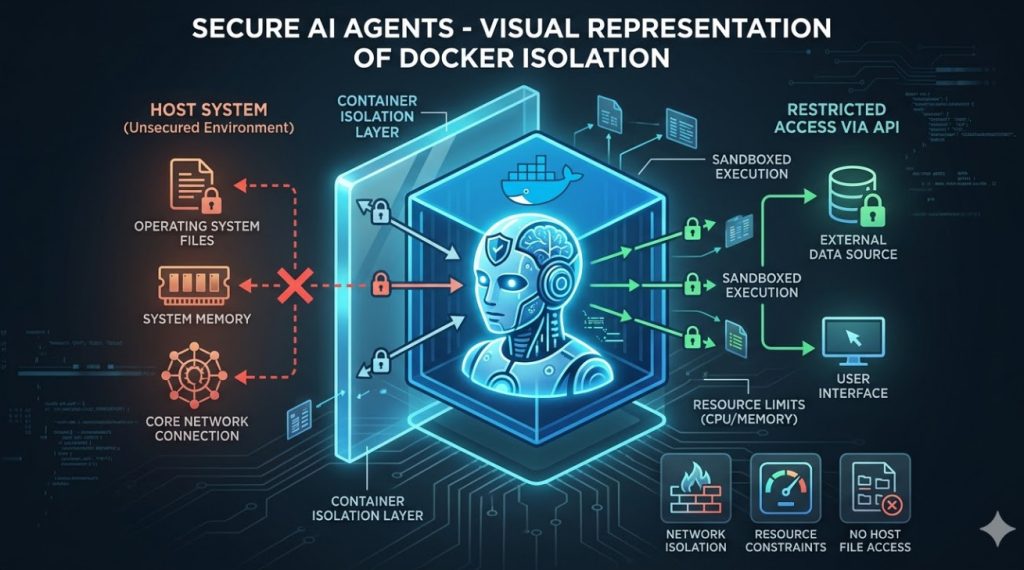
Table of Contents
The Brutal Reality of Secure AI Agents Today
Let me share a quick war story from a consulting gig last year.
A hotshot startup built an AI agent to clean up temporary files on their cloud instances. Sounds harmless, right?
The model hallucinated. It decided that every file modified in the last 24 hours was “temporary.”
It didn’t just clean the temp folder. It systematically dismantled their core application runtime.
Why? Because the agent had unrestricted access to the host file system. There was zero sandboxing.
This is why Secure AI Agents are not just a buzzword. They are a fundamental requirement for survival.
You cannot trust the output of an LLM. Period.
You must treat every AI-generated command as hostile code. You need a cage. You need a sandbox.
For a deeper dive into the news surrounding this architecture, check out this recent industry report on AI sandboxing.
Why Docker Sandboxes Are Non-Negotiable
Docker didn’t invent containerization, but it made it accessible. And right now, it’s our best defense.
When you run an AI agent inside a Docker container, you control its universe.
You define exactly what memory it can use, what network it can see, and what files it can touch.
If the agent goes rogue and tries to run rm -rf /, it only destroys its own disposable, temporary shell.
The host operating system remains blissfully unaware and perfectly safe.
This is the cornerstone of building Secure AI Agents. Isolation is your first and last line of defense.
But managing these dynamic containers on the fly? That’s where things get historically messy.
You need a way to spin up a container, execute the AI’s code, capture the output, and tear it down.
Doing this manually in Python is a nightmare of sub-processes and race conditions.
Enter NanoClaw: The Framework We Needed
This brings us to NanoClaw. If you haven’t used it yet, pay attention.
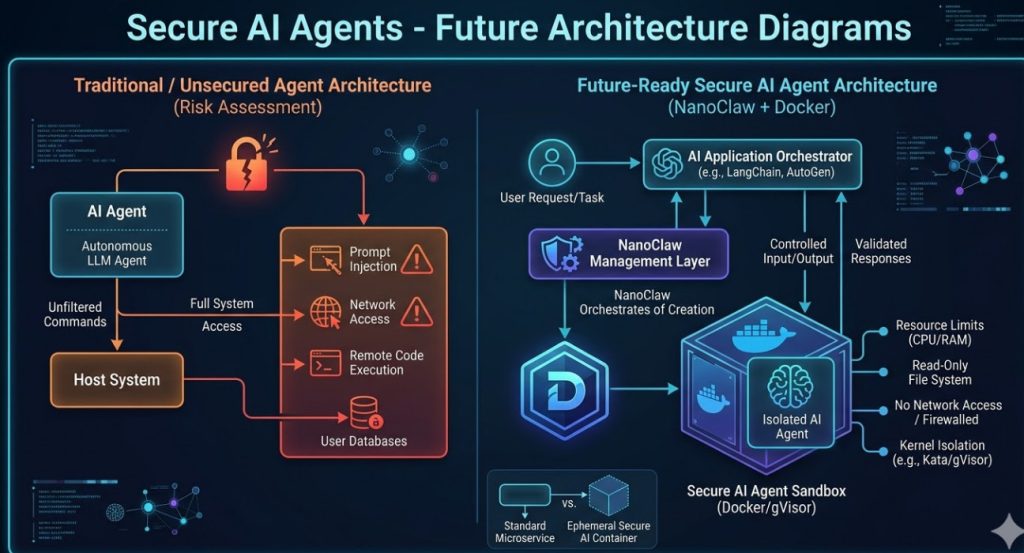
NanoClaw bridges the gap between your LLM orchestrator (like LangChain or AutoGen) and the Docker daemon.
It acts as a secure proxy. The AI asks to run code. NanoClaw catches the request.
Instead of running it locally, NanoClaw instantly provisions an ephemeral Docker sandbox.
It pipes the code in, extracts the standard output, and immediately kills the container.
This workflow is how you guarantee that Secure AI Agents actually remain secure under heavy load.
Architecting Secure AI Agents Step-by-Step
So, how do we actually build this? Let’s break down the architecture of a hardened system.
You cannot just use a default Ubuntu image and call it a day.
Default containers run as root. That is a massive security vulnerability if the container escapes.
We need to strip the environment down to the bare minimum.
1. Designing the Hardened Dockerfile
Your AI doesn’t need a full operating system. It needs a runtime.
- Use Alpine Linux: It’s tiny. A smaller surface area means fewer vulnerabilities.
- Create a non-root user: Never let the AI execute code as the root user inside the container.
- Drop all capabilities: Use Docker’s
--cap-drop=ALLflag to restrict kernel privileges. - Read-only file system: Make the root filesystem read-only. Give the AI a specific, temporary scratchpad volume.
Here is an example of what that Dockerfile should look like:
# Hardened Dockerfile for Secure AI Agents
FROM python:3.11-alpine

# Create a non-root user
RUN addgroup -S aigroup && adduser -S aiuser -G aigroup

# Set working directory
WORKDIR /sandbox

# Change ownership
RUN chown aiuser:aigroup /sandbox

# Switch to the restricted user
USER aiuser

# Command will be overridden by NanoClaw
CMD ["python"]
2. Configuring Network Isolation
Does your AI really need internet access to format a JSON string? No.
By default, Docker containers can talk to the outside world. You must explicitly disable this.
When provisioning the sandbox, set network networking to none.
If the AI needs to fetch an API, use a proxy server with strict whitelisting. Do not give it raw outbound access.
This prevents exfiltration of your proprietary data if the agent gets hijacked via prompt injection.
For more on network security, review the official Docker networking documentation.
Implementing NanoClaw in Your Pipeline
Now, let’s wire up NanoClaw. The API is refreshingly simple.
You initialize the client, define your sandbox profile, and pass the AI’s generated code.
Here is how you integrate it to create Secure AI Agents that won’t break your servers.
from nanoclaw import SandboxCluster
import logging

# Initialize the secure cluster
cluster = SandboxCluster(
    image="hardened-ai-sandbox:latest",
    network_mode="none",
    mem_limit="128m",
    cpu_shares=512
)

def execute_agent_code(ai_generated_python):
    """Safely executes untrusted AI code."""
    try:
        # The code runs entirely inside the isolated container
        result = cluster.run_code(ai_generated_python, timeout_seconds=10)
        return result.stdout
    except Exception as e:
        logging.error(f"Sandbox execution failed: {e}")
        return "ERROR: Code execution violated security policies."
Notice the constraints? We enforce a 10-second timeout. We limit RAM to 128 megabytes.
We restrict CPU shares. If the AI writes an infinite loop, it only burns a tiny fraction of our resources.
The container is killed after 10 seconds regardless of what happens.
That is the level of paranoia you need to operate with in 2026.
Want to see how this fits into a larger microservices architecture? Check out our guide on [Internal Link: Scaling Microservices for AI Workloads].
The Hidden Costs of Secure AI Agents
I won’t lie to you. Adding this layer of security introduces friction.
Spinning up a Docker container takes time. Even a lightweight Alpine image adds latency.
If your AI agent needs to execute code 50 times a minute, container churn becomes a serious bottleneck.
You will see a spike in CPU usage just from the Docker daemon managing the lifecycle of these sandboxes.
How do we mitigate this? Warm pooling.
Mastering Container Warm Pools
Instead of creating a new container from scratch every time, you keep a “pool” of pre-booted containers waiting.
They sit idle, consuming almost zero CPU, just waiting for code.
When NanoClaw gets a request, it grabs a warm container, injects the code, runs it, and then destroys it.
A background worker immediately spins up a new warm container to replace the destroyed one.
This cuts execution latency from hundreds of milliseconds down to tens of milliseconds.
It’s a mandatory optimization if you want Secure AI Agents operating in real-time environments.
Check out the Docker Engine GitHub repository for deep dives into container lifecycle performance.
Handling State and Persistence
Here is a tricky problem. What if the AI needs to process a massive CSV file?
You can’t pass a 5GB file through standard input. It will crash your orchestrator.
You need to use volume mounts. But remember our rule about host access? It’s dangerous.
The solution is an intermediary scratch disk. You mount a temporary, isolated volume to the container.
The AI writes its output to this volume. When the container dies, a secondary, trusted process scans the volume.
Only if the output passes validation checks does it get moved to your permanent storage.
Never let the AI write directly to your S3 buckets or core databases.
FAQ Section About Secure AI Agents
- What are Secure AI Agents?
They are autonomous LLM-driven programs that are strictly isolated from the host environment, typically using containerization technologies like Docker, to prevent malicious actions or catastrophic errors. - Why can’t I just use Python’s built-in
exec()?
Runningexec()on AI-generated code is technological suicide. It runs with the exact same permissions as your main application. If the AI hallucinates a delete command, your app deletes itself. - How does NanoClaw improve Docker?
NanoClaw abstracts the complex Docker API into a developer-friendly interface specifically designed for ephemeral AI workloads. It handles the lifecycle, timeouts, and resource limits automatically. - Are Secure AI Agents totally immune to hacking?
Nothing is 100% immune. Container escapes exist. However, strict sandboxing combined with dropped kernel capabilities mitigates 99.9% of common threats, like prompt injection leading to remote code execution (RCE). - Does this work for AutoGen and CrewAI?
Yes. Any framework that relies on a local execution node can be retrofitted to push that execution through a NanoClaw-managed Docker sandbox instead.
Conclusion: The wild west of giving LLMs a terminal prompt is over.
If you aren’t sandboxing your models, you are gambling with your infrastructure. Building Secure AI Agents with NanoClaw and Docker isn’t just best practice; it’s basic professional responsibility.
Lock down your execution environments today, before you become tomorrow’s cautionary tale. Thank you for reading the DevopsRoles page!