I am sick and tired of watching brilliant developers burn their runway on cloud API calls.
Every time your application pings OpenAI or Anthropic, you are renting hardware you could own.
That is exactly why Running LLMs Locally is no longer just a hobbyist’s weekend project; it is a financial imperative.
Listen, I have been building software since before the dot-com crash, and the shift happening right now is massive.
We are moving from centralized, highly censored mega-models to decentralized, raw compute power sitting right on your desk.
This guide isn’t theoretical fluff; it is the exact playbook I use to deploy open-source intelligence.
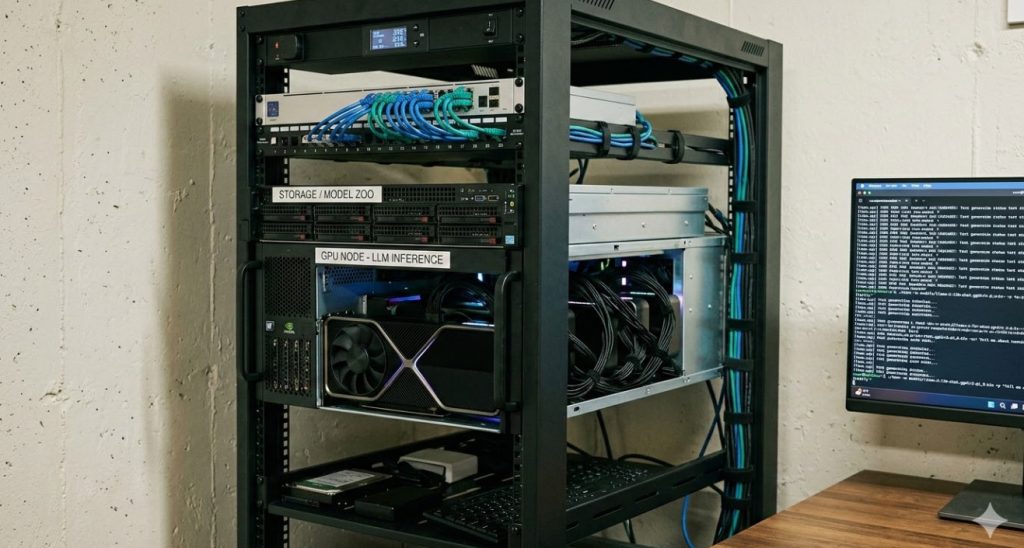
Table of Contents
Why Running LLMs Locally Changes Everything
The honeymoon phase of generative AI is over, and the bills are coming due.
If you have ever scaled a popular app built on a proprietary API, you know the panic of hitting a rate limit.
Or worse, you wake up to an invoice that dwarfs your server costs.
But when you start Running LLMs Locally, you take complete control of your destiny.
The Privacy and Security Mandate
Let me be blunt: sending your enterprise data to a third-party API is a massive security risk.
Are you really comfortable piping your proprietary codebase or customer data through an external black box?
Local deployment means your data never leaves your internal network.
For healthcare, finance, or government contractors, this isn’t just a nice-to-have feature.
It is legally required compliance, plain and simple.
Hardware for Running LLMs Locally: The Reality Check
You probably think you need a server farm to run a competent 70B parameter model.
That used to be true, but quantization has completely flipped the script.
Today, you can run incredibly capable models on consumer hardware.
- Apple Silicon (Mac): The M-series chips with unified memory are absolute beasts for inference.
- Nvidia RTX Series: A dual RTX 4090 setup will chew through 70B models if quantized correctly.
- Budget Rigs: Even an older rig with 64GB of RAM can run smaller 8B models on the CPU using Llama.cpp.
Do not let the hardware requirements intimidate you from starting.
Step 1: Meet Ollama (The Gateway Drug)
If you are just dipping your toes into Running LLMs Locally, Ollama is where you start.
Ollama abstracts away all the python dependencies, CUDA drivers, and compiling nightmares.
It packages everything into a beautiful, Docker-like experience.
You literally type one command, and you have a local AI assistant running on your machine.
For more details, check the official documentation.
Installing and Firing Up Llama 3
Let’s get our hands dirty right now.
First, download the installer for your OS from the official site.
Open your terminal, and run this simple command to pull and run Meta’s Llama model:
# This pulls the model and drops you into a chat interface
ollama run llama3
It will download a few gigabytes. Grab a coffee.
Once it finishes, you have a terminal-based chat interface ready to go.
But we aren’t here to just chat in a terminal, are we?
Step 2: Building Local APIs
The real magic of Running LLMs Locally is integrating them into your existing codebase.
Ollama automatically spins up a REST API on port 11434.
This means you can instantly replace your OpenAI API calls with local requests.
It is a seamless transition if you use standard HTTP requests.
Here is exactly how you hit your local model using Python:
import requests
import json

def chat_with_local_model(prompt):
    url = "http://localhost:11434/api/generate"

    payload = {
        "model": "llama3",
        "prompt": prompt,
        "stream": False
    }

    response = requests.post(url, json=payload)
    return response.json()['response']

# Test the connection
print(chat_with_local_model("Explain the value of local AI in 3 sentences."))
Run that script. No API keys. No network latency.
Just pure, localized compute executing your logic.
Step 3: Scaling to Production with vLLM
Ollama is fantastic for local development and prototyping.
But if you are building an app with hundreds of concurrent users, Ollama will choke.
This is where we separate the amateurs from the pros.
For production-grade Running LLMs Locally, you need vLLM.
vLLM is a high-throughput and memory-efficient LLM serving engine.
It uses PagedAttention to manage memory keys and values efficiently.
Setting Up Your vLLM Server
Deploying vLLM requires a Linux environment and Nvidia GPUs.
I highly recommend checking the official vLLM GitHub repository for the latest CUDA requirements.
Here is how you launch an OpenAI-compatible server using vLLM:
# Install vLLM via pip
pip install vllm

# Start the server with a Mistral model
python -m vllm.entrypoints.openai.api_server \
    --model mistralai/Mistral-7B-Instruct-v0.2 \
    --dtype auto \
    --api-key your_custom_secret_key
Notice the `–api-key` flag?
You just created your own private API endpoint that acts exactly like OpenAI.
You can point LangChain, LlamaIndex, or any standard AI tooling directly at your server IP.
The Magic of Quantization (GGUF)
You cannot talk about Running LLMs Locally without discussing quantization.
A full 70-billion parameter model in 16-bit float requires over 140GB of VRAM.
That is enterprise-grade hardware, far beyond most consumer budgets.
Quantization compresses these models from 16-bit down to 8-bit, 4-bit, or even 3-bit.
The current gold standard format for this is GGUF, developed by the Llama.cpp team.
Why GGUF Matters
GGUF allows you to run massive models by splitting the workload.
It offloads as many layers as possible to your GPU.
Whatever doesn’t fit in VRAM spills over into your system RAM and CPU.
It is slower than pure GPU execution, but it makes the impossible, possible.
Want to dive deeper into hardware optimization?
Read our comprehensive guide here: [Internal Link: The Best GPUs for Local AI Deployment].
Structuring RAG for Local Models
Models are inherently stupid about your specific, private data.
They only know what they were trained on up until their cutoff date.
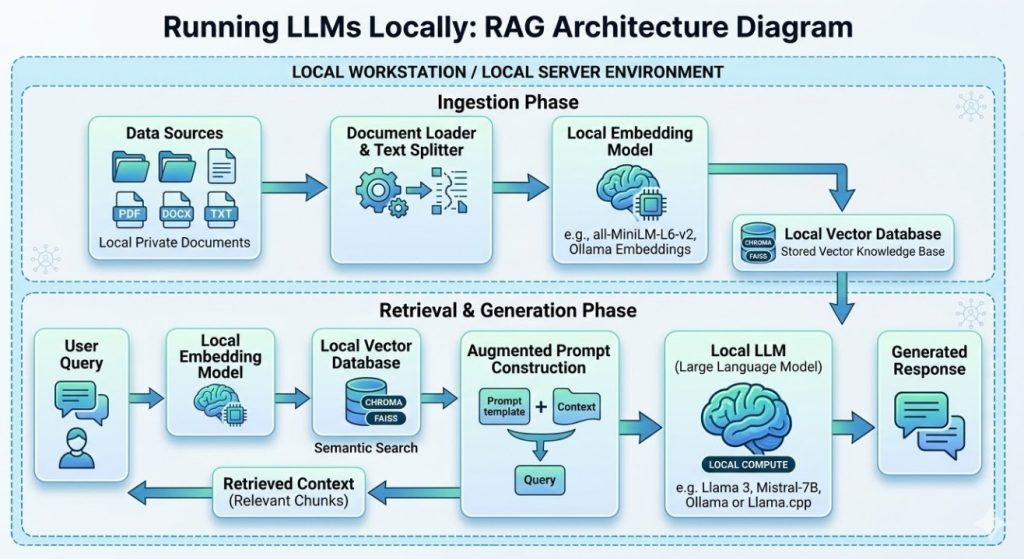
To make them useful, we use Retrieval-Augmented Generation (RAG).
When Running LLMs Locally, your RAG pipeline also needs to be local.
You cannot use a cloud vector database if you want total privacy.
Building the Local Vector Stack
I use ChromaDB or Qdrant for my local vector stores.
Both can run via Docker on the same machine as your LLM.
First, you embed your company documents using a local embedding model.
Next, you store those embeddings in ChromaDB.
When a user asks a question, you perform a similarity search.
Finally, you inject those retrieved documents into your local LLM’s prompt.
It is entirely self-contained, offline, and secure.
FAQ on Running LLMs Locally
- Is it really cheaper than using OpenAI?
Yes, if you have sustained usage. If you only make 10 requests a day, stick to the cloud. If you make 10,000, buy a GPU. - Can my laptop run ChatGPT?
You cannot run ChatGPT (it is closed source). But you can run Llama 3 or Mistral, which perform similarly, right on a MacBook Pro. - What is the best model for coding?
Currently, DeepSeek Coder or Phind-CodeLlama are exceptional choices for local code generation tasks. - Do I need internet access?
Only to download the model initially. After that, Running LLMs Locally is 100% offline. Air-gapped environments are fully supported. - How do I handle updates?
You manually pull new weights from platforms like HuggingFace when developers release updated versions.
Advanced Tricks: Fine-Tuning Locally
Once you master inference, the next frontier is fine-tuning.
You don’t have to accept the default personality or formatting of these models.
Using a technique called LoRA (Low-Rank Adaptation), you can train models on your own datasets.
You can teach a model to write exactly like your marketing team.
Or train it strictly on your legacy COBOL codebase.
This process requires more VRAM than simple inference, but it is achievable on a 24GB GPU.
Tools like Unsloth have made local fine-tuning ridiculously fast and accessible.
Conclusion: The era of relying entirely on cloud giants for artificial intelligence is ending. By mastering the art of Running LLMs Locally, you build resilient, private, and incredibly cost-effective applications. Stop renting compute. Start owning your infrastructure. The open-source community has given us the tools; now it is your job to deploy them. Thank you for reading the DevopsRoles page!

