Introduction: I’ve spent the last two decades building infrastructure, and I’ll tell you right now: relying on public AI toolkits is a ticking time bomb. If you are serious about enterprise AI, you absolutely need a Private Skills Registry for OpenClaw.
I learned this the hard way back in 2024 when a client accidentally leaked proprietary data through a poorly vetted public skill. It was a nightmare.
You cannot control what you don’t host.
By bringing your tools in-house, you gain total authority over what your AI agents can and cannot execute.
Let’s roll up our sleeves and build one from scratch.
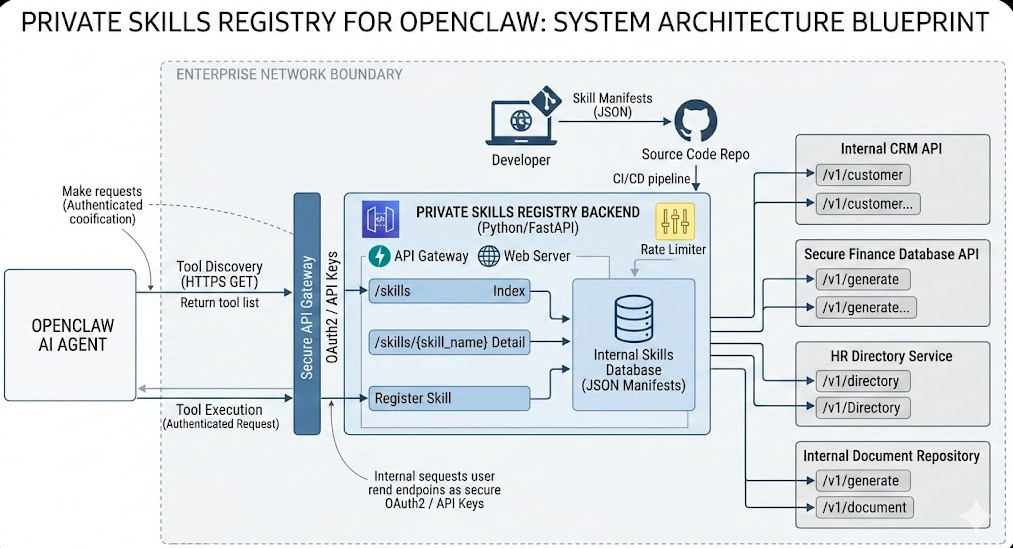
Table of Contents
- 1 Why Building a Private Skills Registry for OpenClaw is Non-Negotiable
- 2 The Core Architecture of a Private Skills Registry for OpenClaw
- 3 Step 1: Scaffolding the FastAPI Backend
- 4 Step 2: Defining Your Internal Skills
- 5 Step 3: Connecting OpenClaw to Your New Registry
- 6 Step 4: Securing Your Private Skills Registry for OpenClaw
- 7 Step 5: CI/CD Pipeline Integration
Why Building a Private Skills Registry for OpenClaw is Non-Negotiable
So, why does this matter? Why not just use the default public registry?
Two words: Data sovereignty.
When you use OpenClaw in a corporate environment, your agents interact with sensitive APIs, internal databases, and private documents.
If those skills are hosted externally, you introduce massive supply chain risks.
A malicious update to a public skill can compromise your entire AI workflow instantly.
A Private Skills Registry for OpenClaw acts as your secure vault.
It guarantees that every single piece of executable code your agent touches has been audited, version-controlled, and approved by your internal security team.
Read up on data sovereignty if you think I’m being paranoid.
The Core Architecture of a Private Skills Registry for OpenClaw
Before writing a single line of code, we need to understand how OpenClaw discovers and loads skills.
It’s surprisingly elegant, but it requires strict adherence to its expected JSON schemas.
OpenClaw expects a RESTful endpoint that returns a catalog of available tools.
This catalog contains metadata, descriptions, and the necessary API routing for the agent to execute the skill.
We are going to replicate this exact behavior locally.
We will use Python and FastAPI to build a lightweight, blazing-fast registry.
Prerequisites for Your Build
Don’t jump in without your gear. Here is what you need:
- Python 3.10 or higher installed on your server.
- Basic knowledge of FastAPI and Uvicorn.
- Your existing OpenClaw configuration files.
- Docker (optional, but highly recommended for deployment).
If you need to brush up on related infrastructure, check out our guide on [Internal Link: Securing Internal APIs for AI Agents].
Step 1: Scaffolding the FastAPI Backend
Let’s start by creating the actual server that will host our skills.
Create a new directory and set up a virtual environment.
Install the necessary dependencies: fastapi and uvicorn.
Now, let’s write the core server code.
# server.py
from fastapi import FastAPI, HTTPException
from pydantic import BaseModel
from typing import List, Dict, Any

app = FastAPI(title="OpenClaw Internal Registry")

class SkillManifest(BaseModel):
    name: str
    description: str
    version: str
    entrypoint: str
    parameters: Dict[str, Any]

# In-memory database for our tutorial
SKILLS_DB = [
    {
        "name": "internal_customer_lookup",
        "description": "Fetches secure customer data from the internal CRM.",
        "version": "1.0.0",
        "entrypoint": "https://api.internal.company.com/v1/customer",
        "parameters": {
            "type": "object",
            "properties": {
                "customer_id": {"type": "string"}
            }
        }
    }
]

@app.get("/skills", response_model=List[SkillManifest])
async def list_skills():
    """Returns the catalog for the Private Skills Registry for OpenClaw."""
    return SKILLS_DB

@app.get("/skills/{skill_name}")
async def get_skill(skill_name: str):
    for skill in SKILLS_DB:
        if skill["name"] == skill_name:
            return skill
    raise HTTPException(status_code=404, detail="Skill not found in private registry.")
This code is simple, but it is exactly what OpenClaw needs to function.
It provides a /skills endpoint that acts as the manifest index.
Step 2: Defining Your Internal Skills
A registry is useless without content.
When you populate your Private Skills Registry for OpenClaw, you must be meticulous with your descriptions.
Language Models rely entirely on these text descriptions to understand when to use a tool.
If your description is vague, the agent will hallucinate or pick the wrong skill.
Be explicit. Tell the agent exactly what inputs are required and what outputs to expect.
Structuring the Manifest JSON
Let’s look at how a properly structured manifest should look.
This is where most beginners fail.
{
  "name": "generate_secure_token",
  "description": "USE THIS SKILL ONLY WHEN authenticating against the legacy finance database. Requires a valid employee ID.",
  "version": "1.2.1",
  "entrypoint": "https://auth.internal.network/generate",
  "parameters": {
    "type": "object",
    "properties": {
      "employee_id": {
        "type": "string",
        "description": "The 6-digit alphanumeric employee ID."
      }
    },
    "required": ["employee_id"]
  }
}
Notice the uppercase emphasis in the description.
Prompt engineering applies to skill definitions just as much as it does to user chat inputs.
Step 3: Connecting OpenClaw to Your New Registry
Now that the server is running, we have to tell OpenClaw to look here instead of the public internet.
This usually involves modifying your environment variables or the core configuration file.
You need to override the default registry URL.
Point it to your local server: http://localhost:8000/skills.
For more details on the exact configuration flags, check the official documentation.
Step 4: Securing Your Private Skills Registry for OpenClaw
Do not skip this step.
If you deploy this API internally without authentication, any developer (or rogue script) on your network can access it.
You must implement API keys or OAuth2.
OpenClaw supports passing bearer tokens in its requests.
Configure your FastAPI backend to require a valid token before returning the skills list.
Adding Middleware for Rate Limiting
AI agents can get stuck in loops.
I once saw an agent hit a skill endpoint 4,000 times in three minutes because of a logic error.
Implement rate limiting on your private registry to prevent internal DDoS attacks.
Check out the Starlette framework documentation for easy middleware solutions.
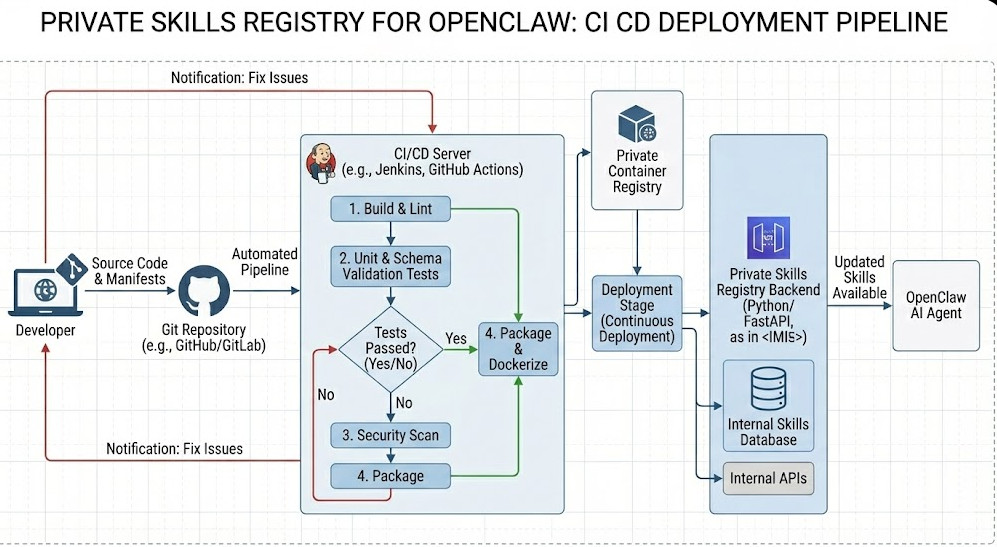
Step 5: CI/CD Pipeline Integration
How do you update skills without breaking things?
You treat your Private Skills Registry for OpenClaw like any other software product.
Keep your skill definitions in a Git repository.
Write unit tests that validate the JSON schemas before deployment.
When a developer pushes a new skill, your CI/CD pipeline should automatically run tests.
If the tests pass, the pipeline updates the FastAPI database or the static JSON files.
This guarantees that OpenClaw only ever sees validated, working skills.
FAQ Section
- Can I host my Private Skills Registry for OpenClaw on AWS S3 instead of an API?
Yes, if your skills are entirely static. You can host a static JSON file. However, an API allows for dynamic skill availability based on user roles. - Does this work with all versions of OpenClaw?
It works with any version that supports custom registry URLs. Check your version’s release notes. - What if a skill fails during execution?
The registry only provides the routing. OpenClaw handles the execution errors natively based on the agent’s internal logic. - How do I handle versioning?
Include version numbers in the skill URLs or headers, ensuring backwards compatibility for older agents.
Conclusion: Taking control of your AI infrastructure isn’t just a best practice; it’s a survival tactic. Building a Private Skills Registry for OpenClaw ensures your data stays yours, your agents remain reliable, and your security team sleeps soundly at night. Get it built, secure it tight, and start deploying enterprise-grade agents with confidence. Thank you for reading the DevopsRoles page!