Introduction: Let’s talk about the nightmare scenario. You wake up, grab your coffee, and check your security alerts only to find the LiteLLM Supply Chain Attack trending across your feeds.
Your heart sinks immediately. Are your LLM API keys compromised?
If you’re building AI applications right now, you are a prime target. Hackers aren’t breaking down your front door anymore; they are poisoning your water supply.
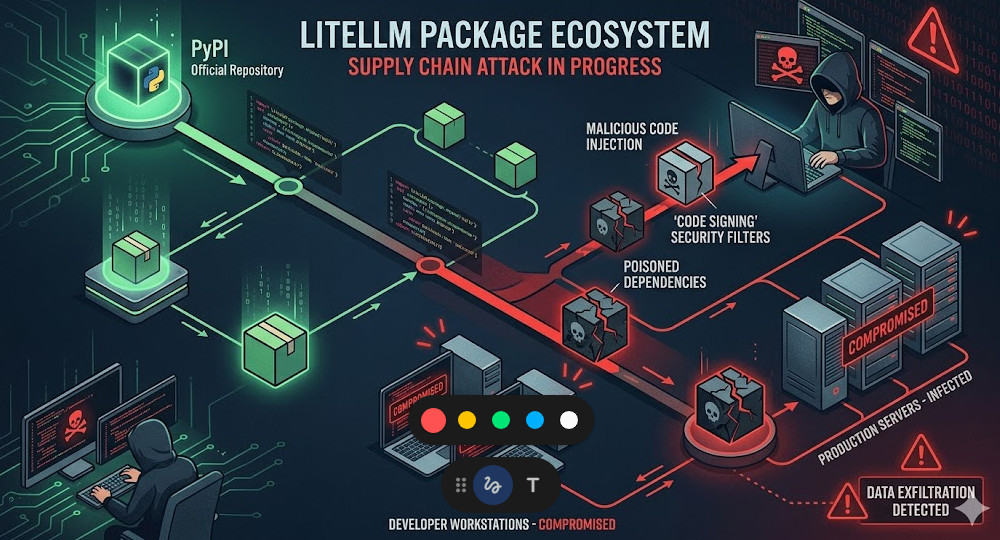
Table of Contents
Understanding the LiteLLM Supply Chain Attack
I’ve been fighting in the DevOps trenches for thirty years. I survived the SolarWinds fallout and the Log4j weekend from hell.
Trust me, I’ve seen this movie before. But modern AI stacks introduce a terrifying new level of chaos.
Developers are pulling Python packages at lightning speed. Startups are shipping AI features without checking their dependency trees.
Then, the inevitable happens. The LiteLLM Supply Chain Attack serves as a brutal wake-up call for the entire industry.
Bad actors didn’t hack the primary, secure repositories directly. They went after the weak links.
They hijacked maintainer accounts, injected malicious code into downstream dependencies, or deployed clever typo-squatted packages.
You blindly run a standard install command, and suddenly, a backdoor is silently established in your production environment.
How the LiteLLM Supply Chain Attack Compromises Systems
So, why does this matter so much for AI developers specifically?
AI applications are incredibly credential-heavy. Your environment variables are a goldmine.
They contain OpenAI keys, Anthropic tokens, database passwords, and cloud infrastructure credentials.
During the LiteLLM Supply Chain Attack, the injected payload was designed to do one thing: exfiltrate.
The malicious code typically runs a pre-install script in the background. It scrapes your `.env` files.
Before your Python application even finishes compiling, your keys are already sitting on a server in a non-extradition country.
The Anatomy of the Poisoned Package
Let’s break down the technical reality of how this payload executes.
It usually starts inside the `setup.py` file of a compromised Python package.
Most developers assume that running a package manager only downloads static files.
This is a deadly assumption. Python package installers can execute arbitrary code upon installation.
For more details on the exact timeline and impact, check the official documentation and incident report.
Symptoms: Are You a Victim of the LiteLLM Supply Chain Attack?
Panic is not a strategy. We need to methodically check your environment right now.
Don’t assume you are safe just because your application hasn’t crashed. Silent exfiltration is the goal.
Here are the immediate steps I force my engineering teams to take when an alert like this fires.
- Check your billing dashboards immediately. Look for massive spikes in LLM API usage.
- Audit outbound network traffic. Look for unexpected HTTPS POST requests to unknown IP addresses.
- Review your package tree. Scrutinize every single sub-dependency installed in the last 72 hours.
If you see a sudden, unexplained $5,000 charge on your OpenAI account, you are likely compromised.
Auditing Your Python Environment
We need to get into the terminal. Stop relying on graphical interfaces for security.
First, list every single package installed in your virtual environment.
We are looking for suspicious names, weird version bumps, or packages you don’t explicitly remember adding.
# Freeze your current environment to inspect the exact state
pip freeze > current_state.txt

# Manually review the output
cat current_state.txt | grep -i litellm
Next, we need to run an automated vulnerability scanner against your manifest.
I highly recommend utilizing standard security tools like `pip-audit`. It cross-references your environment against the PyPA advisory database.
If you aren’t running pip-audit in your CI/CD pipeline, you are flying blind.
Hardening Your AI Python Stack After the LiteLLM Supply Chain Attack
Cleaning up the mess is only phase one. We need to prevent the next intrusion.
The days of running `pip install litellm` and crossing your fingers are permanently over.
You must adopt a zero-trust architecture for your third-party code.
If you want to survive the next LiteLLM Supply Chain Attack, implement these hardening strategies today.
Step 1: Strict Dependency Pinning
Never, ever use floating versions in your production requirements files.
Writing `litellm>=1.0.0` is basically begging to be compromised by an automatic malicious update.
You must pin to exact, tested versions. When you upgrade, you do it intentionally and manually.
# BAD: Leaving your app vulnerable to automatic malicious updates
litellm

# GOOD: Pinning to an exact, known-safe version
litellm==1.34.2
Step 2: Enforcing Cryptographic Hashes
Pinning the version isn’t enough anymore. What if the attacker replaces the underlying file on the repository?
You need to verify the cryptographic hash of the package before your system is allowed to install it.
This guarantees that the code you download today is byte-for-byte identical to the code you tested yesterday.
Modern package managers like Poetry or Pipenv handle this automatically via lockfiles.
# Example of a requirements.txt with hash checking
litellm==1.34.2 \
    --hash=sha256:d9b23f2... \
    --hash=sha256:e7a41c9...
If the hash doesn’t match, the installation fails immediately. It is your ultimate failsafe.
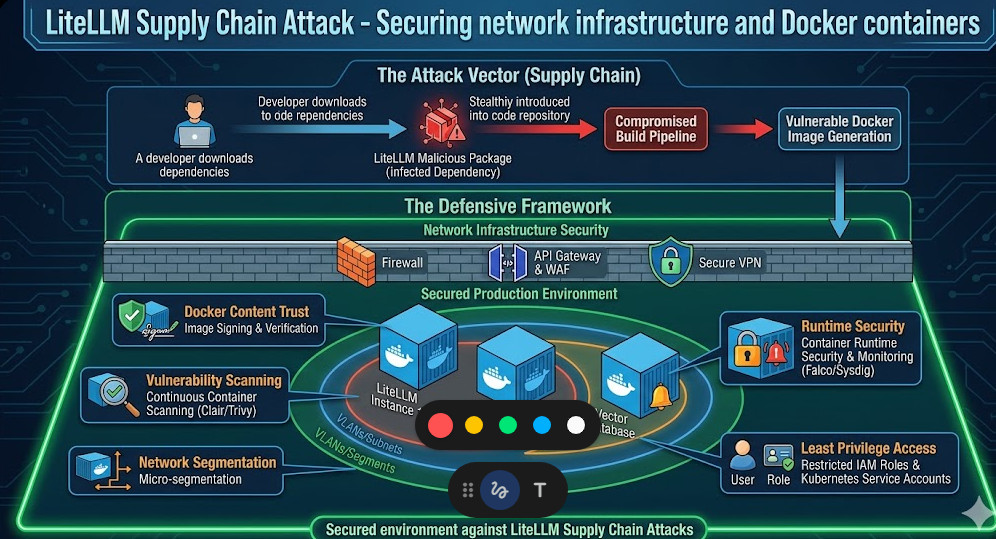
Step 3: Network Egress Isolation
Let’s assume the worst. A malicious package slips past your defenses and executes.
How do we stop it from sending your API keys back to the attacker?
You restrict outbound network access. Your AI application should only be allowed to talk to the specific APIs it needs.
If your app only uses OpenAI, whitelist `api.openai.com` and block everything else.
Drop the outbound packets. If the malware can’t phone home, the LiteLLM Supply Chain Attack fails.
You can configure this easily using Docker network rules or cloud security groups.
Want to go deeper on API security? Check out my guide here: [Internal Link: The Ultimate Guide to Securing LLM API Endpoints in Production].
Step 4: Use Dedicated Service Accounts
Stop putting your master AWS or OpenAI keys in your local `.env` files.
Create heavily restricted service accounts for your development environments.
Give these accounts strict spending limits. Cap them at $10 a day.
If those keys are stolen, the blast radius is contained to a mild annoyance rather than a catastrophic bill.
The Future of Open Source AI Security
The open-source ecosystem is a massive blessing, but it is built on a foundation of blind trust.
Attacks like this are not an anomaly. They are the new standard operating procedure for threat actors.
As AI infrastructure becomes more complex, the surface area for these attacks expands exponentially.
We have to shift our mindset from “move fast and break things” to “verify everything, trust nothing.”
You should actively monitor databases like the OWASP Foundation for emerging threat vectors.
FAQ Section
- What exactly is a supply chain attack in Python?
It’s when hackers infiltrate a widely used software library rather than attacking your code directly. When you download the compromised library, you infect your own system. - Did the LiteLLM Supply Chain Attack steal my code?
Typically, these attacks focus on stealing environment variables and API keys rather than source code, as keys are easier to monetize quickly. - Does using Docker protect me from this?
No. Docker isolates your application from your host machine, but if the malicious code is inside the container, it can still read your `.env` files and send them over the internet unless you restrict network egress. - How often should I audit my dependencies?
Every single time you deploy. Automated vulnerability scanning should be a non-negotiable step in your CI/CD pipeline.
Conclusion: The LiteLLM Supply Chain Attack is a harsh reminder that in the world of AI development, security cannot be an afterthought. By implementing dependency hashes, network isolation, and strict version pinning, you can build a fortress around your infrastructure. Don’t wait for the next breach—lock down your Python stack today. Thank you for reading the DevopsRoles page!

