Introduction: If you think containers killed the hypervisor, you fundamentally misunderstand Kubernetes VM Infrastructure.
I hear it every week from junior engineers.
They swagger into my office, fresh off reading a Medium article, demanding we rip out our hypervisors.
They want to run K8s directly on bare metal.
“It’s faster,” they say. “It removes overhead,” they claim.
I usually just laugh.
Let me tell you a war story from my 30 years in the trenches.
Back in 2018, I let a team convince me to go full bare metal for a production cluster.
It was an unmitigated disaster.
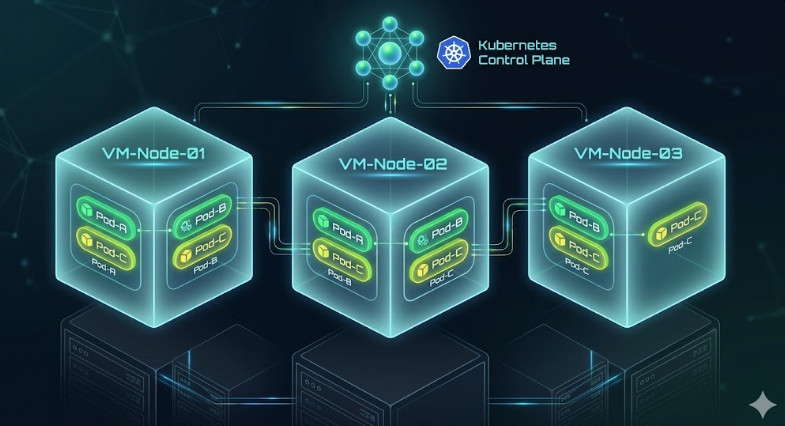
Table of Contents
The Harsh Reality of Kubernetes VM Infrastructure
The truth is, your Kubernetes VM Infrastructure provides something containers alone cannot.
Hard boundaries.
Containers are just glorified Linux processes.
They share the exact same kernel.
If a kernel panic hits one container, your entire physical node is toast.
Is that a risk you want to take with a multi-tenant cluster?
I didn’t think so.
Security Isolation in Kubernetes VM Infrastructure
Let’s talk about the dreaded noisy neighbor problem.
When you rely on a robust Kubernetes VM Infrastructure, you get hardware-level virtualization.
Cgroups and namespaces are great, but they aren’t bulletproof.
A rogue pod can still exhaust kernel resources.
With VMs, you have a hypervisor enforcing strict resource allocation.
This is why every major cloud provider runs managed Kubernetes on VMs.
Do you think AWS, GCP, and Azure are just wasting CPU cycles?
No. They know better.
If you are building your own private cloud, read the official industry analysis.
You will quickly see why the virtualization layer is non-negotiable.
Disaster Recovery Made Easy
Have you ever tried to snapshot a bare metal server?
It is a nightmare.
In a solid Kubernetes VM Infrastructure, node recovery is trivial.
You snapshot the VM. You clone the VM. You move the VM.
If a host dies, VMware or Proxmox just restarts the VM on another host.
Kubernetes doesn’t even notice the hardware failed.
The pods just spin back up.
This decoupling of hardware from the orchestration plane is magical.
Automated Provisioning and Cluster Autoscaling
Let’s look at the Cluster Autoscaler.
How do you autoscale a bare metal rack?
Do you send an intern down to the data center to rack another Dell server?
Of course not.
When traffic spikes, your Kubernetes VM Infrastructure API talks to your hypervisor.
It requests a new node.
The hypervisor provisions a new VM from a template in seconds.
Kubelet joins the cluster, and pods start scheduling.
Here is how a standard NodeClaim might look when interacting with a cloud API:
apiVersion: karpenter.sh/v1beta1
kind: NodeClaim
metadata:
  name: default-machine
spec:
  requirements:
    - key: kubernetes.io/arch
      operator: In
      values: ["amd64"]
    - key: kubernetes.io/os
      operator: In
      values: ["linux"]
    - key: karpenter.k8s.aws/instance-category
      operator: In
      values: ["c", "m", "r"]
Try doing that dynamically with physical ethernet cables.
You can’t.
The Cost Argument for Kubernetes VM Infrastructure
People love to complain about the “hypervisor tax.”
They obsess over the 2-5% CPU overhead.
Stop pinching pennies while dollars fly out the window.
What costs more?
A 3% CPU hit on your infrastructure?
Or a massive multi-day outage because a driver update kernel-panicked your bare metal node?
I know which one my CFO cares about.
Check out the Kubernetes official documentation on node management.
Notice how often they reference cloud instances (which are VMs).
You need flexibility.
You can overcommit CPU and RAM at the hypervisor level.
This actually saves you money in a dense Kubernetes VM Infrastructure.
You get better bin-packing and utilization across your physical fleet.
For more on organizing your workloads, check out our guide on [Internal Link: Advanced Pod Affinity and Anti-Affinity].
When Bare Metal Actually Makes Sense
I am not completely unreasonable.
There are exactly two times I recommend bare metal K8s.
- Extreme Telco workloads: 5G packet processing where microseconds matter.
- Massive Machine Learning clusters: Where direct GPU access bypassing virtualization is required.
For everyone else?
For your standard microservices, databases, and web apps?
Stick to a reliable Kubernetes VM Infrastructure.
Storage Integrations are Simpler
Storage is the hardest part of any deployment.
Stateful workloads on K8s can be terrifying.
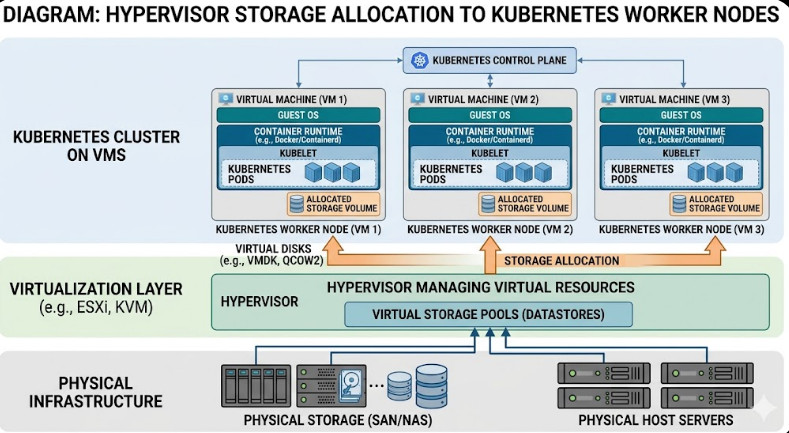
But when you use VMs, you leverage mature SAN/NAS integrations.
Your hypervisor abstracts the storage complexity.
You just attach a virtual disk (vmdk, qcow2) to the worker node.
The CSI driver inside K8s mounts it.
If the node fails, the hypervisor detaches the disk and moves it.
It is safe, proven, and boring.
And in operations, boring is beautiful.
To understand the underlying Linux concepts, brush up on your cgroups knowledge.
You’ll see exactly where containers end and hypervisors begin.
Frequently Asked Questions
- Is Kubernetes VM Infrastructure slower? Yes, slightly. The hypervisor adds minimal overhead. But the operational velocity you gain far outweighs a 2% CPU tax.
- Do public clouds use VMs for K8s? Absolutely. EKS, GKE, and AKS all provision virtual machines as your worker nodes by default.
- Can I run VMs inside Kubernetes? Yes! Projects like KubeVirt let you run traditional VM workloads alongside your containers using Kubernetes as the orchestrator.
The Future of Kubernetes VM Infrastructure
The industry isn’t moving away from virtualization.
It is merging with it.
We are seeing tighter integration between the orchestrator and the hypervisor.
Projects are making it easier to manage both from a single pane of glass.
But the underlying separation of concerns remains valid.
Hardware fails. It is a fundamental law of physics.
VMs insulate your logical clusters from physical failures.
They provide the blast radius control you desperately need.
Don’t be fooled by the bare metal hype.
Protect your weekends.
Protect your SLA.
Conclusion: Your Kubernetes VM Infrastructure is the unsung hero of your tech stack. It provides the security, scalability, and disaster recovery that containers simply cannot offer on their own. Keep your hypervisors spinning, and let K8s do what it does best: orchestrate, not emulate. Thank you for reading the DevopsRoles page!