In multi-tenant high-performance computing (HPC) environments, ensuring strict resource boundaries is not just a performance concern—it is a critical security requirement. For Oracle Cloud Infrastructure Container Engine for Kubernetes (OKE), verifying GPU Accelerator Access Isolation is paramount when running untrusted workloads alongside critical AI/ML inference tasks. This guide targets expert Platform Engineers and SREs, focusing on the mechanisms, configuration, and practical validation of GPU isolation within OKE clusters.
Table of Contents
The Mechanics of GPU Isolation in Kubernetes
Before diving into validation, it is essential to understand how OKE and the underlying container runtime mediate access to hardware accelerators. Unlike CPU and RAM, which are compressible resources managed via cgroups, GPUs are treated as extended resources.
Pro-Tip: The default behavior of the NVIDIA Container Runtime is often permissive. Without the NVIDIA Device Plugin explicitly setting environment variables like
NVIDIA_VISIBLE_DEVICES, a container might gain access to all GPU devices on the node. Isolation relies heavily on the correct interaction between the Kubelet, the Device Plugin, and the Container Runtime Interface (CRI).
Isolation Layers
- Physical Isolation (Passthrough): Giving a Pod exclusive access to a specific PCle device.
- Logical Isolation (MIG): Using Multi-Instance GPU (MIG) on Ampere architectures (e.g., A100) to partition a single physical GPU into multiple isolated instances with dedicated compute, memory, and cache.
- Time-Slicing: Sharing a single GPU context across multiple processes (weakest isolation, mostly for efficiency, not security).
Prerequisites for OKE
To follow this validation procedure, ensure your environment meets the following criteria:
- An active OKE Cluster (version 1.25+ recommended).
- Node pools using GPU-enabled shapes (e.g.,
VM.GPU.A10.1,BM.GPU.A100-vCP.8). - The NVIDIA Device Plugin installed (standard in OKE GPU images, but verify the daemonset).
kubectlcontext configured for administrative access.
Step 1: Establishing the Baseline (The “Rogue” Pod)
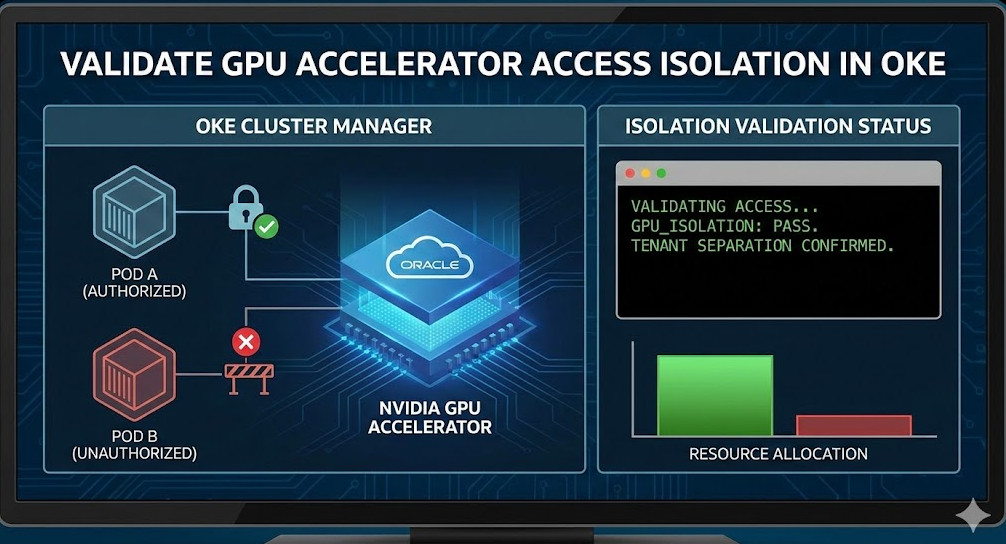
To validate GPU Accelerator Access Isolation, we must first attempt to access resources from a Pod that has not requested them. This simulates a “rogue” workload attempting to bypass resource quotas or scrape data from GPU memory.
Deploying a Non-GPU Workload
Deploy a standard pod that includes the NVIDIA utilities but requests 0 GPU resources.
apiVersion: v1
kind: Pod
metadata:
  name: gpu-rogue-validation
  namespace: default
spec:
  restartPolicy: Never
  containers:
  - name: cuda-container
    image: nvcr.io/nvidia/k8s/cuda-sample:nbody-cuda11.7.1-ubuntu20.04
    command: ["sleep", "3600"]
    # CRITICAL: No resources.limits.nvidia.com/gpu defined here
    resources:
      limits:
        cpu: "500m"
        memory: "512Mi"
Verification Command
Exec into the pod and attempt to query the GPU status. If isolation is working correctly, the NVIDIA driver should report no devices found or the command should fail.
kubectl exec -it gpu-rogue-validation -- nvidia-smiExpected Outcome:
Failed to initialize NVML: Unknown Error- Or, a clear output stating
No devices were found.
If this pod returns a full list of GPUs, isolation has failed. This usually indicates that the default runtime is exposing all devices because the Device Plugin did not inject the masking environment variables.
Step 2: Validating Authorized Access
Now, deploy a valid workload that requests a specific number of GPUs to ensure the scheduler and device plugin are correctly allocating resources.
apiVersion: v1
kind: Pod
metadata:
  name: gpu-authorized
spec:
  restartPolicy: Never
  containers:
  - name: cuda-container
    image: nvcr.io/nvidia/k8s/cuda-sample:nbody-cuda11.7.1-ubuntu20.04
    command: ["sleep", "3600"]
    resources:
      limits:
        nvidia.com/gpu: 1 # Requesting 1 GPU
Inspection
Run nvidia-smi inside this pod. You should see exactly one GPU device.
Furthermore, inspect the environment variables injected by the plugin:
kubectl exec gpu-authorized -- env | grep NVIDIA_VISIBLE_DEVICESThis should return a UUID (e.g., GPU-xxxxxxxx-xxxx-xxxx...) rather than all.
Step 3: Advanced Validation with MIG (Multi-Instance GPU)
For workloads requiring strict hardware-level isolation on OKE using A100 instances, you must validate MIG partitioning. GPU Accelerator Access Isolation in a MIG context means a Pod on “Instance A” cannot impact the memory bandwidth or compute units of “Instance B”.
If you have configured MIG strategies (e.g., mixed or single) in your OKE node pool:
- Deploy two separate pods, each requesting
nvidia.com/mig-1g.5gb(or your specific profile). - Run a stress test on Pod A:
kubectl exec -it pod-a -- /usr/local/cuda/samples/1_Utilities/deviceQuery/deviceQuery - Verify UUIDs: Ensure the UUID visible in Pod A is distinct from Pod B.
- Crosstalk Check: Attempt to target the GPU index of Pod B from Pod A using CUDA code. It should fail with an invalid device error.
Troubleshooting Isolation Leaks
If your validation tests fail (i.e., the “rogue” pod can see GPUs), check the following configurations in your OKE cluster.
1. Privileged Security Context
A common misconfiguration is running containers as privileged. This bypasses the container runtime’s device cgroup restrictions.
# AVOID THIS IN MULTI-TENANT CLUSTERS
securityContext:
  privileged: true
Fix: Enforce Pod Security Standards (PSS) to disallow privileged containers in non-system namespaces.
2. HostPath Volume Mounts
Ensure users are not mounting /dev or /var/run/nvidia-container-devices directly. Use OPA Gatekeeper or Kyverno to block HostPath mounts that expose device nodes.
Frequently Asked Questions (FAQ)
Does OKE enable GPU isolation by default?
Yes, OKE uses the standard Kubernetes Device Plugin model. However, “default” relies on the assumption that you are not running privileged containers. You must actively validate that your RBAC and Pod Security Policies prevent privilege escalation.
Yes, via Time-Slicing or MIG. However, Time-Slicing does not provide memory isolation (OOM in one pod can crash the GPU context for others). For true isolation, you must use MIG (available on A100 shapes in OKE).
How do I monitor GPU violations?
Standard monitoring (Prometheus/Grafana) tracks utilization, not access violations. To detect access violations, you need runtime security tools like Falco, configured to alert on unauthorized open() syscalls on /dev/nvidia* devices by pods that haven’t requested them.
Conclusion
Validating GPU Accelerator Access Isolation in OKE is a non-negotiable step for securing high-value AI infrastructure. By systematically deploying rogue and authorized pods, inspecting environment variable injection, and enforcing strict Pod Security Standards, you verify that your multi-tenant boundaries are intact. Whether you are using simple passthrough or complex MIG partitions, trust nothing until you have seen the nvidia-smi output deny access. Thank you for reading the DevopsRoles page!