
Table of Contents
#Introduction
In this tutorial, How to use Docker deploy MySQL and phpMyAdmin.
Docker is a software platform designed to make it easier to create, deploy, and run applications by using containers.
MySQL Database Service is a fully managed database service to deploy cloud-native applications. Quota from MySQL.
Prerequisites Docker deploy MySQL and phpMyAdmin
- Host OS: Ubuntu 21.04
- Installed Docker
Deploy the MySQL Database
First I will create a volume for MySQL to remain persistent. I will create a volume name is mysql-volume with the command below:
docker volume create mysql-volumeThe output terminal is as below:
vagrant@devopsroles:~$ docker volume create mysql-volume
mysql-volume
vagrant@devopsroles:~$ docker volume ls
DRIVER    VOLUME NAME
local     1b944b2bc6253d6ef43a7fe8c0b57f7e070a219d495a69d89ee5e33ab3ffc48f
local     4f63522a2fe6eec851e2502fc56bbed0706a73df8e2a119ef1a9382c234f1b5b
local     8c2473be65a52c7a0a47e2d7b48b6781f29255f3ef6372b60e4c227644ff0844
local     c6e1ca4cc9617ca9031d974f4d19a5efbac96102850aa255d07c9dc53bd7f6e4
local     c509424aaaeda0374dc1d3d849bc245a183e865cddffa4bc1606d736ee3fb615
local     cb6583b8ad3d474f06e6c8fef30f5d4d11cb1a51e69ca0cc5d2df15a9deae1c3
local     ghost-blog_ghost
local     ghost-blog_mysql
local     my-postgres-db-db
local     mysql-volume
After our volume ready, we will deploy the MySQL container with named is devops_mysql and connect it to the volume with the command below:
docker run --name=devops_mysql -p3306:3306 -v mysql-volume:/var/lib/mysql -e MYSQL_ROOT_PASSWORD=123abc@ -d mysql/mysql-serverThe output terminal as below
vagrant@devopsroles:~$ docker run --name=devops_mysql -p3306:3306 -v mysql-volume:/var/lib/mysql -e MYSQL_ROOT_PASSWORD=123abc@ -d mysql/mysql-server
Unable to find image 'mysql/mysql-server:latest' locally
latest: Pulling from mysql/mysql-server
221c7ea50c9e: Pull complete
d32a20f3a6af: Pull complete
28749a63c815: Pull complete
3cdab959ca41: Pull complete
30ceffa70af4: Pull complete
e4b028b699c1: Pull complete
3abed4e8adad: Pull complete
Digest: sha256:6fca505a0d41c7198b577628584e01d3841707c3292499baae87037f886c9fa2
Status: Downloaded newer image for mysql/mysql-server:latest
8b5a319d3cdaac3cd34046e6a32d8a6df25cbf17d28b3e83ac759389d2916e0c
vagrant@devopsroles:~$ docker ps
CONTAINER ID   IMAGE                COMMAND                  CREATED          STATUS                             PORTS                                                        NAMES
8b5a319d3cda   mysql/mysql-server   "/entrypoint.sh mysq…"   16 seconds ago   Up 14 seconds (health: starting)   0.0.0.0:3306->3306/tcp, :::3306->3306/tcp, 33060-33061/tcp   devops_mysql
Deploy the phpMyAdmin Container
I will deploy the phpMyAdmin Container. Create a volume for phpMyAdmin with the command line as below
docker volume create phpmyadmin-volumeThe output terminal is as below:
vagrant@devopsroles:~$ docker volume create phpmyadmin-volume
phpmyadmin-volume
vagrant@devopsroles:~$ docker volume ls | grep phpmyadmin-volume
local     phpmyadmin-volume
deploy the phpMyAdmin container with the command:
docker run --name devops-phpmyadmin -v phpmyadmin-volume:/etc/phpmyadmin/config.usr.inc.php --link devops_mysql:db -p 82:80 -d phpmyadmin/phpmyadminThe output terminal is as below:
vagrant@devopsroles:~$ docker run --name devops-phpmyadmin -v phpmyadmin-volume:/etc/phpmyadmin/config.usr.inc.php --link devops_mysql:db -p 82:80 -d phpmyadmin/phpmyadmin
b505829b235660a4a4881cbc6df777b8592a32b4bd014cc543e02238c3b1f409
vagrant@devopsroles:~$ docker ps | grep  devops-phpmyadmin
b505829b2356   phpmyadmin/phpmyadmin   "/docker-entrypoint.…"   12 seconds ago   Up 11 seconds            0.0.0.0:82->80/tcp, :::82->80/tcp                            devops-phpmyadmin
vagrant@devopsroles:~$
The explanation of the above command
- Deploying a container named devops-phpmyadmin
- Linking to devops_mysql database
- external port is 82
- Internal port is 80
- running the container in daemon mode (with the -d option)
How to Access phpMyAdmin
Open a web browser and point it to http://SERVER:82

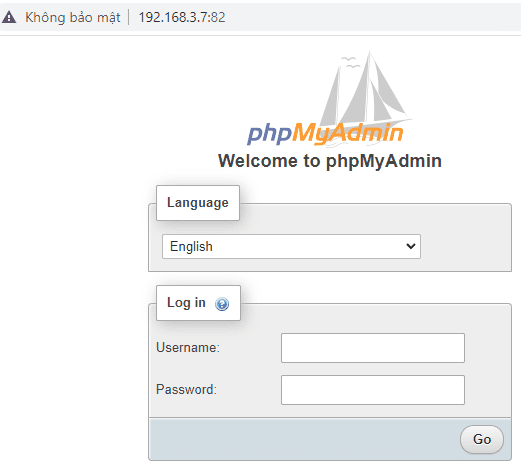
Log in with the username root and the password you used when you deployed the MySQL container.
For example, the username is root and the Password is 123abc@
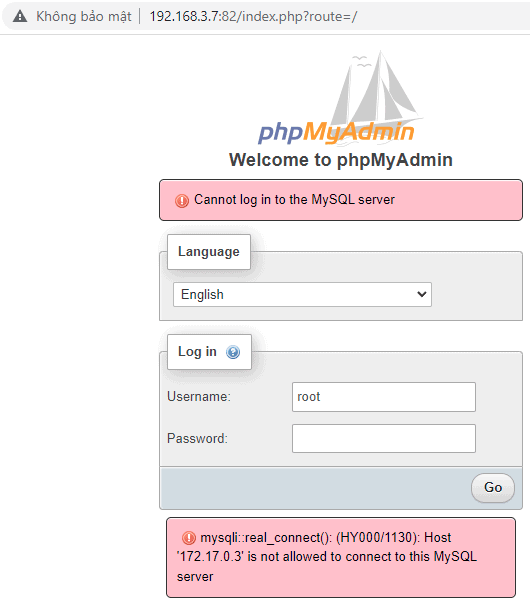
Can not access MySQL docker as the picture below

How to fix it
docker exec -it devops_mysql mysql -u root -p
update mysql.user set host='%' where user='root' and host = 'localhost';
flush privileges;
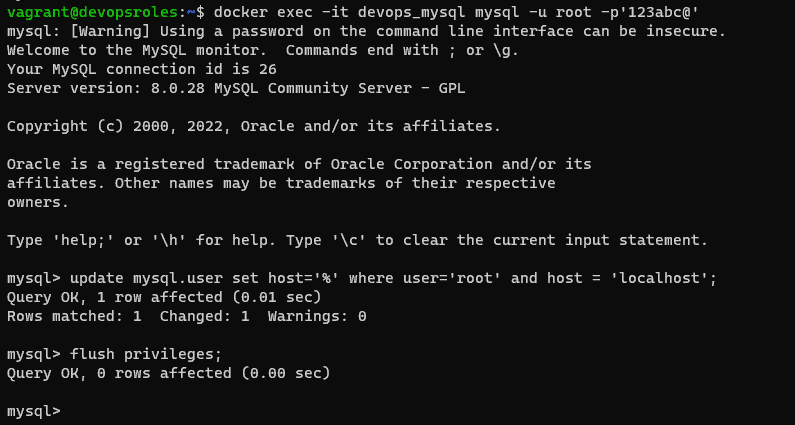
The result, Login access to phpMyAdmin

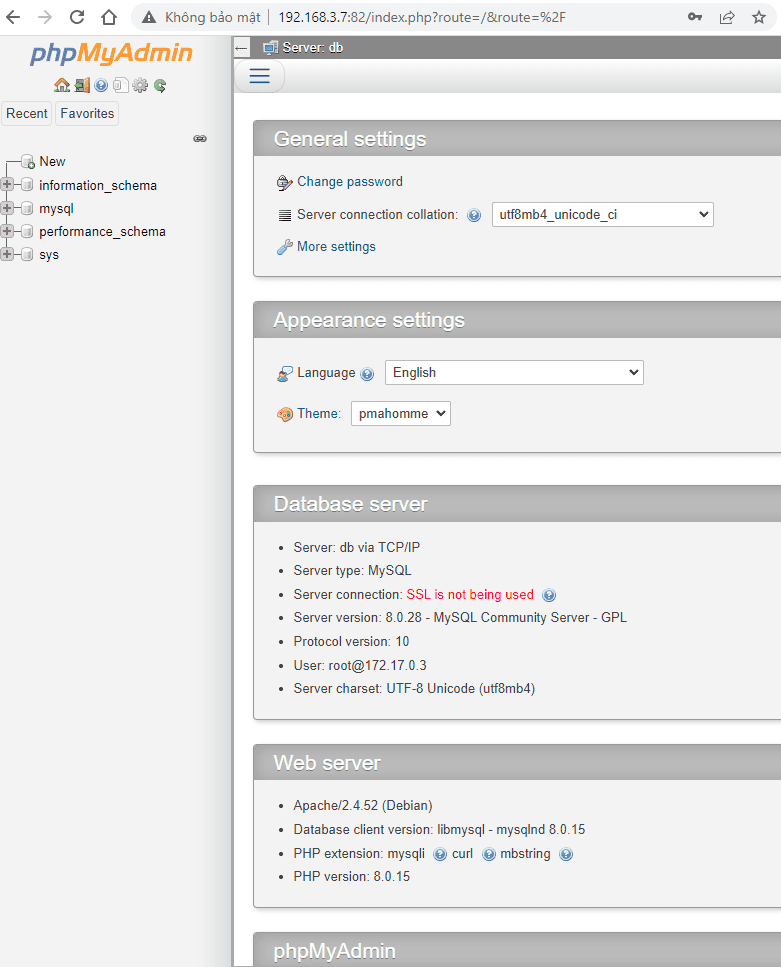
How to access MySQL and phpMyAdmin containers
docker exec -it devops_mysql /bin/bash
docker exec -it devops-phpmyadmin /bin/bash
Via youtube

Conclusion
You have to Docker deploy MySQL and phpMyAdmin. I hope will this your helpful. Thank you for reading the DevopsRoles page!