Let’s talk about the reality of AI for code review. If you are still manually parsing 500-line pull requests at 2 AM, you are burning money and brain cells.
I have been a software engineer and tech journalist for over 30 years. I remember the dark days of printing out code on dot-matrix printers just to find a missing semicolon.
Today? That kind of manual labor is just pure masochism. We finally have tools that can automate the soul-crushing grunt work of peer reviews.

Table of Contents
Why AI for Code Review is Mandatory in 2026
Let me give it to you straight. Human reviewers are tired, biased, and easily distracted.
When a developer submits a massive PR on a Friday afternoon, what happens? LGTM. “Looks good to me.” We approve it blindly just to get to the weekend.
This is exactly where relying on AI for code review saves your production environment from going up in flames.
Machines do not get tired. They do not care that it is 4:59 PM on a Friday. They parse syntax, logic, and security flaws with ruthless consistency.
The True Cost of Human Fatigue
Think about your hourly rate. Now think about the hourly rate of your senior engineering team.
Having a Senior Staff Engineer spend three hours hunting down a memory leak in a junior dev’s pull request is an egregious waste of resources.
By offloading the initial pass to an automated agent, your senior devs only step in for architectural decisions. That is massive ROI.
Top Tools Dominating AI for Code Review
Not all bots are created equal. I have tested dozens of them across various repositories, from simple Node.js apps to monolithic C++ nightmares.
Here are the heavy hitters you need to be looking at if you want to speed up your deployment pipeline.
For more community insights on these tools, check the official developer guide.
1. GitHub Copilot Enterprise
Microsoft has essentially weaponized Copilot for pull requests. It doesn’t just write code anymore; it reads it.
The PR summary feature is a lifesaver. It automatically generates a human-readable description of what the code actually does, catching undocumented changes instantly.
If you are already in the GitHub ecosystem, turning this on is an absolute no-brainer.
2. CodiumAI
CodiumAI takes a slightly different approach. It focuses heavily on generating meaningful tests for the code you are reviewing.
Instead of just saying “this looks wrong,” it actively tries to break the PR by simulating edge cases.
I used this on a legacy Python backend last month, and it caught a silent race condition that three senior devs missed.
3. Amazon Q Developer
If you are living deep inside AWS, Amazon Q is your new best friend. It understands cloud-native architecture better than almost anything else.
It will flag inefficient IAM policies or exposed S3 buckets right inside the merge request.
Security teams love it. Developers tolerate it. But it absolutely works.
Best Practices: Implementing AI for Code Review
Buying the tool is only 10% of the battle. The other 90% is getting your stubborn engineering team to actually use it correctly.
Here is my battle-tested playbook for rolling out AI code review without causing a mutiny.
1. Do Not Blindly Trust the Bot
This is the golden rule. AI hallucinates. It confidently lies. It will suggest “optimizations” that actually introduce infinite loops.
Treat the AI like a highly enthusiastic, incredibly fast Junior Developer. Trust, but verify.
Never bypass human sign-off for critical infrastructure or authentication modules.
2. Dial in the Noise-to-Signal Ratio
If your AI bot leaves 45 nitpicky comments on a 10-line PR, your developers will simply mute it.
Configure your tools to ignore formatting issues. We have linters for that.
Force the AI to focus on logical errors, security vulnerabilities, and performance bottlenecks.
3. Provide Context in Your Prompts
An AI is only as smart as the context window you give it. If you feed it an isolated file, it will fail.
You need to hook it into your issue tracker, your architecture documentation, and your past closed PRs.
Read more about configuring your pipelines here: [Internal Link: 10 CI/CD Pipeline Mistakes].
Automating the Pipeline (Code Example)
Want to see how easy it is to wire this up? Let’s look at a basic GitHub Actions workflow.
This snippet triggers an AI review script every time a pull request is opened or updated.
name: AI PR Reviewer

on:
  pull_request:
    types: [opened, synchronize]

jobs:
  review:
    runs-on: ubuntu-latest
    steps:
      - name: Checkout Repo
        uses: actions/checkout@v4

      - name: Run AI Review Bot
        uses: some-ai-vendor/pr-reviewer-action@v2
        with:
          github_token: ${{ secrets.GITHUB_TOKEN }}
          openai_api_key: ${{ secrets.OPENAI_API_KEY }}
          model: "gpt-4-turbo"
          exclude_patterns: "**/*.md, **/*.txt"
Notice how we explicitly exclude markdown and text files? Save your API tokens for the actual source code.
Small optimizations like this will save you thousands of dollars in API costs over a year.
Security First: Finding the Invisible Flaws
Let’s talk about the elephant in the room. Cybersecurity. The threat landscape is evolving faster than any human can track.
According to the OWASP Foundation, injection flaws and broken access controls remain massive problems.
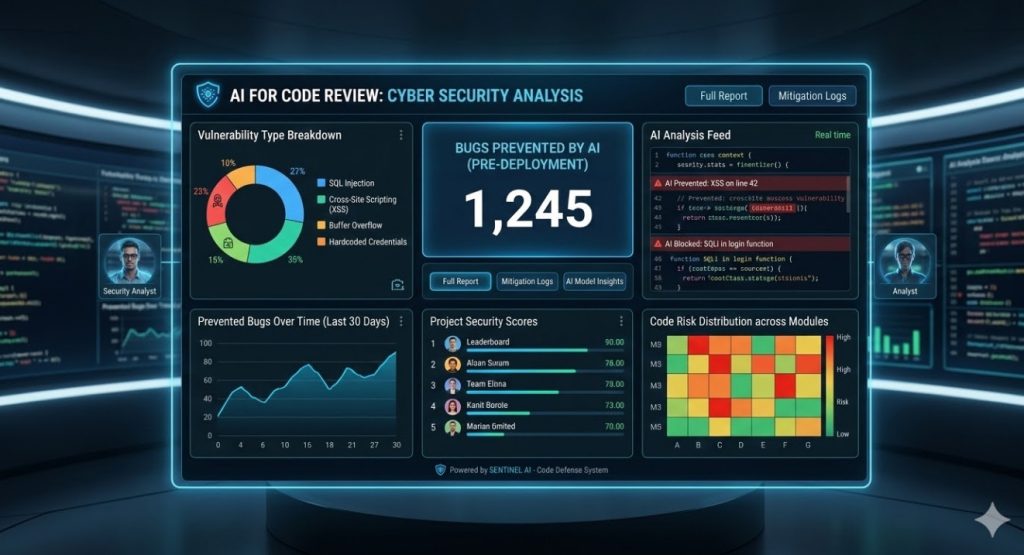
Using AI for code review acts as a secondary firewall against these exact vulnerabilities before they reach production.
I have seen AI bots flag hardcoded credentials hidden deep within nested config objects that a human eye just skipped over.
FAQ Section
- Will AI replace human code reviewers? No. It replaces the boring parts of code review. You still need human engineers to ensure the code actually solves the business problem.
- Is AI for code review secure? It depends on the vendor. Always ensure your provider has zero-data-retention policies. Never send proprietary algorithms to public, consumer-grade LLMs.
- How much does it cost? Enterprise tools range from $10 to $40 per user per month. Compare that to the hourly rate of a senior dev fixing a production bug, and it pays for itself on day one.
- Can it understand legacy code? Yes, surprisingly well. Modern models can parse ancient COBOL or messy PHP and actually suggest modern refactoring patterns.
Conclusion: The Train is Leaving the Station
Look, I have seen fads come and go. I survived the SOAP XML era. I watched NoSQL try to kill relational databases. Most tech trends are overblown.
But leveraging AI for code review is not a fad. It is a fundamental shift in how we ship software.
If you are not integrating these tools into your workflows right now, your competitors are. And they are deploying faster, with fewer bugs, than you are.
Stop romanticizing the manual grind. Install a bot, configure your webhooks, and let the machines do the heavy lifting. Thank you for reading the DevopsRoles page!

