Introduction: The Kubernetes Gateway API is officially here for AWS, and it is about time.
I have spent three decades in tech, watching networking paradigms shift from hardware appliances to virtualized spaghetti. Nothing frustrated me more than the old Ingress API.
It was rigid. It was poorly defined. We had to hack it with endless, unmaintainable annotations.
Now, AWS has announced general availability support for this new standard in their Load Balancer Controller.
If you are running EKS in production, this isn’t just a minor patch. It is a complete architectural overhaul.
So, why does this matter to you and your bottom line?
Let’s break down the technical realities of this release and look at how to actually implement it without breaking your staging environment.
Table of Contents
The Problem with the Old Ingress Object
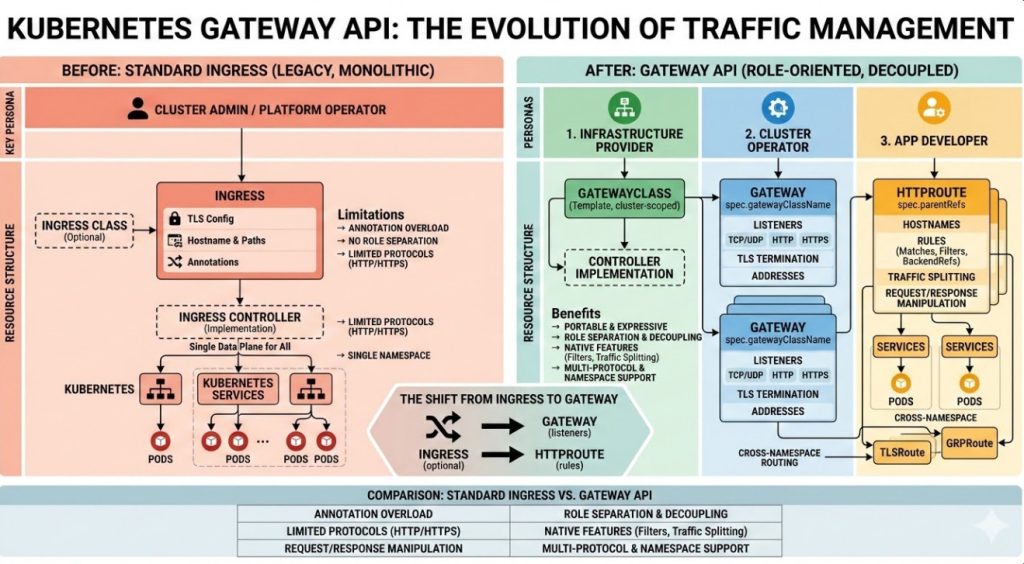
To understand why the Kubernetes Gateway API is so critical, we have to look back at the original Ingress resource.
Ingress was designed for a simpler time. It assumed a single person managed the cluster and the networking.
In the real world? That is a joke. Infrastructure teams, security teams, and application developers constantly step on each other’s toes.
Because the original API only supported basic HTTP routing, controller maintainers (like NGINX or AWS) stuffed everything else into annotations.
“Annotations are where good configurations go to die.” – Every SRE I’ve ever shared a beer with.
Enter the Kubernetes Gateway API
The Kubernetes Gateway API solves the annotation nightmare through role-oriented design.
It splits the monolithic Ingress object into distinct, composable resources.
This allows different teams to manage their specific pieces of the puzzle safely.
- GatewayClass: Managed by infrastructure providers (AWS, in this case).
- Gateway: Managed by cluster operators to define physical/logical boundaries.
- HTTPRoute: Managed by application developers to define how traffic hits their specific microservices.
You can read the official announcement regarding the AWS Load Balancer Controller release here.
How the AWS Load Balancer Controller Uses Kubernetes Gateway API
AWS isn’t just paying lip service to the standard. They’ve built native integration.
When you deploy a Gateway resource using the AWS controller, it automatically provisions an Application Load Balancer (ALB) or a VPC Lattice service network.
No more guessing if your Ingress controller is going to conflict with your AWS networking limits.
This deep integration means your Kubernetes Gateway API configuration directly maps to cloud-native AWS constructs.
Are you using VPC Lattice? The integration here is phenomenal for cross-cluster communication.
Advanced Traffic Routing with Kubernetes Gateway API
One of the biggest wins here is advanced traffic management right out of the box.
With the old system, doing a simple blue/green deployment or canary release required third-party meshes or ugly hacks.
Now? It is built directly into the HTTPRoute specification.
You can route traffic based on:
- HTTP Headers
- Query Parameters
- Path prefixes
- Weight-based distribution
This natively aligns with the official Kubernetes documentation for the API.
Hands-On: Deploying Your First Gateway
Talk is cheap. Let’s look at the actual code required to get this running on your EKS cluster.
First, you need to ensure you have the correct IAM roles assigned to your worker nodes or IRSA.
I’ve lost hours debugging “access denied” errors because I forgot a simple IAM policy.
Here is how a standard GatewayClass looks using the AWS implementation:
apiVersion: gateway.networking.k8s.io/v1beta1
kind: GatewayClass
metadata:
  name: amazon-alb
spec:
  controllerName: ingress.k8s.aws/alb
Notice how clean that is? No messy annotations configuring the backend protocol.
Next, the cluster operator defines the Gateway.
This is where we specify the listeners and ports for our ALB.
apiVersion: gateway.networking.k8s.io/v1beta1
kind: Gateway
metadata:
  name: external-gateway
  namespace: infrastructure
spec:
  gatewayClassName: amazon-alb
  listeners:
  - name: http
    port: 80
    protocol: HTTP
    allowedRoutes:
      namespaces:
        from: All
Routing Traffic to Your Apps
Finally, the application developer takes over with the Kubernetes Gateway API routing rules.
They create an HTTPRoute in their specific namespace.
This prevents developer A from accidentally overriding developer B’s routing rules.
Here is an HTTPRoute routing to a specific service based on a path prefix:
apiVersion: gateway.networking.k8s.io/v1beta1
kind: HTTPRoute
metadata:
  name: my-app-route
  namespace: application-team
spec:
  parentRefs:
  - name: external-gateway
    namespace: infrastructure
  rules:
  - matches:
    - path:
        type: PathPrefix
        value: /store
    backendRefs:
    - name: store-service
      port: 8080
That is it. You have just provisioned an AWS ALB and routed traffic securely using the new standard.
Migrating from K8s Ingress
I won’t lie to you. Migrating existing production workloads requires careful planning.
Do not just delete your Ingress objects on a Friday afternoon.
You can run both the old Ingress and the new Kubernetes Gateway API resources side-by-side.
Start by identifying low-risk internal services.
Write the corresponding HTTPRoutes, verify traffic flows, and then slowly decommission the old annotations.
If you need help setting up the base cluster, check out our [Internal Link: Ultimate EKS Cluster Provisioning Guide].
Security and the ReferenceGrant
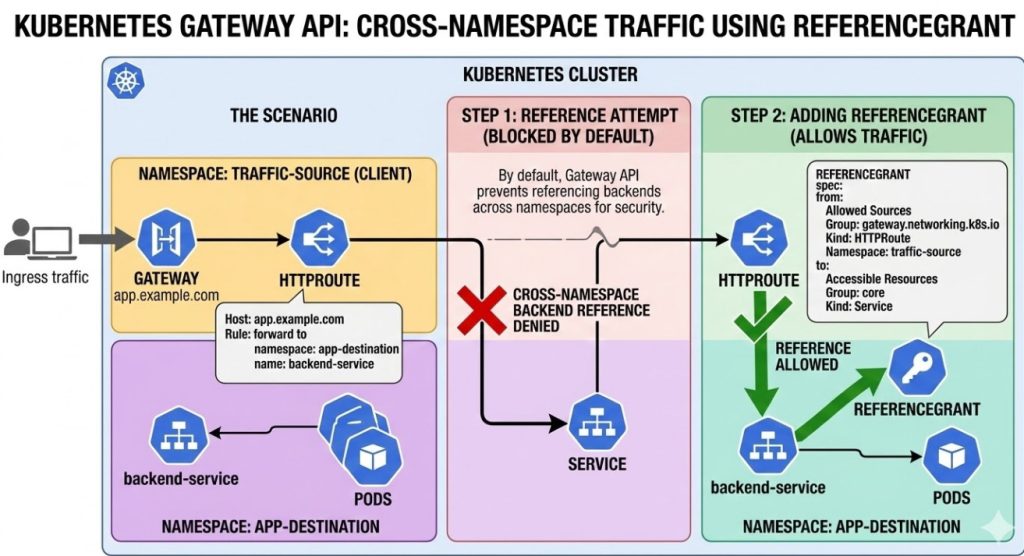
Let’s talk security, because crossing namespace boundaries is usually where breaches happen.
The old system allowed routes to blindly forward traffic anywhere if not strictly policed by admission controllers.
The new API introduces the ReferenceGrant resource.
If an HTTPRoute in Namespace A wants to send traffic to a Service in Namespace B, Namespace B MUST explicitly allow it.
This is zero-trust networking applied directly at the configuration layer.
It forces security to be intentional, rather than an afterthought.
FAQ Section
- Is the Kubernetes Gateway API replacing Ingress? Yes, eventually. While Ingress won’t be deprecated tomorrow, all new features are going to the new API.
- Does this cost extra on AWS? The controller itself is free, but you pay for the underlying ALBs or VPC Lattice infrastructure it provisions.
- Can I use this with Fargate? Absolutely. The AWS Load Balancer Controller works seamlessly with EKS on Fargate.
- Do I still need a service mesh? It depends. For basic cross-cluster routing and canary deployments, this API covers a lot. For mTLS and deep observability, a mesh might still be needed.
Conclusion: The general availability of the Kubernetes Gateway API in the AWS Load Balancer Controller marks the end of the messy annotation era. It provides clear team boundaries, native AWS integration, and robust traffic routing capabilities. Stop relying on outdated hacks and start planning your migration to this robust standard today. Your on-call engineers will thank you. Thank you for reading the DevopsRoles page!