Introduction: I still remember the exact day Docker pulled the rug out from under us with their licensing changes. Panic swept through enterprise development teams everywhere.
Enter Podman Desktop. Red Hat just dropped a massive enterprise-grade alternative, and it is exactly what we have been waiting for.
You need a reliable, cost-effective way to build containers without the overhead of heavy daemons. I’ve spent 30 years in the tech trenches, and I can tell you this release changes everything.
If you are tired of licensing headaches and resource-hogging applications, you are in the right place.
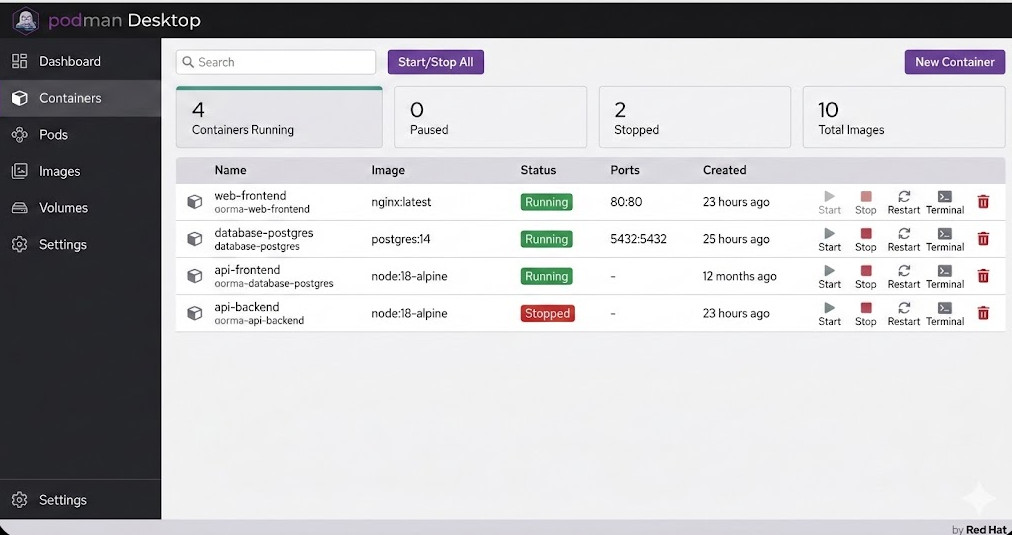
Table of Contents
Why Podman Desktop is the Wake-Up Call the Industry Needed
For years, Docker was the only game in town. We installed it, forgot about it, and let it run in the background.
But monopolies breed complacency. When they changed their terms for enterprise users, IT budgets took a massive, unexpected hit.
That is where this new tool steps in. Red Hat saw a glaring vulnerability in the market and exploited it brilliantly.
They built an open-source, GUI-driven application that gives developers everything they loved about Docker, minus the extortionate fees.
Want to see the original breaking story? Check out the announcement coverage here.
The Daemonless Advantage
Here is my biggest gripe with legacy container engines: they rely on a fat, privileged background daemon.
If that daemon crashes, all your containers go down with it. It is a single point of failure that keeps site reliability engineers up at night.
Podman Desktop doesn’t do this. It uses a fork-exec model.
This means your containers run as child processes. If the main interface closes, your containers keep happily humming along.
It is cleaner. It is safer. It is the way modern infrastructure should have been built from day one.
Key Features of Red Hat’s Podman Desktop
So, what exactly are you getting when you make the switch? Let’s break down the heavy hitters.
First, the user interface is incredibly snappy. Built with web technologies, it doesn’t drag your machine to a halt.
Second, it natively understands Kubernetes. This is a massive paradigm shift for local development.
Instead of wrestling with custom YAML formats, you can generate Kubernetes manifests directly from your running containers.
Read more about Kubernetes standards at the official Kubernetes documentation.
Let’s not forget about internal operations. Check out our guide on [Internal Link: Securing Enterprise CI/CD Pipelines] to see how this fits into the bigger picture.
Rootless Containers Out of the Box
Security teams, rejoice. Running containers as root is a massive security risk, plain and simple.
A container breakout vulnerability could compromise your entire host machine if the daemon runs with root privileges.
By default, this platform runs containers as a standard user.
You get the isolation you need without handing over the keys to the kingdom. It is a no-brainer for compliance audits.
Migrating to Podman Desktop: The War Story
I recently helped a Fortune 500 client migrate 400 developers off their legacy container platform.
They were terrified of the downtime. “Will our `compose` files still work?” they asked.
The answer is yes. You simply alias the CLI command, and the transition is entirely invisible to the average developer.
Here is exactly how we set up the alias on their Linux and Mac machines.
# Add this to your .bashrc or .zshrc
alias docker=podman

# Verify the change
docker version
# Output will cleanly show it is actually running Podman under the hood!
It was that simple. Within 48 hours, their entire team was migrated.
We saved them roughly $120,000 in annual licensing fees with a single line of bash configuration.
That is the kind of ROI that gets you promoted.
Handling Podman Compose
But what about complex multi-container setups? We rely heavily on compose files.
Good news. The Red Hat enterprise build handles this beautifully through the `podman-compose` utility.
It reads your existing `docker-compose.yml` files directly. No translation or rewriting required.
Let’s look at a quick example of how you bring up a stack.
# Standard docker-compose.yml
version: '3'
services:
  web:
    image: nginx:latest
    ports:
      - "8080:80"
  db:
    image: postgres:14
    environment:
      POSTGRES_PASSWORD: secretpassword
You just run `podman-compose up -d` and watch the magic happen.
The GUI automatically groups these containers into a cohesive pod, allowing you to manage them as a single entity.
Why Enterprise Support Matters for Podman Desktop
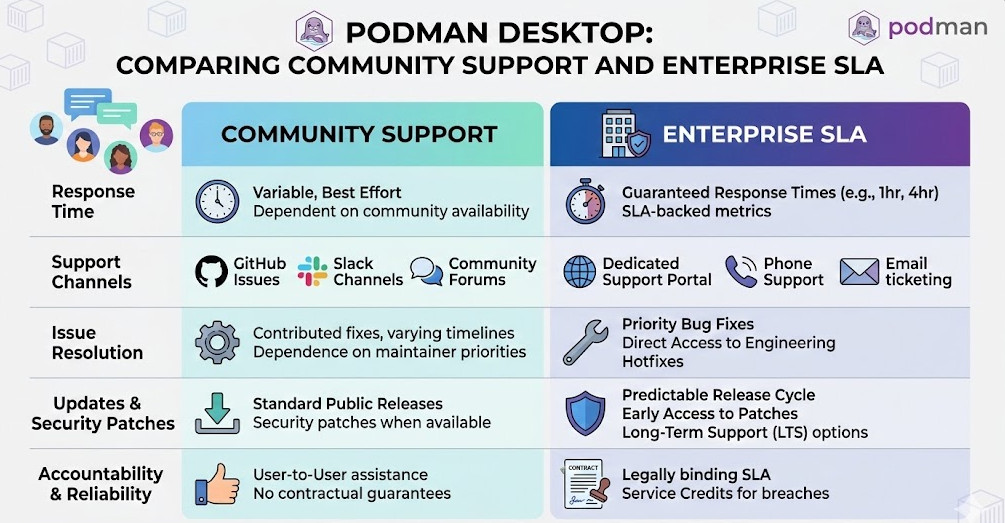
Open-source software is incredible, but large corporations need a throat to choke when things go sideways.
That is the genius of Red Hat stepping into this ring.
They are offering enterprise SLAs, dedicated support channels, and guaranteed patching for critical vulnerabilities.
If you are building banking software or healthcare applications, you cannot rely on community forums for bug fixes.
Red Hat has decades of experience backing open-source projects with serious corporate muscle.
You can verify their track record by checking out their history on Wikipedia.
Extensions and the Developer Ecosystem
A core platform is only as good as its ecosystem. Extensibility is critical.
This desktop application allows developers to install plug-ins that expand its functionality.
Need to connect to an external container registry? There’s an extension for that.
Want to run local AI models? The ecosystem is rapidly expanding to support massive local workloads.
It is not just a replacement tool; it is a foundation for future development workflows.
Advanced Troubleshooting: Podman Desktop Tips
Nothing is perfect. I have run into a few edge cases during massive enterprise deployments.
Networking can sometimes be tricky when dealing with strict corporate VPNs.
Because it runs rootless, binding to privileged ports (under 1024) requires specific system configurations.
Here is how you fix the most common issue: “Permission denied” on port 80.
# Configure sysctl to allow unprivileged users to bind to lower ports
sudo sysctl net.ipv4.ip_unprivileged_port_start=80

# Make it permanent across reboots
echo "net.ipv4.ip_unprivileged_port_start=80" | sudo tee -a /etc/sysctl.conf
Boom. Problem solved. Your developers can now test web servers natively without needing sudo privileges.
It is small configurations like this that separate the rookies from the veterans.
FAQ Section on Podman Desktop
- Is it entirely free to use?
Yes, the core application is completely open-source and free, even for commercial use. Red Hat monetizes the enterprise support layer.
- Does it work on Windows and Mac?
Absolutely. It uses a lightweight virtual machine under the hood on these operating systems to run the Linux container engine seamlessly.
- Can I use my existing Dockerfiles?
100%. The build commands are completely compatible. Your existing CI/CD pipelines will not need to be rewritten.
- How does the resource usage compare?
In my testing, idle CPU and RAM usage is significantly lower. The daemonless architecture genuinely saves battery life on developer laptops.
The Future of Container Management
The tech landscape shifts fast. Tools that were industry standards yesterday can become liabilities tomorrow.
We are witnessing a changing of the guard in the containerization space.
Developers demand tools that are lightweight, secure by default, and free of vendor lock-in.
Red Hat has delivered exactly that. They listened to the community and built a product that solves actual pain points.
If you haven’t installed it yet, you are falling behind the curve.
Conclusion: The era of paying exorbitant fees for basic local development tools is over. Podman Desktop is faster, safer, and backed by an enterprise giant. Stop throwing money away on legacy software, make the switch today, and take control of your container infrastructure. Thank you for reading the DevopsRoles page!