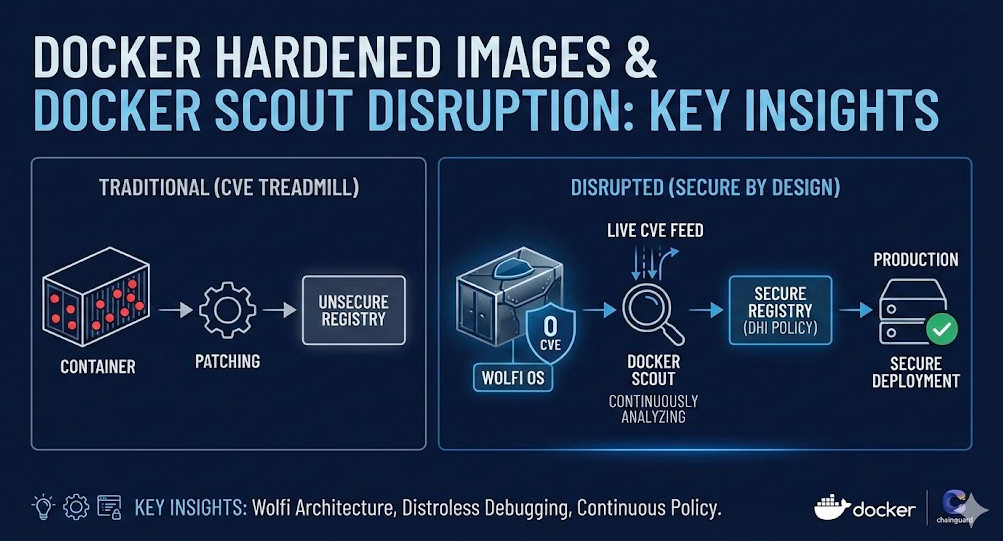
For years, the “CVE Treadmill” has been the bane of every Staff Engineer’s existence. You spend more time patching trivial vulnerabilities in base images than shipping value. Enter Docker Hardened Images (DHI)—a strategic partnership between Docker and Chainguard that fundamentally disrupts how we handle container security. This isn’t just about “fewer vulnerabilities”; it’s about a zero-CVE baseline powered by Wolfi, integrated with the real-time intelligence of Docker Scout.
This guide is written for Senior DevOps professionals and SREs who need to move beyond “scanning and patching” to “secure by design.” We will dissect the architecture of Wolfi, operationalize distroless images, and debug shell-less containers in production.
Table of Contents
1. The Architecture of Hardened Images: Wolfi vs. Alpine
Most “minimal” images rely on Alpine Linux. While Alpine is excellent, its reliance on musl libc often creates friction for enterprise applications (e.g., DNS resolution quirks, Python wheel compilation failures).
Docker Hardened Images are primarily built on Wolfi, a Linux “undistro” designed specifically for containers.
Why Wolfi Matters for Experts
- glibc Compatibility: Unlike Alpine, Wolfi uses
glibc. This ensures binary compatibility with standard software (like Python wheels) without the bloat of a full Debian/Ubuntu OS. - Apk Package Manager: It uses the speed of the
apkformat but draws from its own curated, secure repository. - Declarative Builds: Every package in Wolfi is built from source using Melange, ensuring full SLSA Level 3 provenance.
Pro-Tip: The “Distroless” myth is that there is no OS. In reality, there is a minimal filesystem with just enough libraries (glibc, openssl) to run your app. Wolfi strikes the perfect balance: the compatibility of Debian with the footprint of Alpine.
2. Operationalizing Hardened Images (Code & Patterns)
Adopting DHI requires a shift in your Dockerfile strategy. You cannot simply apt-get install your way to victory.
The “Builder Pattern” with Wolfi
Since runtime images often lack package managers, you must use multi-stage builds. Use a “Dev” variant for building and a “Hardened” variant for runtime.
# STAGE 1: Build
# Use a Wolfi-based SDK image that includes build tools (compilers, git, etc.)
FROM cgr.dev/chainguard/go:latest-dev AS builder

WORKDIR /app
COPY go.mod go.sum ./
RUN go mod download
COPY . .
# Build a static binary
RUN CGO_ENABLED=0 go build -o myapp .

# STAGE 2: Runtime
# Switch to the minimal, hardened runtime image (Distroless philosophy)
# No shell, no package manager, zero-CVE baseline
FROM cgr.dev/chainguard/static:latest

COPY --from=builder /app/myapp /myapp
CMD ["/myapp"]
Why this works: The final image contains only your binary and the bare minimum system libraries. Attackers gaining RCE have no shell (`/bin/sh`) and no package manager (`apk`/`apt`) to expand their foothold.
3. Docker Scout: Real-Time Intelligence, Not Just Scanning
Traditional scanners provide a snapshot in time. Docker Scout treats vulnerability management as a continuous stream. It correlates your image’s SBOM (Software Bill of Materials) against live CVE feeds.
Configuring the “Valid DHI” Policy
For enterprise environments, you can enforce a policy that only allows Docker Hardened Images. This is done via the Docker Scout policy engine.
# Example: Check policy compliance for an image via CLI
$ docker scout policy local-image:tag --org my-org

# Expected Output for a compliant image:
# ✓  Policy "Valid Docker Hardened Image" passed
#    - Image is based on a verified Docker Hardened Image
#    - Base image has valid provenance attestation
Integrating this into CI/CD (e.g., GitHub Actions) prevents non-compliant base images from ever reaching production registries.
4. Troubleshooting “Black Box” Containers
The biggest friction point for Senior Engineers adopting distroless images is debugging. “How do I `exec` into the pod if there’s no shell?”
Do not install a shell in your production image. Instead, use Kubernetes Ephemeral Containers.
The `kubectl debug` Pattern
This command attaches a “sidecar” container with a full toolkit (shell, curl, netcat) to your running target pod, sharing the process namespace.
# Target a running distroless pod
kubectl debug -it my-distroless-pod \
  --image=cgr.dev/chainguard/wolfi-base \
  --target=my-app-container

# Once inside the debug container:
# The target container's filesystem is available at /proc/1/root
$ ls /proc/1/root/app/config/
Advanced Concept: By sharing the Process Namespace (`shareProcessNamespace: true` in Pod spec or implicit via `kubectl debug`), you can see processes running in the target container (PID 1) from your debug container and even run tools like `strace` or `tcpdump` against them.
Frequently Asked Questions (FAQ)
Q: How much do Docker Hardened Images cost?
A: As of late 2025, Docker Hardened Images are an add-on subscription available to users on Pro, Team, and Business plans. They are not included in the free Personal tier.
Q: Can I mix Alpine packages with Wolfi images?
A: No. Wolfi packages are built against glibc; Alpine packages are built against musl. Binary incompatibility will cause immediate failures. Use apk within a Wolfi environment to pull purely from Wolfi repositories.
Q: What if my legacy app relies on `systemd` or specific glibc versions?
A: Wolfi is glibc-based, so it has better compatibility than Alpine. However, it lacks a system manager like `systemd`. For legacy “fat” containers, you may need to refactor to decouple the application from OS-level daemons.
Conclusion
Docker Hardened Images represent the maturity of the container ecosystem. By shifting from “maintenance” (patching debian-slim) to “architecture” (using Wolfi/Chainguard), you drastically reduce your attack surface and operational toil.
The combination of Wolfi’s glibc compatibility and Docker Scout’s continuous policy evaluation creates a “secure-by-default” pipeline that satisfies both the developer’s need for speed and the CISO’s need for compliance.
Next Step: Run a Docker Scout Quickview on your most critical production image (`docker scout quickview `) to see how many vulnerabilities you could eliminate today by switching to a Hardened Image base. Thank you for reading the DevopsRoles page!