

Table of Contents
Introduction
In this tutorial, How to deploy the website to VPS using Gitlab CI/CD. You need a little knowledge about VPS, SSH, Public key, private key, Nginx… Now let’s go Gitlab CI/CD and deploy the website to VPS.
Prerequisites
- Domain: https://devopsroles.com
- VPS on Linode: Have installed Nginx and added the domain into VPS.
- Source code: For example, is React
- Create SSH key on VPS
- Add SSH key into GitLab, CI/CD of Project
- Install Gitlab Runner
- Add .gitlab-ci.yml to the root folder on Gitlab
On VPS
Create a public key and Private key for CI/CD
Type the command on VPS below:
ssh-keygen -t rsa -b 4096 -m pem -C "pvhuu285@gmail.com" -P "" -q -f ~/.ssh/gitlab
It will gen two files is gitlab and gitlab.pub
Convert PKCS #1 to PKCS #8 as command below:
openssl pkcs8 -in gitlab -topk8 -out gitlab2 -nocrypt
#openssl pkcs8 -in gitlab -topk8 -out gitlab2
If you use gitlab key PKCS #1 is the error “Error loading key “/root/.ssh/id_rsa”: invalid format”. I will convert the gitlab2 private key.
On terminal type command
cat gitlab.pub
Copy the code public key, and paste it into SSH of the account Gitlab

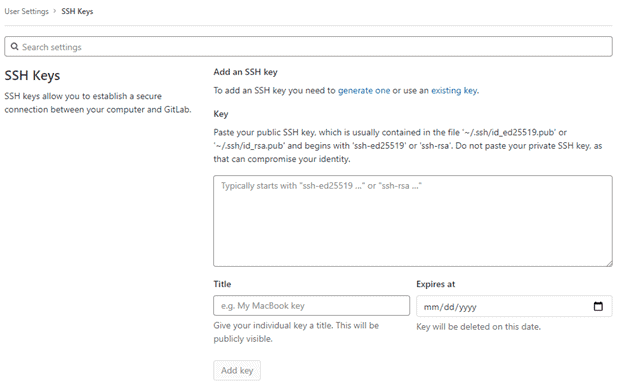
Type the command below to get the private key
cat gitlab2
This private key assign to Settings CI/CD of Repository. Variables are SSH_PRIVATE_KEY


Copy the public key into the authorized_keys file.
touch .ssh/authorized_keys
cat .ssh/gitlab.pub > .ssh/authorized_keys
Create a new .ssh/config file with the content below:
  IgnoreUnknown AddKeysToAgent,UseKeychain
  #UseKeychain yes
  AddKeysToAgent yes
  PreferredAuthentications publickey
  IdentityFile ~/.ssh/gitlab
Install Gitlab Runner on VPS
My example, Install Gitlab Runner on Ubuntu VPS
Download and install binary
sudo curl -L --output /usr/local/bin/gitlab-runner https://gitlab-runner-downloads.s3.amazonaws.com/latest/binaries/gitlab-runner-linux-amd64
Give it permission to execute
sudo chmod +x /usr/local/bin/gitlab-runner
Create a GitLab CI user
sudo useradd --comment 'GitLab Runner' --create-home gitlab-runner --shell /bin/bash
Install and run as a service
sudo gitlab-runner install --user=gitlab-runner --working-directory=/home/gitlab-runner
sudo gitlab-runner start
Command to register the runner
sudo gitlab-runner register --url https://gitlab.com/ --registration-token $REGISTRATION_TOKEN
REGISTRATION_TOKEN the get on repository setting, In CI/CD

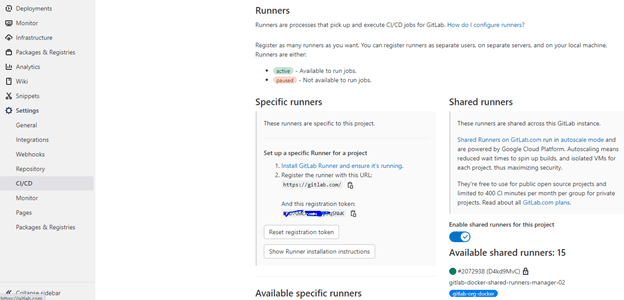
Create new .gitlab-ci.yml file at the folder root on Gitlab

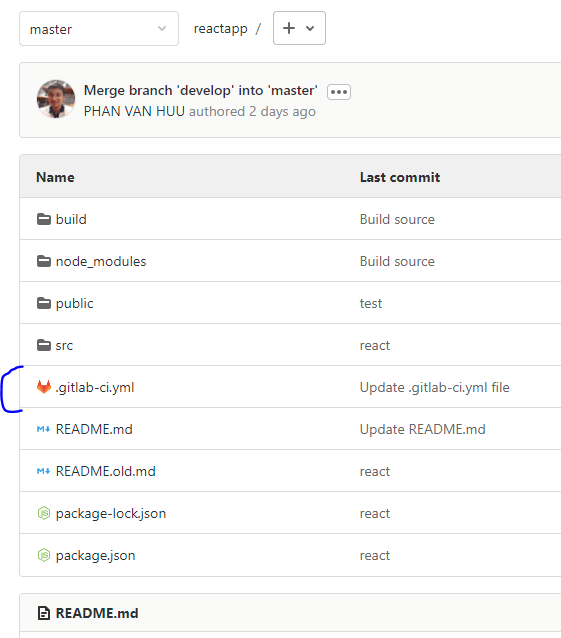
The content is as below:
# Using the node image to build the React app

image: node:latest
variables:
  PUBLIC_URL: /
# Cache node modules - speeds up future builds
#cache:
#  paths:
#     - node_modules
stages:
     - build
     - deploy
build:
  stage: build
  script:
     - echo "Start building App"
     - chmod +x node_modules/.bin/react-scripts
     - npm install # Install all dependencies
     - npm run build #--prod  Build for prod
     - echo "Build successfully!"
  artifacts:
    paths:
      - build
  only:
    - master # Only run on master branch
deploy_production:
  stage: deploy
  image: ubuntu
  before_script:
    - 'which ssh-agent || ( apt-get update -y && apt-get install openssh-client -y )'
    - mkdir -p ~/.ssh
    - echo "$SSH_PRIVATE_KEY" | tr -d '\r' > ~/.ssh/gitlab
    - chmod 700 ~/.ssh/gitlab
    - eval "$(ssh-agent -s)"
    - ssh-add ~/.ssh/gitlab
    - ssh-keyscan -H 'gitlab.com' >> ~/.ssh/known_hosts
    - apt-get install rsync -y -qq
    - apt-get install curl -y -qq

  script:
     - echo "Deploying to server"
     - ssh -i ~/.ssh/gitlab -o StrictHostKeyChecking=no huupv@SERVER_IP -p PORT
     - rsync -avz --progress -a -e "ssh -p PORT" build/ huupv@SERVER_IP:/var/www/YOUR_DOMAIN/public_html
     - echo "Deployed"
  environment:
    name: production
  only:
     - master # Only run on master branch
After clicking commit and checking the result in CI/CD

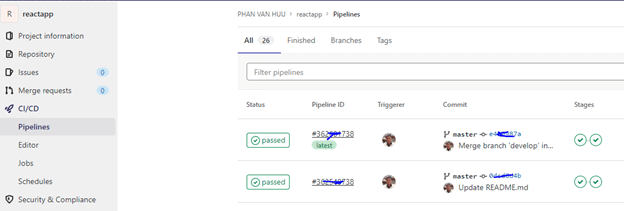
Conclusion
You have Gitlab CI/CD deploy the website to VPS. I hope will this your helpful. Thank you for reading the DevopsRoles page!
What kind of gitlab-runner executor is recommended for this kind of project when registering the gitlab-runner on the VPS? It seems that registering the gitlab runner seems to have missing steps in terms of clarity.
Hi,
clould U help:
>$ cat ~/.ssh/gitlab
>$ chmod 700 ~/.ssh/gitlab
>$ eval “$(ssh-agent -s)”
>Agent pid 388
>$ ssh-add ~/.ssh/gitlab
>Error loading key “/root/.ssh/gitlab”: error in libcrypto
Hi Dominik
Cause: The most likely cause of that is the SSH key in the variable doesn’t have a line break at the end. Go back to the CI variables part and check. Add a new, blank like at the end if needed.
Thanks