

In this tutorial, How do I use BASH script to recursively list files directories and subdirectories? Bash script the essential for DevOps Roles. Bash script recursive file list example.
Example List all files in directories and files in subdirectories as below
[huupv@huupv devopsroles]$ pwd
/home/huupv/devopsroles
[huupv@huupv devopsroles]$ tree /home/huupv/devopsroles
/home/huupv/devopsroles
├── bash_arguments_function2.sh
├── bash_arguments_function.sh
├── bash_colors_formatting.sh
├── bash_print_recurse.sh
├── bash_sleep.sh
├── bash_string_compare.sh
├── bash_substitution_string.sh
├── file.txt
├── folder
│   └── file.txt
├── link_folder -> /home/huupv/devopsroles/folder
├── README.TXT
├── test2.sh
└── test.sh

2 directories, 12 files
My Bash script recursive file list
#!/bin/bash
# Colourise the output on terminal
RED='\033[0;31m' # Red
GRE='\033[0;32m' # Green
NCL='\033[0m' # No Color

print_file_recursively() {
   FILE_NAME="$(basename "${entry}")"
   printf "%*s\t[FILE]:\t${GRE} $FILE_NAME %s${NCL}\n"
}

# loop and print all file and folder recusively,
print_recursively() {
   local indent="${2:-0}"
   printf "\n%*s${RED}%s${NCL}\n\n" "$indent" '[DIR]: ' "$1"
for entry in "$1"/*; do
   [[ -f "$entry" ]] && print_file_recursively
done
for entry in "$1"/*; do
   [[ -d "$entry" ]] && print_recursively "$entry" $((indent+4))
done
}

# Check folder
PATH_FOLDER=""
if [ -d "$1" ]; then
PATH_FOLDER=$1;
fi
print_recursively $PATH_FOLDER
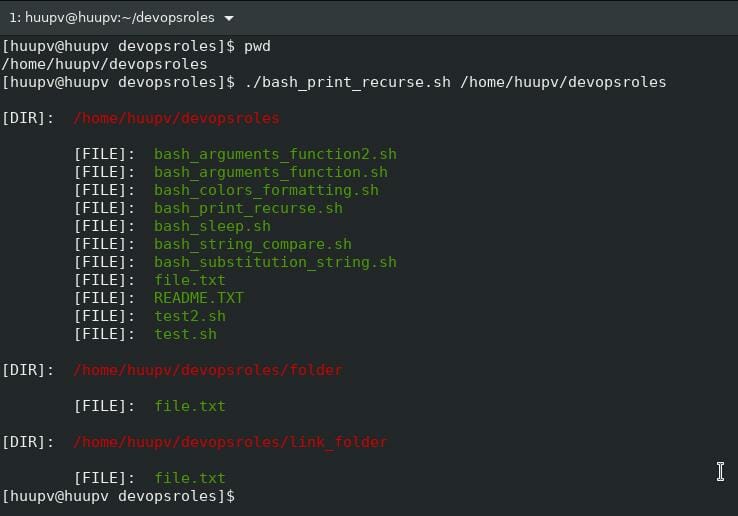
The screen output terminal:

Conclusion
Thought the article, you can use Bash script recursive file list as above. I hope will this your helpful. More details refer to Bash script.