

In this tutorial, find out the ansible task type of state. In Ansible, the state attribute is used to define the desired state of a resource or module. It is commonly used in tasks that involve package management, service management, configuration file management, and more.
The state the attribute accepts different values depending on the module being used. Ansible the essential for DevOps Roles.
Ansible task type of state
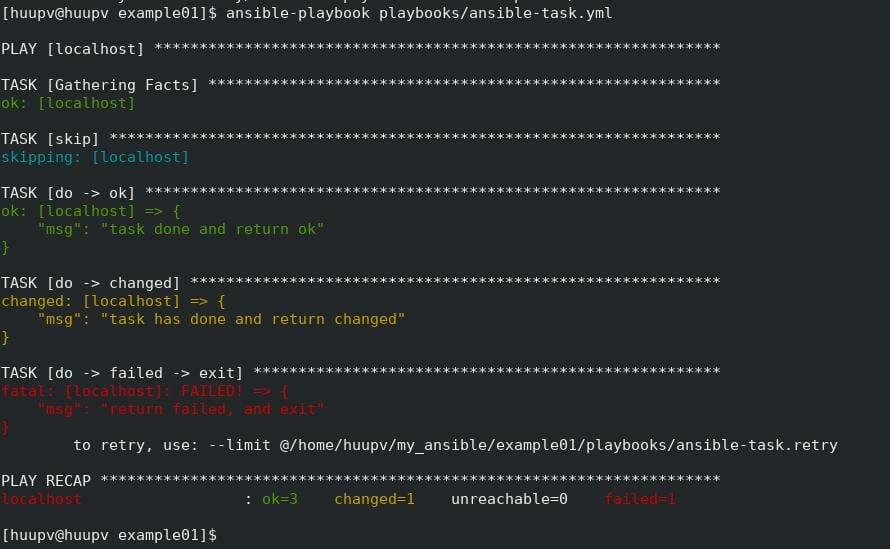
skip
– The skip task and nothing. using when: false
do –> ok
– The task is successful.
do -> changed
– The status when a change occurred in the task. Using “changed_when: yes”
do -> failed -> exit
– Using “failed_when: yes”. This task returned failed and exited.
Ansible playbook task
- hosts:
    - localhost
  tasks:
    - name: skip
      debug:
        msg: skipped
      when: false

    - name: do -> ok
      debug:
        msg: task done and return ok

    - name: do -> changed
      debug:
        msg: task has done and return changed
      changed_when: yes

    - name: do -> failed -> exit
      debug:
        msg: return failed, and exit
      failed_when: yes
The terminal output as below

These are just a few examples of the different states that can be used with Ansible modules.
The available states can vary depending on the module being used. It’s important to refer to the documentation of the specific module you’re working with to understand the available states and their behaviors.
Conclusion
Through the article, you can use the Ansible task type of state. I hope will this your helpful. For more details refer to Ansible tutorial.